
cocos2d 實作:用 Objective-C 打造微信飛機大戰
編輯:iOS 開發綜合
最終效果
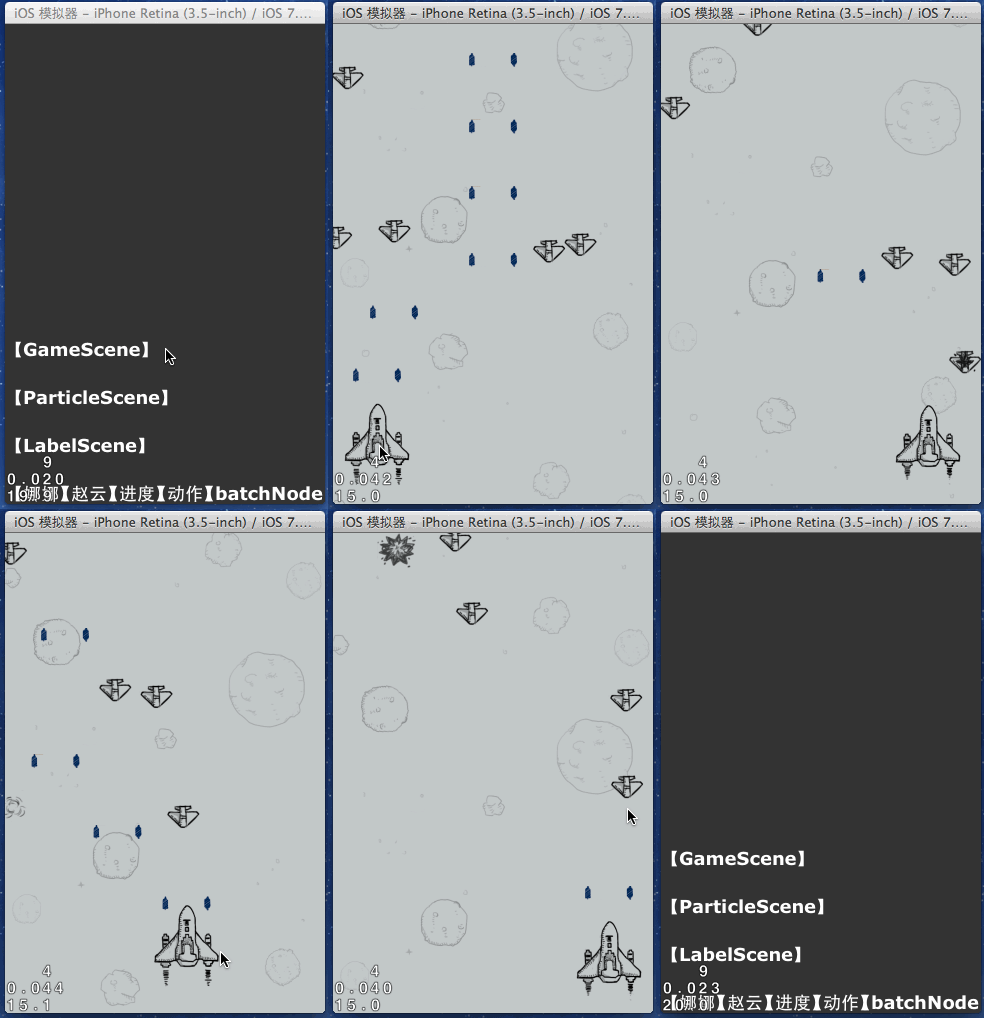
這個範例用 cocos2d 把經典的「飛機大戰」重做了一遍,剛好可以把精靈、精靈批次節點、時鐘方法與碰撞偵測這幾個核心觀念串起來。
素材
場景:GameScene
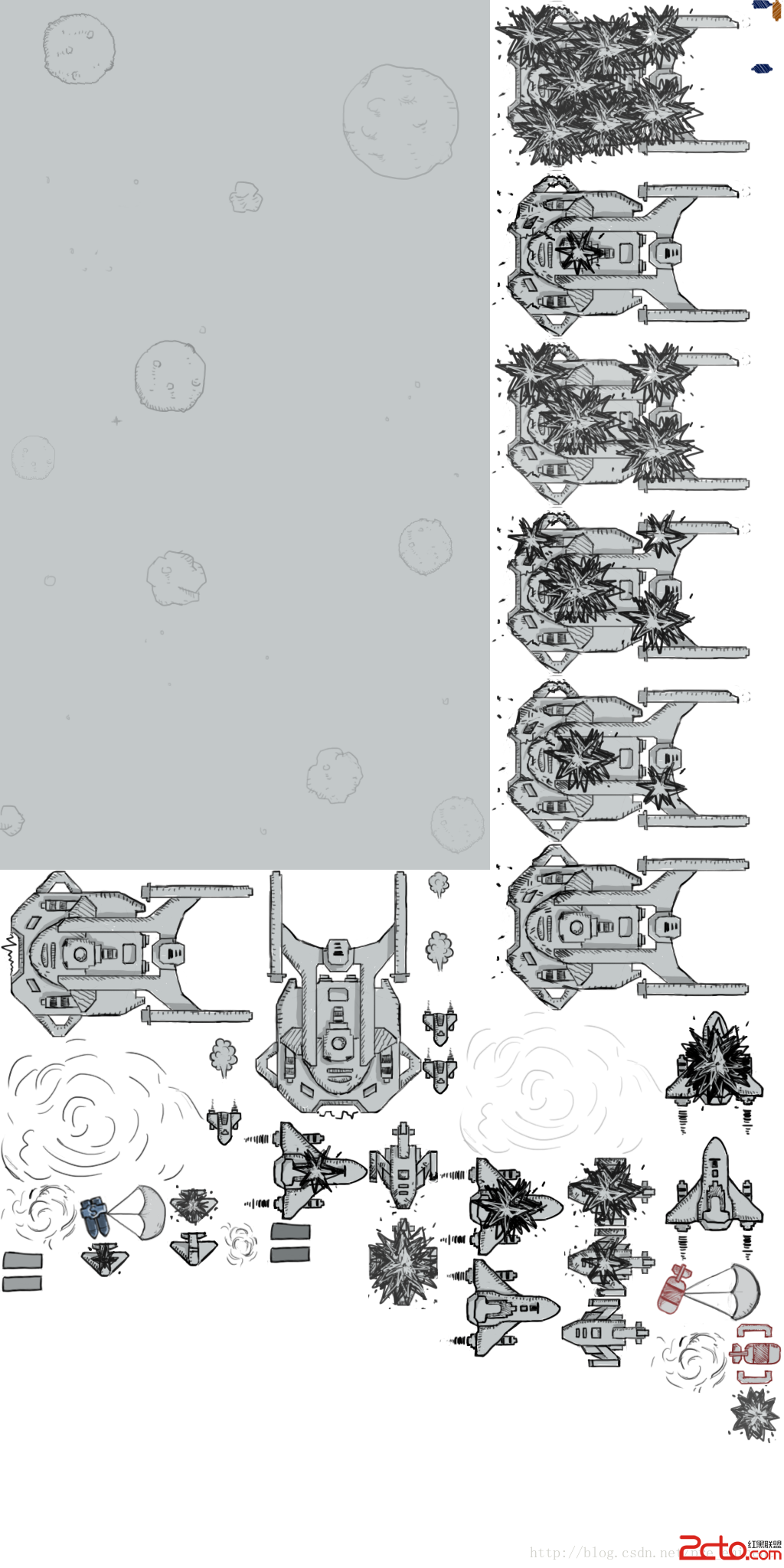
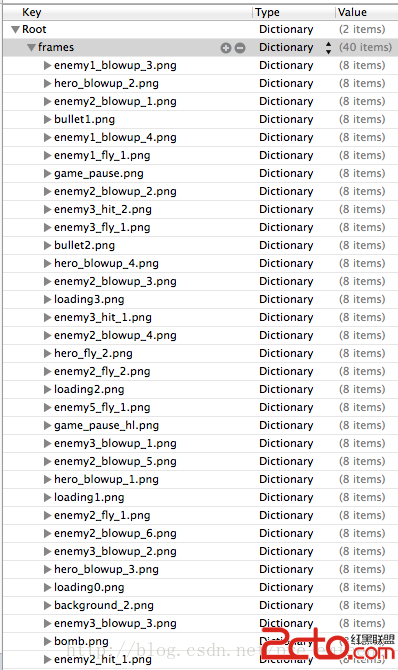
整個遊戲的骨架都在這裡。設計上有幾個決定值得先說明:所有圖形來自同一張大圖,因此全部掛到同一個 CCSpriteBatchNode 之下統一管理;子彈與敵機都採「預先建立、重複回收」的物件池策略,避免實作過程中不斷配置與釋放。
#import "GameScene.h"
#import "Hero.h"
#import "OALSimpleAudio.h"
#import "Pellet.h"
#import "Enemy.h"

#define kPelletMaxCount 10        // 子彈物件池最大數量
#define kPelletTotalIntervalTime 0.3  // 兩次發射之間的間隔
#define kEnemyMaxCount 5          // 敵機物件池最大數量

@interface GameScene() {
    CCSpriteBatchNode *_batch;   // 一個 batchNode 對應一張紋理
    CCSprite *_bg1, *_bg2;       // 兩張背景圖,交替滾動
    Hero *_hero;
    BOOL _isGameRuning;
    NSMutableArray *_pelletArr;  // 子彈緩存
    CGFloat _pelletTotalIntervalTime;  // 累積的發射間隔
    NSMutableArray *_enemyArr;   // 敵機緩存
}
@end

@implementation GameScene

#pragma mark - 初始化流程
- (id)init {
    if (self = [super init]) {
        [self setupBasic];      // 1. 基本初始化
        [self setupBg];         // 2. 背景
        [self setupPlayer];     // 3. 主角
        [self setupPelletArr];  // 4. 子彈池
        [self setupEnemyArr];   // 5. 敵機池
        [self startGame];       // 6. 開場
    }
    return self;
}

- (void)setupBasic {
    [[CCSpriteFrameCache sharedSpriteFrameCache] addSpriteFramesWithFile:@"gameArts.plist"];
    _batch = [CCSpriteBatchNode batchNodeWithFile:@"gameArts.png"];
    [self addChild:_batch];
    [self setupPauseButton];
}

- (void)setupPauseButton {
    [self addBtn:@"暫停/繼續" position:ccp(0.5, 0.5) target:self sel:@selector(gameControlBtnClicked)];
}

- (void)setupBg {
    NSString *bgPicName = @"background_2.png";
    _bg1 = [CCSprite spriteWithImageNamed:bgPicName];
    _bg1.anchorPoint = CGPointZero;
    // 第二張永遠疊在第一張頭上
    _bg2 = [CCSprite spriteWithImageNamed:bgPicName];
    _bg2.anchorPoint = CGPointZero;
    [_batch addChild:_bg1];
    [_batch addChild:_bg2];
}

- (void)setupPlayer {
    _hero = [Hero node];
    [_batch addChild:_hero];
}

- (void)setupPelletArr {
    _pelletArr = [NSMutableArray array];
    for (int i = 0; i < kPelletMaxCount; i++) {
        Pellet *b = [Pellet node];
        b.type = kPelletTypeBig;   // 預設先隱藏
        [_pelletArr addObject:b];
        [_batch addChild:b];
    }
}

- (void)setupEnemyArr {
    _enemyArr = [[NSMutableArray alloc] init];
    for (int i = 0; i < kEnemyMaxCount; i++) {
        Enemy *e = [Enemy node];
        e.type = kEnemyType_1;     // 預設先隱藏
        [_enemyArr addObject:e];
        [_batch addChild:e];
    }
}

#pragma mark - 開始 / 暫停 / 結束
- (void)gameControlBtnClicked {
    if (_isGameRuning) {
        [self pauseGame];
    } else {
        [self startGame];
    }
}

- (void)startGame {
    _isGameRuning = YES;
    self.userInteractionEnabled = YES;
    [[OALSimpleAudio sharedInstance] preloadBg:@"game_music.mp3"];
    [[OALSimpleAudio sharedInstance] playBgWithLoop:YES];
    // 讓遊戲一開始就有子彈射出
    _pelletTotalIntervalTime = kPelletTotalIntervalTime;
}

- (void)pauseGame {
    _isGameRuning = NO;
    self.userInteractionEnabled = NO;
    // 讓 batchNode 底下所有成員一起停止排程
    [_batch.children makeObjectsPerformSelector:@selector(unscheduleAllSelectors)];
    [[OALSimpleAudio sharedInstance] stopBg];
    [[OALSimpleAudio sharedInstance] stopAllEffects];
}

- (void)endGame {
    _isGameRuning = NO;
    self.userInteractionEnabled = NO;
    [_batch.children makeObjectsPerformSelector:@selector(unscheduleAllSelectors)];
}

#pragma mark - 時鐘
- (void)update:(CCTime)delta {
    if (!_isGameRuning) return;
    [self bgAnimation];
    [self pelletAnimation:delta];
    [self enemyAnimation:delta];
    [self collsionAndBoundaryCheck];
}

- (void)bgAnimation {
    CGFloat height = _bg1.contentSize.height;
    CGFloat bg1_Y = _bg1.position.y;
    bg1_Y--;                        // 持續向下捲
    if (bg1_Y <= -height) bg1_Y = 0; // 超出螢幕就拉回原點
    _bg1.position = ccp(0, bg1_Y);
    _bg2.position = ccp(0, bg1_Y + height);  // 永遠貼在 1 的頭上
}

- (void)pelletAnimation:(CCTime)delta {
    _pelletTotalIntervalTime += delta;
    if (_pelletTotalIntervalTime >= kPelletTotalIntervalTime) {
        Pellet *pellet;
        for (pellet in _pelletArr) {
            if (pellet.visible == NO) {   // 回收池中閒置的子彈
                CGPoint from = ccp(_hero.position.x, CGRectGetMaxY(_hero.boundingBox));
                [pellet emitFrom:from velocity:ccp(0, 200)];
                break;
            }
            pellet = nil;
        }
        if (pellet == nil) {              // 池子用盡,才新建
            Pellet *p = [Pellet node];
            p.type = kPelletTypeBig;
            [_pelletArr addObject:p];
            [_batch addChild:p];
            CGPoint from = ccp(_hero.position.x, CGRectGetMaxY(_hero.boundingBox));
            [p emitFrom:from velocity:ccp(0, 200)];
        }
        _pelletTotalIntervalTime = 0;
    }
}

- (void)enemyAnimation:(CCTime)delta {
    Enemy *enemy;
    for (enemy in _enemyArr) {
        if (enemy.visible == NO) {
            [enemy attendTheBattle];   // 一次時鐘只放一架
            break;
        }
    }
}

#pragma mark - 碰撞與邊界
- (void)collsionAndBoundaryCheck {
    Pellet *pellet;
    for (pellet in _pelletArr) {
        if (pellet.visible == NO) continue;
        [self checkPellet:pellet];
    }
}

- (void)checkPellet:(Pellet *)pellet {
    if (!CGRectIntersectsRect(self.boundingBox, pellet.boundingBox)) {
        [pellet dismiss];              // 飛出螢幕
    } else {
        Enemy *enemy;
        for (enemy in _enemyArr) {
            if (enemy.visible == NO) continue;
            [self enemy:enemy checkWithPellet:pellet];
        }
    }
}

- (void)enemy:(Enemy *)enemy checkWithPellet:(Pellet *)pellet {
    if (!CGRectIntersectsRect(self.boundingBox, enemy.boundingBox)) {
        [enemy hide];                  // 逃離螢幕
    } else if (CGRectIntersectsRect(pellet.boundingBox, enemy.boundingBox)) {
        [pellet dismiss];
        [enemy gotHit];                // 中彈
    } else {
        [self enemyCheckWithHero:enemy];
    }
}

- (void)enemyCheckWithHero:(Enemy *)enemy {
    if (CGRectContainsRect(_hero.boundingBox, enemy.boundingBox)) {
        [_hero dieWithEnemyTogether];
        [self endGame];
    }
}

#pragma mark - 觸控拖曳
- (void)touchBegan:(UITouch *)touch withEvent:(UIEvent *)event { }

- (void)touchMoved:(UITouch *)touch withEvent:(UIEvent *)event {
    CGPoint curPoint = [[CCDirector sharedDirector] convertToGL:[touch locationInView:touch.view]];
    CGPoint prePoint = [[CCDirector sharedDirector] convertToGL:[touch previousLocationInView:touch.view]];
    CGPoint newPosition = ccpAdd(_hero.position, ccpSub(curPoint, prePoint));

    CGFloat w = _hero.contentSize.width;
    CGFloat h = _hero.contentSize.height;
    if (newPosition.x < w * 0.5) return;
    if (newPosition.x > self.contentSize.width - w * 0.5) return;
    if (newPosition.y < 0) return;
    if (newPosition.y > self.contentSize.height - h) return;
    _hero.position = newPosition;
}
@end
子彈:Pellet
子彈在建立時一律隱藏,只有呼叫 emitFrom:velocity: 才現身,這是物件池能反覆沿用的關鍵。切換 type 時攔截 setter,順手把貼圖換掉。
typedef enum {
    kPelletTypeSmall,
    kPelletTypeBig
} PelletType;

@interface Pellet : CCSprite
@property (nonatomic, assign) PelletType type;
@property (nonatomic, assign) CGPoint velocity;
- (void)emitFrom:(CGPoint)from velocity:(CGPoint)velocity;
- (void)dismiss;
@end
@implementation Pellet

- (id)init {
    if (self = [super init]) {
        self.visible = NO;   // 預設隱藏
    }
    return self;
}

- (void)setType:(PelletType)type {
    _type = type;
    NSString *imgName = (_type == kPelletTypeSmall) ? @"bullet1.png" : @"bullet2.png";
    [self setSpriteFrame:[CCSpriteFrame frameWithImageNamed:imgName]];
}

- (void)emitFrom:(CGPoint)from velocity:(CGPoint)velocity {
    self.visible = YES;
    self.position = from;
    self.velocity = velocity;
    [[OALSimpleAudio sharedInstance] playEffect:@"bullet.mp3"];
}

- (void)dismiss {
    self.visible = NO;
    [self unscheduleAllSelectors];
}

- (void)update:(CCTime)delta {
    if (!self.visible) return;
    CGPoint s = ccpMult(self.velocity, delta);   // 路程 = 速度 × 時間
    self.position = ccpAdd(self.position, s);
}
@end
主角:Hero
主角在初始化時就掛上飛行用的循環幀動畫;一旦被撞到,則改播爆炸動畫。
@implementation Hero

- (id)init {
    // 圖片其實在大圖的幀緩存裡,靠 key 裁出來
    if (self = [super initWithImageNamed:@"hero_fly_1.png"]) {
        self.anchorPoint = ccp(0.5, 0);
        CGSize fullScreenSize = [[CCDirector sharedDirector] viewSize];
        self.position = ccp(fullScreenSize.width * 0.5, 0);

        CCSpriteFrameCache *cache = [CCSpriteFrameCache sharedSpriteFrameCache];
        CCSpriteFrame *frame1 = [cache spriteFrameByName:@"hero_fly_1.png"];
        CCSpriteFrame *frame2 = [cache spriteFrameByName:@"hero_fly_2.png"];
        CCAnimation *animation = [CCAnimation animationWithSpriteFrames:@[frame1, frame2] delay:0.1];
        [self runAction:[CCActionRepeatForever actionWithAction:
                         [CCActionAnimate actionWithAnimation:animation]]];
    }
    return self;
}

- (void)dieWithEnemyTogether {
    [self stopAllActions];
    NSMutableArray *frames = [NSMutableArray array];
    for (int i = 1; i <= 4; i++) {
        NSString *name = [NSString stringWithFormat:@"hero_blowup_%d.png", i];
        [frames addObject:[[CCSpriteFrameCache sharedSpriteFrameCache] spriteFrameByName:name]];
    }
    CCAnimation *animation = [CCAnimation animationWithSpriteFrames:frames delay:0.1];
    [self runAction:[CCActionAnimate actionWithAnimation:animation]];
}
@end
敵機:Enemy
敵機有五種型別,型別同時決定外觀與血量。出場時滿血並從螢幕頂端俯衝;中彈後血量为 0 才播爆炸動畫,播完隱藏並把貼圖還原,準備下一次上場。
typedef enum {
    kEnemyType_1 = 1, kEnemyType_2 = 2, kEnemyType_3 = 3,
    kEnemyType_4 = 4, kEnemyType_5 = 5
} EnemyType;

@interface Enemy : CCSprite
@property (nonatomic, assign) EnemyType type;
- (void)attendTheBattle;
- (void)hide;
- (void)gotHit;
@end
@interface Enemy() {
    int _maxHp;
    int _hp;
}
@end

@implementation Enemy

- (id)init {
    if (self = [super init]) {
        self.visible = NO;
    }
    return self;
}

- (void)setType:(EnemyType)type {
    _type = type;
    [self setEnemyImage];
    switch (type) {
        case kEnemyType_1: _maxHp = 1; break;
        case kEnemyType_2: _maxHp = 2; break;
        case kEnemyType_3: _maxHp = 3; break;
        case kEnemyType_4: _maxHp = 4; break;
        case kEnemyType_5: _maxHp = 5; break;
        default: break;
    }
}

- (void)update:(CCTime)delta {
    if (!self.visible) return;
    self.position = ccpAdd(self.position, ccp(0, -100 * delta));
}

- (void)attendTheBattle {
    _hp = _maxHp;
    self.visible = YES;
    self.anchorPoint = ccp(0.5, 0);
    CGSize winSize = [CCDirector sharedDirector].viewSize;
    // 減 1 是為了讓它「一隻腳踏進螢幕」,確保與 window 的 rect 有交集
    self.position = ccp(winSize.width * CCRANDOM_0_1(), winSize.height - 1);
}

- (void)gotHit {
    _hp--;
    if (_hp == 0) {
        [self playHitSound];
        [self playExplodeAnimation];
    }
}

- (void)hide {
    self.visible = NO;
    [self unscheduleAllSelectors];
}

- (void)setEnemyImage {
    NSString *name = [NSString stringWithFormat:@"enemy%d_fly_1.png", _type];
    [self setSpriteFrame:[[CCSpriteFrameCache sharedSpriteFrameCache] spriteFrameByName:name]];
}

- (void)playHitSound {
    [[OALSimpleAudio sharedInstance] playEffect:[NSString stringWithFormat:@"enemy%d_down.mp3", _type]];
}

- (void)playExplodeAnimation {
    NSMutableArray *frames = [NSMutableArray array];
    for (int i = 1; i <= 4; i++) {
        NSString *name = [NSString stringWithFormat:@"enemy1_blowup_%d.png", i];
        [frames addObject:[[CCSpriteFrameCache sharedSpriteFrameCache] spriteFrameByName:name]];
    }
    CCAnimation *animation = [CCAnimation animationWithSpriteFrames:frames delay:0.1];
    CCActionAnimate *explosion = [CCActionAnimate actionWithAnimation:animation];
    CCActionHide *hide = [CCActionHide action];
    // 爆炸後貼圖變了,要還原,才能投入下一場
    CCActionCallFunc *func = [CCActionCallFunc actionWithTarget:self selector:@selector(setEnemyImage)];
    CCActionSequence *sequence = [CCActionSequence actions:explosion, hide, func, nil];
    [self runAction:sequence];
}
@end
敵機的行為目前還留著擴充空間,例如依型別給不同速度、不同彈道,都可以在 attendTheBattle 裡繼續發揮。