
iOS 動畫完全攻略:UIKit 動畫與 Core Animation 四大家族
一、UIKit 動畫
先談 UIKit 動畫,因為大部分簡單效果用它就足夠了。若要做更複雜的表現,才需要請出 Core Animation——那裡有完整的基礎動畫、關鍵幀動畫與轉場動畫。UIKit 動畫有兩種寫法,而且不只作用於 view,其他控制項也能用。
寫法一:beginAnimations / commitAnimations
- (void)animationOfUIKit {
    UIView *redView = [[UIView alloc] initWithFrame:CGRectMake(10, 10, 100, 100)];
    redView.backgroundColor = [UIColor redColor];
    [self.view addSubview:redView];

    [UIView beginAnimations:@"test" context:nil];   // 開始
    [UIView setAnimationDuration:1];                 // 時長
    redView.backgroundColor = [UIColor blueColor];   // 以下為動畫目標狀態
    redView.frame = CGRectMake(50, 50, 200, 200);
    redView.alpha = 0.5;
    [UIView commitAnimations];                       // 提交
}
寫法二:animateWithDuration 區塊式(推薦)
這是以後更常見的形式,UIKit 已經幫我們封裝好了:
- (void)animationOfBlock {
    UIView *redView = [[UIView alloc] initWithFrame:CGRectMake(10, 80, 100, 100)];
    redView.backgroundColor = [UIColor redColor];
    [self.view addSubview:redView];

    [UIView animateWithDuration:2.0                       // 時長
                          delay:0                         // 延遲
                        options:UIViewAnimationOptionTransitionFlipFromLeft
                     animations:^{
                         redView.backgroundColor = [UIColor blueColor];
                         redView.frame = CGRectMake(50, 100, 200, 200);
                         redView.alpha = 0.5;
                     }
                     completion:^(BOOL finished) {
                         NSLog(@"動畫結束");
                     }];
}
options 列舉速查
常規屬性(可多選,彼此以位元或合併)
UIViewAnimationOptionLayoutSubviews:動畫過程中讓子視圖跟著一起運動。
UIViewAnimationOptionAllowUserInteraction:動畫期間允許使用者操作。
UIViewAnimationOptionBeginFromCurrentState:所有視圖從當前狀態開始。
UIViewAnimationOptionRepeat:重複播放。
UIViewAnimationOptionAutoreverse:到終點後再以動畫方式走回起點。
UIViewAnimationOptionOverrideInheritedDuration:忽略巢狀動畫的時間設定。
UIViewAnimationOptionOverrideInheritedCurve:忽略巢狀動畫的速度曲線。
UIViewAnimationOptionAllowAnimatedContent:動畫過程中重繪視圖(僅轉場動畫有效)。
UIViewAnimationOptionShowHideTransitionViews:切換時直接隱藏舊視圖、顯示新視圖,而非從父視圖移除(僅轉場動畫)。
UIViewAnimationOptionOverrideInheritedOptions:不繼承父動畫的設定與類型。
速度曲線(只能選一個)
UIViewAnimationOptionCurveEaseInOut:先慢後快再慢。
UIViewAnimationOptionCurveEaseIn:由慢漸快。
UIViewAnimationOptionCurveEaseOut:由快漸慢。
UIViewAnimationOptionCurveLinear:等速,預設值。
轉場類型(僅轉場動畫需要,只能選一個)
UIViewAnimationOptionTransitionNone:無轉場效果。
UIViewAnimationOptionTransitionFlipFromLeft / FromRight / FromTop / FromBottom:自左/右/上/下翻轉。
UIViewAnimationOptionTransitionCurlUp / CurlDown:向後/向前翻頁。
UIViewAnimationOptionTransitionCrossDissolve:舊視圖溶解消失、新視圖浮現。
二、Core Animation
Core Animation 直接作用在 CALayer 上(不是 UIView),是一套跨 OS X 與 iOS 的強大動畫 API。它的動畫執行在背景,不會阻塞主執行緒,這是它相比手動逐幀改 frame 的關鍵優勢。CAAnimation 分為四種:
CABasicAnimation     —— 基本動畫
CAKeyframeAnimation  —— 關鍵幀動畫
CAAnimationGroup     —— 動畫組
CATransition         —— 轉場動畫
CABasicAnimation:兩個數值之間的插值
核心屬性只有三個:keyPath(要改變的屬性名稱,傳字串)、fromValue(起始值)、toValue(結束值)。動畫進行的 duration 秒內,該屬性的值會從 fromValue 平滑過渡到 toValue。
可用的 keyPath(皆為 CALayer 的 Animatable 屬性):
transform.rotation.x/y/z:繞 x/y/z 軸旋轉,參數為弧度。
transform.rotation:預設繞 z 軸。
transform.scale.x/y/z:單軸縮放,參數為比例。
transform.scale:全軸縮放。
transform.translation.x/y/z:單軸位移。
transform.translation:移動到指定座標。
opacity:透明度(0~1)。
backgroundColor:背景色,需傳 CGColor。
cornerRadius:圓角半徑。
borderWidth:邊框寬度。
bounds:尺寸。
contents:內容(CGImage)。
contentsRect:可視內容區域,取值 0~1。
hidden:是否隱藏。
注意角度要自己轉弧度,Core Animation 不吃度數。實例:
CALayer *myLayer = [CALayer layer];
myLayer.backgroundColor = [UIColor purpleColor].CGColor;
myLayer.frame = CGRectMake(50, 100, 120, 120);
myLayer.cornerRadius = 10;
[self.view.layer addSublayer:myLayer];

// 位移
CABasicAnimation *animation = [CABasicAnimation animationWithKeyPath:@"position"];
animation.fromValue = [NSValue valueWithCGPoint:myLayer.position];
animation.toValue   = [NSValue valueWithCGPoint:CGPointMake(myLayer.position.x + 100, 100)];

// 繞 X 軸旋轉
CABasicAnimation *rotationAnimation = [CABasicAnimation animationWithKeyPath:@"transform.rotation.x"];
rotationAnimation.fromValue = [NSNumber numberWithFloat:0.0];
rotationAnimation.toValue   = [NSNumber numberWithFloat:6.0 * M_PI];

// 縮放
CABasicAnimation *scaleAnimation = [CABasicAnimation animationWithKeyPath:@"transform.scale.x"];
scaleAnimation.fromValue = [NSNumber numberWithFloat:1.0];
scaleAnimation.toValue   = [NSNumber numberWithFloat:2];

// 組成動畫組
CAAnimationGroup *group = [CAAnimationGroup animation];
group.autoreverses = YES;    // 播放完再反向跑一次
group.duration     = 2.0;
group.repeatCount  = 3;
group.animations   = [NSArray arrayWithObjects:animation, rotationAnimation, scaleAnimation, nil];

// 若希望動畫結束後停在終點而非跳回原狀:
// group.removedOnCompletion = NO;
// group.fillMode = kCAFillModeForwards;   (此時 autoreverses 必須為 NO)

[myLayer addAnimation:group forKey:@"MyLayerAnimation"];
CAKeyframeAnimation:沿著一串關鍵幀前進
CABasicAnimation 只能從一個值走到另一個值,CAKeyframeAnimation 則用一個 NSArray 保存多個值。主要屬性:
values:上述陣列,裡面每個元素稱為一個關鍵幀。動畫會在 duration 內依序呈現每一幀。
path:可設為 CGPathRef/CGMutablePathRef,讓圖層沿著指定軌跡移動。path 只對 CALayer 的 anchorPoint 與 position 生效;一旦設了 path,values 會被忽略。
keyTimes:為每個關鍵幀指定對應時間點,取值 0~1。若不設定,各幀時間均分。可以說 CABasicAnimation 就是只有兩個關鍵幀的特例。
關於 timingFunction:它決定動畫的節奏(pacing),也就是起點到終點之間的插值方式——等速、先快後慢、先慢後快,還是先慢再快再慢。用數學說法,時間函式的橫座標是時間 t(0~1),縱座標是變化比例 x(t)(0~1)。若一個動畫 duration 為 8 秒、值從 a 變到 b,那麼第 4 秒的值就是 a + x(4/8) * (b - a);本質上就是把真實時間映射到單位比例再還原。五個預定義常量分別是:
kCAMediaTimingFunctionLinear
kCAMediaTimingFunctionEaseIn
kCAMediaTimingFunctionEaseOut
kCAMediaTimingFunctionEaseInEaseOut
kCAMediaTimingFunctionDefault
下面四條曲線對應前四種,橫軸為時間、縱軸為變化量(不是平面座標系裡的 x/y):
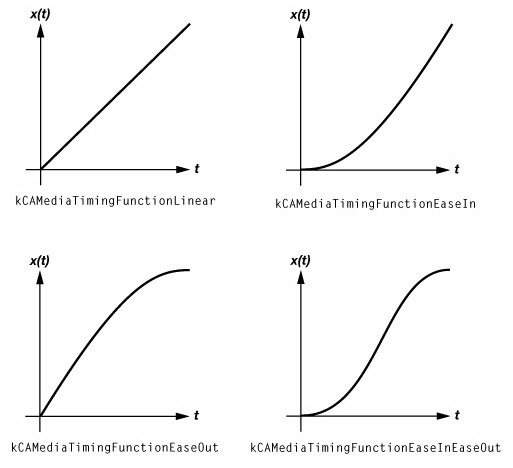
兩種用法實例——values 讓視圖沿方形路線繞一圈,path 則讓它沿橢圓公轉:
// values 方式
- (void)animationValues {
    UIView *myView = [[UIView alloc] initWithFrame:CGRectMake(120, 350, 50, 50)];
    myView.backgroundColor = [UIColor cyanColor];
    [self.view addSubview:myView];

    CAKeyframeAnimation *keyAnimation = [CAKeyframeAnimation animation];
    keyAnimation.keyPath = @"position";
    keyAnimation.values = @[
        [NSValue valueWithCGPoint:CGPointMake(100, 100)],
        [NSValue valueWithCGPoint:CGPointMake(200, 100)],
        [NSValue valueWithCGPoint:CGPointMake(200, 200)],
        [NSValue valueWithCGPoint:CGPointMake(100, 200)],
        [NSValue valueWithCGPoint:CGPointMake(100, 100)]
    ];
    keyAnimation.repeatCount = MAXFLOAT;
    keyAnimation.removedOnCompletion = NO;
    keyAnimation.fillMode = kCAFillModeForwards;
    keyAnimation.duration = 4.0;
    keyAnimation.timingFunction = [CAMediaTimingFunction functionWithName:kCAMediaTimingFunctionDefault];
    [myView.layer addAnimation:keyAnimation forKey:nil];
}

// path 方式
- (void)animationPath {
    UIView *myView = [[UIView alloc] initWithFrame:CGRectMake(120, 350, 50, 50)];
    myView.backgroundColor = [UIColor purpleColor];
    [self.view addSubview:myView];

    CAKeyframeAnimation *animation = [CAKeyframeAnimation animation];
    animation.keyPath = @"position";
    CGMutablePathRef path = CGPathCreateMutable();
    CGPathAddEllipseInRect(path, NULL, CGRectMake(50, 100, 220, 180));
    animation.path = path;
    CGPathRelease(path);
    animation.repeatCount = MAXFLOAT;
    animation.removedOnCompletion = NO;
    animation.fillMode = kCAFillModeForwards;
    animation.duration = 4.0f;
    animation.timingFunction = [CAMediaTimingFunction functionWithName:kCAMediaTimingFunctionEaseInEaseOut];
    [myView.layer addAnimation:animation forKey:nil];
}
CAAnimationGroup:讓多個動畫同時上演
動畫組是 CAAnimation 的子類,用 animations 屬性保存一組動畫物件。加入圖層後,組內動畫預設同時並發執行;若要錯開,逐一設定各自的 beginTime 即可。
- (void)animationGroup {
    UIView *myView = [[UIView alloc] initWithFrame:CGRectMake(120, 350, 50, 50)];
    myView.backgroundColor = [UIColor yellowColor];
    [self.view addSubview:myView];

    // 貝茲曲線軌跡
    UIBezierPath *movePath = [UIBezierPath bezierPath];
    [movePath moveToPoint:CGPointMake(50.0, 50.0)];
    [movePath addQuadCurveToPoint:CGPointMake(130, 350) controlPoint:CGPointMake(300, 100)];

    // 位移(關鍵幀)
    CAKeyframeAnimation *posAnim = [CAKeyframeAnimation animationWithKeyPath:@"position"];
    posAnim.path = movePath.CGPath;
    posAnim.removedOnCompletion = YES;

    // 縮小
    CABasicAnimation *scaleAnim = [CABasicAnimation animationWithKeyPath:@"transform"];
    scaleAnim.fromValue = [NSValue valueWithCATransform3D:CATransform3DIdentity];
    scaleAnim.toValue   = [NSValue valueWithCATransform3D:CATransform3DMakeScale(0.1, 0.1, 1.0)];
    scaleAnim.removedOnCompletion = YES;

    // 淡出
    CABasicAnimation *opacityAnim = [CABasicAnimation animationWithKeyPath:@"alpha"];
    opacityAnim.fromValue = [NSNumber numberWithFloat:1.0];
    opacityAnim.toValue   = [NSNumber numberWithFloat:0.1];
    opacityAnim.removedOnCompletion = YES;

    CAAnimationGroup *animGroup = [CAAnimationGroup animation];
    animGroup.animations = [NSArray arrayWithObjects:posAnim, scaleAnim, opacityAnim, nil];
    animGroup.duration = 5;
    animGroup.autoreverses = NO;
    animGroup.removedOnCompletion = NO;
    animGroup.fillMode = kCAFillModeRemoved;

    [myView.layer addAnimation:animGroup forKey:nil];
}
CATransition:畫面切換的過場
主要屬性:type(過場類型)、subtype(過場方向)、startProgress/endProgress(動畫在整體中的起訖百分比)。若指定了 filter,subtype 會失效。方向可為 kCATransitionFromRight / FromLeft / FromTop / FromBottom。
內建的 type 有:fade(交叉淡化)、push(把舊視圖推出去)、moveIn(新視圖移到舊視圖之上)、reveal(移開舊視圖露出下面的新視圖)、cube(立方體翻滾)、oglFlip(翻轉)、suckEffect(收縮,像布被抽走)、rippleEffect(水滴)、pageCurl/pageUnCurl(向上/向下翻頁)、cameraIrisHollowOpen/Close(相機光圈開合)。此外還有不少私有 API 類型,但別用在送審的 App 上。
// 由下往上進場
- (void)animationTransition {
    UIView *myView = [[UIView alloc] initWithFrame:CGRectMake(0, self.view.bounds.size.height - 250,
                                                              self.view.bounds.size.width, 250)];
    myView.backgroundColor = [UIColor redColor];
    [self.view addSubview:myView];

    CATransition *animation = [CATransition animation];
    animation.duration = 1;
    animation.timingFunction = UIViewAnimationCurveEaseInOut;
    animation.fillMode = kCAFillModeForwards;
    animation.type = kCATransitionMoveIn;
    animation.subtype = kCATransitionFromLeft;
    [myView.layer addAnimation:animation forKey:nil];
}

// 由上往下推入
- (void)animationPushTransition {
    UIView *myView = [[UIView alloc] initWithFrame:CGRectMake(0, self.view.bounds.size.height,
                                                              self.view.bounds.size.width, 250)];
    myView.backgroundColor = [UIColor orangeColor];
    [self.view addSubview:myView];

    CATransition *animation = [CATransition animation];
    animation.duration = 4.0;
    animation.timingFunction = UIViewAnimationCurveEaseInOut;
    animation.fillMode = kCAFillModeForwards;
    animation.type = kCATransitionPush;
    animation.subtype = kCATransitionFromBottom;
    [myView.layer addAnimation:animation forKey:nil];
}
最後提醒一個實務上最常被問到的細節:Core Animation 的動畫只是「展示效果」,它並不改變 layer 的 model 值。動畫結束後,layer 會立刻跳回 model layer 所描述的狀態。這正是 removedOnCompletion = NO 搭配 fillMode = kCAFillModeForwards 存在的原因——若最終狀態就是你要的結果,正確做法是把 model 值改成終值,讓動畫負責「從舊看起來像新」,這樣結束後自然停在對的位置。