
iOS 7 文字轉語音:AVSpeechSynthesizer 快速上手
iOS 7 加入的這個 API 相當實用。幾行程式碼就能把文字唸出來,不必自己準備音檔。
一、加入框架
在 Xcode 5.0 中建好專案後,先把 AVFoundation.framework 加入。
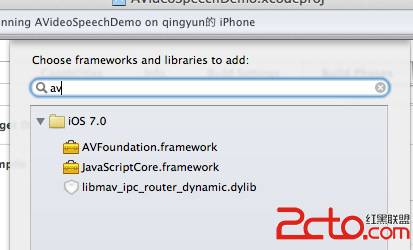
標頭檔別忘了引入:
#import <AVFoundation/AVSpeechSynthesis.h>
二、三行完成語音合成
AVSpeechSynthesizer *av = [[AVSpeechSynthesizer alloc] init];
AVSpeechUtterance *utterance = [[AVSpeechUtterance alloc] initWithString:@"Hello qingjoin"];
[av speakUtterance:utterance];
有 API 就是省事。三行程式碼,文字就唸出來了。
三、一個可操作的範例
把輸入框與按鈕接上,就能做一個簡易的朗讀器:
#import "ViewController.h"

@implementation ViewController

- (void)viewDidLoad {
    [super viewDidLoad];
    _textS.delegate = self;
}

- (IBAction)textToSpeechBtnPress:(id)sender {
    AVSpeechSynthesizer *av = [[AVSpeechSynthesizer alloc] init];
    AVSpeechUtterance *utterance = [[AVSpeechUtterance alloc] initWithString:_textS.text];
    [av speakUtterance:utterance];
}

// 按 return 收起鍵盤
-(BOOL)textFieldShouldReturn:(UITextField *)textField {
    [textField resignFirstResponder];
    return YES;
}

@end
執行後 console 會印出類似下面的訊息:
Enqueue: <AXSpeechAction> hello :Pitch 1.000000 : Language: (null)
Enqueue: <AXSpeechAction> 你好,我是qingjoin ! hello :Pitch 1.000000 : Language: (null)
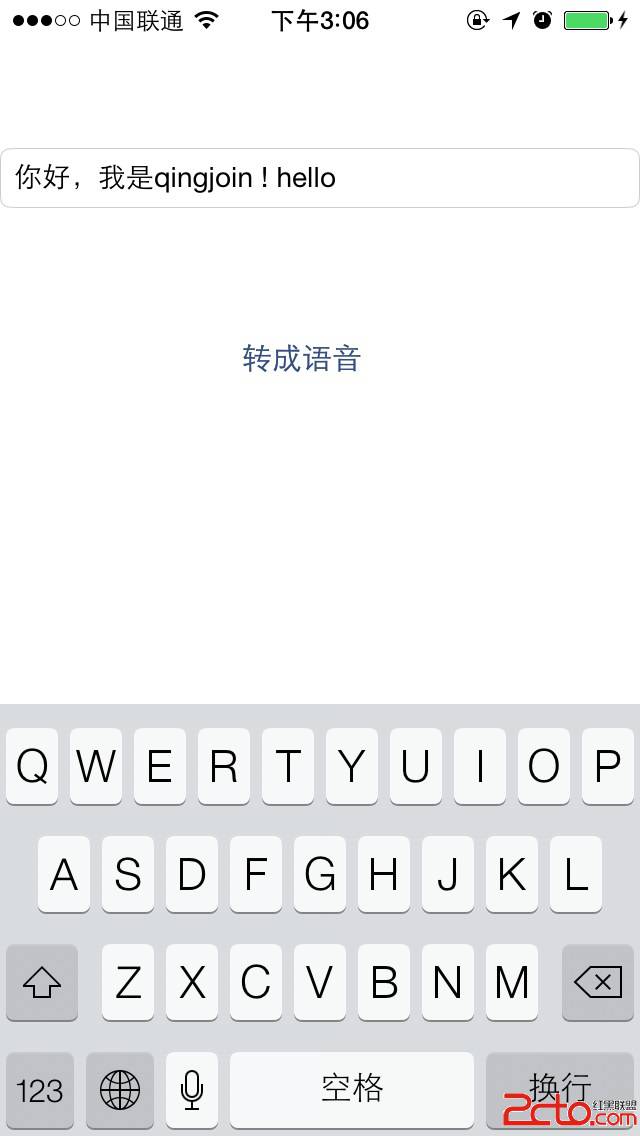
從 Enqueue 這個字樣可以看出,系統內部是佇列式的:每次 speakUtterance: 都把一段語音排進佇列,前一段唸完才接下一段。這解釋了為什麼連續呼叫不會互相打斷。
四、幾個實用的調整參數
AVSpeechUtterance 是一種類別方法工廠,常用的有幾個:
// 語速:0~1,預設為 AVSpeechUtteranceDefaultSpeechRate
utterance.rate = 0.4;

// 音高,預設 1.0
utterance.pitchMultiplier = 1.0;

// 音量,0~1
utterance.volume = 1.0;

// 指定發音語言,例如 zh-TW、en-US
utterance.voice = [AVSpeechSynthesisVoice voiceWithLanguage:@"zh-TW"];

// 一段唸完後的停頓(秒)
utterance.preUtteranceDelay = 0;
utterance.postUtteranceDelay = 0.2;
也可以直接指定特定嗓音:
AVSpeechSynthesisVoice *voice = [AVSpeechSynthesisVoice voiceWithIdentifier:...];
五、實務上要注意的幾件事
synthesizer 必須被強引用。上面範例把 av 宣告為區域變項,方法一結束就可能被回收,語音也就跟著中斷。正式寫法應該存成屬性或實例變項。
要 controlling 播放流程,用 delegate。AVAudioSynthesizerDelegate 提供 didStartSpeechUtterance、didFinishSpeechUtterance、willSpeakRangeOfSpeechString 等方法。最後一個特別有用——它能告訴你「目前唸到字串的第幾個字」,搭配 attributed string 就能做出卡拉OK式的逐字高亮。
背景播放需要設定 AVAudioSession。預設情況下 App 進入背景後語音會停。若要在鎖屏時繼續,記得把 category 設為 AVAudioSessionCategoryPlayback 並在 Info.plist 宣告 UIBackgroundModes 的 audio。
中英文混排的語言語村落差明顯。實測上同一段文字用不同 voice 唸出來的自然度差異不小,建議依主要使用對象 explicit 指定語言,別依賴系統自動判斷。
最後補充一個現在更常用的替代方案:若你需要的是「把語音轉成檔案」而非即時播放,或需要更自然的合成品質,可以考慮 Vision 框架的 VNRecognizeTextRequest 反向搭配,或使用 AVFoundation 中的 AVSpeechSynthesizer 寫出功能——但更常見的選擇是串接雲端 TTS 服務並快取音檔,在離線與品質之間取得平衡。
- 上一篇文章: iOS 全景瀏覽實作:把貼圖貼在球體內側
- 下一篇文章: iOS 以程式碼手繪立體餅圖