
iOS 相冊 Moment 功能優化實戰:分批加載與取尾排序
iOS 相冊 Moment 功能的優化方案
本文為投稿文章,作者:RylanJIN。
最近在開發公司產品 Perfect365 的 Gallery 模塊,包含按日期排序的 Moment 與 Album 兩部分。Moment 的交互與系統相冊類似:依據拍攝日期排序,再按不同日期分 section 展示。
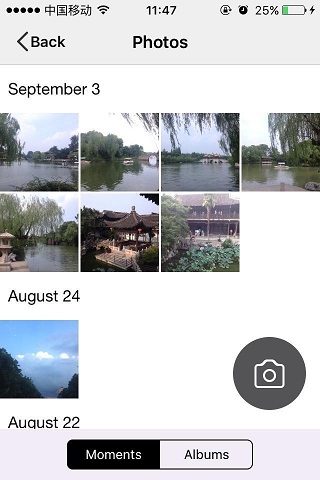
實現思路聽起來很直接:遍歷系統所有相冊,取出每張圖的日期,按日期分類排序,最後渲染到界面。最初的代碼大致如下:
NSSortDescriptor *sort = [NSSortDescriptor sortDescriptorWithKey:@"date" ascending:NO];
[objects sortUsingDescriptors:@[sort]];

MomentCollection *lastGroup = nil;
NSMutableArray *ds = [[NSMutableArray alloc] init];

for (ALAsset *asset in objects) {
    @autoreleasepool {
        NSDateComponents *components =
            [[NSCalendar currentCalendar] components:(NSDayCalendarUnit | NSMonthCalendarUnit | NSYearCalendarUnit)
                                            fromDate:[asset date]];
        NSUInteger month = [components month];
        NSUInteger year  = [components year];
        NSUInteger day   = [components day];

        if (!lastGroup || lastGroup.year != year || lastGroup.month != month || lastGroup.day != day) {
            lastGroup = [MomentCollection new];
            [ds addObject:lastGroup];
            lastGroup.month = month;
            lastGroup.year  = year;
            lastGroup.day   = day;
        }

        ALAsset *lPhoto = [lastGroup.assetObjs lastObject];
        NSURL *lPhotoURL = [lPhoto valueForProperty:ALAssetPropertyAssetURL];
        NSURL *photoURL  = [asset valueForProperty:ALAssetPropertyAssetURL];
        if (![lPhotoURL isEqual:photoURL]) {
            [lastGroup.assetObjs addObject:asset];
        }
    }
}
然後創建 UICollectionView、接好 dataSource,Moment 就能顯示了——起初我也這麼認為。但對於一款擁有 6500 萬用戶的 App 來說,一切皆有可能。版本發布後,大量用戶反饋打開相冊直接卡死。QA 測試時明明一切正常。追問之下,用戶回覆:手機裡放了 3 萬多張圖片,佔了 20G+ 存儲。好吧。
優化方案
Moment 必須遍歷全部相冊並按日期排序,那優化空間就只能在枚舉與排序這兩處。經過兩天琢磨,最終採用分批加載 + 取尾排序的方案。
核心思路:當設備圖片較多時,不要等全部枚舉排序完再顯示,而是每枚舉一定數量(例如 50 張)就丟進 NSOperationQueue 做一次分類排序並展示,讓用戶看到動態加載的過程,知道程序還活著。而由於排序通常比枚舉慢,第一批排完時,隊列裡往往已積壓了好幾批——這些中間批次已經沒有意義了,因此只對最後一批做排序(即「取尾」),並清空當前隊列。
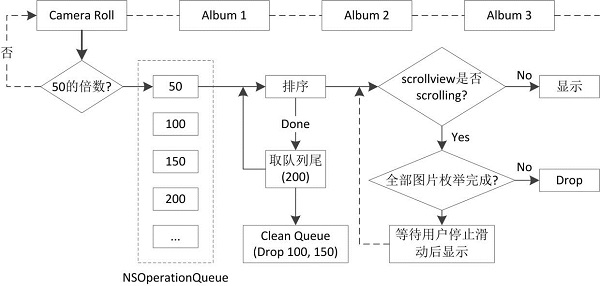
此外,為了避免加載過程中的刷新打斷用戶操作,顯示前需判斷用戶是否正在滑動,只在頁面靜止時刷新;但最後一批數據必須暫存下來,等用戶停止滑動後再 reloadData,否則就沒有內容可顯示了。
分批加載
Moment 需要按日期倒序展示(最新的在最前),因此枚舉時先從 camera roll 開始(用戶拍攝的照片通常早於導入的圖片)。每累積到 50 的倍數就丟進隊列等待排序,一個相冊枚舉完再繼續下一個。
- (void)getPhotosWithGroupTypes:(ALAssetsGroupType)types
                     batchReturn:(BOOL)batch
                      completion:(void (^)(BOOL ret, id obj))completion {
    self.batchBlock = completion;
    NSMutableArray *tmpArr = [[NSMutableArray alloc] init];

    [self.assetLibary enumerateGroupsWithTypes:types usingBlock:^(ALAssetsGroup *group, BOOL *stop) {
        if (self.stopEnumeratePhoto) { *stop = YES; return; }

        NSInteger gType = [[group valueForProperty:ALAssetsGroupPropertyType] integerValue];
        if (group && (gType != ALAssetsGroupPhotoStream)) {
            [group setAssetsFilter:[ALAssetsFilter allPhotos]];
            [group enumerateAssetsWithOptions:NSEnumerationReverse usingBlock:^(ALAsset *result, NSUInteger index, BOOL *stop) {
                if (self.stopEnumeratePhoto) { *stop = YES; return; }
                if (result) [tmpArr addObject:result];
                if (batch && !([tmpArr count] % 50)) {
                    [self addQueueWithData:tmpArr final:NO];
                }
            }];
        } else if (nil == group) {
            [self addQueueWithData:tmpArr final:YES];
        }
    } failureBlock:nil];
}
取尾排序
每批數據都被包成一個 operation 加入串行隊列等待排序。某批排序完成後,取隊列中最後一個(也就是最新入隊的那批)繼續執行,並清空其餘排隊的任務——中間批次只是為了先給用戶看到內容而已。
- (void)addQueueWithData:(NSMutableArray *)data final:(BOOL)final {
    NSMutableArray *rawData = [NSMutableArray arrayWithArray:data];
    NSBlockOperation *op = [NSBlockOperation blockOperationWithBlock:^{
        [self sortMomentWithDate:rawData final:final];
    }];
    [self.operQueue addOperation:op];
}

- (void)cleanQueueAfterRoundOperation {
    if (self.operQueue == nil) return;
    if (self.operQueue.operationCount > 1) {
        NSArray *queueArr = self.operQueue.operations;
        NSMutableArray *opArr = [NSMutableArray arrayWithArray:queueArr];
        [opArr removeLastObject];   // 保留最新的一批
        [opArr removeLastObject];
        [opArr makeObjectsPerformSelector:@selector(cancel)];
    }
}
刷新 CollectionView
中間批次的分類數據準備好後,reloadData 之前先判斷用戶是否在滑動:非滑動狀態才刷新,否則丟棄;最後一批則需要暫存,並在 scrollViewDidEndDragging: 與 scrollViewDidEndDecelerating: 中判斷,一旦停止滑動立即刷新。
[[ImageDataAPI sharedInstance] getMomentsWithBatchReturn:YES ascending:NO completion:^(BOOL done, id obj) {
    NSMutableArray *dArr = (NSMutableArray *)obj;
    if (dArr != nil && [dArr count]) {
        if (!self.momentView.dragging && !self.momentView.decelerating) {
            dispatch_async(dispatch_get_main_queue(), ^{
                [self reloadWithData:dArr];
            });
        } else {
            if (done) { self.backupArr = dArr; }
        }
    }
}];

- (void)scrollViewDidEndDragging:(UIScrollView *)scrollView willDecelerate:(BOOL)decelerate {
    if (!decelerate && self.backupArr) {
        dispatch_async(dispatch_get_main_queue(), ^{
            [self reloadWithData:self.backupArr];
            self.backupArr = nil;
        });
    }
}

- (void)scrollViewDidEndDecelerating:(UIScrollView *)scrollView {
    if (self.backupArr) {
        dispatch_async(dispatch_get_main_queue(), ^{
            [self reloadWithData:self.backupArr];
            self.backupArr = nil;
        });
    }
}
後續可改進之處
按上述方案,無論設備裡有多少圖片,基本都能正常打開相冊並逐步加載。但仍有改進空間:中間批次的數據也可以先暫存、等停止滑動後再刷新,而不是簡單丟棄;排序本身也還能再優化——目前第一批 50 張排完後,第二批 200 張又要從頭分類排序,其實可以只對新增的 150 張排序:若出現新日期就新建 section,相同日期則直接插入前面。
iOS 8 以上:改用 PhotoKit
iOS 8 引入了全新的 PhotoKit 來取代 AssetsLibrary,並直接提供了訪問 Moment 的接口:
+ (PHFetchResult *)fetchMomentsWithOptions:(nullable PHFetchOptions *)options;
它會直接返回按日期分好類的圖片集合,而且速度極快(猜測是系統在用戶拍攝或導入時就已經標記日期並分類)。因此 iOS 8 以上可以直接用 PhotoKit 實現 Moment:
PHFetchOptions *options = [[PHFetchOptions alloc] init];
options.sortDescriptors = @[[NSSortDescriptor sortDescriptorWithKey:@"endDate" ascending:ascending]];
PHFetchResult *momentRes = [PHAssetCollection fetchMomentsWithOptions:options];

NSMutableArray *momArray = [[NSMutableArray alloc] init];
for (PHAssetCollection *collection in momentRes) {
    NSDateComponents *components =
        [[NSCalendar currentCalendar] components:(NSDayCalendarUnit | NSMonthCalendarUnit | NSYearCalendarUnit)
                                        fromDate:collection.endDate];
    MomentCollection *moment = [MomentCollection new];
    moment.month = [components month];
    moment.year  = [components year];
    moment.day   = [components day];

    PHFetchOptions *option = [[PHFetchOptions alloc] init];
    option.predicate = [NSPredicate predicateWithFormat:@"mediaType = %d", PHAssetMediaTypeImage];
    moment.assetObjs = [PHAsset fetchAssetsInAssetCollection:collection options:option];

    if ([moment.assetObjs count]) [momArray addObject:moment];
}
於是可以對外提供統一的 Moment 接口,內部再按系統版本分流:iOS 7 走 AssetsLibrary 並採用上述優化方案,iOS 8 以上直接調用 Photos.framework。
但這裡有個問題:AssetsLibrary 的類型是 ALAssetsGroup,PhotoKit 是 PHFetchResult,怎麼統一?難道要讓調用方再判斷一次系統版本?
解法很簡單:定義自己的數據類,把差異封裝在內部。例如 MomentCollection 對外的 assetObjs 在內部按系統返回或設定對應類型:
@interface MomentCollection : NSObject
@property (nonatomic, readwrite) NSUInteger month;
@property (nonatomic, readwrite) NSUInteger year;
@property (nonatomic, readwrite) NSUInteger day;
@property (nonatomic, strong) id assetObjs;
@end

// 內部實現
@property (nonatomic, strong) NSMutableArray *items;   // iOS 7
@property (nonatomic, strong) PHFetchResult  *assets;  // iOS 8+

- (id)assetObjs {
    return IS_IOS_8 ? self.assets : self.items;
}

- (void)setAssetObjs:(id)assetObjs {
    if (IS_IOS_8) {
        self.assets = (PHFetchResult *)assetObjs;
    } else {
        self.items = (NSMutableArray *)assetObjs;
    }
}
相冊與單張圖片同理,定義 AlbumObj 與 PhotoObj 即可。這樣外界完全不需要關心底層用的是哪套框架,所有邏輯都在內部處理。其他功能(相冊枚舉、Poster 圖獲取、圖片 URL 獲取、某相冊內所有縮略圖的獲取等)都可以用同樣的方式統一接口:
- (void)getMomentsWithBatchReturn:(BOOL)batch        // batch 僅 iOS 7 有效
                        ascending:(BOOL)ascending
                       completion:(void (^)(BOOL done, id obj))completion;

- (void)getThumbnailForAssetObj:(id)asset withSize:(CGSize)size  // size 僅 iOS 8 有效
                     completion:(void (^)(BOOL ret, UIImage *image))completion;

- (void)getURLForAssetObj:(id)asset
               completion:(void (^)(BOOL ret, NSURL *URL))completion;

- (void)getAlbumsWithCompletion:(void (^)(BOOL ret, id obj))completion;

- (void)getPosterImageForAlbumObj:(id)album
                       completion:(void (^)(BOOL ret, id obj))completion;

- (void)getPhotosWithGroup:(id)group
                completion:(void (^)(BOOL ret, id obj))completion;

- (void)getImageForPhotoObj:(id)asset withSize:(CGSize)size
                 completion:(void (^)(BOOL ret, UIImage *image))completion;
完整的 Moment 優化方案與 PhotoKit/AssetsLibrary 的統一封裝(RJPhotoGallery)已上傳到 GitHub,其中 ImageDataAPI 封裝了 Moment 與 Album 的數據加載邏輯,有需要的可以直接取用。歡迎各路朋友交流指正。