
iOS 瀑布流實作:繼承 UICollectionViewLayout 打造不規則多列佈局
編輯:iOS 開發綜合
UICollectionView 比 UITableView 靈活得多,系統也提供了现成的 UICollectionViewFlowLayout。但只要你的卡片高度不一致,FlowLayout 就無能為力了——它預設同一列等高。要做出真正的瀑布流,唯一途徑是繼承 UICollectionViewLayout,自己決定每個 cell 的位置。
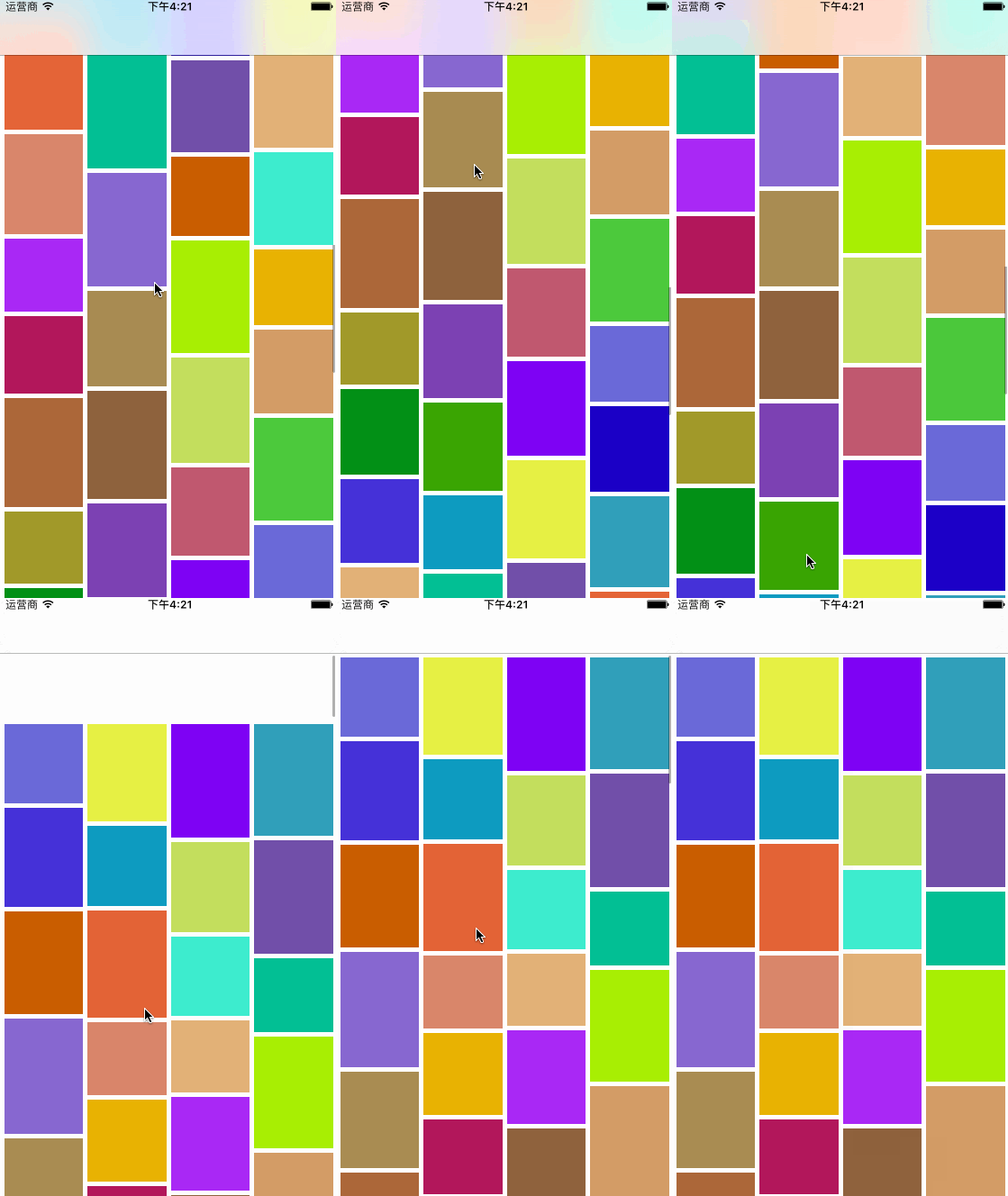
先看效果:
一、核心思路
瀑布流的算法可以濃縮成一句話:每個新 cell 永遠放進當前最矮的那一列。為此只需要一個記錄各列累積高度的陣列,每次挑出最小值,算完位置後把該列高度加上這個 cell 的高度。
二、布局類的骨架
#import "WaterfallCollectionLayout.h"

#define colMargin  5     // 列間距
#define colCount   4     // 列數
#define rolMargin  5     // 行間距

@interface WaterfallCollectionLayout ()

@property (nonatomic, strong) NSMutableArray *colsHeight;   // 各列的累積高度
@property (nonatomic, assign) CGFloat colWidth;             // 單元格寬度

@end
要繼承的父類共有五個方法需要重寫,各有明確職責:
// 布局前的準備工作
- (void)prepareLayout;

// collectionView 的可滾動內容尺寸
- (CGSize)collectionViewContentSize;

// 設定單個 item 的 frame
- (UICollectionViewLayoutAttributes *)layoutAttributesForItemAtIndexPath:(NSIndexPath *)indexPath;

// 一口氣回傳指定矩形區域內所有 item 的屬性
- (NSArray<UICollectionViewLayoutAttributes *> *)layoutAttributesForElementsInRect:(CGRect)rect;

// 邊界變化時是否需要重新布局
- (BOOL)shouldInvalidateLayoutForBoundsChange:(CGRect)newBounds;
三、逐一實作
prepareLayout:每次布局前重置狀態
這裡先算出 cell 寬度:(總寬 - 左右邊距 - 列間距) / 列數。然後把高度陣列清空,讓系統重新計算。
- (void)prepareLayout
{
    [super prepareLayout];

    self.colWidth = (self.collectionView.frame.size.width - (colCount + 1) * colMargin) / colCount;
    self.colsHeight = nil;      // 觸發懶加載重建
}
collectionViewContentSize:找出最高的那一列
- (CGSize)collectionViewContentSize
{
    NSNumber *longest = self.colsHeight[0];

    for (NSInteger i = 0; i < self.colsHeight.count; i++) {
        NSNumber *rolHeight = self.colsHeight[i];
        if (longest.floatValue < rolHeight.floatValue) {
            longest = rolHeight;
        }
    }

    return CGSizeMake(self.collectionView.frame.size.width, longest.floatValue);
}
layoutAttributesForItemAtIndexPath:瀑布流的心臟
這個方法在每個 cell 即將出現時被呼叫,任務是找出最矮列並算出 frame。
- (UICollectionViewLayoutAttributes *)layoutAttributesForItemAtIndexPath:(NSIndexPath *)indexPath
{
    UICollectionViewLayoutAttributes *attr =
        [UICollectionViewLayoutAttributes layoutAttributesForCellWithIndexPath:indexPath];

    // 1. 找出當前最矮的那一列
    NSNumber *shortest = self.colsHeight[0];
    NSInteger shortCol = 0;

    for (NSInteger i = 0; i < self.colsHeight.count; i++) {
        NSNumber *rolHeight = self.colsHeight[i];
        if (shortest.floatValue > rolHeight.floatValue) {
            shortest = rolHeight;
            shortCol = i;
        }
    }

    // 2. 計算座標
    CGFloat x = (shortCol + 1) * colMargin + shortCol * self.colWidth;
    CGFloat y = shortest.floatValue + colMargin;

    // 3. 高度由外部傳入的 block 決定
    CGFloat height = 0;
    NSAssert(self.heightBlock != nil, @"未實作計算高度的 block");
    if (self.heightBlock) {
        height = self.heightBlock(indexPath);
    }

    attr.frame = CGRectMake(x, y, self.colWidth, height);

    // 4. 更新該列的累積高度
    self.colsHeight[shortCol] = @(shortest.floatValue + colMargin + height);

    return attr;
}
這裡有個設計取捨值得說明:為什麼高度要透過 block 從外部傳入,而不是在布局類裡算?因為布局類的職責是「排位置」,而 cell 高度取決於內容(文字長短、圖片比例),屬於資料層的事。把兩者解耦,布局類就能被任何資料結構複用。
layoutAttributesForElementsInRect:回傳可見範圍內的全部屬性
- (NSArray<UICollectionViewLayoutAttributes *> *)layoutAttributesForElementsInRect:(CGRect)rect
{
    NSMutableArray *array = [NSMutableArray array];
    NSInteger items = [self.collectionView numberOfItemsInSection:0];

    for (int i = 0; i < items; i++) {
        UICollectionViewLayoutAttributes *attr =
            [self layoutAttributesForItemAtIndexPath:[NSIndexPath indexPathForItem:i inSection:0]];
        [array addObject:attr];
    }

    return array;
}
這裡為了求簡單,直接回傳了全部 item。資料量大時應該做矩形相交判斷,只回傳真正可見的部分,否則滾動會明顯卡頓。
shouldInvalidateLayoutForBoundsChange:觸發重新布局
- (BOOL)shouldInvalidateLayoutForBoundsChange:(CGRect)newBounds
{
    return YES;
}
colsHeight 的懶加載
- (NSMutableArray *)colsHeight
{
    if (!_colsHeight) {
        NSMutableArray *array = [NSMutableArray array];
        for (int i = 0; i < colCount; i++) {
            [array addObject:@(0)];    // 初始高度可自訂
        }
        _colsHeight = [array mutableCopy];
    }
    return _colsHeight;
}
四、控制器端
控制器要做的只有三件事:建立 collectionView、建立 layout 並注入高度 block、準備高度資料。
#pragma mark - getter

- (UICollectionView *)collectionView
{
    if (!_collectionView) {
        _collectionView = [[UICollectionView alloc] initWithFrame:self.view.frame
                                            collectionViewLayout:self.layout];
        _collectionView.backgroundColor = [UIColor whiteColor];
        _collectionView.delegate   = self;
        _collectionView.dataSource = self;
        [_collectionView registerClass:[CollectionViewCell class]
           forCellWithReuseIdentifier:identifer];
    }
    return _collectionView;
}

- (UICollectionViewLayout *)layout
{
    if (!_layout) {
        _layout = [[WaterfallCollectionLayout alloc] initWithItemsHeightBlock:^CGFloat(NSIndexPath *index) {
            return [self.heightArr[index.item] floatValue];
        }];
    }
    return _layout;
}

- (NSArray *)heightArr
{
    if (!_heightArr) {
        // 這裡用隨機數模擬不規則高度
        NSMutableArray *arr = [NSMutableArray array];
        for (int i = 0; i < 100; i++) {
            [arr addObject:@(arc4random() % 50 + 80)];
        }
        _heightArr = [arr copy];
    }
    return _heightArr;
}
延伸建議
這個最小實現能跑,但要上生產環境還缺幾塊:
- 預先計算全部高度並快取,避免 layoutAttributes 每次都被呼叫時重算。
- 實作
shouldInvalidateLayoutForBoundsChange的精細判斷,只在寬度真正改變時才重排,滾動時不必重算。 - 高度快取以 indexPath 為 key,特別是圖片非同步載入後尺寸才確定的場景。
瀑布流相關文章網上不勝枚舉,本文的價值在於把「最矮列優先」這條主線講清楚。演算法本身只有十幾行,剩下的都是工程細節。