
iOS 多級列表實作:樹形資料結構與局部刷新
專案裡遇到層級列表是常事。簡單的二級列表用 UITableView 的 header 就能做,三級列表調一下 cell 高度也勉強可以。但遇到層數不定的動態列表,就得換個思路了。
原理:把列表當成一棵多叉樹
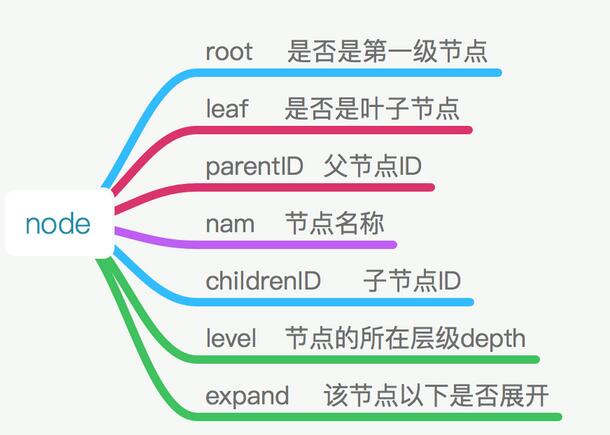
層級列表的結構與樹很像,只是不是二叉樹而是多叉樹。每個節點只需要知道父節點與子節點的 ID,就能還原整棵樹。
我們設一個虛擬的 root 節點,ID 為 rootID。凡是 parentID 等於 rootID 的節點就是第一級,也就是樹的深度 depth 為 0 的那層。每個 node 都帶著 parentID 與 childrenID,靠 rootID 逐層往下查,就能還原所有父子關係,同時也能辨識出葉節點。
效果預覽
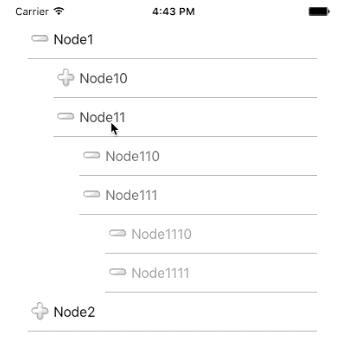
1. 一般多級列表
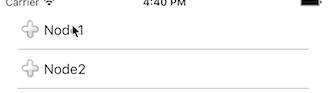
2. 會記住展開狀態的列表
實作思路
1. 先依 rootID 取出所有第一級節點,放進 dataSourceArr 作為初始列表。
2. 展開:點擊節點 cell,依 childrenID 找出下一級,插入到當前節點之後並刷新。
3. 收攏:點擊已展開的節點,從 currentIndex + 1 往後掃,凡是 level 大於當前節點的都移除,遇到 level 小於等於的就停止。
4. 點擊葉節點則不響應展開/收攏,直接把節點資訊回傳出去。
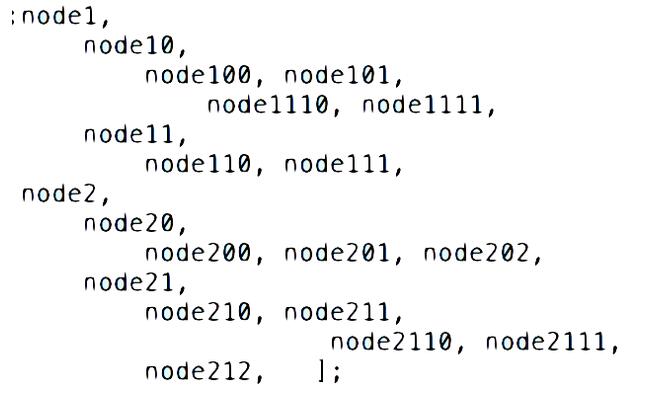
dataSourceArr 的排列必須符合樹的前序走訪順序,這樣插入與刪除才能靠連續區間完成。
踩過的兩個坑
1. 局部刷新的崩潰
一開始展開/收攏後直接 reloadSections:withRowAnimation:,結果整個列表閃一下,體驗很差,於是改用 insertRowsAtIndexPaths: 與 deleteRowsAtIndexPaths: 做局部更新。
但刷新時報了錯:
* Terminating app due to uncaught exception 'NSInternalInconsistencyException',
  reason: 'attempt to delete row 2 from section 0 which only contains 2 rows before the update'
推測原因是:呼叫刪除之前,numberOfRowsInSection 返回的行數還沒跟上資料源的變動,UITableView 拿舊行數去核對新操作,於是判定不一致。
解法是把順序調正:先更新資料源,再讓表格重新問一次行數,然後才執行插入或刪除。
[_reloadArray removeAllObjects];

[tableView reloadRowsAtIndexPaths:@[indexPath]
                 withRowAnimation:UITableViewRowAnimationNone];

if (currentNode.isExpand) {
    [self expandNodesForParentID:currentNode.childrenID insertIndex:indexPath.row];
    [tableView insertRowsAtIndexPaths:_reloadArray
                     withRowAnimation:UITableViewRowAnimationNone];
} else {
    [self foldNodesForLevel:currentNode.level currentIndex:indexPath.row];
    [tableView deleteRowsAtIndexPaths:_reloadArray
                     withRowAnimation:UITableViewRowAnimationNone];
}
2. 如何保留歷史展開狀態
層級深的時候,使用者會期望收起再打開後,子層級的展開狀態還在。做法很簡單:給每個 node 加一個 isExpand 屬性。收攏時只改當前節點的狀態,展開時只插入那些 isExpand 為 YES 的子節點,遞迴下去即可。
- (NSUInteger)expandNodesForParentID:(NSString *)parentID
                          insertIndex:(NSUInteger)insertIndex {
    for (int i = 0; i < _nodes.count; i++) {
        YKNodeModel *node = _nodes[i];
        if ([node.parentID isEqualToString:parentID]) {
            if (!self.isPreservation) {
                node.expand = NO;
            }
            insertIndex++;
            [_tempNodes insertObject:node atIndex:insertIndex];
            [_reloadArray addObject:[NSIndexPath indexPathForRow:insertIndex inSection:0]];

            if (node.isExpand) {
                insertIndex = [self expandNodesForParentID:node.childrenID
                                            insertIndex:insertIndex];
            }
        }
    }
    return insertIndex;
}
這裡的 isPreservation 開關就是「是否記住歷史狀態」的總閘門,關掉它就退化成每次都從頭展開的一般行為。
Demo:https://github.com/YangKa/YKMutableLevelTableView.git