
用 UICollectionView 做左右聯動的二級選單
編輯:iOS 開發綜合
電商與內容型 App 常見這種版面:頂端一排「家具/家電」這類大類切換鈕,下方則是對應的商品格狀列表。切換大類,下面的內容整批換掉。用 UICollectionView 的 supplementary view 來承載這排切換鈕,是相當乾淨的做法。
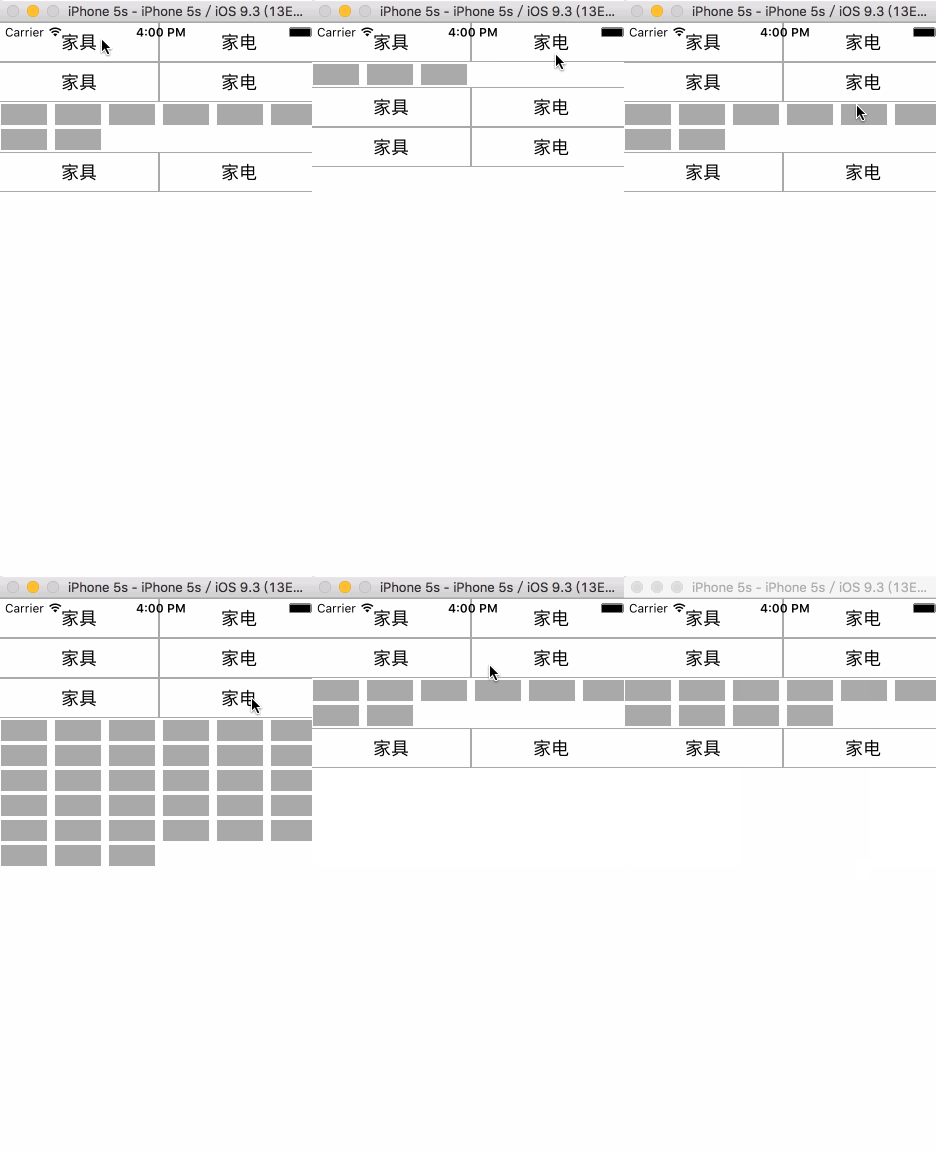
核心設計:用兩個狀態記錄「選了哪一區、選了左還是右」
clickIndexPath 記住目前展開的是第幾個 section,leftOrRight 記住使用者按的是左鈕還是右鈕。numberOfItemsInSection: 只要拿這兩個狀態去查表回傳數量,畫面自然就對了。
#import "ViewController.h"
#import "CollectionViewCell.h"
#import "CollectionSectionView.h"

@interface ViewController ()<UICollectionViewDelegateFlowLayout, UICollectionViewDataSource>
@property (nonatomic, strong) UICollectionView *collectionView;
@property (nonatomic, copy) NSString *leftOrRight;
@property (nonatomic, strong) NSIndexPath *clickIndexPath;
@end

static NSString *cellIdentifier = @"CollectionViewCell";
static NSString *sectionIdentifier = @"CollectionSectionView";

@implementation ViewController

- (void)viewDidLoad {
    [super viewDidLoad];
    UICollectionViewFlowLayout *flowLayout = [[UICollectionViewFlowLayout alloc] init];
    flowLayout.itemSize = CGSizeMake(50, 25);
    flowLayout.minimumLineSpacing = 0;
    flowLayout.minimumInteritemSpacing = 0;
    flowLayout.headerReferenceSize = CGSizeMake(0, 40);
    flowLayout.sectionInset = UIEdgeInsetsMake(0, 0, 0, 0);

    self.collectionView = [[UICollectionView alloc] initWithFrame:self.view.frame
                                            collectionViewLayout:flowLayout];
    _collectionView.backgroundColor = [UIColor whiteColor];
    _collectionView.delegate = self;
    _collectionView.dataSource = self;
    [_collectionView registerClass:[CollectionViewCell class]
        forCellWithReuseIdentifier:cellIdentifier];
    [_collectionView registerClass:[CollectionSectionView class]
        forSupplementaryViewOfKind:UICollectionElementKindSectionHeader
               withReuseIdentifier:sectionIdentifier];
    [self.view addSubview:_collectionView];
}

- (NSInteger)numberOfSectionsInCollectionView:(UICollectionView *)collectionView {
    return 3;
}

- (NSInteger)collectionView:(UICollectionView *)collectionView
     numberOfItemsInSection:(NSInteger)section {
    if (self.clickIndexPath.section == section) {
        if (self.clickIndexPath.section == 0 && [self.leftOrRight isEqualToString:@"left"])  return 3;
        if (self.clickIndexPath.section == 0 && [self.leftOrRight isEqualToString:@"right"]) return 4;
        if (self.clickIndexPath.section == 1 && [self.leftOrRight isEqualToString:@"left"])  return 10;
        if (self.clickIndexPath.section == 1 && [self.leftOrRight isEqualToString:@"right"]) return 8;
        if (self.clickIndexPath.section == 2 && [self.leftOrRight isEqualToString:@"left"])  return 33;
        if (self.clickIndexPath.section == 2 && [self.leftOrRight isEqualToString:@"right"]) return 6;
    }
    return 0;
}

- (UICollectionViewCell *)collectionView:(UICollectionView *)collectionView
                  cellForItemAtIndexPath:(NSIndexPath *)indexPath {
    CollectionViewCell *cell = [collectionView dequeueReusableCellWithReuseIdentifier:cellIdentifier
                                                                         forIndexPath:indexPath];
    cell.label.text = [NSString stringWithFormat:@"%ld-%ld", indexPath.section, indexPath.row];
    return cell;
}

- (UICollectionReusableView *)collectionView:(UICollectionView *)collectionView
          viewForSupplementaryElementOfKind:(NSString *)kind
                        atIndexPath:(NSIndexPath *)indexPath {
    if ([kind isEqualToString:UICollectionElementKindSectionHeader]) {
        CollectionSectionView *sectionView =
            [collectionView dequeueReusableSupplementaryViewOfKind:kind
                                              withReuseIdentifier:sectionIdentifier
                                                     forIndexPath:indexPath];
        sectionView.backgroundColor = [UIColor lightGrayColor];
        sectionView.leftStr = @"家具";
        sectionView.rightStr = @"家電";
        [sectionView customBtnHandelAction:^(NSString *leftOrRight) {
            self.clickIndexPath = indexPath;
            self.leftOrRight = leftOrRight;
            [collectionView reloadData];
        }];
        return sectionView;
    }
    return nil;
}
@end
自訂 Supplementary View:用 Block 把點擊事件回傳
header 裡放兩個按鈕,透過 tag 分辨左右,再用一個 Block 把結果拋回 controller。這樣 header 完全不需要知道 controller 的存在,耦合度低。
#import <UIKit/UIKit.h>

typedef void(^BtnHandleAction)(NSString *leftOrRight);

@interface CollectionSectionView : UICollectionReusableView
@property (nonatomic, copy) NSString *leftStr;
@property (nonatomic, copy) NSString *rightStr;
- (void)customBtnHandelAction:(BtnHandleAction)action;
@end
#import "CollectionSectionView.h"

@interface CollectionSectionView ()
@property (nonatomic, strong) UIButton *leftBtn;
@property (nonatomic, strong) UIButton *rightBtn;
@property (nonatomic, copy) BtnHandleAction btnHandelAction;
@end

@implementation CollectionSectionView

- (instancetype)initWithFrame:(CGRect)frame {
    self = [super initWithFrame:frame];
    if (self) { [self setup]; }
    return self;
}

- (UIButton *)leftBtn {
    if (!_leftBtn) {
        self.leftBtn = [UIButton buttonWithType:UIButtonTypeCustom];
        _leftBtn.tag = 2000;
        _leftBtn.frame = CGRectMake(1, 1, self.frame.size.width / 2 - 2, self.frame.size.height - 2);
        _leftBtn.backgroundColor = [UIColor whiteColor];
        [_leftBtn addTarget:self action:@selector(btnAction:) forControlEvents:UIControlEventTouchUpInside];
    }
    return _leftBtn;
}

- (UIButton *)rightBtn {
    if (!_rightBtn) {
        self.rightBtn = [UIButton buttonWithType:UIButtonTypeCustom];
        _rightBtn.tag = 2001;
        _rightBtn.frame = CGRectMake(self.frame.size.width / 2 + 1, 1,
                                     self.frame.size.width / 2 - 2, self.frame.size.height - 2);
        _rightBtn.backgroundColor = [UIColor whiteColor];
        [_rightBtn addTarget:self action:@selector(btnAction:) forControlEvents:UIControlEventTouchUpInside];
    }
    return _rightBtn;
}

- (void)btnAction:(UIButton *)sender {
    NSInteger tag = sender.tag;
    if (tag == 2000) self.btnHandelAction(@"left");
    if (tag == 2001) self.btnHandelAction(@"right");
}

- (void)customBtnHandelAction:(BtnHandleAction)action {
    self.btnHandelAction = action;
}

- (void)setup {
    [self addSubview:self.leftBtn];
    [self addSubview:self.rightBtn];
}

- (void)setLeftStr:(NSString *)leftStr {
    [self.leftBtn setTitle:leftStr forState:UIControlStateNormal];
    [self.leftBtn setTitleColor:[UIColor blackColor] forState:UIControlStateNormal];
}

- (void)setRightStr:(NSString *)rightStr {
    [self.rightBtn setTitle:rightStr forState:UIControlStateNormal];
    [self.rightBtn setTitleColor:[UIColor blackColor] forState:UIControlStateNormal];
}
@end
值得學的兩個設計點
第一,把「目前展開哪一區」抽成狀態變數,讓 dataSource 保持純函式式的判斷,邏輯一目了然。第二,header 與 controller 之間用 Block 而非 delegate 溝通,在這種單一事件的場景下更省事。若換成需要回傳值的情境,delegate 會更合適。