
iOS 崩潰排查實戰:Xcode 日誌、Exception Breakpoint 到 Bugly 上線收集
App 閃退是常態,但「怎麼查」才是真功夫。開發階段有三招,上線之後則得靠 Bugly 這類工具接手。
開發階段的三種觀察方式
#1. 模擬器執行,看 Xcode 錯誤日誌
#2. 真機除錯,看 Xcode 錯誤日誌
#3. 真機執行,看裝置系統日誌
先寫一段必定崩潰的程式碼:
- (void)viewDidLoad {
    [super viewDidLoad];
    [self performSelector:@selector(print) withObject:nil afterDelay:5];
}

- (void)print {
    NSArray *array = @[];
    NSLog(@"%@", array[1]);
}
方法一:模擬器 + Xcode 日誌
執行後立刻崩潰,Xcode 給出:
2016-10-29 12:13:29.015 CrashDemo[37842:7436441] *** Terminating app due to uncaught exception 'NSRangeException', reason: '*** -[__NSArray0 objectAtIndex:]: index 1 beyond bounds for empty NSArray'
*** First throw call stack:
(
0   CoreFoundation   0x00b7ba84 __exceptionPreprocess + 180
1   libobjc.A.dylib  0x00642e02 objc_exception_throw + 50
2   CoreFoundation   0x00b22390 __CFArrayGetTypeID_block_invoke + 0
3   CoreFoundation   0x00ac07f8 -[NSArray objectAtIndexedSubscript:] + 40
4   CrashDemo        0x000877b7 -[ViewController print] + 87
5   Foundation       0x00250d71 __NSFireDelayedPerform + 442
...
)
libc++abi.dylib: terminating with uncaught exception of type NSException (lldb)
從 call stack 已經能看出是陣列越界,而且出事的函式叫 print。但真實專案動輒上萬行,你不可能每次都靠讀堆疊猜位置。這時候祭出 Exception Breakpoint:開 Breakpoint Navigator,點加號選 Add Exception Breakpoint,再執行一次,Xcode 會自動停在即將出事的那一行。
方法二:真機除錯 + Xcode 日誌
有掛 exception breakpoint,程式會停在 array[1] 那行;沒掛就是直接閃退,日誌資訊也精簡得多:
2016-10-29 12:15:53.561 CrashDemo[1062:316582] *** Terminating app due to uncaught exception 'NSRangeException', reason: '*** -[__NSArray0 objectAtIndex:]: index 1 beyond bounds for empty NSArray'
*** First throw call stack:
(0x211b398b 0x2094ee17 0x211433e7 0xc5a3b 0x219d1ad5 0x211765ff ...)
libc++abi.dylib: terminating with uncaught exception of type NSException (lldb)
方法三:裝置系統日誌
讓 Xcode 停止執行,開 Window → Devices,選中裝置按 View Device Logs,然後在手機上重跑一次。依時間排序,最新的那筆就是剛剛的崩潰報告:
Incident Identifier: 9A4C52F0-B0D7-42C9-A7CB-D4D3321D00D5
Hardware Model: iPhone4,1
Process: CrashDemo [1074]
Identifier: PEGA.CrashDemo
Version: 1 (1.0)
Code Type: ARM (Native)
OS Version: iOS 9.3.1 (13E238)
Exception Type: EXC_CRASH (SIGABRT)
Exception Note: EXC_CORPSE_NOTIFY
Triggered by Thread: 0
Last Exception Backtrace:
0   CoreFoundation   0x211b3986 __exceptionPreprocess + 122
1   libobjc.A.dylib  0x2094ee12 objc_exception_throw + 34
2   CoreFoundation   0x211433e2 -[__NSArray0 objectAtIndex:] + 110
3   CrashDemo        0x000e6a36 0xe0000 + 27190
4   Foundation       0x219d1ad0 __NSFireDelayedPerform + 464
App 上線之後:Bugly 接手
以上三招在開發期都很好用,但 App 一旦發布,你手上只有使用者一句「我在做某操作的時候閃退了」。想靠自己重現,效率低到令人絕望,而且多半重現不出來。
Bugly 的解法很直接:SDK 在崩潰發生的瞬間,把完整錯誤資訊自動送到伺服器,你登入後台就能看堆疊、裝置分布與操作路徑。
接入步驟
1. 到 https://bugly.qq.com/v2/ 註冊帳號,建立 App 並下載 SDK 包。
2. 把 Bugly.framework 拖進專案,記得勾選 Copy Items If Needed。
3. 補上 libz.tbd、libstdc++.tbd、Security.framework、SystemConfiguration.framework。
AppDelegate 中啟動
- (BOOL)application:(UIApplication *)application didFinishLaunchingWithOptions:(NSDictionary *)launchOptions {
    [Bugly startWithAppId:@"此處替換為你的AppId"];
    return YES;
}
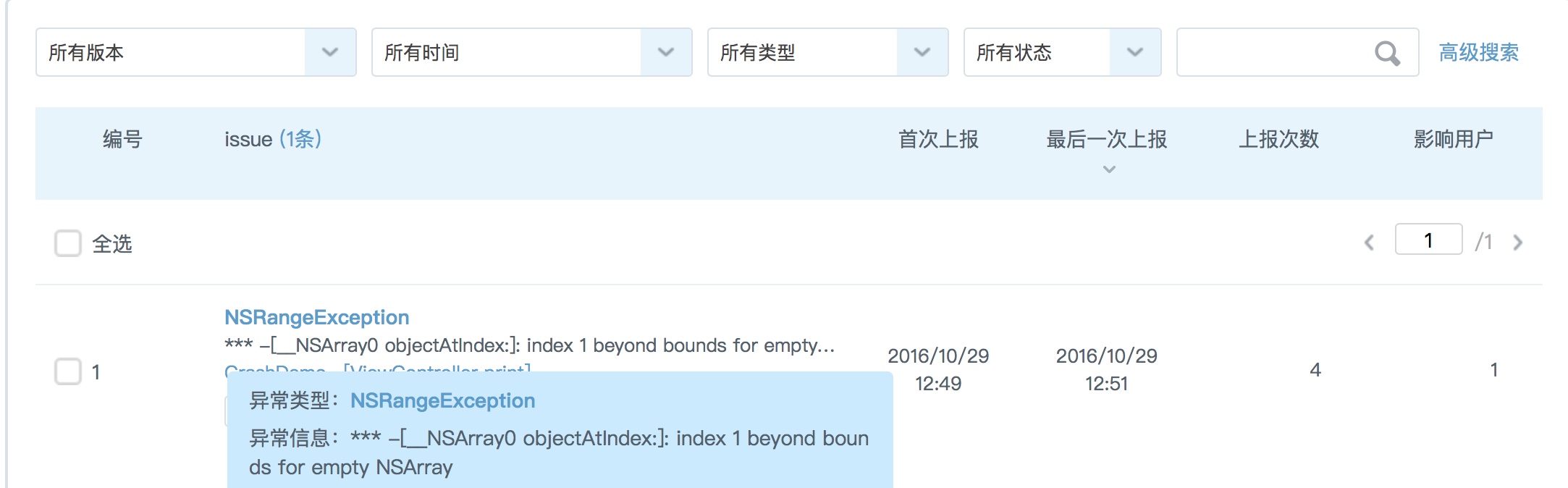
接好之後,崩潰資訊會自動回報,後台看到的畫面大致如上圖。從此線上問題不再是黑箱。