
iOS UITableView 入門(一):資料源與代理的分工
編輯:iOS 開發綜合
UITableView 相當於 Android 的 ListView:一個「視圖相同、資料不同」的重複清單,例如微信的聯繫人列表。
一、兩個代理各司其職
UITableView 本身幾乎不做任何事。它的資料由 UITableViewDataSource 提供,行為則由 UITableViewDelegate 決定。這種切分讓同一個表格元件可以套用到完全不同的場景,只要換一組代理對象即可。
二、兩種列表樣式
UITableView 有 plain(單列表)與 Group(分組列表)兩種形態。前者是常見的貼齊邊緣長條列表,後者在每組上下有圓角與間距,早期 iOS 的設定畫面就是典型例子。
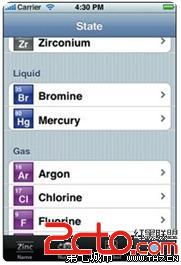
Group
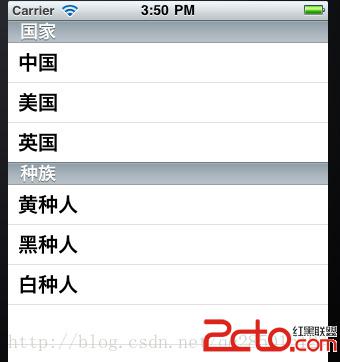
Plain
三、幾個必要的名詞
Section:組數,也就是列表被分成幾段。
NSIndexPath:定位用的座標。indexPath.row 是該組中的第幾列,indexPath.section 是第幾組。兩者合起來才能唯一確定一個 cell,這點在只有一組的簡單列表上容易被忽略,等到實作分組時就會出問題。
四、資料源的兩個核心方法
// 有幾組
- (NSInteger)numberOfSectionsInTableView:(UITableView *)tableView {
    return 1;
}

// 每一組有幾列
- (NSInteger)tableView:(UITableView *)tableView
 numberOfRowsInSection:(NSInteger)section {
    return self.data.count;
}
五、每一列的樣子
做過 Android ListView 的人都知道,adapter 裡實作了視圖重用:某個 item 只在第一次建立,之後只是反覆被賦值。iOS 的對應做法是回傳 UITableViewCell 及其子類。
- (UITableViewCell *)tableView:(UITableView *)tableView
         cellForRowAtIndexPath:(NSIndexPath *)indexPath {
    static NSString *ID = @"cell";
    UITableViewCell *cell = [tableView dequeueReusableCellWithIdentifier:ID];
    if (cell == nil) {
        cell = [[UITableViewCell alloc] initWithStyle:UITableViewCellStyleSubtitle
                                     reuseIdentifier:ID];
    }
    cell.textLabel.text = self.data[indexPath.row];
    return cell;
}
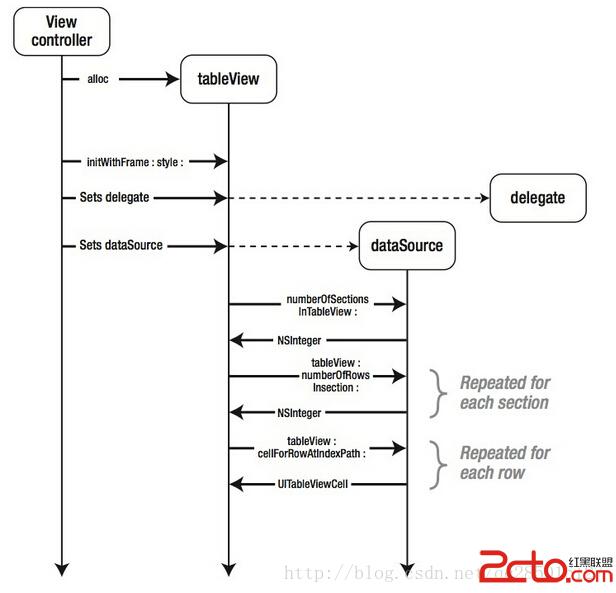
把這幾件事湊起來看,就會發現:只要決定了組數、每組的列數、以及每一列的樣式,整個列表的模樣就已經定型。UITableView 的複雜度不在於 API 數量,而在於你如何安排資料的組織方式。因此實務上更值得投入心力的是:資料來源要怎麼設計,才能讓 numberOfRows 與 cellForRow 都保持單純。