
iOS 取得 App 版本號:kCFBundleVersionKey 的用法
翻程式碼時看到這一句,用來取得 plist 中的版本號:
labelVersion.text = [NSString stringWithFormat:@"v%@",
    [[NSBundle mainBundle] objectForInfoDictionaryKey:(NSString *)kCFBundleVersionKey]];
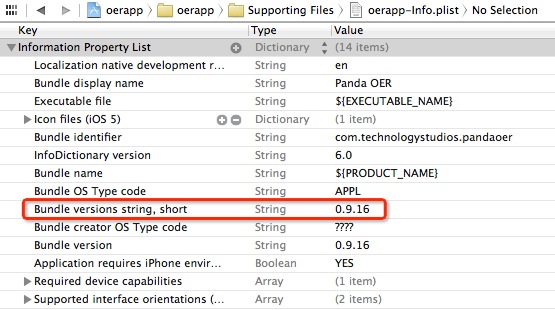
後面那個參數是什麼
比較有意思的是 kCFBundleVersionKey——它並不是自己定義的常數,而是 CFBundle.h 中早已宣告好的變數。文件裡對它的說明是:
const CFStringRef kCFBundleVersionKey;
/* The version number of the bundle.
   For Mac OS 9 style version numbers (for example "2.5.3d5"),
   clients can use CFBundleGetVersionNumber() instead of accessing
   this key directly since that function will properly convert the
   version string into its compact integer representation. */
也就是說,它代表 bundle 的版本號。對於舊式(Mac OS 9 風格)的版本號格式,蘋果建議改用 CFBundleGetVersionNumber(),因為那個函式會把版本字串正確轉換成緊湊的整數表示。
兩個版本號容易搞混
Info.plist 裡其實有兩個不同的版本欄位,用途完全不同:
· CFBundleShortVersionString(對應 Bundle versions string, short):對外展示的版本,例如 1.2.0。這是給使用者看的,App Store 頁面顯示的就是它。
· CFBundleVersion(對應 kCFBundleVersionKey):建置編號。每次上傳新 binary 到 iTunes Connect,這個值都必須比上一版大,否則會被拒收。
所以顯示給使用者看時,通常用 CFBundleShortVersionString 才對;而 kCFBundleVersionKey 更適合用於「判斷這是第幾次建置」,例如做強制更新提示或比對是否包含某個修正。
還有更多這類的 key
像這樣以 kCF 開頭的常數還有很多,都屬於 Standard Info.plist keys。有興趣可以直接打開 CFBundle.h 看一遍,研究它們各自的用途。幾個實務上常用的:
· kCFBundleIdentifierKey:Bundle Identifier
· kCFBundleNameKey:Bundle 名稱
· kCFBundleExecutableKey:主要執行檔名稱
更簡潔的寫法
其實自 iOS 4 起,NSBundle 已經提供了更直接的 API,不必透過 Info.plist 的字典查詢:
NSString *shortVersion = [[NSBundle mainBundle] objectForInfoDictionaryKey:@"CFBundleShortVersionString"];
NSString *buildVersion  = [[NSBundle mainBundle] objectForInfoDictionaryKey:@"CFBundleVersion"];

// 或者用專用屬性
NSString *v = [[[NSBundle mainBundle] infoDictionary] objectForKey:@"CFBundleShortVersionString"];
用字串 key 而非那個 CFStringRef 常數,是因為後者需要轉型(如範例中的 (NSString *))才能放進 objectForInfoDictionaryKey:,寫起來反而更囉嗦。
- 上一篇文章: 在 iOS 專案中使用 FMDB
- 下一篇文章: iOS 打包驗證失敗的原因整理與解法