
Objective-C 呼叫 JavaScript 並取得回傳值
這是一個最小可用的範例,目標是讓你快速跑通「Objective-C 呼叫 JS 並拿到回傳值」這條路。
1. 準備一個本地 HTML 網頁
先寫一個放在 App 內的網頁 jsIOS.html,裡頭有一個文字輸入框與一個會回傳輸入值的函式:
<html>
<head>
<meta http-equiv="content-type" content="text/html;charset=utf-8">
<title>js 呼叫 oc</title>
<script type="text/javaScript">
function postStr() {
    return document.getElementById("text1").value;
    // return "javaScript 回傳值啦";
}
</script>
</head>
<body>
<p><input type="text" id="text1" value="回傳值"/></p>
</body>
</html>
2. 把 HTML 放進專案
將這個檔案加入專案,並確認它被加進 target 的 Copy Bundle Resources——否則執行時會找不到檔案。
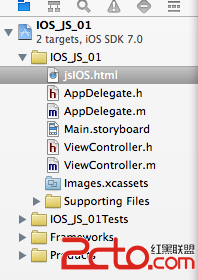
3. 在畫面上放控制項並連線
從物件庫拖一個 UIWebView 與一個 UIButton 到 ViewController 對應的 xib 或 storyboard 上。
在 .h 中宣告對應的變數與按鈕事件,並採用 UIWebViewDelegate:
#import <UIKit/UIKit.h>

@interface ViewController : UIViewController <UIWebViewDelegate>
@property (nonatomic, retain) IBOutlet UIWebView *webview;
@property (nonatomic, retain) IBOutlet UIButton *button;
- (IBAction)IOS_JS:(id)sender;
@end
記得在 Interface Builder 中把 webview 的 delegate 連到 ViewController,並把 button 的 action 連到 IOS_JS:。
4. 載入網頁並呼叫 JS
#import "ViewController.h"

@implementation ViewController
@synthesize webview;

- (void)viewDidLoad {
    [super viewDidLoad];

    webview.backgroundColor = [UIColor clearColor];
    webview.delegate = self;

    // 找出 bundle 內 jsIOS.html 的路徑
    NSString *basePath = [[NSBundle mainBundle] bundlePath];
    NSString *helpHtmlPath = [basePath stringByAppendingPathComponent:@"jsIOS.html"];
    NSURL *url = [NSURL fileURLWithPath:helpHtmlPath];

    // 載入本地 html
    [webview loadRequest:[NSURLRequest requestWithURL:url]];
}

/*
 * 點擊事件:呼叫 JS 的 postStr() 並取得回傳值
 */
- (IBAction)IOS_JS:(id)sender {
    NSString *str = [self.webview
        stringByEvaluatingJavaScriptFromString:@"postStr();"];
    NSLog(@"JS 回傳值:%@", str);
}

- (void)didReceiveMemoryWarning {
    [super didReceiveMemoryWarning];
}
@end
重點在這一行
整個功能的關鍵就是 stringByEvaluatingJavaScriptFromString:。它同步執行一段 JavaScript,並以 NSString 回傳結果。因為是同步的,呼叫後可以立刻拿到值。
實務上要留意的三件事
1. 網頁必須先載入完成。若在 webViewDidFinishLoad 之前就呼叫,JS 函式還不存在,會拿到 nil 或空字串。保險做法是把呼叫安排在 webViewDidFinishLoad 之後,或讓使用者透過按鈕觸發(如本例)。
2. 回傳值只能是字串。JS 若回傳數字、物件或陣列,記得在 JS 端先轉成字串(例如用 JSON.stringify),OC 端再自行解析。
3. 它是同步呼叫。若那段 JS 需要時間執行,會短暫卡住主執行緒。耗時運算應該在 JS 端非同步處理,完成後回頭呼叫 OC(做法是透過自訂 URL scheme 攔截 shouldStartLoadWithRequest)。
- 上一篇文章: iOS 的螢幕旋轉與搖動偵測:加速計與陀螺儀入門
- 下一篇文章: iOS 專案開發布局(一):建立專案與認識預設檔案結構