
iOS KVC 與字典轉模型:從語法到實戰陷阱
編輯:iOS 開發綜合
Key Value Coding(KVC)是 Cocoa 的標準組成部分,讓你可以透過 key(名稱)而非具體的存取方法來讀寫屬性。用對場合,它能大幅精簡程式碼。
一、KVC 能省下多少程式碼
不用 KVC 時,表格取值得逐一判斷:
- (id)tableView:(NSTableView *)tableview
objectValueForTableColumn:(id)column
            row:(NSInteger)row {
    ChildObject *child = [childrenArray objectAtIndex:row];
    if ([[column identifier] isEqualToString:@"name"]) {
        return [child name];
    }
    if ([[column identifier] isEqualToString:@"age"]) {
        return [child age];
    }
    if ([[column identifier] isEqualToString:@"favoriteColor"]) {
        return [child favoriteColor];
    }
    // 還有更多…
    return nil;
}
改用 KVC 之後:
- (id)tableView:(NSTableView *)tableview
objectValueForTableColumn:(id)column
            row:(NSInteger)row {
    ChildObject *child = [childrenArray objectAtIndex:row];
    return [child valueForKey:[column identifier]];
}
差別一目了然。
二、KVC 賦值
// 1. 為當前物件屬性賦值
- (void)setValue:(id)value forKey:(NSString *)key;

// 2. 為「屬性的屬性」賦值
- (void)setValue:(id)value forKeyPath:(NSString *)keyPath;

// 3. 處理未定義的鍵(避開崩潰的關鍵)
- (void)setValue:(id)value forUndefinedKey:(NSString *)key;

// 4. 字典轉模型:把 dict 中 key 同名的屬性一次設好
- (void)setValuesForKeysWithDictionary:(NSDictionary *)keyedValues;
注意第 4 項的前提:字典的 key 必須與物件屬性同名,且值需為基本 OC 型別(Array、Dictionary、Boolean、Data、Number、String)。
三、KVC 取值
- (id)valueForKey:(NSString *)key;          // 取屬性
- (id)valueForKeyPath:(NSString *)keyPath;  // 取屬性的屬性
使用範例:
Person *p = [[Person alloc] init];
Car *car = [[Car alloc] init];
p.car = car;

[p setValue:@"qhyuan"   forKeyPath:@"name"];
[p setValue:@(20)        forKey:@"id"];
[p setValue:@"baoshijie" forKeyPath:@"car.brand"];
[p setValue:@180000      forKeyPath:@"car.price"];

NSLog(@"kvc 賦值的 person 物件 ---- %@", p);

NSString *name  = [p valueForKey:@"name"];
NSString *brand = [p valueForKeyPath:@"car.brand"];
NSLog(@"%@ %@", name, brand);
四、字典轉模型:基本情況
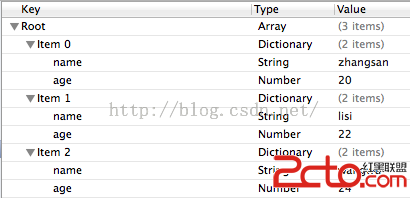
模型定義(Person.h):
@interface Person : NSObject
@property (nonatomic, copy) NSString *name;
@property (nonatomic, assign) int age;
- (instancetype)initWithDict:(NSDictionary *)dict;
+ (instancetype)personWithDict:(NSDictionary *)dict;
+ (NSArray *)person;
@end
實作(Person.m):
@implementation Person

- (instancetype)initWithDict:(NSDictionary *)dict {
    if (self = [super init]) {
        // KVC 字典轉模型,省下大量賦值程式碼
        [self setValuesForKeysWithDictionary:dict];
        // 等價的手寫版本:
        // self.name = dict[@"name"];
        // self.age  = [dict[@"age"] integerValue];
    }
    return self;
}

+ (instancetype)personWithDict:(NSDictionary *)dict {
    return [[self alloc] initWithDict:dict];
}

// 從 plist 批次載入
+ (NSArray *)person {
    NSMutableArray *mutablePersons = [NSMutableArray array];
    NSString *path = [[NSBundle mainBundle] pathForResource:@"persons.plist" ofType:nil];
    NSArray *persons = [[NSArray alloc] initWithContentsOfFile:path];
    for (NSDictionary *person in persons) {
        [mutablePersons addObject:[self personWithDict:person]];
    }
    return mutablePersons;
}

- (NSString *)description {
    return [NSString stringWithFormat:@"<%p:(%@,%d)>", self, self.name, self.age];
}

@end
五、陷阱一:key 是 OC 關鍵字
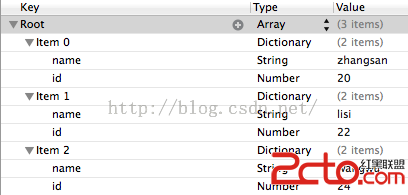
若字典中的 age 換成 id,程式會拋出例外:
*** Terminating app due to uncaught exception 'NSUnknownKeyException',
reason: '[<Person 0x8c419a0> setValue:forUndefinedKey:]:
this class is not key value coding-compliant for the key id.'
解法是覆寫 setValue:forUndefinedKey:,把不認識的 key 導向正確的屬性:
- (void)setValue:(id)value forUndefinedKey:(NSString *)key {
    if ([key isEqualToString:@"id"]) {
        key = @"age";
    }
    [super setValue:value forKey:key];
}
六、陷阱二:屬性是自訂類別
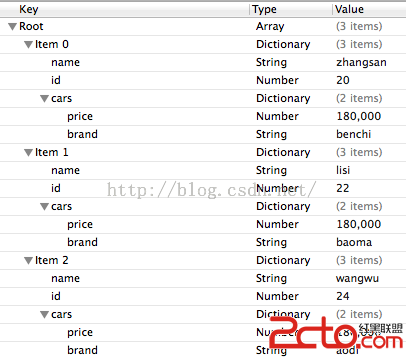
Person 增加了一個 Car 型別的屬性 @property (nonatomic, strong) Car *car;,但字典裡對應的是一個 NSDictionary。這時覆寫 setValue:forKey: 攔下來自行轉換:
- (void)setValue:(id)value forKey:(NSString *)key {
    if ([key isEqualToString:@"cars"]) {
        Car *car = [Car carWithDict:(NSDictionary *)value];
        self.car = car;
    } else {
        [super setValue:value forKey:key];
    }
}
執行結果:
(
  <Person: (zhangsan, 20, <Car: (benchi, 180000)>)>,
  <Person: (lisi,     22, <Car: (baoma,  180000)>)>,
  <Person: (wangwu,   24, <Car: (aodi,   180000)>)>
)
七、KVC 的邊界
KVC 很香,但有兩個必須知道的限制。第一,它犧牲了編譯期檢查——key 打錯字不會在編譯時報錯,而是執行時才崩潰,所以 key 最好抽成常數集中管理。第二,setValuesForKeysWithDictionary: 遇到 nil 值時不會把屬性設為 nil,而是呼叫 setNilValueForKey:,對基本型別而言這會直接崩潰,需要一併覆寫處理。理解這兩點,KVC 才是助力而非地雷。