
iOS 動畫實作:CAReplicatorLayer 製作載入指示器
編輯:iOS 開發綜合
成果展示
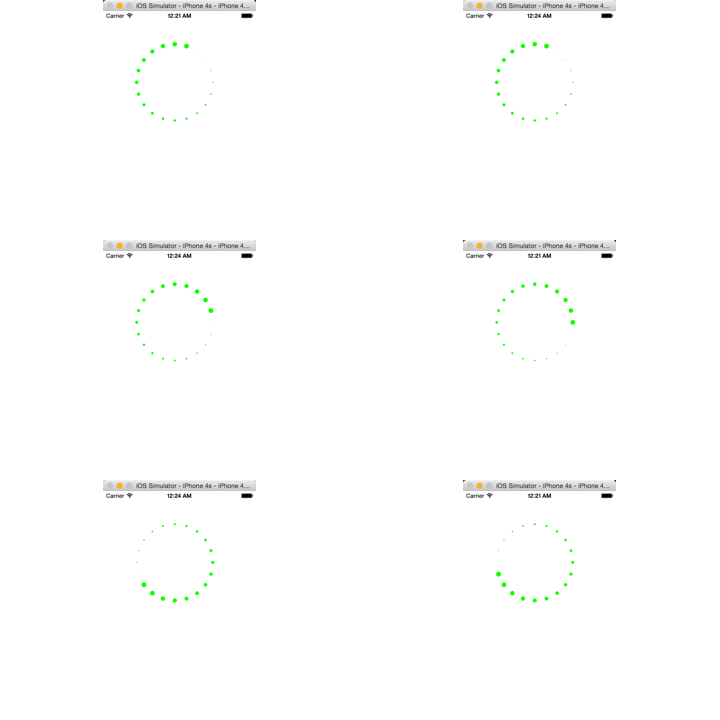
這種繞圈圈的載入動畫,直覺做法是建立 12 個 layer 各給不同延遲的動畫。但用 CAReplicatorLayer 只需要一個圖層加上三行設定。
實現思路
1. 建立複製層
CAReplicatorLayer *replicator = [CAReplicatorLayer layer];
replicator.frame = CGRectMake(50, 50, 200, 200);
replicator.backgroundColor = [UIColor clearColor].CGColor;
[self.view.layer addSublayer:replicator];
2. 建立一個小方塊並加上縮放動畫
CALayer *indicator = [CALayer layer];
indicator.bounds  = CGRectMake(0, 0, 10, 10);
indicator.cornerRadius = 5;
indicator.position = CGPointMake(100, 20);   // 圓圈最上方
indicator.backgroundColor = [UIColor greenColor].CGColor;
[replicator addSublayer:indicator];

CGFloat durtion = 1;
CABasicAnimation *anim = [CABasicAnimation animation];
anim.keyPath = @"transform.scale";
anim.fromValue = @1;
anim.toValue = @0.1;
anim.repeatCount = MAXFLOAT;
anim.duration = durtion;
[indicator addAnimation:anim forKey:nil];
3. 複製並旋轉分佈
int count = 10;
replicator.instanceCount = count;

// 每個複製層旋轉的角度
CGFloat angle = M_PI * 2 / count;
replicator.instanceTransform = CATransform3DMakeRotation(angle, 0, 0, 1);
4. 設定延遲,讓動畫依序接力
這是最關鍵的一步。延遲時間必須等分動畫總時長,才能形成無縫的循環——當最後一個跑到終點時,第一個正好回到起點。
// 延長時間 = 動畫時長 / 子層總數
replicator.instanceDelay = durtion / count;
舉例:兩個圖層、動畫 1 秒,則延遲 0.5 秒。第一個動畫執行到一半(0.5 秒)時第二個才啟動,第二個跑完時第一個正好回到起點重新開始。
完整程式碼
#import "ViewController.h"

#define Count        20.0
#define DurationTime 1.0

@interface ViewController ()
@property (nonatomic, strong) CAReplicatorLayer *replicator;
@property (nonatomic, strong) CALayer *indicator;
@property (nonatomic, strong) CABasicAnimation *anim;
@end

@implementation ViewController

#pragma mark - 複製層(懶載入)

- (CAReplicatorLayer *)replicator {
    if (_replicator == nil) {
        _replicator = [CAReplicatorLayer layer];
        _replicator.frame = CGRectMake(50, 50, 200, 200);
        _replicator.backgroundColor = [UIColor clearColor].CGColor;

        // 子層總數
        _replicator.instanceCount = Count;

        // 子層動畫延遲:動畫時長平均分配
        _replicator.instanceDelay = DurationTime / Count;

        // 子層旋轉角度
        CGFloat angle = M_PI * 2 / Count;
        _replicator.instanceTransform = CATransform3DMakeRotation(angle, 0, 0, 1);
    }
    return _replicator;
}

#pragma mark - 原始子層

- (CALayer *)indicator {
    if (_indicator == nil) {
        _indicator = [CALayer layer];
        _indicator.bounds = CGRectMake(0, 0, 10, 10);
        _indicator.cornerRadius = 5;
        _indicator.position = CGPointMake(100, 20);
        _indicator.backgroundColor = [UIColor greenColor].CGColor;
    }
    return _indicator;
}

#pragma mark - 動畫

- (CABasicAnimation *)anim {
    if (_anim == nil) {
        _anim = [CABasicAnimation animation];
        _anim.keyPath = @"transform.scale";
        _anim.fromValue = @1;
        _anim.toValue = @0.1;
        _anim.repeatCount = MAXFLOAT;
        _anim.duration = DurationTime;
    }
    return _anim;
}

#pragma mark - 組裝

- (void)viewDidLoad {
    [super viewDidLoad];

    [self.view.layer addSublayer:self.replicator];
    [self.replicator addSublayer:self.indicator];
    [self.indicator addAnimation:self.anim forKey:nil];
}

@end
為什麼這個做法值得學
- 動畫只定義了一次,所有複製層自動共用同一份動畫,改 duration 只需改一個常數。
instanceDelay的「等分」觀念是重點:只有duration / count才能讓循環看起來無接縫,給成固定值會出現明顯的斷層。- 想做出顏色漸層(例如由深到淺),可在複製層上設定
instanceAlphaOffset為負值,讓每一個都比前一個更透明。 - 調整
indicator.position的 Y 值可以改變圓圈半徑;調整bounds大小則改變圓點粗細。
- 上一篇文章: iOS 動畫實作:打造走時精準的類比時鐘
- 下一篇文章: iOS 時間顯示:x 分鐘前 / 昨天 / x 天前的實作