
iOS 動畫實作:打造走時精準的類比時鐘
編輯:iOS 開發綜合
最終效果
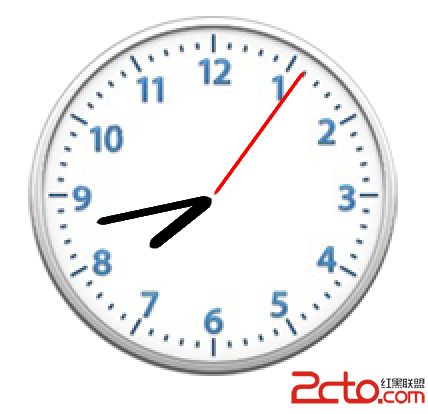
實現思路
iOS 中圖層預設繞中心點旋轉,因為 anchorPoint 預設在圖層中心。要讓指針繞著底部中心轉,必須改錨點位置,再依錨點反推 position,使其落在時鐘的中點。
旋轉角度的計算:
- 秒針:一圈 360° ÷ 60 秒 = 每秒 6°,所以角度 = 秒數 × 6。
- 分針:同秒針,每分鐘 6°。
- 時針:一小時 30°,因此每分鐘 30 ÷ 60 = 0.5°。所以時針角度 = 時數 × 30 + 分鐘數 × 0.5。
時間資料透過 NSCalendar 取得 NSDateComponents 中的各個組成成分,再用 NSTimer 每秒更新一次。最後把指針頭尾設圓角,視覺上更精緻。
完整程式碼
#import "ViewController.h"

// 取得當前的各個時間成分
#define CURRENTSEC   [[NSCalendar currentCalendar] component:NSCalendarUnitSecond fromDate:[NSDate date]]
#define CURRENTMIN   [[NSCalendar currentCalendar] component:NSCalendarUnitMinute fromDate:[NSDate date]]
#define CURRENTHOUR  [[NSCalendar currentCalendar] component:NSCalendarUnitHour   fromDate:[NSDate date]]

// 角度轉弧度
#define ANGEL(x) (x / 180.0 * M_PI)

#define kPerSecondA      ANGEL(6)    // 每秒 6 度
#define kPerMinuteA      ANGEL(6)    // 每分鐘 6 度
#define kPerHourA        ANGEL(30)   // 每小時 30 度
#define kPerHourMinuteA  ANGEL(0.5)  // 時針每分鐘 0.5 度

@interface ViewController ()
@property (nonatomic, strong) UIImageView *imageClock;
@property (nonatomic, strong) CALayer *layerSec;
@property (nonatomic, strong) CALayer *layerMin;
@property (nonatomic, strong) CALayer *layerHour;
@end

@implementation ViewController

- (void)viewDidLoad {
    [super viewDidLoad];

    [self.view addSubview:self.imageClock];
    [self.imageClock.layer addSublayer:self.layerSec];
    [self.imageClock.layer addSublayer:self.layerMin];
    [self.imageClock.layer addSublayer:self.layerHour];

    [self timeChange];

    [NSTimer scheduledTimerWithTimeInterval:1
                                     target:self
                                   selector:@selector(timeChange)
                                   userInfo:nil
                                    repeats:YES];
}

#pragma mark - 更新指針角度

- (void)timeChange {
    self.layerSec.transform =
        CATransform3DMakeRotation(CURRENTSEC * kPerSecondA, 0, 0, 1);

    self.layerMin.transform =
        CATransform3DMakeRotation(CURRENTMIN * kPerMinuteA, 0, 0, 1);

    // 時針 = 小時部分 + 分鐘推進的部分
    self.layerHour.transform = CATransform3DMakeRotation(
        CURRENTHOUR * kPerHourA + CURRENTMIN * kPerHourMinuteA, 0, 0, 1);
}

#pragma mark - 懶載入

- (UIImageView *)imageClock {
    if (_imageClock == nil) {
        _imageClock = [[UIImageView alloc] initWithImage:[UIImage imageNamed:@"鐘表"]];
        _imageClock.frame = CGRectMake(100, 100, 200, 200);
    }
    return _imageClock;
}

- (CALayer *)layerSec {
    if (_layerSec == nil) {
        _layerSec = [CALayer layer];
        _layerSec.bounds = CGRectMake(0, 0, 2, 80);
        _layerSec.backgroundColor = [UIColor redColor].CGColor;
        _layerSec.cornerRadius = 1;
        _layerSec.anchorPoint = CGPointMake(0.5, 1);   // 錨點在底部中央
        _layerSec.position = CGPointMake(
            self.imageClock.bounds.size.width  / 2,
            self.imageClock.bounds.size.height / 2);
    }
    return _layerSec;
}

- (CALayer *)layerMin {
    if (_layerMin == nil) {
        _layerMin = [CALayer layer];
        _layerMin.bounds = CGRectMake(0, 0, 4, 60);
        _layerMin.backgroundColor = [UIColor blackColor].CGColor;
        _layerMin.cornerRadius = 2;
        _layerMin.anchorPoint = CGPointMake(0.5, 1);
        _layerMin.position = CGPointMake(
            self.imageClock.bounds.size.width  / 2,
            self.imageClock.bounds.size.height / 2);
    }
    return _layerMin;
}

- (CALayer *)layerHour {
    if (_layerHour == nil) {
        _layerHour = [CALayer layer];
        _layerHour.bounds = CGRectMake(0, 0, 6, 40);
        _layerHour.backgroundColor = [UIColor blackColor].CGColor;
        _layerHour.cornerRadius = 3;
        _layerHour.anchorPoint = CGPointMake(0.5, 1);
        _layerHour.position = CGPointMake(
            self.imageClock.bounds.size.width  / 2,
            self.imageClock.bounds.size.height / 2);
    }
    return _layerHour;
}

@end
幾個容易忽略的細節
- 錨點與 position 必須成對設定。改錨點會讓圖層位置改變,所以設定順序上,先設 anchorPoint 再設 position 才不會錯位。
- cornerRadius 要對稱。半徑給得比寬度的一半還大時,系統會自動截到最大值,形狀會變成半圓柱;原範例寫 5 對寬度 2 的秒針來說過大,改成 1 才是想要的細圓頭。
- 用 CABasicAnimation 取代每秒跳動。目前是直接設定 transform,指針每秒跳一格。若要平滑掃描,可為每根指針加上
CABasicAnimation,把byValue設為單格角度、duration設為 1 秒並開repeatCount = MAXFLOAT。 - 計時器要在 dealloc 中 invalidate,否則會持續佔用資源。