
iOS 進階筆記:從 UIWebView 遷移到 WKWebView 的實戰要點
前言
Xcode 8 之後,編譯器不再支援 iOS 7,因此許多應用在適配 iOS 10 的同時也順勢放手了 iOS 7,其中包括網易新聞、滴滴出行等大型產品。我們公司的應用也在這個時間點決定淘汰 iOS 7。
既然最低支援版本拉到 iOS 8,第一件要改的事自然是用 WKWebView 取代 UIWebView。WKWebView 的優勢相當明顯:
- 對 HTML5 特性的支援更完整
- 官方宣稱可達 60fps 的滾動效能,並內建手勢
- 把原本糾結在一起的 UIWebView 與 UIWebViewDelegate 拆成 14 個類別與 3 個協定,過去難以實作的功能變得可行
- 使用與 Safari 相同的 JavaScript 引擎
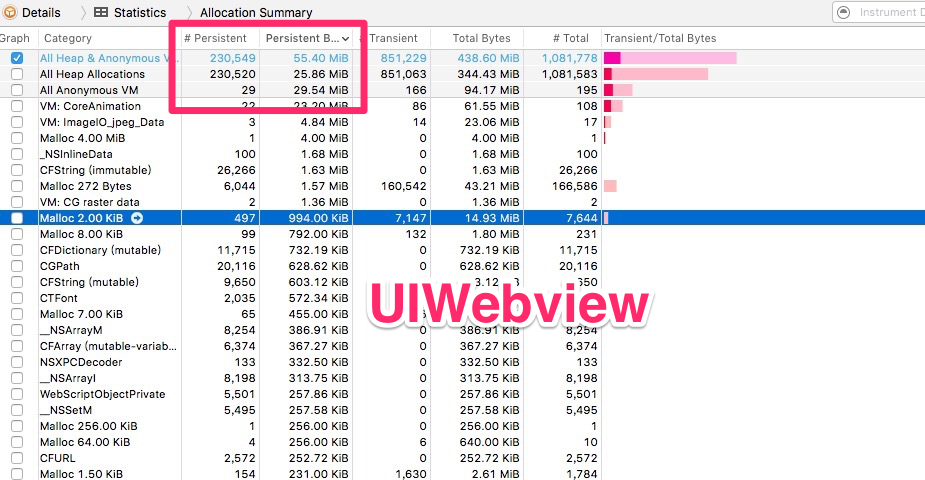
- 佔用更少記憶體
UIWebView
WKWebView
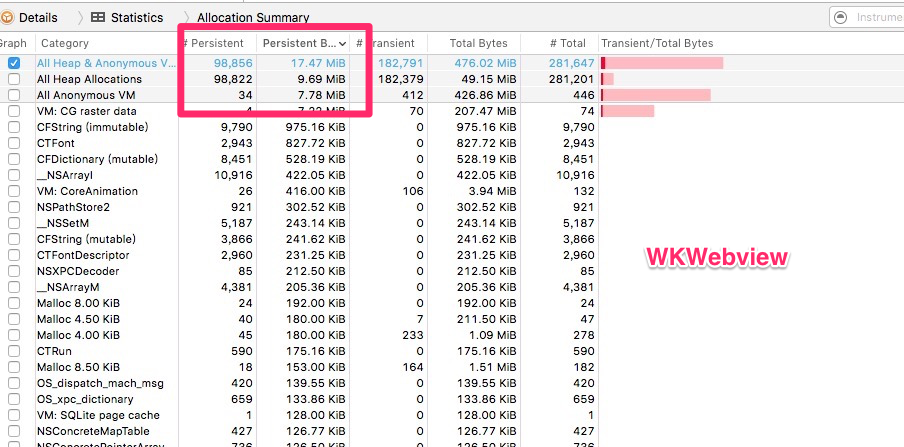
因此,改用 WKWebView 確實有其必要。
基本用法
WKWebView 有兩個 delegate:WKUIDelegate 與 WKNavigationDelegate。前者負責 JS 腳本、輸入框、確認框、警告框等與 UI 相關的互動;後者處理頁面跳轉與載入流程。實務上前者使用頻率遠低於後者。
常用的方法大致如下:
#pragma mark - lifeCircle
- (void)viewDidLoad {
    [super viewDidLoad];
    webView = [[WKWebView alloc] init];
    [self.view addSubview:webView];
    [webView mas_makeConstraints:^(MASConstraintMaker *make) {
        make.left.equalTo(self.view);
        make.right.equalTo(self.view);
        make.top.equalTo(self.view);
        make.bottom.equalTo(self.view);
    }];
    webView.UIDelegate = self;
    webView.navigationDelegate = self;
    [webView loadRequest:[NSURLRequest requestWithURL:[NSURL URLWithString:@"https://www.baidu.com"]]];
}

#pragma mark - WKNavigationDelegate
// 開始載入時呼叫
- (void)webView:(WKWebView *)webView didStartProvisionalNavigation:(WKNavigation *)navigation {}

// 內容開始返回時呼叫
- (void)webView:(WKWebView *)webView didCommitNavigation:(WKNavigation *)navigation {}

// 載入完成後呼叫
- (void)webView:(WKWebView *)webView didFinishNavigation:(WKNavigation *)navigation {}

// 載入失敗時呼叫
- (void)webView:(WKWebView *)webView didFailProvisionalNavigation:(WKNavigation *)navigation {}

// 收到伺服器跳轉請求後呼叫
- (void)webView:(WKWebView *)webView didReceiveServerRedirectForProvisionalNavigation:(WKNavigation *)navigation {}

// 收到回應後,決定是否跳轉
- (void)webView:(WKWebView *)webView decidePolicyForNavigationResponse:(WKNavigationResponse *)navigationResponse
  decisionHandler:(void (^)(WKNavigationResponsePolicy))decisionHandler {
    NSLog(@"%@", navigationResponse.response.URL.absoluteString);
    decisionHandler(WKNavigationResponsePolicyAllow);   // 允許跳轉
    // decisionHandler(WKNavigationResponsePolicyCancel); // 不允許跳轉
}

// 發送請求前,決定是否跳轉
- (void)webView:(WKWebView *)webView decidePolicyForNavigationAction:(WKNavigationAction *)navigationAction
  decisionHandler:(void (^)(WKNavigationActionPolicy))decisionHandler {
    NSLog(@"%@", navigationAction.request.URL.absoluteString);
    decisionHandler(WKNavigationActionPolicyAllow);
    // decisionHandler(WKNavigationActionPolicyCancel);
}

#pragma mark - WKUIDelegate
// 建立新的 WebView
- (WKWebView *)webView:(WKWebView *)webView createWebViewWithConfiguration:(WKWebViewConfiguration *)configuration
    forNavigationAction:(WKNavigationAction *)navigationAction windowFeatures:(WKWindowFeatures *)windowFeatures {
    return [[WKWebView alloc] init];
}

// 輸入框
- (void)webView:(WKWebView *)webView runJavaScriptTextInputPanelWithPrompt:(NSString *)prompt
    defaultText:(nullable NSString *)defaultText initiatedByFrame:(WKFrameInfo *)frame
    completionHandler:(void (^)(NSString * __nullable result))completionHandler {
    completionHandler(@"http");
}

// 確認框
- (void)webView:(WKWebView *)webView runJavaScriptConfirmPanelWithMessage:(NSString *)message
    initiatedByFrame:(WKFrameInfo *)frame completionHandler:(void (^)(BOOL result))completionHandler {
    completionHandler(YES);
}

// 警告框
- (void)webView:(WKWebView *)webView runJavaScriptAlertPanelWithMessage:(NSString *)message
    initiatedByFrame:(WKFrameInfo *)frame completionHandler:(void (^)(void))completionHandler {
    NSLog(@"%@", message);
    completionHandler();
}
Objective-C 與 JS 互動
WKWebView 內建了與 JS 溝通的 API,不必再依賴 JavaScriptCore 或第三方 JavaScriptBridge。核心思路是透過 WKUserContentController:先註冊約定好的方法名稱,再由 JS 呼叫。
JS 呼叫 Objective-C
先看一個「有問題」的直觀寫法(記憶體無法釋放):
@interface ViewController ()
    WKWebView * webView;
    WKUserContentController* userContentController;
@end

@implementation ViewController
- (void)viewDidLoad {
    [super viewDidLoad];
    // 配置環境
    WKWebViewConfiguration * configuration = [[WKWebViewConfiguration alloc] init];
    userContentController = [[WKUserContentController alloc] init];
    configuration.userContentController = userContentController;
    webView = [[WKWebView alloc] initWithFrame:CGRectMake(0, 0, 100, 100) configuration:configuration];
    // 註冊名為 sayhello 的方法
    [userContentController addScriptMessageHandler:self name:@"sayhello"];
    // ... 加入視圖、設定 delegate、載入請求
}
- (void)dealloc {
    // 前面註冊過的方法一定要移除
    [userContentController removeScriptMessageHandlerForName:@"sayhello"];
}
#pragma mark - WKScriptMessageHandler
- (void)userContentController:(WKUserContentController *)userContentController
      didReceiveScriptMessage:(WKScriptMessage *)message {
    NSLog(@"name:%@\n body:%@\n frameInfo:%@\n", message.name, message.body, message.frameInfo);
}
@end
實際跑一下會發現 dealloc 根本不會被呼叫,等於必然洩漏記憶體。問題出在 addScriptMessageHandler:self name:@"sayhello" 這一句(順帶一提,我試過改用具弱引用也無法解決)。正確作法是引入一個專用的 controller 來接收訊息,再由它透過 delegate 把訊息轉回原本的 VC。
改寫後:
- (void)viewDidLoad {
    [super viewDidLoad];
    WKWebViewConfiguration * configuration = [[WKWebViewConfiguration alloc] init];
    userContentController = [[WKUserContentController alloc] init];
    configuration.userContentController = userContentController;
    webView = [[WKWebView alloc] initWithFrame:CGRectMake(0, 0, 100, 100) configuration:configuration];
    // 改用專用的 delegate controller
    WKDelegateController * delegateController = [[WKDelegateController alloc] init];
    delegateController.delegate = self;
    [userContentController addScriptMessageHandler:delegateController name:@"sayhello"];
    // ... 其餘設定同上
}
WKDelegateController 的標頭檔:
@protocol WKDelegate
- (void)userContentController:(WKUserContentController *)userContentController
      didReceiveScriptMessage:(WKScriptMessage *)message;
@end

@interface WKDelegateController : UIViewController
@property (weak, nonatomic) id delegate;
@end
實作檔:
@implementation WKDelegateController
- (void)userContentController:(WKUserContentController *)userContentController
      didReceiveScriptMessage:(WKScriptMessage *)message {
    if ([self.delegate respondsToSelector:@selector(userContentController:didReceiveScriptMessage:)]) {
        [self.delegate userContentController:userContentController didReceiveScriptMessage:message];
    }
}
@end
H5 端則用 window.webkit.messageHandlers 呼叫已註冊的方法名:
function say() {
    // window.webkit.messageHandlers.註冊的方法名.postMessage({body: 傳輸的數據})
    window.webkit.messageHandlers.sayhello.postMessage({body: 'hello world!'});
}
印出的 log:
name:sayhello
body:{ body = "hello world!"; }
frameInfo:<WKFrameInfo: 0x7f872060ce20; isMainFrame = YES; request = { URL: https://www.test.com/ }>
注意事項
addScriptMessageHandler必須與removeScriptMessageHandlerForName成對出現,否則會造成記憶體洩漏。- H5 只能傳一個參數,若需傳多個值,得用字典或 JSON 組裝。
Objective-C 呼叫 JS 方法
- (void)webView:(WKWebView *)tmpWebView didFinishNavigation:(WKNavigation *)navigation {
    // say() 是 JS 方法名,completionHandler 為非同步回呼
    [webView evaluateJavaScript:@"say()" completionHandler:^(id _Nullable result, NSError * _Nullable error) {
        NSLog(@"%@", result);
    }];
}
H5 端程式碼同上。
WebViewJavascriptBridge
好的 UI 背後往往有一個大神級的封裝框架。WebViewJavascriptBridge 的作者就另外做了一套支援 WKWebView 的版本。
- CocoaPods:
pod 'WebViewJavascriptBridge', '~> 5.0.5' - GitHub:
https://github.com/marcuswestin/WebViewJavascriptBridge
主要介面如下:
// 初始化
+ (instancetype)bridgeForWebView:(WKWebView*)webView;
+ (void)enableLogging;
// 註冊處理器
- (void)registerHandler:(NSString*)handlerName handler:(WVJBHandler)handler;
// 呼叫處理器
- (void)callHandler:(NSString*)handlerName;
- (void)callHandler:(NSString*)handlerName data:(id)data;
- (void)callHandler:(NSString*)handlerName data:(id)data responseCallback:(WVJBResponseCallback)responseCallback;
// 重置
- (void)reset;
// 設定 WKNavigationDelegate
- (void)setWebViewDelegate:(id)webViewDelegate;
底層原理與前面手寫的差不多,只是做了更完整的封裝,有興趣可以直接 pod 下來用。
我是翻滾的牛寶寶,歡迎大家一起討論交流~
補充:遷移過程中踩到的 Cookie 問題
前不久把專案中的 UIWebView 全面換成 WKWebView,解決了一批問題,也遺留了一批——最典型的就是 Cookie。
UIWebView 會自動從 NSHTTPCookieStorage 讀取 Cookie,WKWebView 不會,於是出現 Cookie 遺失與一連串連帶問題。應變方式是在 request 中手動補上:
mainWebView.UIDelegate = self;
mainWebView.navigationDelegate = self;
NSMutableURLRequest *request = [NSMutableURLRequest requestWithURL:[NSURL URLWithString:@"https://www.test.com"]];
[request addValue:[self readCurrentCookieWithDomain:@"https://www.test.com/"] forHTTPHeaderField:@"Cookie"];
[mainWebView loadRequest:request];

- (NSString *)readCurrentCookieWithDomain:(NSString *)domainStr {
    NSHTTPCookieStorage *cookieJar = [NSHTTPCookieStorage sharedHTTPCookieStorage];
    NSMutableString *cookieString = [[NSMutableString alloc] init];
    for (NSHTTPCookie *cookie in [cookieJar cookies]) {
        [cookieString appendFormat:@"%@=%@;", cookie.name, cookie.value];
    }
    // 刪除最後一個「;」
    [cookieString deleteCharactersInRange:NSMakeRange(cookieString.length - 1, 1)];
    return cookieString;
}
但這只解決了首次進入的問題——頁面內跳轉(例如 a 標籤)時仍然取不到 Cookie,因此還要再補一段:
- (void)webView:(WKWebView *)webView didFinishNavigation:(WKNavigation *)navigation {
    NSHTTPCookieStorage *cookieStorage = [NSHTTPCookieStorage sharedHTTPCookieStorage];
    // 注入 setCookie / getCookie / delCookie 三個 JS 函式
    NSString *JSFuncString = @"function setCookie(name,value,expires){ \
        var oDate = new Date(); oDate.setDate(oDate.getDate() + expires); \
        document.cookie = name + '=' + value + ';expires=' + oDate + ';path=/'; } \
        function getCookie(name){ \
        var arr = document.cookie.match(new RegExp('(^| )' + name + '=([^;]*)(;|$)')); \
        if (arr != null) return unescape(arr[2]); return null; } \
        function delCookie(name){ \
        var exp = new Date(); exp.setTime(exp.getTime() - 1); \
        var cval = getCookie(name); \
        if (cval != null) document.cookie = name + '=' + cval + ';expires=' + exp.toGMTString(); }";
    // 逐一寫入 Cookie
    NSMutableString *JSCookieString = JSFuncString.mutableCopy;
    for (NSHTTPCookie *cookie in cookieStorage.cookies) {
        NSString *excuteJSString = [NSString stringWithFormat:@"setCookie('%@', '%@', 1);", cookie.name, cookie.value];
        [JSCookieString appendString:excuteJSString];
    }
    // 執行
    [webView evaluateJavaScript:JSCookieString completionHandler:nil];
}
整體遷移下來最大的體會是:WKWebView 在效能與能力上確實是明顯的升級,但它把原本被 UIWebView 「貼心代勞」的事情交還給了你,Cookie 只是其中一項。
- 上一篇文章: Xcode 8 時代,用對 StoryBoard 的幾個實務建議
- 下一篇文章: 五個立刻生效的技巧,讓 Xcode 編譯快起來