
iOS 開發:點擊狀態列讓 tableView 回到頂部(附狀態列點擊事件)
編輯:iOS 7 技巧
滑到很下面想回頂端時,點一下最上方的狀態列就能瞬間回到頂部——這是 iOS 內建的貼心設計。本文說明它的觸發條件,以及在需要攔截這個行為時該怎麼寫。
一、頁面上只有一個 scrollView
如果畫面上只有一個表格(UITableView),點擊頂部狀態列後,表格就會像 QQ、微信聯絡人列表那樣回到最上面。這個行為是 iOS 系統預設提供的,不需要額外寫程式。
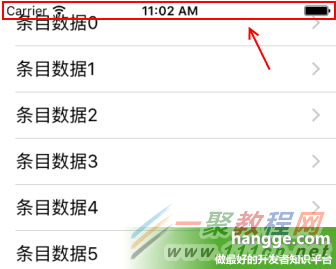
二、頁面上有多個 scrollView
這時候點狀態列會變成完全沒有反應。解法是把不需要參與的 scrollView 的 scrollsToTop 設為 false,只保留一個:
tableView?.scrollsToTop = false;
三、攔截狀態列點擊事件
有時我們除了讓視圖自動滾動,還想在點擊狀態列時執行其他操作。實作方式分兩種情況:
(1)頁面上有 scrollView
直接在 scrollViewShouldScrollToTop() 中加入相關邏輯即可。(若不需要滾動,方法內 return false 就能單純攔截事件而不捲動畫面。)
import UIKit

class ViewController: UIViewController, UITableViewDelegate, UITableViewDataSource {

    var tableView:UITableView?

    override func loadView() {
        super.loadView()
    }

    override func viewDidLoad() {
        super.viewDidLoad()

        //創建表視圖
        self.tableView = UITableView(frame: self.view.frame, style:UITableViewStyle.Plain)
        self.tableView!.delegate = self
        self.tableView!.dataSource = self
        //創建一個重用的單元格
        self.tableView!.registerClass(UITableViewCell.self, forCellReuseIdentifier: "SwiftCell")
        self.view.addSubview(self.tableView!)
    }

    func scrollViewShouldScrollToTop(scrollView: UIScrollView) -> Bool {
        print("狀態欄點擊")
        //這裡添加需要執行的代碼邏輯....

        //不滾動表格視圖
        return false
    }

    //在本例中,只有一個分區
    func numberOfSectionsInTableView(tableView: UITableView) -> Int {
        return 1;
    }

    //返回表格行數(也就是返回控件數)
    func tableView(tableView: UITableView, numberOfRowsInSection section: Int) -> Int {
        return 100
    }

    //創建各單元顯示內容(創建參數indexPath指定的單元)
    func tableView(tableView: UITableView, cellForRowAtIndexPath indexPath: NSIndexPath)
        -> UITableViewCell
    {
        //為了提供表格顯示性能,已創建完成的單元需重復使用
        let identify:String = "SwiftCell"
        //同一形式的單元格重復使用,在聲明時已注冊
        let cell = tableView.dequeueReusableCellWithIdentifier(identify,
            forIndexPath: indexPath) as UITableViewCell
        cell.accessoryType = UITableViewCellAccessoryType.DisclosureIndicator
        cell.textLabel?.text = "條目數據\(indexPath.row)"
        return cell
    }

    override func didReceiveMemoryWarning() {
        super.didReceiveMemoryWarning()
    }
}
(2)頁面上沒有 scrollView
如果畫面上完全沒有滾動視圖,可以自己加一個高度為 0 的隱藏 scrollView,同樣在 scrollViewShouldScrollToTop() 中處理事件。
特別提醒:不要用 hidden 或 alpha=0 來隱藏它,那樣會導致 scrollViewShouldScrollToTop() 永遠不被呼叫。正確做法是把高度設為 0。
import UIKit

class ViewController: UIViewController, UIScrollViewDelegate{

    var tableView:UITableView?

    override func loadView() {
        super.loadView()
    }

    override func viewDidLoad() {
        super.viewDidLoad()

        //創建一個隱藏的滾動視圖
        let scrollView = UIScrollView()
        scrollView.frame = CGRect(x: 0, y: 0, width: self.view.frame.width, height: 0)
        scrollView.contentSize = CGSize(width: self.view.frame.width,height: 10)
        scrollView.contentOffset = CGPoint(x: 0,y: 10)
        scrollView.delegate = self
        self.view.addSubview(scrollView)
    }

    func scrollViewShouldScrollToTop(scrollView: UIScrollView) -> Bool {
        print("狀態欄點擊")
        //這裡添加需要執行的代碼邏輯....

        //不滾動視圖
        return false
    }

    override func didReceiveMemoryWarning() {
        super.didReceiveMemoryWarning()
    }
}
這個技巧很實用:即使頁面是純自繪內容、沒有任何列表,也能藉此實作出「點狀態列回到頂部」或觸發其他快捷操作的互動。