
iOS 開發:SQLite 資料庫的建表、查詢與寫入
SQLite 可以視為 MySQL 的輕量版本,特別適合行動裝置這類資源有限的環境。它的優點很明確:可移植性高、不需要獨立伺服器就能運行,整個資料庫就是一個檔案。缺點同樣存在——沒有圖形化的建庫工具,得自己下 SQL;而且官方只提供 C 語言 API,沒有物件導向介面,相對於 Objective-C 的寫作風格顯得笨重。
即便如此,當資料量與結構超過 plist 能負荷的程度時,SQLite 仍然比用一堆檔案硬存來得可靠。
一、準備工作
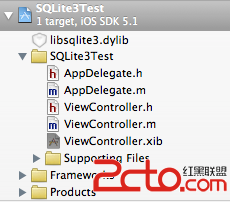
建立一個 Single View Application,命名為 SQLite3Test。工程結構如下:
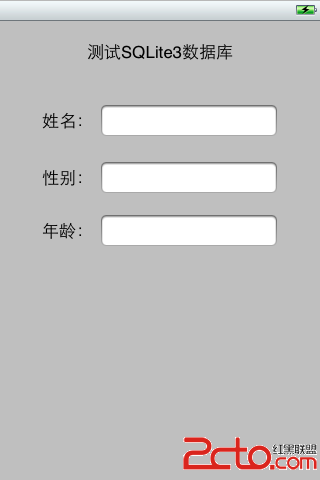
打開 ViewController.xib 佈置介面,放進三個 UITextField,並在右側屬性檢查器把它们的 tag 分別設為 1、2、3——稍後我們會用 tag 來反查控件。
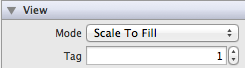
設定 tag 的位置在屬性選擇器中:
二、Header 檔宣告
#import <UIKit/UIKit.h>

@interface ViewController : UIViewController

@property (copy, nonatomic) NSString *databaseFilePath;

// App 即將進入背景時會被呼叫(透過通知中心觸發)
- (void)applicationWillResignActive:(NSNotification *)notification;

// 點擊空白處收起鍵盤
- (IBAction)backgroundTapped:(id)sender;

@end
三、實作檔
寫之前別忘了把 libsqlite3.dylib 加入專案,並引入 sqlite3.h。
#import "ViewController.h"
#import "sqlite3.h"

#define kDatabaseName @"database.sqlite3"

@implementation ViewController

@synthesize databaseFilePath;

- (void)viewDidLoad
{
    [super viewDidLoad];

    // 把資料庫放在 Documents 目錄
    NSArray *paths = NSSearchPathForDirectoriesInDomains(NSDocumentDirectory, NSUserDomainMask, YES);
    NSString *documentDirectory = [paths objectAtIndex:0];
    self.databaseFilePath = [documentDirectory stringByAppendingPathComponent:kDatabaseName];

    // 開啟資料庫;UTF8String 用來把 OC 字串轉成 C 字串
    sqlite3 *database = NULL;
    if (sqlite3_open([self.databaseFilePath UTF8String], &database) != SQLITE_OK) {
        sqlite3_close(database);
        NSAssert(0, @"資料庫開啟失敗");
    }

    // 建立資料表
    NSString *createSql = @"CREATE TABLE IF NOT EXISTS STUDENT (TAG INTEGER PRIMARY KEY, FIELD_DATA TEXT);";
    char *errorMsg = NULL;

    // sqlite3_exec 適合執行沒有結果集的操作,例如建表、插入、刪除
    if (sqlite3_exec(database, [createSql UTF8String], NULL, NULL, &errorMsg) != SQLITE_OK) {
        sqlite3_close(database);
        NSAssert(0, @"建立資料表錯誤:%s", errorMsg);
    }

    // 查詢資料
    NSString *querySql = @"SELECT * FROM STUDENT ORDER BY TAG";
    sqlite3_stmt *statement = NULL;

    // sqlite3_prepare_v2 會把 SQL 編譯成 statement,並回傳指標
    if (sqlite3_prepare_v2(database, [querySql UTF8String], -1, &statement, NULL) == SQLITE_OK) {
        // sqlite3_step 讓游標往前推進一筆;回傳 SQLITE_ROW 代表還有資料
        while (sqlite3_step(statement) == SQLITE_ROW) {
            int tag = sqlite3_column_int(statement, 0);
            char *rowData = (char *)sqlite3_column_text(statement, 1);

            // 用 tag 反查控件,概念上類似 Android 的 findViewById
            UITextField *textField = (UITextField *)[self.view viewWithTag:tag];

            // C 字串轉回 OC 字串
            textField.text = [[NSString alloc] initWithUTF8String:rowData];
        }
        // 釋放編譯後的 statement
        sqlite3_finalize(statement);
    }

    sqlite3_close(database);

    // 註冊通知:App 要進入背景時自動存檔
    UIApplication *application = [UIApplication sharedApplication];
    [[NSNotificationCenter defaultCenter] addObserver:self
                                            selector:@selector(applicationWillResignActive:)
                                                name:UIApplicationWillResignActiveNotification
                                              object:application];
}
進入背景時存檔
這裡改用 INSERT OR REPLACE 搭配預先編譯的 statement 與參數綁定,比的字串拼接安全得多,也能避免 SQL 注入風險。
- (void)applicationWillResignActive:(NSNotification *)notification
{
    sqlite3 *database = NULL;
    if (sqlite3_open([self.databaseFilePath UTF8String], &database) != SQLITE_OK) {
        NSAssert(0, @"開啟資料庫錯誤");
        sqlite3_close(database);
        return;
    }

    for (int i = 1; i <= 3; i++) {
        UITextField *textField = (UITextField *)[self.view viewWithTag:i];

        char *update = "INSERT OR REPLACE INTO STUDENT VALUES (?, ?)";
        sqlite3_stmt *statement = NULL;

        if (sqlite3_prepare_v2(database, update, -1, &statement, NULL) == SQLITE_OK) {
            // 綁定第 1 欄:tag
            sqlite3_bind_int(statement, 1, i);

            // 綁定第 2 欄:文字。第 4 個參數 -1 代表整串,
            // 第 5 個參數是完成後的回呼,需要自行清理記憶體時可傳 destructor
            sqlite3_bind_text(statement, 2, [textField.text UTF8String], -1, NULL);
        }

        // SQLITE_DONE 代表這次更新成功完成
        if (sqlite3_step(statement) != SQLITE_DONE) {
            char *errorMsg = NULL;
            NSAssert(0, @"更新資料出錯:%s", errorMsg);
        }
        sqlite3_finalize(statement);
    }

    sqlite3_close(database);
}
點空白處收鍵盤
- (IBAction)backgroundTapped:(id)sender
{
    for (int i = 1; i <= 3; i++) {
        UITextField *textField = (UITextField *)[self.view viewWithTag:i];
        [textField resignFirstResponder];
    }
}
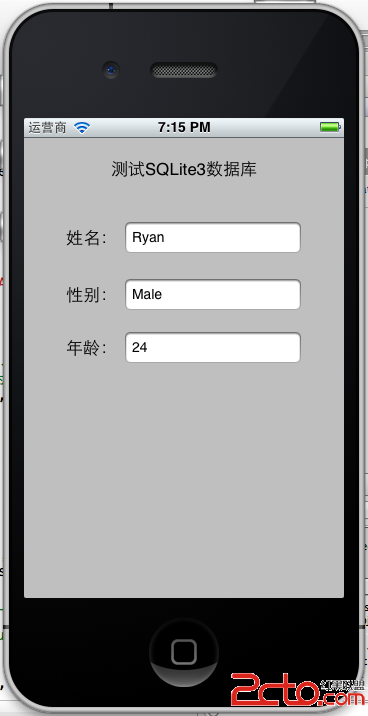
這個做法需要幾個 Interface Builder 上的設定:打開 XIB,選中整個視圖,把屬性選擇器中的 class 從 UIView 改成 UIControl,接著在事件選擇器把 Touch Down 事件連到 backgroundTapped: 即可。
四、幾個容易踩到的細節
欄位索引從 0 開始。原範例中 sqlite3_column_int(statement, 1) 其實抓到的是第二欄。查詢時務必對照建表順序確認索引。
statement 一定要 finalize。每個 prepare 出來的 statement 用完就該釋放,否則長時間運行會累積資源。
優先使用參數綁定。sqlite3_bind_text 不只是效能較好,更重要的是徹底避開引號、單引號造成的語法錯誤與注入攻擊。
今天的 iOS 專案若要在關聯式資料庫上選擇,通常會直接採用 Core Data 或 GRDB 這類封装;但理解 SQLite 這層底層 API,在需要客製 SQL 或排查效能問題時仍然非常有用。