
iOS 通訊錄開發:查詢、單值與多值屬性、聯絡人照片讀取
讀取通訊錄的流程是「先取得記錄、再存取屬性」,而屬性又分為單值與多值兩類。本文以一個可搜尋的聯絡人列表為例,把整個 AddressBook 框架的用法走過一遍。
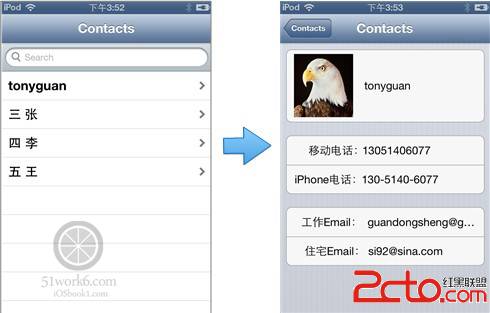
一、兩件必做的前置工作
1. 加入框架:AddressBook.framework 與 AddressBookUI.framework。
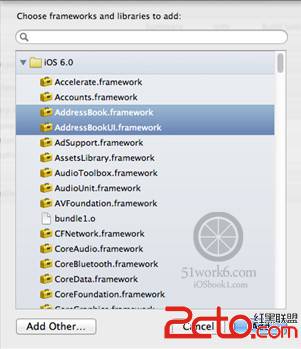
2. 在需要使用的檔案引入標頭:
#import <AddressBook/AddressBook.h>
#import <AddressBookUI/AddressBookUI.h>
二、查詢聯絡人記錄
通訊錄不是關聯式資料庫,無法下 SQL,只能靠兩個函式:
// 取得所有聯絡人
CFArrayRef ABAddressBookCopyArrayOfAllPeople(ABAddressBookRef addressBook);

// 依姓名前綴搜尋
CFArrayRef ABAddressBookCopyPeopleWithName(ABAddressBookRef addressBook, CFStringRef name);
兩者都需要一個 addressBook 物件,由 ABAddressBookCreateWithOptions 建立(iOS 6 之前是 ABAddressBookCreate):
ABAddressBookRef ABAddressBookCreateWithOptions(CFDictionaryRef options, CFErrorRef *error);
options 目前保留未使用,傳 NULL 即可。
三、授權:iOS 6 之後的必要步驟
- (void)viewDidLoad {
    [super viewDidLoad];

    CFErrorRef error = NULL;
    ABAddressBookRef addressBook = ABAddressBookCreateWithOptions(NULL, &error);

    ABAddressBookRequestAccessWithCompletion(addressBook, ^(bool granted, CFErrorRef error) {
        if (granted) {
            [self filterContentForSearchText:@""];   // 查詢全部
        }
    });

    CFRelease(addressBook);
}
首次存取會跳出授權對話框。要注意 ABAddressBookRequestAccessWithCompletion 是非同步的,所以你會看到畫面先出現、資料稍後才填進來。少了這一步,iOS 6 以上根本讀不到任何資料。
四、封裝查詢方法
- (void)filterContentForSearchText:(NSString *)searchText {
    // 未授權直接返回
    if (ABAddressBookGetAuthorizationStatus() != kABAuthorizationStatusAuthorized) {
        return;
    }

    CFErrorRef error = NULL;
    ABAddressBookRef addressBook = ABAddressBookCreateWithOptions(NULL, &error);

    if ([searchText length] == 0) {
        self.listContacts = CFBridgingRelease(ABAddressBookCopyArrayOfAllPeople(addressBook));
    } else {
        CFStringRef cfSearchText = (CFStringRef)CFBridgingRetain(searchText);
        self.listContacts = CFBridgingRelease(ABAddressBookCopyPeopleWithName(addressBook, cfSearchText));
        CFRelease(cfSearchText);
    }

    [self.tableView reloadData];
    CFRelease(addressBook);
}
這裡有個 ARC 時代的關鍵議題:Core Foundation 與 Foundation 之間的物件所有權轉換。
(__bridge NSArray *):只做型別轉換,所有權不變,你仍需自行 CFRelease。
CFBridgingRelease:轉型並把所有權交給 ARC,之後不必理會。
CFBridgingRetain:反向操作,把 Foundation 物件交給 Core Foundation 世界,因此你有責任 CFRelease。
最後,Core Foundation 型別不受 ARC 管理,必須手動 CFRelease——它扮演的角色等同於 MRC 中的 release。
五、搜尋列串接
- (void)searchBarCancelButtonClicked:(UISearchBar *)searchBar {
    [self filterContentForSearchText:@""];      // 取消時還原全部
}

- (BOOL)searchDisplayController:(UISearchDisplayController *)controller
        shouldReloadTableForSearchString:(NSString *)searchString {
    [self filterContentForSearchText:searchString];
    return YES;
}
六、讀取單值屬性
單值屬性就是「只有一個值」的那些:名字、姓氏、中間名、暱稱、組織、職稱、部門、備註等,各有對應的 kABPersonXxxProperty 常數。
讀取用 ABRecordCopyValue,回傳 CFTypeRef(Core Foundation 的泛型):
CFTypeRef ABRecordCopyValue(ABRecordRef record, ABPropertyID property);
- (UITableViewCell *)tableView:(UITableView *)tableView
           cellForRowAtIndexPath:(NSIndexPath *)indexPath {
    static NSString *CellIdentifier = @"Cell";
    UITableViewCell *cell = [tableView dequeueReusableCellWithIdentifier:CellIdentifier];
    if (cell == nil) {
        cell = [[UITableViewCell alloc] initWithStyle:UITableViewCellStyleDefault
                                      reuseIdentifier:CellIdentifier];
    }

    ABRecordRef thisPerson = CFBridgingRetain([self.listContacts objectAtIndex:[indexPath row]]);

    NSString *firstName = CFBridgingRelease(ABRecordCopyValue(thisPerson, kABPersonFirstNameProperty));
    firstName = firstName != nil ? firstName : @"";

    NSString *lastName = CFBridgingRelease(ABRecordCopyValue(thisPerson, kABPersonLastNameProperty));
    lastName = lastName != nil ? lastName : @"";

    cell.textLabel.text = [NSString stringWithFormat:@"%@ %@", firstName, lastName];

    CFRelease(thisPerson);
    return cell;
}
nil 檢查是必要的,因為不是每筆記錄都填了名字。
七、把 record ID 傳給詳情頁
- (void)prepareForSegue:(UIStoryboardSegue *)segue sender:(id)sender {
    if ([[segue identifier] isEqualToString:@"showDetail"]) {
        NSIndexPath *indexPath = [self.tableView indexPathForSelectedRow];
        ABRecordRef thisPerson = CFBridgingRetain([self.listContacts objectAtIndex:[indexPath row]]);

        ABRecordID personID = ABRecordGetRecordID(thisPerson);
        NSNumber *personIDAsNumber = [NSNumber numberWithInt:personID];

        DetailViewController *dvc = [segue destinationViewController];
        dvc.personIDAsNumber = personIDAsNumber;

        CFRelease(thisPerson);
    }
}
用 ID 而不是整筆記錄傳遞,是因為列表裡的記錄物件生命週期短,詳情頁需要時再依 ID 重新查一次更安全。
八、讀取多值屬性
電話號碼、Email、URL、地址、即時通訊帳號、社群帳號等屬於多值屬性,型別是 ABMultiValueRef。每一筆包含 label(標籤)、value(值)與唯一不重複的 ID。
讀取方式與單值類似,只是要用 ABMultiValueCopyArrayOfAllValues 把值攤平成陣列:
ABMultiValueRef emailsProperty = ABRecordCopyValue(person, kABPersonEmailProperty);
NSArray *emailsArray = CFBridgingRelease(ABMultiValueCopyArrayOfAllValues(emailsProperty));

for (int index = 0; index < [emailsArray count]; index++) {
    NSString *email = [emailsArray objectAtIndex:index];
    NSString *emailLabel = CFBridgingRelease(ABMultiValueCopyLabelAtIndex(emailsProperty, index));

    if ([emailLabel isEqualToString:(NSString *)kABWorkLabel]) {
        [self.lblWorkEmail setText:email];
    } else if ([emailLabel isEqualToString:(NSString *)kABHomeLabel]) {
        [self.lblHomeEmail setText:email];
    } else {
        NSLog(@"%@: %@", @"其它Email", email);
    }
}
CFRelease(emailsProperty);
電話號碼的做法完全相同,只是把標籤常數換成 kABPersonPhoneMobileLabel、kABPersonPhoneIPhoneLabel、kABPersonPhoneWorkFAXLabel 等。
九、讀取聯絡人照片
if (ABPersonHasImageData(person)) {
    NSData *photoData = CFBridgingRelease(ABPersonCopyImageData(person));
    if (photoData) {
        [self.imageView setImage:[UIImage imageWithData:photoData]];
    }
}
ABPersonHasImageData 用來先判斷有沒有照片,避免不必要的配置;ABPersonCopyImageData 回傳 CFDataRef,對應 Foundation 的 NSData。
十、現代的替代方案:Contacts.framework
上面整套 AddressBook 的 C 風格 API 自 iOS 9 起已被 Contacts 與 ContactsUI 框架取代,新的 Contacts framework 基於 Objective-C/Swift 物件模型設計,不再需要 CFRelease 與 CFBridging 混用。
對應關係大致如下:ABAddressBookRef 對應 CNContactStore,ABRecordRef 對應 CNContact,ABMultiValueRef 對應 CNLabeledValue 陣列,查詢改用 CNContactFetchRequest 或 unifiedContactFetchRequest。授權狀態則以 CNAuthorizationStatus 表示。
新 API 有兩個明顯優勢:一是可以一次指定要取回哪些鍵(例如只要名字與電話),大幅降低讀取成本;二是型別安全,編譯期就能攔下錯誤。若你今天才要實作通訊錄功能,請直接從 Contacts.framework 開始;若是維護老專案,則本文的記憶體管理觀念仍然完全適用。
- 上一篇文章: Xcode 與 Mac 常用快捷鍵整理:把開發效率補回來
- 下一篇文章: iOS 自繪畫板:三色畫筆與橡皮擦的實作