
iOS 分組列表結合本地搜尋:UISearchBar 與 UISearchDisplayController 實作
要做一個「按省份分組的城市列表,還能即時搜尋」,UISearchBar 搭配 UISearchDisplayController 是最直覺的組合。本文以一份 plist 城市資料為例,走過完整的實作流程。
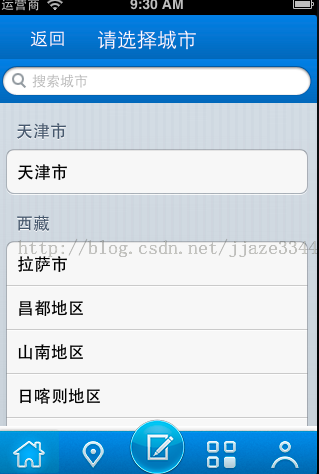
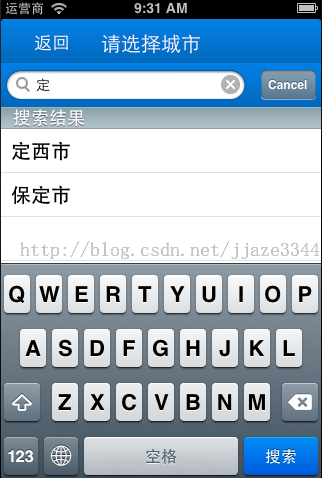
一、宣告需要的屬性
除了表格與原始資料,還要額外準備搜尋結果陣列、一個暫存全部城市名稱的陣列,以及搜尋條與搜尋控制器:
@interface CityListViewController : UIViewController <UITableViewDataSource, UITableViewDelegate, UISearchBarDelegate>

@property (nonatomic, retain) UITableView *mTableView;
@property (nonatomic, retain) NSArray *dataList;        // plist 原始結構
@property (nonatomic, retain) NSArray *searchData;      // 搜尋結果
@property (nonatomic, retain) NSMutableArray *allCitys; // 攤平後的城市名稱
@property (nonatomic, retain) UISearchBar *mSearchBar;
@property (nonatomic, retain) UISearchDisplayController *searchController;

@end
二、初始化表格、搜尋條與搜尋控制器
// 分組表格
self.mTableView = [[UITableView alloc] initWithFrame:CGRectMake(0, 88, 320, 480)
                                               style:UITableViewStyleGrouped];
self.mTableView.delegate = self;
self.mTableView.dataSource = self;

// 搜尋條
self.mSearchBar = [[UISearchBar alloc] initWithFrame:CGRectMake(0, 44, 320, 44)];
[self.mSearchBar setBackgroundImage:[UIImage imageNamed:@"nav_bg.png"]];
[self.mSearchBar setPlaceholder:@"搜索城市"];
self.mSearchBar.delegate = self;
[self.mSearchBar sizeToFit];

// 搜尋控制器:把搜尋條與內容控制器綁在一起
self.searchController = [[UISearchDisplayController alloc] initWithSearchBar:self.mSearchBar
                                                                 contentsController:self];
self.searchController.searchResultsDelegate = self;
self.searchController.searchResultsDataSource = self;
self.searchController.delegate = self;

// 讀取本地 plist
NSString *path = [[NSBundle mainBundle] pathForResource:@"Provineces" ofType:@"plist"];
self.dataList = [NSArray arrayWithContentsOfFile:path];
關鍵在於 UISearchDisplayController 建立時傳入的 searchBar 與 contentsController:搜尋結果會由一個獨立的表格呈現,而兩個表格共用同一組 delegate 方法。
三、用「表格身分」分流資料源
因為同一個控制器要同時餵飽兩個表格,每個方法開頭都先判斷是不是搜尋結果表:
-(NSInteger)tableView:(UITableView *)tableView numberOfRowsInSection:(NSInteger)section {
    if ([tableView isEqual:self.searchController.searchResultsTableView]) {
        return [self.searchData count];
    }
    NSDictionary *dic = [self.dataList objectAtIndex:section];
    return [[dic objectForKey:@"Citys"] count];
}

-(NSInteger)numberOfSectionsInTableView:(UITableView *)tableView {
    if ([tableView isEqual:self.searchController.searchResultsTableView]) {
        return 1;   // 搜尋結果不分组
    }
    return [self.dataList count];
}

- (NSString *)tableView:(UITableView *)tableView titleForHeaderInSection:(NSInteger)section {
    if ([tableView isEqual:self.searchController.searchResultsTableView]) {
        return @"搜索結果";
    }
    return [[self.dataList objectAtIndex:section] objectForKey:@"p_Name"];
}
順帶說明:把每個分組的城市名稱收集進 allCitys,是為了後續搜尋不必反覆巢狀遍歷,這個小動作能省下不少時間。
四、過濾與重新載入
核心的過濾方法很單純,就是拿字串比對:
-(void)filterContentForSearchText:(NSString *)searchText scope:(NSString *)scope {
    NSMutableArray *searchResult = [NSMutableArray array];
    for (NSString *str in self.allCitys) {
        if ([str rangeOfString:searchText].location != NSNotFound) {
            [searchResult addObject:str];
        }
    }
    self.searchData = [NSArray arrayWithArray:searchResult];
}

-(BOOL)searchDisplayController:(UISearchDisplayController *)controller
        shouldReloadTableForSearchString:(NSString *)searchString {
    [self filterContentForSearchText:searchString
                               scope:[[self.searchDisplayController.searchBar scopeButtonTitles]
                                        objectAtIndex:[self.searchDisplayController.searchBar selectedScopeButtonIndex]]];
    return YES;
}
回傳 YES 代表同意重新載入結果表。若搜尋條有啟用 scope 按鈕,還有另一個 shouldReloadTableForSearchScope: 版本要一併實作。
五、Cell 與點擊
-(UITableViewCell *)tableView:(UITableView *)tableView cellForRowAtIndexPath:(NSIndexPath *)indexPath {
    static NSString *cellName = @"cellName";
    UITableViewCell *cell = [tableView dequeueReusableCellWithIdentifier:cellName];
    if (cell == nil) {
        cell = [[UITableViewCell alloc] initWithStyle:UITableViewCellStyleDefault
                                      reuseIdentifier:cellName];
    }
    if ([tableView isEqual:self.searchController.searchResultsTableView]) {
        cell.textLabel.text = [self.searchData objectAtIndex:indexPath.row];
    } else {
        NSDictionary *dict = [[self.dataList objectAtIndex:[indexPath section]] objectForKey:@"Citys"];
        cell.textLabel.text = [[dict objectAtIndex:indexPath.row] objectForKey:@"C_Name"];
    }
    return cell;
}
點擊時同樣要分兩路取值,再把選中的城市名寫回 AppDelegate,最後返回上一頁:
if ([tableView isEqual:self.searchController.searchResultsTableView]) {
    self.cityName = [self.searchData objectAtIndex:indexPath.row];
} else {
    self.cityName = [[[[self.dataList objectAtIndex:indexPath.section] objectForKey:@"Citys"]
                        objectAtIndex:indexPath.row] objectForKey:@"C_Name"];
}
((AppDelegate *)[[UIApplication sharedApplication] delegate]).APPDelegateCityName = self.cityName;
[self.navigationController popToRootViewControllerAnimated:YES];
實作提醒
三個容易出錯的地方:一是搜尋結果表與主表必須在每個 delegate 方法裡分流,否則會互相污染資料;二是 plist 讀進來的是不可變集合,需要修改時記得轉成 mutable 版本;三是 allCitys 的收集不要在 cellForRow 裡做,那是會被呼叫許多次的路徑,應在載入階段一次處理完。
補充背景:UISearchDisplayController 在 iOS 8 之後已被視為舊式做法,官方建議改用 UISearchController 搭配 UISearchResultsUpdating 協定,串接方式更直觀。不過理解這套「搜尋結果表共用 delegate」的思維,對維護老專案仍有實際價值。