
iOS9 新 API 上手:Spotlight 搜索集成指南
1. Spotlight 是什麼?
Spotlight 在 iOS9 上做了不少改進,其中最值得關注的就是開放了一批新的 API。透過 CoreSpotlight Framework,你可以在自己的 App 中集成 Spotlight,讓使用者在系統搜索中直接搜到 App 內的內容,並藉由搜尋結果打開對應頁面。
Demo 演示
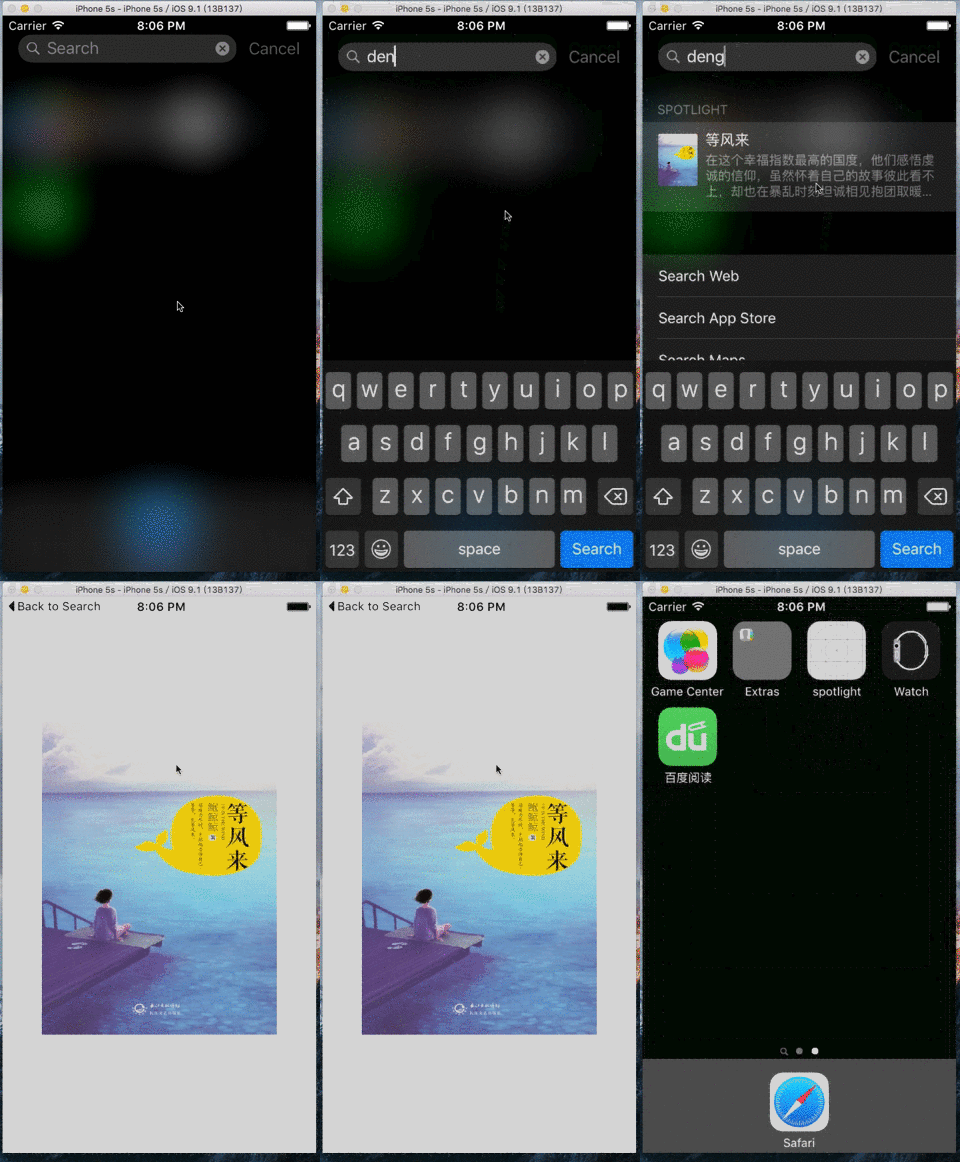
2. 如何集成 Spotlight
a. 添加所需框架
#if __IPHONE_OS_VERSION_MAX_ALLOWED >= 90000
#import <CoreSpotlight/CoreSpotlight.h>
#import <MobileCoreServices/MobileCoreServices.h>
#endif
註:由於多數 App 仍需相容 iOS9 以下的裝置,加入 #if __IPHONE_OS_VERSION_MAX_ALLOWED >= 90000 這個判斷,可以避免在低版本裝置上運行時崩潰。
b. 建立 CSSearchableItemAttributeSet 物件
CSSearchableItemAttributeSet *attributeSet = [[CSSearchableItemAttributeSet alloc] initWithItemContentType:(NSString *)kUTTypeImage];
attributeSet.title = spotlightTitle; // 標題
attributeSet.keywords = keywords; // 關鍵字,NSArray 格式
attributeSet.contentDescription = spotlightDesc; // 描述
attributeSet.thumbnailData = photo; // 圖示,NSData 格式
// 把圖片轉換成 NSData 的方法
UIImagePNGRepresentation([UIImage imageNamed:@"xxx.png"])
c. 建立可檢索條目 CSSearchableItem
// spotlightInfo 可作為傳遞資料給接收方的載體
// domainId id,透過這個 id 判斷是哪個 spotlight
CSSearchableItem *item = [[CSSearchableItem alloc] initWithUniqueIdentifier:spotlightInfo domainIdentifier:domainId attributeSet:attributeSet];
d. 添加檢索入口
[[CSSearchableIndex defaultSearchableIndex] indexSearchableItems:@[item] completionHandler:^(NSError * error) {
if (error) {
NSLog(@"indexSearchableItems Error:%@",error.localizedDescription);
}
}];
========完整程式碼========
- (void)insertSearchableItem:(NSData *)photo spotlightTitle:(NSString *)spotlightTitle description:(NSString *)spotlightDesc keywords:(NSArray *)keywords spotlightInfo:(NSString *)spotlightInfo domainId:(NSString *)domainId {
CSSearchableItemAttributeSet *attributeSet = [[CSSearchableItemAttributeSet alloc] initWithItemContentType:(NSString *)kUTTypeImage];
attributeSet.title = spotlightTitle; // 標題
attributeSet.keywords = keywords; // 關鍵字,NSArray 格式
attributeSet.contentDescription = spotlightDesc; // 描述
attributeSet.thumbnailData = photo; // 圖示,NSData 格式
CSSearchableItem *item = [[CSSearchableItem alloc] initWithUniqueIdentifier:spotlightInfo domainIdentifier:domainId attributeSet:attributeSet];
[[CSSearchableIndex defaultSearchableIndex] indexSearchableItems:@[item] completionHandler:^(NSError * error) {
if (error) {
NSLog(@"indexSearchableItems Error:%@",error.localizedDescription);
}
}];
}
========加載本地圖片的使用方法========
[self insertSearchableItem:UIImagePNGRepresentation([UIImage imageNamed:@"xxx.png"]) spotlightTitle:@"等風來" description:@"等風來描述" keywords:@[@"鮑鯨鯨",@"大麗花"] spotlightInfo:@"傳遞過去的值" domainId:@"com.wb.spotlight"];
========加載網路圖片的使用方法========
dispatch_async(dispatch_get_global_queue(DISPATCH_QUEUE_PRIORITY_DEFAULT, 0), ^{
NSData * data = [NSData dataWithContentsOfURL:[NSURL URLWithString:@"https://hiphotos.baidu.com/doc/pic/item/eaf81a4c510fd9f905f61934262dd42a2934a48e.jpg"]];
[self insertSearchableItem:data spotlightTitle:@"等風來" description:@"等風來描述" keywords:@[@"鮑鯨鯨",@"大麗花"] spotlightInfo:@"傳遞過去的值" domainId:@"com.wb.spotlight"];
});
========刪除所有 spotlight 的方法========
[[CSSearchableIndex defaultSearchableIndex] deleteAllSearchableItemsWithCompletionHandler:^(NSError * _Nullable error) {
if (error) {
NSLog(@"%@", error.localizedDescription);
}
}];
========刪除指定 spotlight 的方法========
[[CSSearchableIndex defaultSearchableIndex] deleteSearchableItemsWithDomainIdentifiers:@"domainId" completionHandler:^(NSError * _Nullable error) {
if (error) {
NSLog(@"%@", error.localizedDescription);
}
}];
========點擊 spotlight 後的響應方法========
- (BOOL)application:(UIApplication *)application continueUserActivity:(NSUserActivity *)userActivity restorationHandler:(void (^)(NSArray * _Nullable))restorationHandler {
if ([[userActivity activityType] isEqualToString:CSSearchableItemActionType]) {
NSString *uniqueIdentifier = [userActivity.userInfo objectForKey:CSSearchableItemActivityIdentifier];
// 接收事先定義好的數值,若為多個參數可把 json 轉成 string 傳遞過來,接收後再轉回 json
NSLog(@"傳遞過來的值%@", uniqueIdentifier);
}
return YES;
}
備註:
#if __IPHONE_OS_VERSION_MAX_ALLOWED >= 90000
// 相關 spotlight 的方法等
#endif
// Spotlight 僅支援 iOS9 以上裝置,對低版本裝置需加上此判斷以防止崩潰
總結來說,集成 Spotlight 的關鍵在於三步:建立屬性集描述內容、包裝成 CSSearchableItem、再透過 CSSearchableIndex 加入索引。同時別忘了用 continueUserActivity 接住使用者點擊搜尋結果後的回跳,並妥善處理版本相容問題。
- 上一篇文章: 深入淺出理解 iOS 多線程開發與線程創建方式
- 下一篇文章: iOS9 中的 WebKit 與 Safari 帶來的驚喜