
iOS 执行绪沟通与执行绪安全:从图片下载实作到互斥锁与原子属性
編輯:iOS 開發綜合
一、执行绪之间的沟通
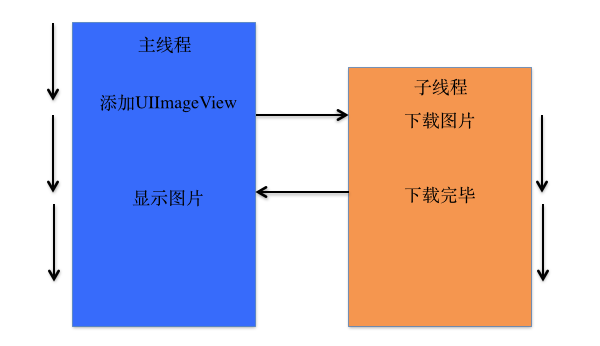
在一个进程中,执行绪往往不是孤立存在的,多个执行绪之间需要经常沟通。这种沟通通常体现在两个方面:一个执行绪把数据传递给另一个执行绪;或者在某个执行绪中完成特定任务后,转到另一个执行绪继续执行。
常用的两个方法:
- (void)performSelectorOnMainThread:(SEL)aSelector withObject:(id)arg waitUntilDone:(BOOL)wait;
- (void)performSelector:(SEL)aSelector onThread:(NSThread *)thr withObject:(id)arg waitUntilDone:(BOOL)wait;
示例:在子执行绪下载图片,再回主执行绪显示
这是最典型的模式——耗时操作放在子执行绪,UI 更新回到主执行绪。
#import "YYViewController.h"

@interface YYViewController ()
@property (weak, nonatomic) IBOutlet UIImageView *iconView;
@end

@implementation YYViewController

-(void)touchesBegan:(NSSet *)touches withEvent:(UIEvent *)event
{
    // 在子线程中调用 download 下载图片
    [self performSelectorInBackground:@selector(download) withObject:nil];
}

-(void)download
{
    // 1. 根据 URL 下载图片
    NSURL *urlstr = [NSURL URLWithString:@"图片地址"];

    // 把图片转换成二进制数据(这一行会比较耗时)
    NSData *data = [NSData dataWithContentsOfURL:urlstr];

    // 把数据转换成图片
    UIImage *image = [UIImage imageWithData:data];

    // 2. 回到主线程设置图片
    [self performSelectorOnMainThread:@selector(settingImage:)
                          withObject:image
                       waitUntilDone:NO];
}

// 设置显示图片
-(void)settingImage:(UIImage *)image
{
    self.iconView.image = image;
}

@end
三种回到主线程的写法
-(void)download
{
    NSURL *urlstr = [NSURL URLWithString:@"图片地址"];
    NSData *data = [NSData dataWithContentsOfURL:urlstr];
    UIImage *image = [UIImage imageWithData:data];

    // 第一种:让 self 的方法回主线程执行
    [self performSelectorOnMainThread:@selector(settingImage:) withObject:image waitUntilDone:NO];

    // 第二种:指定在 mainThread 上执行目标对象的方法
    [self.iconView performSelector:@selector(setImage:)
                          onThread:[NSThread mainThread]
                        withObject:image
                     waitUntilDone:NO];

    // 第三种:直接对目标控件调用 performSelectorOnMainThread
    [self.iconView performSelectorOnMainThread:@selector(setImage:)
                                   withObject:image
                                waitUntilDone:NO];
}
二、执行绪安全
1. 多执行绪的安全隐忧:资源共享
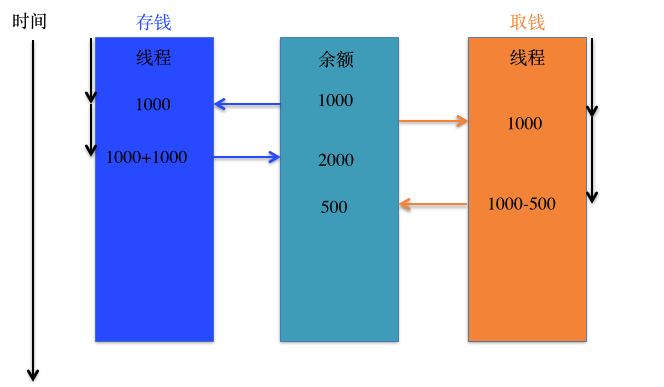
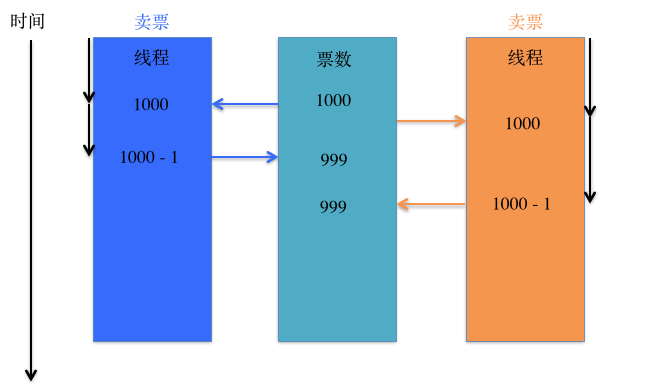
一块资源可能会被多个执行绪共享,也就是多个执行绪可能访问同一块资源——同一个对象、同一个变量、同一个文件。当多个执行绪同时访问同一块资源时,很容易引发数据错乱与数据安全问题。
示例一:
示例二:
问题代码:三个售票员卖同一批票
#import "YYViewController.h"

@interface YYViewController ()
// 剩余票数
@property (nonatomic, assign) int leftTicketsCount;
@property (nonatomic, strong) NSThread *thread1;
@property (nonatomic, strong) NSThread *thread2;
@property (nonatomic, strong) NSThread *thread3;
@end

@implementation YYViewController

- (void)viewDidLoad
{
    [super viewDidLoad];

    self.leftTicketsCount = 10;   // 默认 10 张票

    // 开启多个线程,模拟多个售票员
    self.thread1 = [[NSThread alloc] initWithTarget:self selector:@selector(sellTickets) object:nil];
    self.thread1.name = @"售票员A";
    self.thread2 = [[NSThread alloc] initWithTarget:self selector:@selector(sellTickets) object:nil];
    self.thread2.name = @"售票员B";
    self.thread3 = [[NSThread alloc] initWithTarget:self selector:@selector(sellTickets) object:nil];
    self.thread3.name = @"售票员C";
}

-(void)sellTickets
{
    while (1) {
        // 1. 先检查票数
        int count = self.leftTicketsCount;
        if (count > 0) {
            [NSThread sleepForTimeInterval:0.002];   // 故意暂停,放大竞争窗口

            // 2. 票数 - 1
            self.leftTicketsCount = count - 1;

            NSThread *current = [NSThread currentThread];
            NSLog(@"%@--卖了一张票,还剩余%d张票", current, self.leftTicketsCount);
        } else {
            [NSThread exit];   // 票卖完,退出线程
        }
    }
}

-(void)touchesBegan:(NSSet *)touches withEvent:(UIEvent *)event
{
    [self.thread1 start];
    [self.thread2 start];
    [self.thread3 start];
}

@end
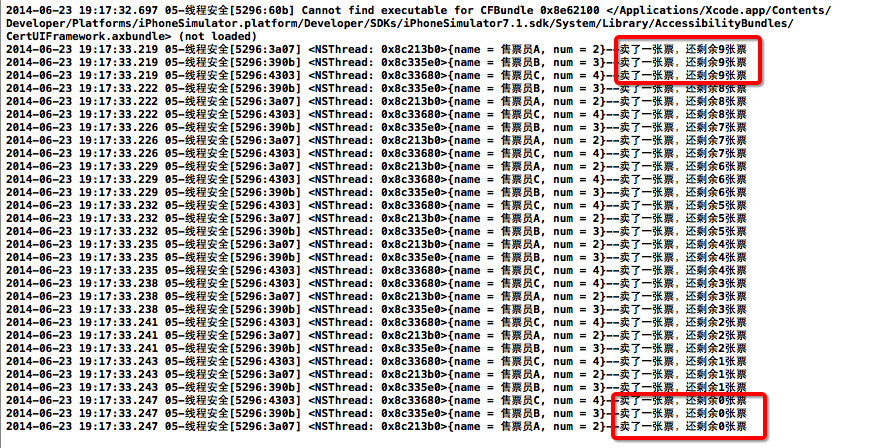
打印结果:
2. 隐忧是怎么产生的
问题出在「检查票数」和「票数减一」这两步之间不是原子的。三个执行绪可能同时读到 count = 1,各自判断都通过,然后各自把票数写成 0——同一张票被卖了三次,甚至出现票数为负的情况。
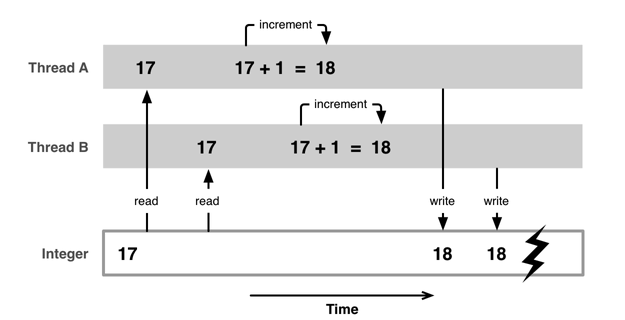
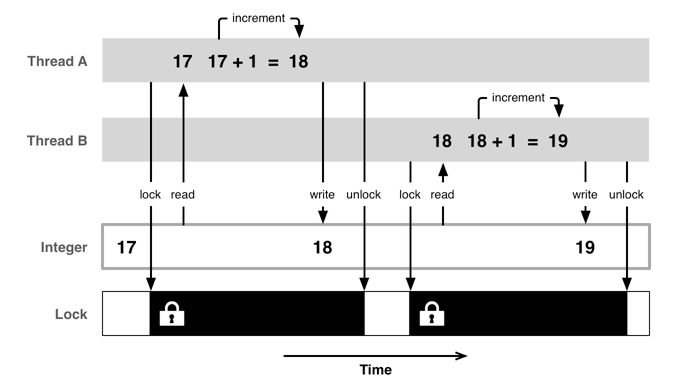
3. 如何解决:互斥锁
使用格式:
@synchronized(锁对象) {
    // 需要锁定的代码
}
注意:锁定一份代码只用一把锁,用多把锁是无效的。
-(void)sellTickets
{
    while (1) {
        @synchronized(self) {   // 只能加一把锁

            // 1. 先检查票数
            int count = self.leftTicketsCount;
            if (count > 0) {
                [NSThread sleepForTimeInterval:0.002];

                // 2. 票数 - 1
                self.leftTicketsCount = count - 1;

                NSThread *current = [NSThread currentThread];
                NSLog(@"%@--卖了一张票,还剩余%d张票", current, self.leftTicketsCount);
            } else {
                [NSThread exit];
            }
        }
    }
}
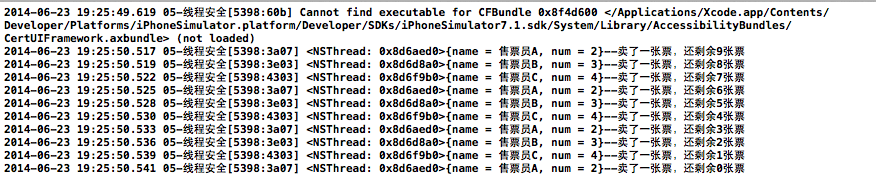
加锁之后的执行效果:
互斥锁的优缺点
- 优点:能有效防止多线程争抢资源造成的数据安全问题。
- 缺点:需要消耗大量 CPU 资源。
使用前提:多条线程争抢同一块资源。相关术语是「线程同步」——让多条线程按顺序地执行任务,而互斥锁正是使用了线程同步技术。
4. 原子与非原子属性
Objective-C 在定义属性时有 nonatomic 和 atomic 两种选择:
atomic:原子属性,会为 setter 方法加锁(默认就是 atomic)。nonatomic:非原子属性,不会为 setter 方法加锁。
atomic 的加锁原理,本质上等价于:
@property (assign, atomic) int age;

- (void)setAge:(int)age
{
    @synchronized(self) {
        _age = age;
    }
}
如何取舍:
atomic:线程安全,但需要消耗较多资源。nonatomic:非线程安全,适合内存较小的移动设备。
iOS 开发的实践建议:
- 所有属性都声明为
nonatomic。 - 尽量避免多线程争抢同一块资源。
- 尽量把加锁与资源争抢的业务逻辑交给服务器端处理,减轻移动客户端的压力。
这个建议的逻辑很清晰:atomic 只保护 setter 的写入原子性,并不能让「读—判断—写」这一整段业务逻辑变成原子操作,所以真正的线程安全不能靠属性修饰符解决,而要从架构上避开共享竞争。