
iOS 程式碼筆記:實作文字跑馬燈效果
編輯:iOS 開發綜合
本文為大家分享 iOS 中文字跑馬燈效果的具體實作程式碼,供大家參考,具體內容如下。
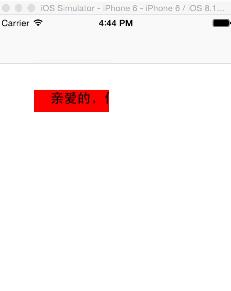
一、效果圖
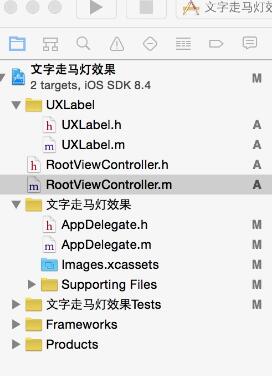
二、工程結構圖
三、程式碼
RootViewController.h
#import <UIKit/UIKit.h>

@interface RootViewController : UIViewController
@end
RootViewController.m
#import "RootViewController.h"
#import "UXLabel.h"

@interface RootViewController ()
@end

@implementation RootViewController

- (id)initWithNibName:(NSString *)nibNameOrNil bundle:(NSBundle *)nibBundleOrNil {
    self = [super initWithNibName:nibNameOrNil bundle:nibBundleOrNil];
    if (self) {
        // Custom initialization
    }
    return self;
}

- (void)viewDidLoad {
    [super viewDidLoad];

    UXLabel* label=[[UXLabel alloc] initWithFrame:CGRectMake(50, 100, 100, 30)];
    label.backgroundColor=[UIColor redColor];
    label.stringColor=CGRectMake(0, 0, 0, 1);
    label.string=@"親愛的,你好嗎?";
    label.stringFont=18.0;
    [self.view addSubview:label];
    [label updateLabel];
}
這個範例使用自訂的 UXLabel 元件來實現文字跑馬燈(scroll/marquee)效果。UXLabel 在系統 UILabel 的基礎上擴充了 string、stringColor、stringFont 等屬性,並透過 updateLabel 方法啟動文字的滾動動畫。當文字內容超過顯示寬度時,便會像跑馬燈一樣持續滾動播放,常用於展示過長的標題或公告訊息,避免文字被截斷而無法完整閱讀。
以上就是本文的全部內容,希望對大家的學習有所幫助。
- 上一篇文章: iOS 記住密碼:將勾選框與文字整合為整體按鈕
- 下一篇文章: iOS 程式碼筆記:實作左右滑動手勢