
iOS 程式碼筆記:為 UIView 打造 placeholder 佔位效果
編輯:iOS 開發綜合
本文為大家分享 iOS 中實作佔位符(placeholder)效果的方法,供大家參考,具體內容如下。
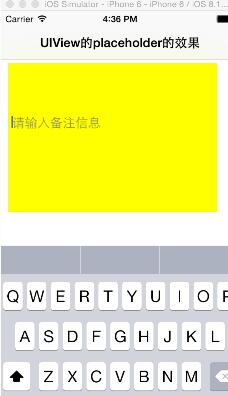
一、效果圖
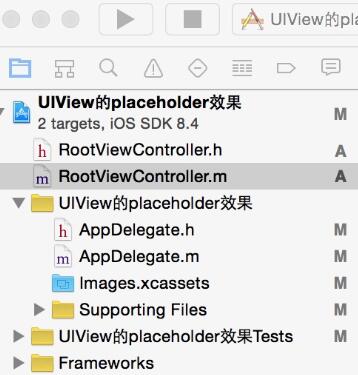
二、工程結構圖
三、程式碼
RootViewController.h
#import <UIKit/UIKit.h>

@interface RootViewController : UIViewController <UITextViewDelegate>
{
    UITextView *psTextView;
    UILabel *pslabel;
}
@end
RootViewController.m
#import "RootViewController.h"

@interface RootViewController ()
@end

@implementation RootViewController

- (id)initWithNibName:(NSString *)nibNameOrNil bundle:(NSBundle *)nibBundleOrNil {
    self = [super initWithNibName:nibNameOrNil bundle:nibBundleOrNil];
    if (self) {
        // Custom initialization
    }
    return self;
}

- (void)viewDidLoad {
    [super viewDidLoad];
    self.title=@"UIView的placeholder的效果";
    [self initBackgroundView];
}

#pragma -mark -初始化背景圖
-(void)initBackgroundView {
    UIView *backView=[[UIView alloc]initWithFrame:CGRectMake(0, 0, 320, 480)];
    [self.view addSubview:backView];

    psTextView=[[UITextView alloc]initWithFrame:CGRectMake(10, 70, 280, 200)];
    psTextView.text=@"";
    psTextView.backgroundColor=[UIColor yellowColor];
    psTextView.delegate=self;
    psTextView.scrollEnabled=NO;
    [backView addSubview:psTextView];

    pslabel=[[UILabel alloc]initWithFrame:CGRectMake(15, 140, 280, 20)];
    pslabel.text=@"請輸入備註資訊";
    pslabel.textColor=[UIColor grayColor];
    pslabel.enabled=NO;
    pslabel.backgroundColor=[UIColor clearColor];
    [backView addSubview:pslabel];
}

#pragma -mark -UITextView Delegate
- (BOOL)textViewShouldBeginEditing:(UITextView *)textView {
    return YES;
}

-(BOOL)textView:(UITextView *)textView shouldChangeTextInRange:(NSRange)range replacementText:(NSString *)text {
    if (text.length>0) {
        pslabel.hidden=YES;
    }
    if ([text isEqualToString:@"\n"]) {
        [textView resignFirstResponder];
        return NO;
    }
    return YES;
}
由於系統原生的 UITextView 不像 UITextField 那樣內建 placeholder 屬性,因此這裡的做法是在 UITextView 上方疊加一個灰色的 UILabel 作為提示文字。當使用者開始輸入內容時,透過 UITextViewDelegate 的 shouldChangeTextInRange: 回調把提示 label 隱藏;同時攔截換行符,讓按下 return 鍵時能順利收起鍵盤。這樣就模擬出了類似輸入框佔位提示的互動效果。
以上就是本文的全部內容,希望對大家的學習有所幫助。
- 上一篇文章: iOS 程式碼筆記:實作網路狀態監聽與提醒功能
- 下一篇文章: iOS 記住密碼:將勾選框與文字整合為整體按鈕