
iOS 程式碼筆記:實作網路狀態監聽與提醒功能
編輯:iOS 開發綜合
本文為大家分享 iOS 網路狀態監聽工具的實作方式,供大家參考,具體內容如下。
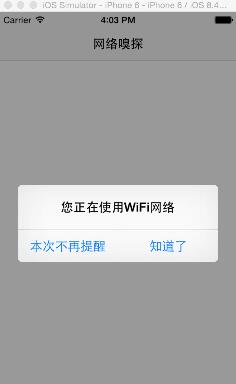
一、效果圖
二、工程結構圖
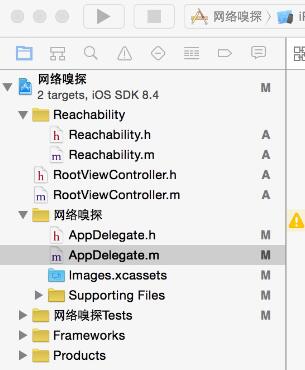
三、程式碼
AppDelegate.h
#import <UIKit/UIKit.h>
#import "Reachability.h"

@interface AppDelegate : UIResponder <UIApplicationDelegate>
{
    Reachability *reachability;
    BOOL WarningViaWWAN;
}
@property (strong, nonatomic) UIWindow *window;
- (void)ReachabilitySniff:(Reachability*) curReach;
- (void)ReachabilitySniffNotification:(NSNotification* )notification;
- (void)alertView:(UIAlertView *)alertView clickedButtonAtIndex:(NSInteger)buttonIndex;
@end
AppDelegate.m
#import "AppDelegate.h"
#import "RootViewController.h"

@implementation AppDelegate

- (BOOL)application:(UIApplication *)application didFinishLaunchingWithOptions:(NSDictionary *)launchOptions {
    self.window = [[UIWindow alloc] initWithFrame:[[UIScreen mainScreen] bounds]];

    RootViewController *rootVC=[[RootViewController alloc]init];
    UINavigationController *nav=[[UINavigationController alloc]initWithRootViewController:rootVC];
    self.window.rootViewController=nav;

    //啟動網路監聽功能
    WarningViaWWAN = TRUE;
    [[NSNotificationCenter defaultCenter] addObserver:self selector:@selector(ReachabilitySniffNotification:) name:kReachabilityChangedNotification object:nil];
    if (!reachability) {
        reachability = [Reachability reachabilityForInternetConnection];
    }
    [reachability startNotifier];
    [self performSelector:@selector(ReachabilitySniff:) withObject:reachability afterDelay:20];

    self.window.backgroundColor = [UIColor whiteColor];
    [self.window makeKeyAndVisible];
    return YES;
}

#pragma mark -網路監聽
- (void)ReachabilitySniffNotification:(NSNotification* )notification {
    Reachability* curReach = [notification object];
    [self performSelector:@selector(ReachabilitySniff:) withObject:curReach afterDelay:2];
}

- (void)ReachabilitySniff:(Reachability*) curReach {
    NSLog(@"ReachabilitySniffNewWorkStatus");
    if (!curReach) {
        return;
    }
    NetworkStatus status = [curReach currentReachabilityStatus];
    switch (status) {
        case ReachableViaWiFi: {
            UIAlertView *alert = [[UIAlertView alloc] initWithTitle:@"您正在使用WiFi網絡" message:Nil delegate:self cancelButtonTitle:Nil otherButtonTitles:@"本次不再提醒",@"知道了", nil];
            [alert show];
            break;
        }
        case ReachableViaWWAN: {
            UIAlertView *alert = [[UIAlertView alloc] initWithTitle:@"您正在使用行動網絡,電信商會收取流量費,建議使用WiFi網絡" message:Nil delegate:self cancelButtonTitle:Nil otherButtonTitles:@"本次不再提醒",@"知道了", nil];
            [alert show];
            break;
        }
        case NotReachable: {
            UIAlertView *alert = [[UIAlertView alloc] initWithTitle:@"沒有網絡" message:Nil delegate:self cancelButtonTitle:Nil otherButtonTitles:@"本次不再提醒",@"知道了", nil];
            [alert show];
            break;
        }
    }
}
這個範例借助 Reachability 類來即時偵測設備的網路連線狀態。當網路狀態改變時,系統會透過 NSNotificationCenter 送出通知,AppDelegate 收到後便依目前的連線情況(WiFi、行動網路或無網路)彈出對應的提示框,提醒使用者當前的上網環境。這種機制在需要控管流量或提示離線狀態的應用中相當實用。
以上就是本文的全部內容,希望對大家的學習有所幫助。
- 上一篇文章: iOS 中如何將手機號碼中間四位替換為符號
- 下一篇文章: iOS 程式碼筆記:為 UIView 打造 placeholder 佔位效果