
iOS 橫向列表的下拉刷新與上拉載入元件 PSRefresh
編輯:iOS 開發綜合
這裡整理一個名為 PSRefresh 的元件,它掛在 UIScrollView 的分類上,因此凡是 UIScrollView 的子類都能用——橫向的 UITableView、UICollectionView 都沒問題。
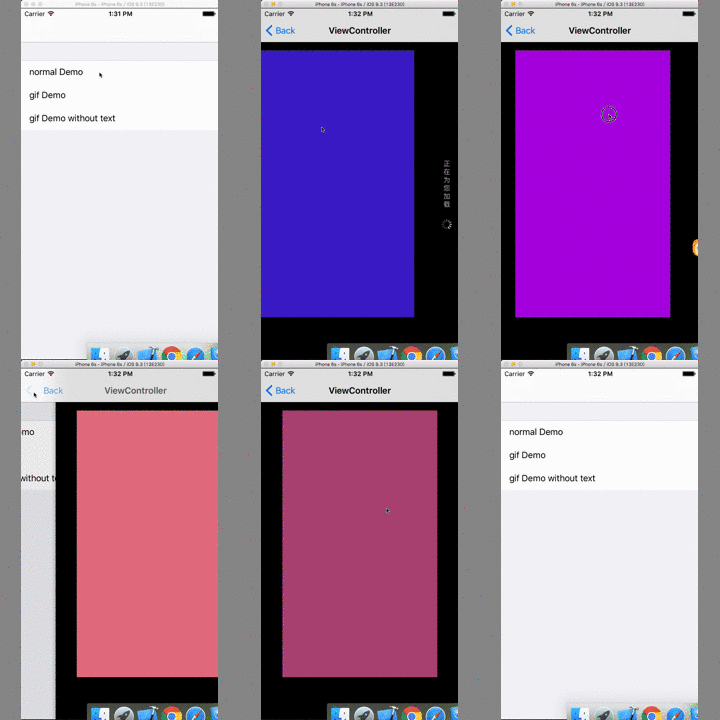
支援自訂提示文字、自訂 gif 圖,也可以指定是否已到最後一頁。一共提供三種樣式:普通樣式、帶狀態文字的 gif 樣式、不帶狀態文字的 gif 樣式。
介面定義
使用時只要引入 "UIScrollView+PSRefresh.h",可用的屬性與方法如下:
 @interface UIScrollView (PSRefresh)

 /** 是否為最後一頁 */
 @property (nonatomic, assign) BOOL isLastPage;

 /** header 背景色 */
 @property (nonatomic, strong) UIColor *refreshHeaderBackgroundColor;
 /** footer 背景色 */
 @property (nonatomic, strong) UIColor *refreshFooterBackgroundColor;
 /** header 字體 */
 @property (nonatomic, strong) UIFont *refreshHeaderFont;
 /** header 字體顏色 */
 @property (nonatomic, strong) UIColor *refreshHeaderTextColor;
 /** footer 字體 */
 @property (nonatomic, strong) UIFont *refreshFooterFont;
 /** footer 字體顏色 */
 @property (nonatomic, strong) UIColor *refreshFooterTextColor;

 /** ===== 以下是呼叫用的方法 ===== */

 /** 普通樣式 */
 - (void)addRefreshHeaderWithClosure:(PSRefreshClosure)closure;
 - (void)addRefreshFooterWithClosure:(PSRefreshClosure)closure;

 /** gif 樣式(帶狀態提示) */
 - (void)addGifRefreshHeaderWithClosure:(PSRefreshClosure)closure;
 - (void)addGifRefreshFooterWithClosure:(PSRefreshClosure)closure;

 /** gif 樣式(不帶狀態提示) */
 - (void)addGifRefreshHeaderNoStatusWithClosure:(PSRefreshClosure)closure;
 - (void)addGifRefreshFooterNoStatusWithClosure:(PSRefreshClosure)closure;

 /** ===== 以下三個方法是上面的合併版本 ===== */

 - (void)addRefreshHeaderWithClosure:(PSRefreshClosure)headerClosure
             addRefreshFooterWithClosure:(PSRefreshClosure)footerClosure;

 - (void)addGifRefreshHeaderWithClosure:(PSRefreshClosure)headerClosure
             addGifRefreshFooterWithClosure:(PSRefreshClosure)footerClosure;

 - (void)addGifRefreshHeaderNoStatusWithClosure:(PSRefreshClosure)headerClosure
             addGifRefreshFooterNoStatusWithClosure:(PSRefreshClosure)footerClosure;

 /** 結束刷新 */
 - (void)endRefreshing;

 @end
呼叫方式
可以一次把頭尾都掛上,也可以分開掛。兩種寫法效果相同,端看哪種讀起來順:
(1)同時添加
 - (void)normalDemo {
     WeakSelf(self)
     [_collectionView addRefreshHeaderWithClosure:^{
         [weakSelf refreshData];   // 刷新
     } addRefreshFooterWithClosure:^{
         [weakSelf loadingData];   // 載入更多
     }];
 }
(2)分別添加
 - (void)normalDemo {
     WeakSelf(self)
     [_collectionView addRefreshHeaderWithClosure:^{
         [weakSelf refreshData];
     }];
     [_collectionView addRefreshFooterWithClosure:^{
         [weakSelf loadingData];
     }];
 }
整體呼叫風格與 MJRefresh 相當接近,接上現有專案時,通常只要把原本的刷新回呼搬過來即可。實際整合時建議留意兩點:回呼裡的 self 要用 weak 修飾避免循環參考;資料請求結束後別忘了呼叫 endRefreshing,否則 loading 動畫會一直轉。
- 上一篇文章: iOS 動畫特效:打造立方體翻轉的 3D 目錄
- 下一篇文章: iOS 網路程式設計:自己封裝一個斷點續傳下載器