
iOS 10 權限崩潰問題詳解:Info.plist 用途說明配置
今天手機升級了 iOS 10 Beta,然後用正在開發的專案裝了個 ipa 包,發現點擊有關權限訪問的功能直接 Crash 了,控制台輸出了這樣的訊息:
This app has crashed because it attempted to access privacy-sensitive data without a usage description. The app's Info.plist must contain an NSContactsUsageDescription key with a string value explaining to the user how the app uses this data.
意思是說:你需要在 info.plist 檔案中添加一個「NSContactsUsageDescription」的 Key,並為 Value 補上一段說明。
1、在專案中找到 info.plist 檔案,右擊選擇 Open As,以 Source Code 的形式打開。
2、分別復制以下 Value 和 Key,Key 一定不能錯,Value 則可以隨意填寫。
相機權限描述:
<key>NSCameraUsageDescription</key>
<string>cameraDesciption</string>
通信錄:
<key>NSContactsUsageDescription</key>
<string>contactsDesciption</string>
麥克風:
<key>NSMicrophoneUsageDescription</key>
<string>microphoneDesciption</string>
相簿:
<key>NSPhotoLibraryUsageDescription</key>
<string>photoLibraryDesciption</string>
例如其他權限描述,debug 控制台都會有輸出,自行添加即可。
3、把上述內容復制到 info.plist 檔案上,然後保存,如下圖:
Source Code 的形式:
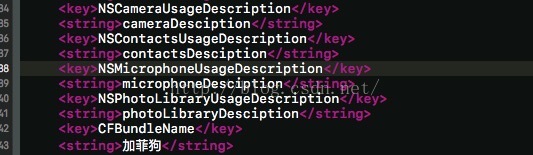
Property List 的展現形式:

4、Clean 之後,運行就 OK 了。
希望透過本文能幫助大家解決 iOS 10 權限崩潰的問題。