
用 UIPickerView 實作城市選擇器(省市聯動)
編輯:iOS 開發綜合
前言
UIPickerView 是一個選擇器控制項,既能產生單列選擇器,也能產生多列選擇器,而且每一列的選項外觀都可以自訂,彈性相當高。需要注意的是,它直接繼承自 UIView 而非 UIControl,因此無法像 UIControl 那樣綁定事件處理方法——所有事件都由它的 delegate 物件接手。
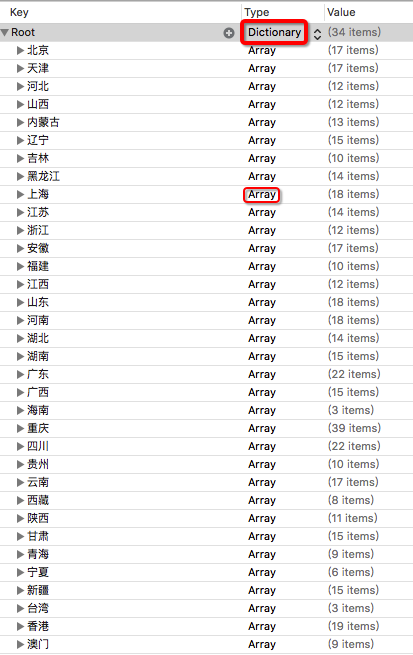
本文用它實作一個省市聯動的城市選擇器:第一列是省份,第二列是該省份對應的城市或區。資料放在 plist 中,結構是外層一個 Dictionary,每個省份對應一個城市 Array:
實作步驟
第一步:拖入控制項並設定代理
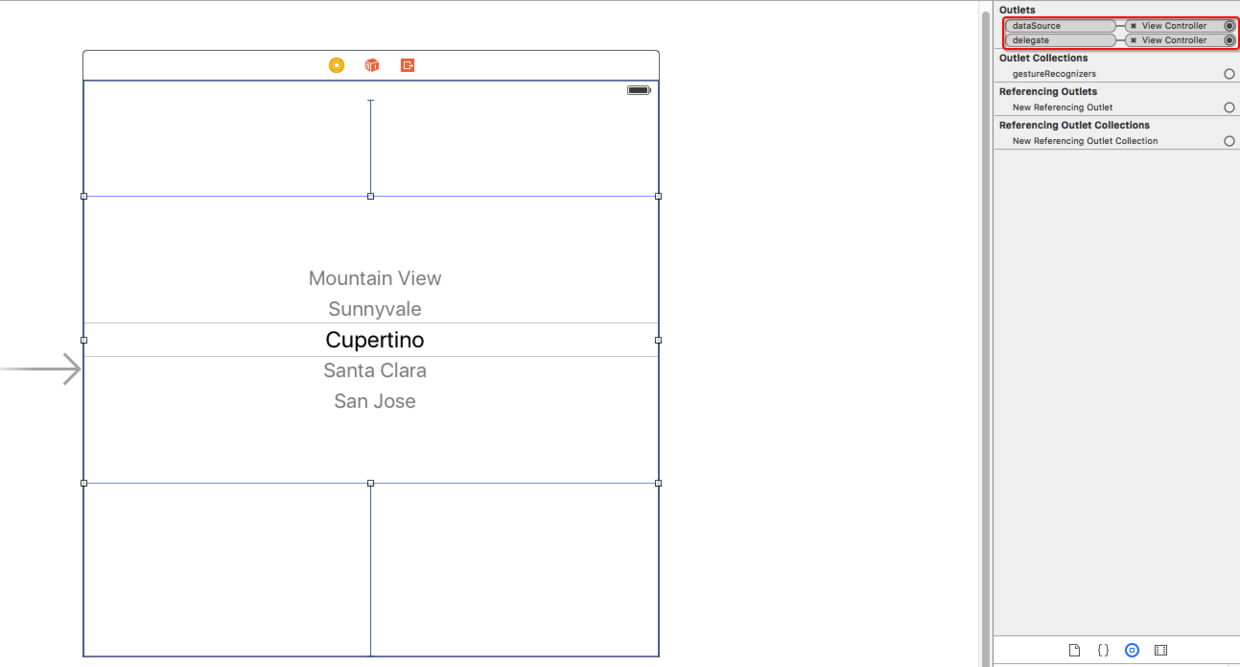
從 StoryBoard 拖一個 UIPickerView 到介面上,把它的 delegate 與 data source 都指向當前控制器(下圖紅色框處):
設定資料來源與代理
第二步:在 ViewController 中實作
#import "ViewController.h"

@interface ViewController () <UIPickerViewDelegate, UIPickerViewDataSource>

/** plist 對應的字典 */
@property (nonatomic, strong) NSDictionary *cityNames;
/** 省份 */
@property (nonatomic, strong) NSArray *provinces;
/** 城市 */
@property (nonatomic, strong) NSArray *cities;

@end

@implementation ViewController

/** 懶載入 plist */
- (NSDictionary *)cityNames {
    if (_cityNames == nil) {
        NSString *path = [[NSBundle mainBundle] pathForResource:@"cityData" ofType:@"plist"];
        _cityNames = [NSDictionary dictionaryWithContentsOfFile:path];
    }
    return _cityNames;
}

/** 懶載入省份列表 */
- (NSArray *)provinces {
    if (_provinces == nil) {
        _provinces = [self.cityNames allKeys];
    }
    return _provinces;
}

/** 一共有幾列 */
- (NSInteger)numberOfComponentsInPickerView:(UIPickerView *)pickerView {
    return 2;
}

/** 每一列的行數 */
- (NSInteger)pickerView:(UIPickerView *)pickerView numberOfRowsInComponent:(NSInteger)component {
    if (component == 0) {
        return self.provinces.count;
    } else {
        [self loadData:pickerView];
        return self.cities.count;
    }
}

/** 每一行顯示的文字 */
- (NSString *)pickerView:(UIPickerView *)pickerView
             titleForRow:(NSInteger)row
          forComponent:(NSInteger)component {
    if (component == 0) {
        return self.provinces[row];
    } else {
        [self loadData:pickerView];
        return self.cities[row];
    }
}

/** 載入第二列的資料 */
- (void)loadData:(UIPickerView *)pickerView {
    // 必須先取得使用者選中的列,才能據此找到省份,再從字典取出對應城市
    NSInteger selRow = [pickerView selectedRowInComponent:0];
    NSString *key = self.provinces[selRow];
    self.cities = [self.cityNames valueForKey:key];
}

/** 選中某一列後的回調,聯動的關鍵 */
- (void)pickerView:(UIPickerView *)pickerView
      didSelectRow:(NSInteger)row
       inComponent:(NSInteger)component {
    if (component == 0) {
        // 重新載入第二列
        [pickerView reloadComponent:1];
        // 讓第二列歸位到首項
        [pickerView selectRow:0 inComponent:1 animated:YES];
    }
}

@end
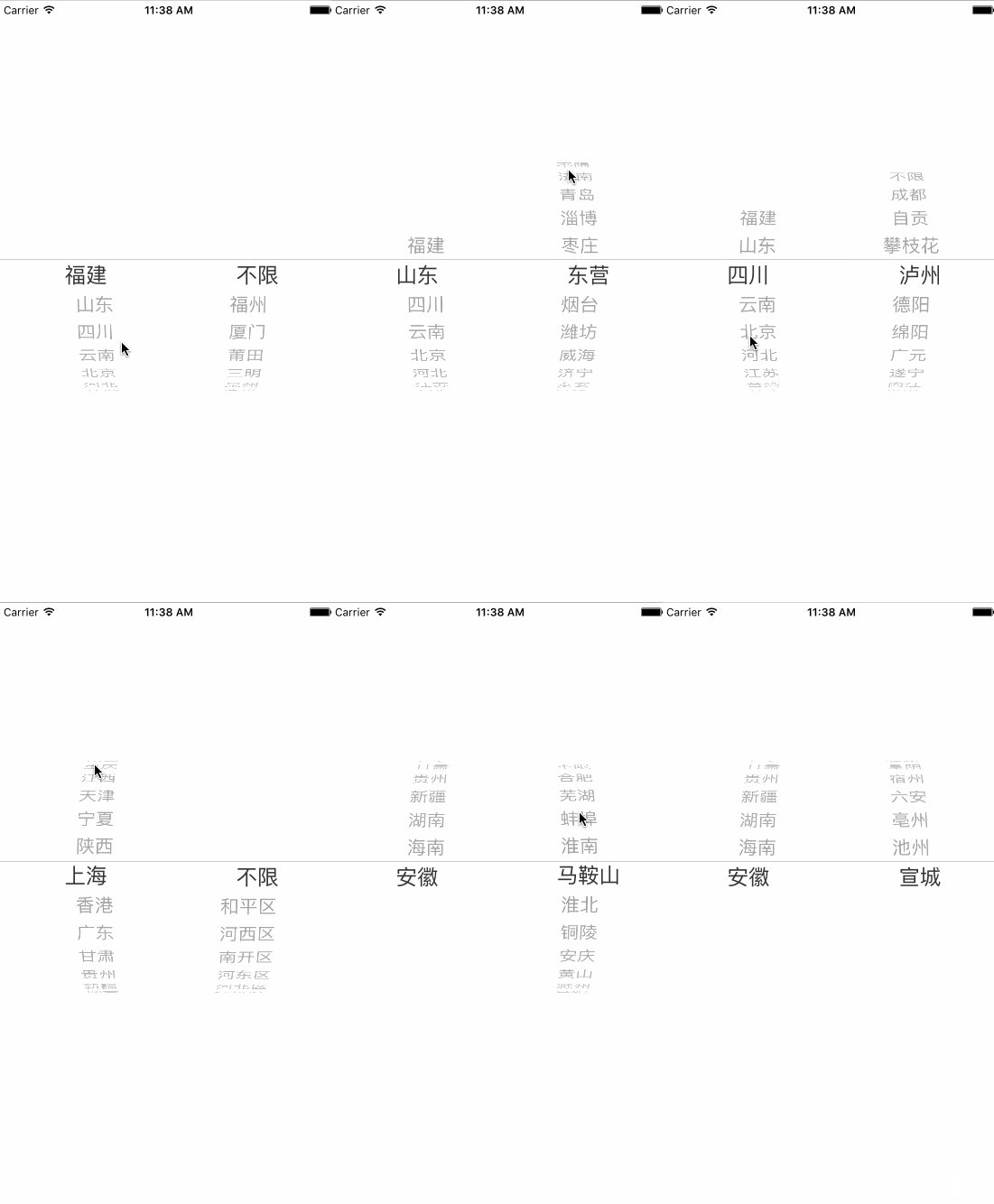
效果預覽
幾個實作要點
聯動的關鍵在 didSelectRow:inComponent::使用者切換省份時,必須先 reloadComponent: 讓第二列重取資料,再呼叫 selectRow:inComponent:animated: 把游標歸位,否則會出現選中的城市與顯示的省份不匹配。
另外,loadData: 中務必先用 selectedRowInComponent: 取得當前選中的列,再據此查字典——直接假定 index 為 0 是常見的錯誤來源。若希望省份有固定排序,建議改用 sortedArrayUsingKeys: 對 allKeys 排序,因為 Dictionary 的 key 順序是不穩定的。
- 上一篇文章: 12 道 iOS 面試題與參考解答整理
- 下一篇文章: 用 Xcode Code Snippet 提升開發效率的實用做法