
自定義日曆控制項的實作過程(UICollectionView 版)
編輯:iOS 開發綜合
專案需要一個日曆控制項,需求是從當天開始往後六個月。查資料後發現大多數說法都指向同一個結論:只要掌握「當月第一天是禮拜幾」和「當月共幾天」這兩個資訊,剩下的靠簡單邏輯就能排出月曆。以下是我從零到完成的完整過程。
第一步:為 NSDate 建立分類
先擴充一批日期操作方法,讓後續的日期轉換更順手。
#import <Foundation/Foundation.h>

@interface NSDate (LYWCalendar)

#pragma mark - 獲取日
- (NSInteger)day:(NSDate *)date;

#pragma mark - 獲取月
- (NSInteger)month:(NSDate *)date;

#pragma mark - 獲取年
- (NSInteger)year:(NSDate *)date;

#pragma mark - 獲取當月第一天是禮拜幾
- (NSInteger)firstWeekdayInThisMonth:(NSDate *)date;

#pragma mark - 獲取當月共有多少天
- (NSInteger)totaldaysInMonth:(NSDate *)date;

@end
逐一實作:
#import "NSDate+LYWCalendar.h"

@implementation NSDate (LYWCalendar)

#pragma mark -- 獲取日
- (NSInteger)day:(NSDate *)date {
    NSDateComponents *components = [[NSCalendar currentCalendar]
        components:(NSCalendarUnitYear | NSCalendarUnitMonth | NSCalendarUnitDay) fromDate:date];
    return components.day;
}

#pragma mark -- 獲取月
- (NSInteger)month:(NSDate *)date {
    NSDateComponents *components = [[NSCalendar currentCalendar]
        components:(NSCalendarUnitYear | NSCalendarUnitMonth | NSCalendarUnitDay) fromDate:date];
    return components.month;
}

#pragma mark -- 獲取年
- (NSInteger)year:(NSDate *)date {
    NSDateComponents *components = [[NSCalendar currentCalendar]
        components:(NSCalendarUnitYear | NSCalendarUnitMonth | NSCalendarUnitDay) fromDate:date];
    return components.year;
}

#pragma mark -- 取得當月第一天是禮拜幾
- (NSInteger)firstWeekdayInThisMonth:(NSDate *)date {
    NSCalendar *calendar = [NSCalendar currentCalendar];
    // 設定每週起始日,預設 1 表示從週日開始
    // 1.Sun. 2.Mon. 3.Tue. 4.Wed. 5.Thu. 6.Fri. 7.Sat.
    [calendar setFirstWeekday:1];

    NSDateComponents *comp = [calendar components:(NSCalendarUnitYear | NSCalendarUnitMonth | NSCalendarUnitDay)
                                        fromDate:date];
    [comp setDay:1];
    NSDate *firstDayOfMonthDate = [calendar dateFromComponents:comp];

    NSUInteger firstWeekday = [calendar ordinalityOfUnit:NSCalendarUnitWeekday
                                                 inUnit:NSCalendarUnitWeekOfMonth
                                                forDate:firstDayOfMonthDate];
    // 若從週日起算需減 1;若從週一起算則不需減
    return firstWeekday - 1;
}

#pragma mark -- 取得當月共有多少天
- (NSInteger)totaldaysInMonth:(NSDate *)date {
    NSRange daysInLastMonth = [[NSCalendar currentCalendar]
        rangeOfUnit:NSCalendarUnitDay inUnit:NSCalendarUnitMonth forDate:date];
    return daysInLastMonth.length;
}

@end
第二步:準備介面骨架
先把週標題列做出來,週末兩天用綠色區隔:
#import "ViewController.h"
#import "Macro.h"
#import "NSDate+LYWCalendar.h"
#import "LYWCollectionViewCell.h"
#import "LYWCollectionReusableView.h"

// 關閉自動適應
self.automaticallyAdjustsScrollViewInsets = NO;

NSArray *weekTitleArray = @[@"周日", @"周一", @"周二", @"周三", @"周四", @"周五", @"周六"];
for (int i = 0; i < weekTitleArray.count; i++) {
    UILabel *weekTitleLable = [[UILabel alloc] initWithFrame:CGRectMake(
        i * (ScreenWidth / weekTitleArray.count), 64,
        ScreenWidth / weekTitleArray.count, 30)];
    weekTitleLable.textColor = (i == 0 || i == 6) ? [UIColor greenColor] : [UIColor blackColor];
    weekTitleLable.text = weekTitleArray[i];
    weekTitleLable.textAlignment = NSTextAlignmentCenter;
    [self.view addSubview:weekTitleLable];
}
第三步:配置 collectionView 與佈局
static NSString *cellID = @"cellID";
static NSString *headerID = @"headerID";
static NSString *footerID = @"footerID";

@implementation ViewController {
    UICollectionViewFlowLayout *_layout;
    UICollectionView *_collectionView;
    NSInteger firstDayInMounthInWeekly;
    NSMutableArray *_firstMounth;
    NSMutableArray *_sixArray;   // 容納六個月資料的大陣列
}
_layout = [[UICollectionViewFlowLayout alloc] init];
// 讓表頭在滾動時保持吸頂
_layout.sectionHeadersPinToVisibleBounds = YES;
_layout.headerReferenceSize = CGSizeMake(414, 40);
_layout.minimumLineSpacing = 0;
_layout.minimumInteritemSpacing = 0;

_collectionView = [[UICollectionView alloc] initWithFrame:CGRectMake(0, 64 + 30, ScreenWidth, ScreenHeight - 64 - 30)
                                    collectionViewLayout:_layout];
_collectionView.backgroundColor = [UIColor whiteColor];
[_collectionView registerClass:[LYWCollectionViewCell class]
    forCellWithReuseIdentifier:cellID];
[_collectionView registerClass:[LYWCollectionReusableView class]
    forSupplementaryViewOfKind:UICollectionElementKindSectionHeader
           withReuseIdentifier:headerID];
_collectionView.delegate = self;
_collectionView.dataSource = self;
[self.view addSubview:_collectionView];
第四步:生成六個月的日期資料
這裡有個關鍵的三元運算式:
(daysInMounth > 29 && (firstDayInThisMounth == 6 || firstDayInThisMounth == 5) ? 42 : 35)
它決定該月要排出 42 格還是 35 格。判斷邏輯是:當月天數大於 29 天,且第一天落在週五或週六(依本程式的計算基準),才需要六列;其餘情況五列即足夠。理論上還可能出現四列的極端情況,但就這個需求而言不會發生,因此不做額外判斷。
// NumberMounthes 為巨集定義,表示要顯示的月份數,需求為六個月
// _sixArray 用來存放每個月的日期資料
_sixArray = [[NSMutableArray alloc] init];
for (int i = 0; i < NumberMounthes; i++) {
    [_sixArray addObject:[NSMutableArray array]];
}

for (int i = 0; i < NumberMounthes; i++) {
    int mounth = ((int)[currentDate month:currentDate] + i) % 12;

    NSDateComponents *components = [[NSDateComponents alloc] init];
    components.month = mounth;
    components.year = 2016 + mounth / 12;
    components.day = 1;
    NSCalendar *calendar = [NSCalendar currentCalendar];
    NSDate *nextDate = [calendar dateFromComponents:components];

    NSInteger firstDayInThisMounth = [nextDate firstWeekdayInThisMonth:nextDate];
    NSInteger daysInThisMounth = [nextDate totaldaysInMonth:nextDate];

    NSString *string = [[NSString alloc] init];
    for (int j = 0; j < (daysInMounth > 29 && (firstDayInThisMounth == 6 || firstDayInThisMounth == 5) ? 42 : 35); j++) {
        if (j < firstDayInThisMounth || j > daysInThisMounth + firstDayInThisMounth - 1) {
            string = @"";   // 該格不屬於本月,留空
        } else {
            string = [NSString stringWithFormat:@"%ld", j - firstDayInThisMounth + 1];
        }
        [[_sixArray objectAtIndex:i] addObject:string];
    }
}
第五步:資料來源與版面代理
- (NSInteger)collectionView:(UICollectionView *)collectionView numberOfItemsInSection:(NSInteger)section {
    return [[_sixArray objectAtIndex:section] count];
}

- (NSInteger)numberOfSectionsInCollectionView:(UICollectionView *)collectionView {
    return _sixArray.count;
}

- (CGSize)collectionView:(UICollectionView *)collectionView
                  layout:(UICollectionViewLayout *)collectionViewLayout
  sizeForItemAtIndexPath:(NSIndexPath *)indexPath {
    return CGSizeMake(ScreenWidth / 7, ScreenWidth / 7);
}

- (UIEdgeInsets)collectionView:(UICollectionView *)collectionView
                        layout:(UICollectionViewLayout *)collectionViewLayout
insetForSectionAtIndex:(NSInteger)section {
    return UIEdgeInsetsMake(0, 0, 0, 0);
}
自定義 cell
// LYWCollectionViewCell.h
#import <UIKit/UIKit.h>

@interface LYWCollectionViewCell : UICollectionViewCell
@property (nonatomic, strong) UILabel *dateLable;
- (instancetype)initWithFrame:(CGRect)frame;
@end
// LYWCollectionViewCell.m
#import "LYWCollectionViewCell.h"

@implementation LYWCollectionViewCell

- (instancetype)initWithFrame:(CGRect)frame {
    if (self = [super initWithFrame:frame]) {
        _dateLable = [[UILabel alloc] initWithFrame:self.bounds];
        [_dateLable setTextAlignment:NSTextAlignmentCenter];
        [_dateLable setFont:[UIFont systemFontOfSize:17]];
        _dateLable.textColor = [UIColor blackColor];
        [self addSubview:_dateLable];
    }
    return self;
}

@end
- (UICollectionViewCell *)collectionView:(UICollectionView *)collectionView
                  cellForItemAtIndexPath:(NSIndexPath *)indexPath {
    LYWCollectionViewCell *cell = [collectionView dequeueReusableCellWithReuseIdentifier:cellID
                                                                            forIndexPath:indexPath];
    // 設定點擊後的選中底色
    UIView *blackgroundView = [[UIView alloc] initWithFrame:CGRectMake(0, 0, cell.frame.size.width, cell.frame.size.height)];
    blackgroundView.backgroundColor = [UIColor yellowColor];
    cell.selectedBackgroundView = blackgroundView;

    cell.dateLable.text = [[_sixArray objectAtIndex:indexPath.section] objectAtIndex:indexPath.row];
    return cell;
}
自定義表頭(顯示年月份)
// LYWCollectionReusableView.h
#import <UIKit/UIKit.h>

@interface LYWCollectionReusableView : UICollectionReusableView
@property (nonatomic, strong) UILabel *dateLable;
- (instancetype)initWithFrame:(CGRect)frame;
@end
// LYWCollectionReusableView.m
#import "LYWCollectionReusableView.h"

@implementation LYWCollectionReusableView

- (instancetype)initWithFrame:(CGRect)frame {
    if (self = [super initWithFrame:frame]) {
        _dateLable = [[UILabel alloc] initWithFrame:self.bounds];
        [_dateLable setTextAlignment:NSTextAlignmentLeft];
        [_dateLable setFont:[UIFont systemFontOfSize:20]];
        _dateLable.textColor = [UIColor blackColor];
        [self addSubview:_dateLable];
    }
    return self;
}

@end
表頭代理中同樣有一處三元判斷,主要用來避免 12 月被顯示成 0 月:
- (UICollectionReusableView *)collectionView:(UICollectionView *)collectionView
          viewForSupplementaryElementOfKind:(NSString *)kind
                        atIndexPath:(NSIndexPath *)indexPath {
    if (kind == UICollectionElementKindSectionHeader) {
        LYWCollectionReusableView *headerRV = [collectionView
            dequeueReusableSupplementaryViewOfKind:kind
                               withReuseIdentifier:headerID
                                      forIndexPath:indexPath];
        headerRV.backgroundColor = DODGER_BLUE;

        NSDate *currentDate = [[NSDate alloc] init];
        NSInteger year = ([currentDate month:currentDate] + indexPath.section) / 12 + 2016;
        NSInteger mounth = ([currentDate month:currentDate] + indexPath.section) % 12 == 0
            ? 12 : ([currentDate month:currentDate] + indexPath.section) % 12;
        headerRV.dateLable.text = [NSString stringWithFormat:@"%ld年%ld月", year, mounth];
        return headerRV;
    } else {
        return nil;
    }
}
點擊事件與空白格攔截
- (void)collectionView:(UICollectionView *)collectionView
didSelectItemAtIndexPath:(NSIndexPath *)indexPath {
    LYWCollectionViewCell *cell = [self collectionView:_collectionView cellForItemAtIndexPath:indexPath];

    NSDate *currentDate = [[NSDate alloc] init];
    if (![cell.dateLable.text isEqualToString:@""]) {
        NSInteger year = ([currentDate month:currentDate] + indexPath.section) / 12 + 2016;
        NSInteger mounth = ([currentDate month:currentDate] + indexPath.section) % 12;
        NSInteger day = [cell.dateLable.text intValue];
        NSLog(@"%ld年%02ld月%02ld日", year, mounth, day);
    }

    // 判斷點到的是否為空白格
    NSInteger mounth = ([currentDate month:currentDate] + indexPath.section) % 12 == 0
        ? 12 : ([currentDate month:currentDate] + indexPath.section) % 12;
    NSDateComponents *components = [[NSDateComponents alloc] init];
    components.month = mounth;
    components.year = 2016 + mounth / 12;
    components.day = 1;
    NSCalendar *calendar = [NSCalendar currentCalendar];
    NSDate *nextDate = [calendar dateFromComponents:components];

    NSInteger firstDayInThisMounth = [nextDate firstWeekdayInThisMonth:nextDate];
    NSInteger daysInThisMounth = [nextDate totaldaysInMonth:nextDate];

    if (indexPath.row < firstDayInThisMounth
        || indexPath.row > daysInThisMounth + firstDayInThisMounth - 1) {
        // 點到空白格則不響應
        [collectionView cellForItemAtIndexPath:indexPath].userInteractionEnabled = NO;
        [collectionView reloadData];
    }
}
最終效果如下(作者自評「很爛」,但作為原理示範已足夠):
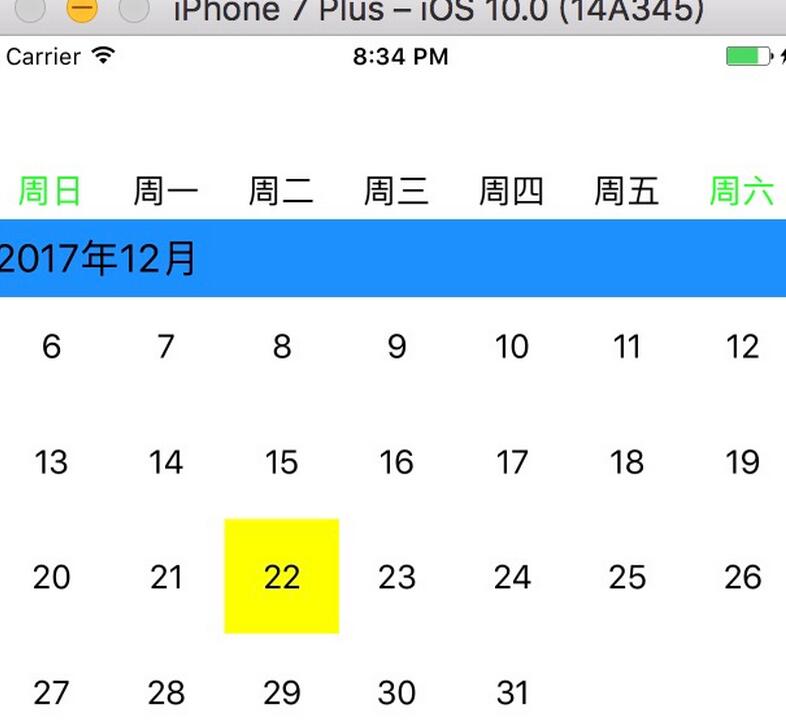
整個實作的重心其實只有兩件事:用 NSCalendar 算出「第一天是禮拜幾」與「本月幾天」,再把日期填進對應格子。剩下的都是常規的 UICollectionView 樣板。若要投入正式專案,建議再補上今天的高亮、已選日期的記錄、跨月跨年的邊界處理,以及把年份硬編碼的 2016 改為動態取值。
- 上一篇文章: iOS App 引導頁開發教程(含封裝與開源方案)
- 下一篇文章: 12 道 iOS 面試題與參考解答整理