
用 AVFoundation 實作原生 QR Code 掃描器
編輯:iOS 開發綜合
iOS 7 之後,掃描二維碼完全不需要第三方套件,AVFoundation 就綽綽有餘。這篇從頭做一個帶掃描動畫的 QR Code 掃描頁。
先講最大的坑:掃描範圍。AVAudioFoundation 的 rectOfInterest 座標系是「原點在左下角、且 x 與 y 互換、w 與 h 互換」的。也就是說,你在畫面上看到的矩形若寫成 CGRectMake(X, Y, W, H),傳進去要寫成 CGRectMake(Y, X, H, W)。記住這條換算就不會出錯。
1. 引入標頭並宣告代理
#import <AVFoundation/AVFoundation.h>

<AVCaptureMetadataOutputObjectsDelegate>
2. 需要用到的成員
@property (strong, nonatomic) AVCaptureDevice *device;
@property (strong, nonatomic) AVCaptureDeviceInput *input;
@property (strong, nonatomic) AVCaptureMetadataOutput *output;
@property (strong, nonatomic) AVCaptureSession *session;
@property (weak, nonatomic) IBOutlet UIView *outputView; // xib 中掃描的 view
@property (strong, nonatomic) AVCaptureVideoPreviewLayer *preview;
@property (strong, nonatomic) NSTimer *timer;            // 掃描動畫的計時器
@property (strong, nonatomic) UIImageView *lineImage;    // 掃描動畫的橫線
3. 懶加載掃描線
- (UIImageView *)lineImage {
    if (!_lineImage) {
        CGFloat outputW = self.outputView.frame.size.width;
        _lineImage = [[UIImageView alloc] initWithFrame:CGRectMake(0, 0, outputW, 2)];
        _lineImage.image = [UIImage imageNamed:@"ray"];
    }
    return _lineImage;
}
4. 初始化(放在 viewDidLoad)
- (void)viewDidLoad {
    [super viewDidLoad];

    // Device
    _device = [AVCaptureDevice defaultDeviceWithMediaType:AVMediaTypeVideo];

    // Input
    _input = [AVCaptureDeviceInput deviceInputWithDevice:self.device error:nil];

    // Output
    _output = [[AVCaptureMetadataOutput alloc] init];
    [_output setMetadataObjectsDelegate:self queue:dispatch_get_main_queue()];

    // Session
    _session = [[AVCaptureSession alloc] init];
    [_session setSessionPreset:AVCaptureSessionPresetHigh];

    // 連接輸入與輸出
    if ([_session canAddInput:self.input]) {
        [_session addInput:self.input];
    }
    if ([_session canAddOutput:self.output]) {
        [_session addOutput:self.output];
    }

    // 設定要掃描的條碼類型
    _output.metadataObjectTypes = @[AVMetadataObjectTypeQRCode];

    // 計算掃描範圍
    CGFloat X = (ScreenW / 2 - 100) / ScreenW;
    CGFloat Y = (ScreenH / 2 - 100) / ScreenH;
    CGFloat W = 200 / ScreenW;
    CGFloat H = 200 / ScreenH;

    // ★注意:X 與 Y 交換、W 與 H 交換
    [_output setRectOfInterest:CGRectMake(Y, X, H, W)];

    // 加入掃描畫面
    _preview = [AVCaptureVideoPreviewLayer layerWithSession:_session];
    _preview.videoGravity = AVLayerVideoGravityResizeAspectFill;
    _preview.frame = CGRectMake(0, 0, ScreenW, ScreenH);
    [self.view.layer insertSublayer:_preview atIndex:0];

    // 開始掃描
    [_session startRunning];

    // 加入掃描動畫
    [self.outputView addSubview:self.lineImage];
    _timer = [NSTimer scheduledTimerWithTimeInterval:2.5f
                                              target:self
                                            selector:@selector(lineAction)
                                            userInfo:nil
                                             repeats:YES];
}
5. 掃描結果的代理事件
- (void)captureOutput:(AVCaptureOutput *)captureOutput
didOutputMetadataObjects:(NSArray *)metadataObjects
       fromConnection:(AVCaptureConnection *)connection {
    NSString *stringValue;

    if ([metadataObjects count] > 0) {
        // 停止掃描
        [_session stopRunning];

        AVMetadataMachineReadableCodeObject *metadataObject = [metadataObjects objectAtIndex:0];
        stringValue = metadataObject.stringValue; // 掃描到的內容
        // 後續依內容進行處理
    }
}
6. 掃描動畫
- (void)lineAction {
    CGFloat outputW = self.outputView.frame.size.width;
    CGFloat outputH = self.outputView.frame.size.height;

    [UIView animateWithDuration:2.4f animations:^{
        CGRect frame = CGRectMake(0, outputH, outputW, 2);
        self.lineImage.frame = frame;
    } completion:^(BOOL finished) {
        CGRect frame = CGRectMake(0, 0, outputW, 2);
        self.lineImage.frame = frame;
    }];
}
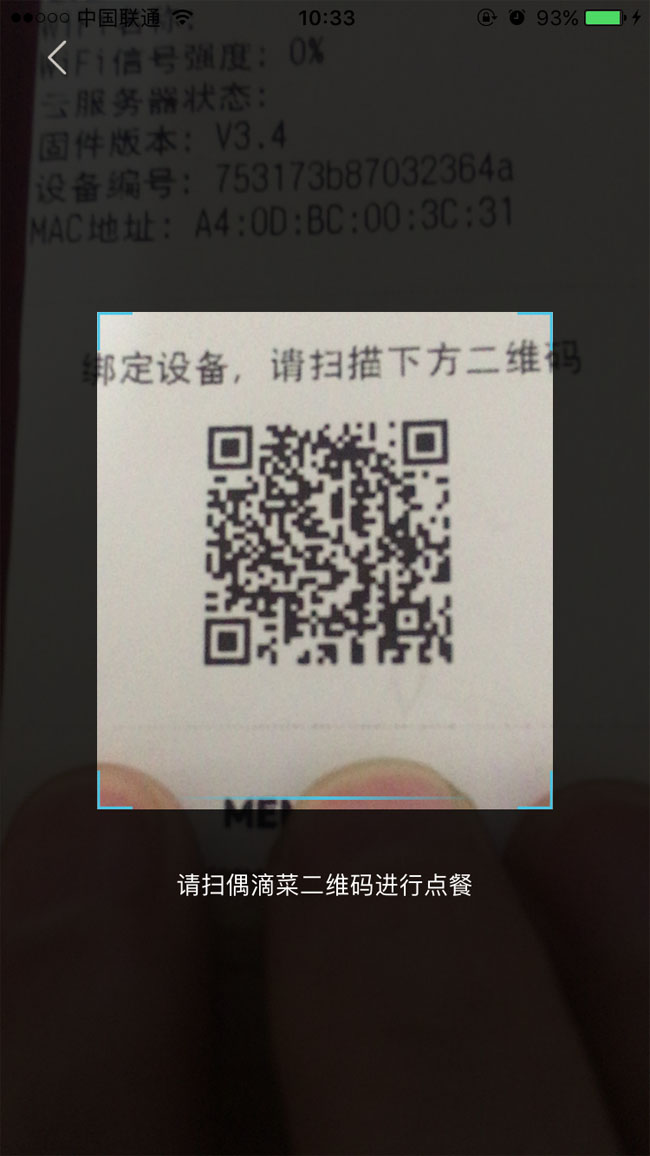
成品如下:
幾個實務上的補充
權限。iOS 7 起存取相機需要在 Info.plist 加上 NSCameraUsageDescription,否則會直接 crash。使用前也應先檢查授權狀態,未決定時主動向使用者請求。
生命週期。離開頁面時記得 [_session stopRunning] 並 invalidate 計時器,否則相機會一直開著,非常耗電。
其他格式。想支援條碼或 PDF417,只要在 metadataObjectTypes 陣列中多放幾個對應的 AVMetadataObjectType 常數即可。