
iOS 螢幕旋轉踩坑記:shouldAutorotate 與 supportedInterfaceOrientations 的呼叫順序之謎
有個需求是讓 App 裡的看檔頁面可以橫放,因為橫屏讀文件舒服得多。聽起來簡單,實際做下去處處是坑。本文把整個流程與 iOS 9 的行為差異整理出來。
步驟一:全域設定
在 專案 → TARGETS → General → Deployment Info 中勾選要支援的方向。
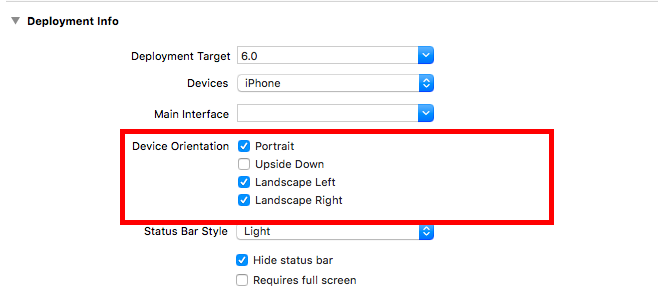
接著在 AppDelegate 中補上:
- (UIInterfaceOrientationMask)application:(UIApplication *)application
     supportedInterfaceOrientationsForWindow:(UIWindow *)window {
    return UIInterfaceOrientationMaskAllButUpsideDown;
}
步驟二:在控制器中實作旋轉方法
該由誰來決定方向,取決於控制器的呈現方式,有兩種情況:
情況一:當前控制器是 window 的 rootViewController,由 rootViewController 全權管理旋轉相關方法。典型的例子是 UINavigationController、UITabBarController。
情況二:當前控制器是以 modal 方式呈現的(透過 presentViewController:animated:completion: 出來),由該控制器自己管理。
旋轉方法的演進
iOS 6 之前只需要實作這一個:
- (BOOL)shouldAutorotateToInterfaceOrientation:(UIInterfaceOrientation)interfaceOrientation {
    return (interfaceOrientation == UIInterfaceOrientationLandscapeLeft
         || interfaceOrientation == UIInterfaceOrientationLandscapeRight);
}
iOS 6 之後換成這兩個:
// 是否支援旋轉
- (BOOL)shouldAutorotate {
    return YES;
}

// 支援的方向集合,回傳列舉
- (NSUInteger)supportedInterfaceOrientations {
    return UIInterfaceOrientationMaskLandscape;
}
關鍵:兩個方法的呼叫順序在 iOS 9 改了
iOS 6 / 7 / 8:先呼叫 shouldAutorotate。
1. 回傳 YES,才會繼續呼叫 supportedInterfaceOrientations 檢查方向集合。集合中有符合設備目前方向的列舉,螢幕就旋轉;沒有則停止檢查、不旋轉。
2. 回傳 NO,直接判定不能旋轉,停止檢查。
iOS 9 之後:順序對調,先呼叫 supportedInterfaceOrientations。
1. 若方向集合中沒有符合設備目前方向的列舉,根本不會呼叫 shouldAutorotate,螢幕不旋轉,檢查結束。
2. 若集合中有符合的方向,才會呼叫 shouldAutorotate:回傳 YES 則旋轉,回傳 NO 則不旋轉並停止檢查。
這個差異是很多人「明明兩個方法都寫了卻不轉」的主因。如果你在 iOS 9 上把 supportedInterfaceOrientations 寫成只回 UIInterfaceOrientationMaskPortrait,卻期待 shouldAutorotate 回 YES 就能橫屏,那是不可能的——第二個方法永遠不會被呼叫。
關於 preferredInterfaceOrientationForPresentation:這個方法用來回傳「最優先顯示的方向」。iOS 7 之後就不再被呼叫了,但網路上流傳 iOS 7 之前不實作會 crash(這一點我沒有實測)。
幾個實務提醒
第一,如果 App 深處某個頁面只想支援橫屏,最乾淨的做法是「混搭」:在導航或分頁容器的 supportedInterfaceOrientations 中依目前顯示的頁面動態回傳不同方向,而不是去動全域設定。
第二,shouldAutorotate 回傳的是「允不允許自動旋轉」,它無法指定方向;指定方向一律靠 supportedInterfaceOrientations。兩者職責不要混。
第三,AppDelegate 那個 supportedInterfaceOrientationsForWindow: 是全域的「天花板」,控制器回傳的方向必須是它的子集,否則會被攔下來。這也是「設定看起來都對卻不轉」的另一個常見原因。