
iOS Runtime 深入解析:forwardInvocation 訊息轉發機制
iOS Runtime forwardInvocation 詳解
程式碼:
TestModel
- (NSMethodSignature *)methodSignatureForSelector:(SEL)aSelector { if(aSelector == @selector(testMethod)) { return [NSMethodSignature signatureWithObjCTypes:"v@:"]; } return nil; } -(void)forwardInvocation:(NSInvocation *)anInvocation { if (anInvocation.selector == @selector(testMethod)) { TestModelHelper1 *h1 = [[TestModelHelper1 alloc] init]; TestModelHelper2 *h2 = [[TestModelHelper2 alloc] init]; [anInvocation invokeWithTarget:h1]; [anInvocation invokeWithTarget:h2]; } }
TestModelHelper1
-(void)testMethod { NSLog(@"i am TestModelHelper1"); } TestModelHelper2 [objc] view plain copy -(void)testMethod { NSLog(@"i am TestModelHelper2"); }
主呼叫類:
TestModel *model = [[TestModel alloc] init]; [model testMethod];
TestModel 本身並未實作 testMethod 方法,但執行後程式不會報錯,而且 TestModelHelper1 與 TestModelHelper2 的 testMethod 都被執行了。
1. forwardingTargetForSelector 與 forwardInvocation 有何差別?何時該把訊息下放到 forwardInvocation 階段轉發?
forwardingTargetForSelector 只能回傳一個物件,也就是訊息只能轉發給單一物件;而 forwardInvocation 可以將訊息同時轉發給任意多個物件。因此當需要「一對多」轉發時,就適合用 forwardInvocation。
2. methodSignatureForSelector 如何實作?
它用於描述被轉發的訊息,格式需遵循特定規則:
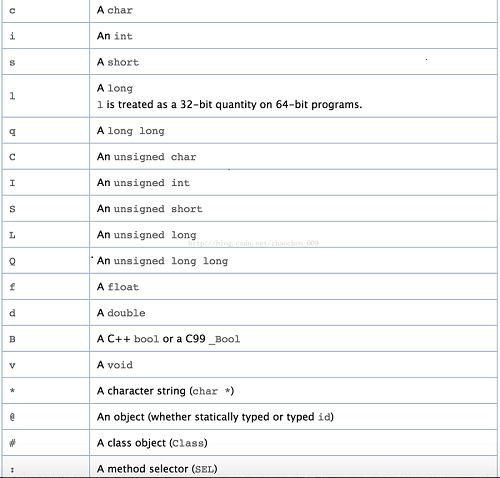
首先要知道,每個方法都有 self 與 _cmd 兩個隱藏參數,self 是接收訊息的物件本身,_cmd 是 selector。因此描述格式大致為:返回值 @ : 參數。@ 對應 self,: 對應 _cmd(selector),返回值與參數依函式定義調整。
例如這個函式:
-(void)testMethod;
返回值為 void、無參數,描述即為 v@:(v 代表 void,@ 代表 self,: 代表 _cmd)。
再練一個:
-(NSString *)testMethod2:(NSString *)str;
描述為 @@:@(第一個 @ 代表返回值 NSString*,第二個 @ 代表 self,: 代表 _cmd,第三個 @ 代表參數 str)。
若實在拿不準,可以寫段程式碼,用 method_getTypeEncoding 查看某函式的描述:
-(void)testMethod { NSLog(@"i am TestModelHelper1"); Method method = class_getInstanceMethod(self.class, @selector(testMethod)); const char *des = method_getTypeEncoding(method); NSString *desStr = [NSString stringWithCString:des encoding:NSUTF8StringEncoding]; NSLog(@"%@",desStr); }

把數字去掉後剩下 v@:,與先前的描述一致。
-(NSString *)testMethod2:(NSString *)str { Method method = class_getInstanceMethod(self.class, @selector(testMethod2:)); const charchar *des = method_getTypeEncoding(method); NSString *desStr = [NSString stringWithCString:des encoding:NSUTF8StringEncoding]; NSLog(@"%@",desStr); return @""; }

結果是 @@:@,與先前結論一致。以上就是本文的全部內容,希望對大家有所幫助。
- 上一篇文章: iOS 點擊按鈕隱藏狀態欄:概念與實作重點
- 下一篇文章: iOS Socket 編程詳解:TCP 粘包與半包問題處理