美圖秀秀美化圖片之編輯 模塊界面設計
編輯:IOS開發綜合
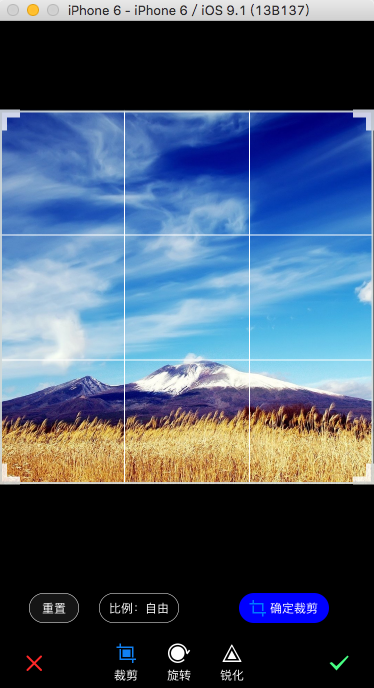
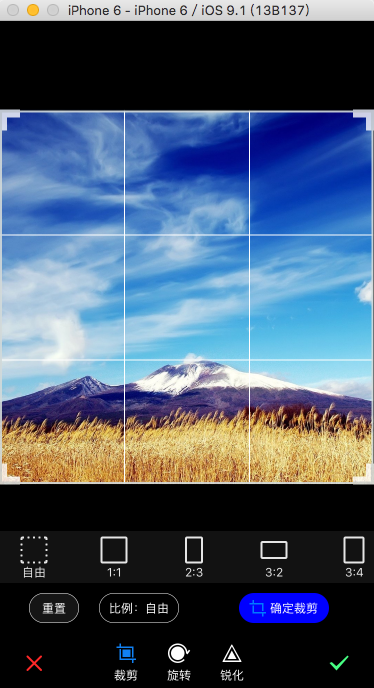
效果如圖
目前旋轉和銳化的界面還沒做。
編輯模塊包含圖片裁剪、旋轉、銳化。
一、點擊美化圖片首頁【編輯】,進入具體操作界面
  FWFunctionViewController *vc = [[FWFunctionViewController alloc] initWithImage:self.image type:FWBeautyProcessTypeEdit];
  [self presentViewController:vc animated:YES completion:^{
  }];
  [vc displayEditPage];
二、配置要處理圖片
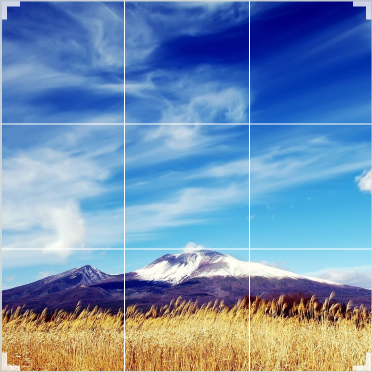
  UIImage *img = [UIImage scaleImage:self.image targetWidth:WIDTH];
        CGFloat x = 0;
        CGFloat y = 0;
        //HEIGHT - 115
        if (img.size.height > HEIGHT - 115)
        {
            img = [UIImage scaleImage:img targetHeight:HEIGHT - 115];
            x = WIDTH / 2 - img.size.width /2;
        }
        else
        {
            y =( HEIGHT - 115) / 2 - img.size.height / 2;
        }
        self.imageView.image = img;
        self.imageView.frame = CGRectMake(x, y, img.size.width, img.size.height);
三、配置bar
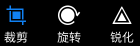
self.styleBar.frame = CGRectMake(100, HEIGHT - 55, 160, 55);

        autoDict = [[FWCommonTools getPlistDictionaryForButton] objectForKey:@'Edit'];

  NSArray *normalImageArr = [autoDict objectForKey:@'normalImages'];
    NSArray *hightlightedImageArr = [autoDict objectForKey:@'HighlightedImages'];
    NSArray *textArr = [autoDict objectForKey:@'Texts'];

    NSMutableArray *arr = [[NSMutableArray alloc] initWithCapacity:0];
    for (int i = 0; i < [textArr count]; i++)
    {
        FWEffectBarItem *item = [[FWEffectBarItem alloc] initWithFrame:CGRectZero];
        [item setFinishedSelectedImage:[UIImage imageNamed:[hightlightedImageArr objectAtIndex:i]] withFinishedUnselectedImage:[UIImage imageNamed:[normalImageArr objectAtIndex:i]] ];
        item.title = [textArr objectAtIndex:i];
        [arr addObject:item];
    }

    self.styleBar.items = arr;

    self.styleBar.effectBardelegate = self;
    [self.styleBar setSelectedItem:[self.styleBar.items objectAtIndex:0]];
    [self.view addSubview:self.styleBar];
    [self effectBar:self.styleBar didSelectItemAtIndex:0];
四、配置按鈕

UIButton *btnReset = [UIButton buttonWithType:UIButtonTypeSystem];
    [btnReset setTitle:@'重置' forState:UIControlStateNormal];

    btnReset.frame = CGRectMake(30, HEIGHT - 95, 50, 30);
    [btnReset.titleLabel setFont:[UIFont systemFontOfSize:12.0]];
    [btnReset setTitleColor:[UIColor whiteColor] forState:UIControlStateNormal];
    btnReset.layer.borderWidth = 0.5;
    btnReset.layer.cornerRadius = 15.0;
    btnReset.layer.borderColor = [UIColor whiteColor].CGColor;
    btnReset.backgroundColor = [UIColor colorWithRed:26 / 255.0 green:26/ 255.0 blue:26/ 255.0 alpha:0.8];
    [self.view addSubview:btnReset];

    UIButton *btnScaleType = [UIButton buttonWithType:UIButtonTypeRoundedRect];
    [btnScaleType setTitle:@'比例:自由' forState:UIControlStateNormal];
    [btnScaleType setTitleColor:[UIColor whiteColor] forState:UIControlStateNormal];
    btnScaleType.frame = CGRectMake(100, HEIGHT - 95, 80, 30);
    [btnScaleType.titleLabel setFont:[UIFont systemFontOfSize:12.0]];
    btnScaleType.layer.borderWidth = 0.5;
    btnScaleType.layer.cornerRadius = 15.0;
    btnScaleType.layer.borderColor = [UIColor whiteColor].CGColor;
    [btnScaleType addTarget:self action:@selector(scaleTypeClick:) forControlEvents:UIControlEventTouchUpInside];

    [self.view addSubview:btnScaleType];

    UIButton *btnConfirm = [UIButton buttonWithType:UIButtonTypeSystem];
    btnConfirm.backgroundColor = [UIColor blueColor];
    [btnConfirm setImage:[UIImage imageNamed:@'icon_clip_confim@2x.png'] withTitle:@'確定裁剪' forState:UIControlStateNormal];
    [btnConfirm setTitleColor:[UIColor whiteColor] forState:UIControlStateNormal];
    btnConfirm.layer.cornerRadius = 15.0;
    btnConfirm.frame = CGRectMake(240, HEIGHT - 95, 90, 30);
    [self.view addSubview:btnConfirm];

    self.imageView.hidden = YES;
    self.cropView = [[FWCropView alloc] initWithFrame:self.imageView.frame];
    [self.cropView setImage:self.image];
    [self.view addSubview:self.cropView];
    [self.imageView removeFromSuperview];
五、配置裁剪比例視圖

    self.scaleScrollView = [[UIScrollView alloc] initWithFrame:CGRectMake(0, HEIGHT - 55 - 10 - 30 - 10 - 52, WIDTH, 52)];
    self.scaleScrollView.contentSize = CGSizeMake(WIDTH * 1.5, 52);
    self.scaleScrollView.bounces = NO;
    self.scaleScrollView.backgroundColor = [UIColor colorWithRed:26 / 255.0 green:26/ 255.0 blue:26/ 255.0 alpha:0.8];
    self.scaleScrollView.alpha = 0.9;
    self.scaleScrollView.showsHorizontalScrollIndicator = YES;
    NSDictionary *dict = [[FWCommonTools getPlistDictionaryForButton] objectForKey:@'scaleMode'];
    NSArray *normalImageArr = [dict objectForKey:@'normalImages'];
    NSArray *hightlightedImageArr = [dict objectForKey:@'HighlightedImages'];
    NSArray *textArr = [dict objectForKey:@'Texts'];

    CGFloat beginX = 20.0;
    CGFloat width = 30;
    CGFloat height = 48;
    CGFloat margin = 50;
    FWEffectBarItem *item = nil;

    for (int i = 0; i < [normalImageArr count]; i++)
    {
        item = [[FWEffectBarItem alloc] initWithFrame:CGRectMake(beginX + i * (margin + width), 2, width, height)];
        [item setFinishedSelectedImage:[UIImage imageNamed:[hightlightedImageArr objectAtIndex:i]] withFinishedUnselectedImage:[UIImage imageNamed:[normalImageArr objectAtIndex:i]]];
        item.title = [textArr objectAtIndex:i];
        [self.scaleScrollView addSubview:item];
    }
    [self.view addSubview:self.scaleScrollView];

相關文章
+- 美圖秀秀美化圖片之【增強】模塊界面與功能設計
- Decosama攝影圖片最新評測:iPhone犀利美圖軟件
- iPhone制圖利器美圖秀秀最新版評測:一款神奇的軟件
- iPhone美圖軟件對比橫評:用戶體驗與功能如何取捨
- iPhone哪個GIF動畫制作軟件好:美圖GIF對比玩圖
- 美圖GIF iPhone版新增泰坦尼克場景
- 美圖貼貼iphone版 女生專屬賣萌神器登App Store
- 邂逅美圖秀秀iPhone新版拍照功能 春攝無邊
- iPhone裡的月光寶盒 美圖GIF帶你體驗時光倒轉
- 騰訊微博如何發美圖私語
- 美圖GIF最新iPhone版(制作真人GIF圖片)
- 升級IOS9系統美圖秀秀變英文了怎麼辦?升級IOS9系統美圖秀秀變英文的解決方法
- 美圖秀秀美化圖片之邊框 界面設計重大更新
- 源碼推薦(7.14):生成漂浮氣泡的按鈕,精致唯美圖表
- 源碼推薦(9.02):生成漂浮氣泡的按鈕,精致唯美圖表