
iOS CLLocationManager定位,IOS8注意
編輯:IOS開發綜合
今天下午動手用了IOS自帶的定位,結果在網上看了很多教程,也將示例代碼直接運行,但就是一直無法獲取位置,代碼如下:
首先導入CoreLocation.framework,然後再引入頭文件#import
定義屬性
@property (nonatomic , strong)CLLocationManager *locationManager;然後使用代理 CLLocationManagerDelegate
- (void)locate{
    // 判斷定位操作是否被允許
    if([CLLocationManager locationServicesEnabled]) {
        //定位初始化
        _locationManager=[[CLLocationManager alloc] init];
        _locationManager.delegate=self;
        _locationManager.desiredAccuracy=kCLLocationAccuracyBest;
        _locationManager.distanceFilter=10;
        [_locationManager startUpdatingLocation];//開啟定位
    }else {
        //提示用戶無法進行定位操作
        UIAlertView *alertView = [[UIAlertView alloc]initWithTitle:@提示 message:@定位不成功 ,請確認開啟定位 delegate:nil cancelButtonTitle:@取消 otherButtonTitles:@確定, nil];
        [alertView show];
    }
    // 開始定位
    [_locationManager startUpdatingLocation];
}

#pragma mark - CoreLocation Delegate

-(void)locationManager:(CLLocationManager *)manager didUpdateLocations:(NSArray *)locations
{
    //此處locations存儲了持續更新的位置坐標值,取最後一個值為最新位置,如果不想讓其持續更新位置,則在此方法中獲取到一個值之後讓locationManager stopUpdatingLocation
    CLLocation *currentLocation = [locations lastObject];
    // 獲取當前所在的城市名
    CLGeocoder *geocoder = [[CLGeocoder alloc] init];
    //根據經緯度反向地理編譯出地址信息
    [geocoder reverseGeocodeLocation:currentLocation completionHandler:^(NSArray *array, NSError *error)
    {
        if (array.count > 0)
        {
            CLPlacemark *placemark = [array objectAtIndex:0];
            //NSLog(@%@,placemark.name);//具體位置
            //獲取城市
            NSString *city = placemark.locality;
            if (!city) {
                //四大直轄市的城市信息無法通過locality獲得,只能通過獲取省份的方法來獲得(如果city為空,則可知為直轄市)
               city = placemark.administrativeArea;
            }
            cityName = city;
            NSLog(@定位完成:%@,cityName);
            //系統會一直更新數據,直到選擇停止更新,因為我們只需要獲得一次經緯度即可,所以獲取之後就停止更新
            [manager stopUpdatingLocation];
         }else if (error == nil && [array count] == 0)
         {
            NSLog(@No results were returned.);
         }else if (error != nil)
         {
             NSLog(@An error occurred = %@, error);
         }
    }];
}
在viewDidLoad中調用了locate之後一直沒有數據返回,代理也不執行,在網上找了很多教程,代碼大多大同小異,但是結果都是不理想,偶然之間看到ios8的定位和低版本的不同,我的手機剛好是ios8,便點開那個博客去看看,博客請點此進入
以下為該博客摘要:
在iOS8以前的版本中,我們使用CLLocationManager定位是沒有問題的,最近在iOS8系統中卻無法定位了。。。。這是一大問題啊!
iOS8中使用CoreLocation定位
1、在使用CoreLocation前需要調用如下函數【iOS8專用】:
iOS8對定位進行了一些修改,其中包括定位授權的方法,CLLocationManager增加了下面的兩個方法:
(1)始終允許訪問位置信息
- (void)requestAlwaysAuthorization;(2)使用應用程序期間允許訪問位置數據
- (void)requestWhenInUseAuthorization;示例如下:
locationManager=[[CLLocationManager alloc] init];
    locationManager.delegate=self;
    locationManager.desiredAccuracy=kCLLocationAccuracyBest;
    locationManager.distanceFilter=10;
    if (iOSVersion>=8) {
        [locationManager requestWhenInUseAuthorization];//使用程序其間允許訪問位置數據(iOS8定位需要)
    }
    [locationManager startUpdatingLocation];//開啟定位
2、在Info.plist文件中添加如下配置:(1)NSLocationAlwaysUsageDescription
(2)NSLocationWhenInUseUsageDescription
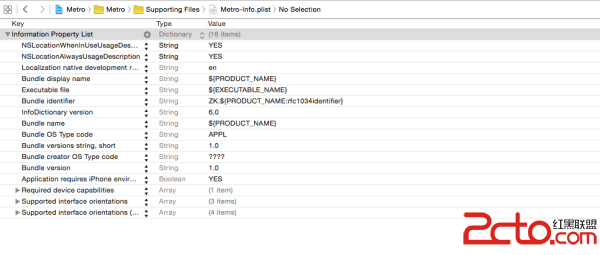
這樣添加後,定位功能就能正常使用了!

相關文章
+