IOS CoreText --- 圖文混排之代碼封裝
上一節中,我詳細的講解了用面向對象的思想將Core Text的純C語言的代碼進行了封裝。這一節,我將對“圖文混排”的效果也進行封裝工作。不過,這一節的代碼是基於上一節的,所以,如果你沒有浏覽過上一節的內容,請點擊這裡。先看看最終的效果圖:
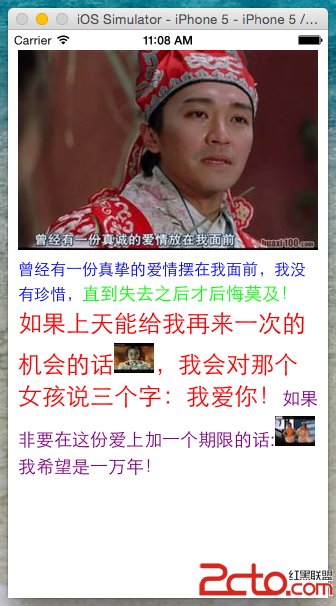
現在,我們就來對上一節的代碼,繼續擴充。
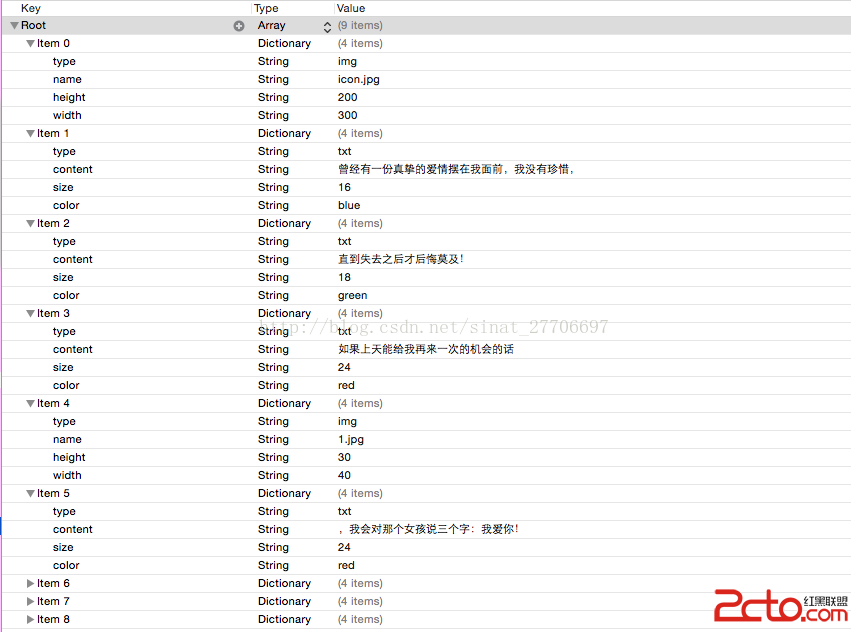
1. 添加了圖片信息,所以我們需要修改數據源(plist)的結構
1)為每一項添加了type信息,“txt”表示純文本;“img”表示圖片;圖片信息包括name,width,height。 name就是圖片的地址,我這裡是存儲在沙盒中,實際開發的時候,可以加載遠程圖片。
2)一定要提供圖片的width和height信息,因為Core Text排版是要計算每一個元素的占位大小的。如果不提供圖片的width和height信息,客戶端在加載遠程圖片後,還要計算出width和height,效率低下,如果在網絡比較差的情況下,圖片一直加載不到,那麼Core Text排版就明顯混亂了;如果服務端數據提供了width和height信息,就算圖片沒有加載過來,也可以有同等大小的空白區域被占位著,不影響整體的布局。
2. 定義CoreTextImageData模型,用於存儲圖片的名稱及位置信息
@interface CoreTextImageData : NSObject
@property (nonatomic,copy) NSString *name;
// 此坐標是 CoreText 的坐標系,而不是UIKit的坐標系
@property (nonatomic,assign) CGRect imagePosition;
@end
3. CoreTextData類中應該包含CoreTextImageData模型信息,這裡用的是數組imageArray,因為有可能包含多張圖片。所以改造一下CoreTextData類,CoreTextData.h代碼如下:
@interface CoreTextData : NSObject

@property (nonatomic,assign) CTFrameRef ctFrame;
@property (nonatomic,assign) CGFloat height;
@property (nonatomic,strong) NSArray *imageArray;

@end
4. 改造CTFrameParser類中的parseTemplateFile方法,使其包含CoreTextImageData信息
+ (CoreTextData *)parseTemplateFile:(NSString *)path config:(CTFrameParserConfig *)config {
    NSMutableArray *imageArray = [NSMutableArray array];
    NSAttributedString *content = [self loadTemplateFile:path config:config imageArray:imageArray];
    CoreTextData *data = [self parseAttributedContent:content config:config];
    data.imageArray = imageArray;
    return data;
}
5. 在loadTemplateFile方法添加支持image的代碼, 這樣,就將plist中img的相關信息保存到CoreTextImageData模型中了。
但是問題來了,Core Text本身並不支持對圖片的展示功能!但是,我們可以在要顯示文本的地方,用一個特殊的空白字符代替,同時設置該字體的CTRunDelegate信息為要顯示的圖片的寬度和高度,這樣最後生成的CTFrame實例,就會在繪制時將圖片的位置預留下來。因為CTDisplayView的繪制代碼是在drawRect裡面的,所以我們可以方便的把需要繪制的圖片,用Quartz 2D的CGContextDrawImage方法直接繪制出來就行了。我這裡所描述的流程,就是在調用的parseImageDataFromNSDictionary中實現的。
+ (NSAttributedString *)loadTemplateFile:(NSString *)path config:(CTFrameParserConfig *)config  imageArray:(NSMutableArray *)imageArray{
    NSMutableAttributedString *result = [[NSMutableAttributedString alloc] init];
    // JSON方式獲取數據
    //        NSArray *array = [NSJSONSerialization JSONObjectWithData:data options:NSJSONReadingAllowFragments error:nil];
    NSArray *array = [NSArray arrayWithContentsOfFile:path];
    if (array) {
        if ([array isKindOfClass:[NSArray class]]) {
            for (NSDictionary *dict in array) {
                NSString *type = dict[@"type"];
                if ([type isEqualToString:@"txt"]) {
                    NSAttributedString *as = [self parseAttributedContentFromNSDictionary:dict config:config];
                    [result appendAttributedString:as];
                } else if ([type isEqualToString:@"img"]) {
                    CoreTextImageData *imageData = [[CoreTextImageData alloc] init];
                    imageData.name = dict[@"name"];
                    [imageArray addObject:imageData];
                    NSAttributedString *as = [self parseImageDataFromNSDictionary:dict config:config];
                    [result appendAttributedString:as];
                }
            }
        }
    }
    return result;
}
6. 占位字符及設置占位字符的CTRunDelegate,代碼中是用'0xFFFC'這個字符進行占位的。
static CGFloat ascentCallback(void *ref) {
    return [(NSNumber *)[(__bridge NSDictionary *)ref objectForKey:@"height"] floatValue];
}

static CGFloat descentCallback(void *ref) {
    return 0;
}

static CGFloat widthCallback(void *ref) {
    return [(NSNumber *)[(__bridge NSDictionary *)ref objectForKey:@"width"] floatValue];
}

+ (NSAttributedString *)parseImageDataFromNSDictionary:(NSDictionary *)dict config:(CTFrameParserConfig *)config {
    CTRunDelegateCallbacks callbacks;
    // memset將已開辟內存空間 callbacks 的首 n 個字節的值設為值 0, 相當於對CTRunDelegateCallbacks內存空間初始化
    memset(&callbacks, 0, sizeof(CTRunDelegateCallbacks));
    callbacks.version = kCTRunDelegateVersion1;
    callbacks.getAscent = ascentCallback;
    callbacks.getDescent = descentCallback;
    callbacks.getWidth = widthCallback;

    CTRunDelegateRef delegate = CTRunDelegateCreate(&callbacks, (__bridge void *)(dict));
    // 使用0xFFFC 作為空白的占位符
    unichar objectReplacementChar = 0xFFFC;
    NSString *content = [NSString stringWithCharacters:&objectReplacementChar length:1];
    NSDictionary *attributes = [self attributesWithConfig:config];
    NSMutableAttributedString *space = [[NSMutableAttributedString alloc] initWithString:content attributes:attributes];
    CFAttributedStringSetAttribute((CFMutableAttributedStringRef)space, CFRangeMake(0, 1), kCTRunDelegateAttributeName, delegate);
    CFRelease(delegate);

    return space;
}
7. 在5,6 兩點的代碼執行完畢後,代碼會返回到第4點,執行下面這句代碼:
data.imageArray = imageArray;
它實際上就是重寫了CoreTextData中的imageArray屬性方法,下面代碼的目的就是計算空白字符的實際占位大小。對下面的代碼,我進行大致的說明:
1) 通過調用CTFrameGetLines方法獲得所有的CTLine。
2)通過調用CTFrameGetLineOrigins方法獲取每一行的起始坐標。
3)通過調用CTLineGetGlyphRuns方法,獲取每一行所有的CTRun。
4)通過CTRun的attributes信息找到key為CTRunDelegateAttributeName的信息,如果存在,表明他就是占位字符,否則的話直接過濾掉。
5)最終計算獲得每一個占位字符的實際尺寸大小。
- (void)setImageArray:(NSArray *)imageArray {
    _imageArray = imageArray;
    [self fillImagePosition];
}

- (void)fillImagePosition {
    if (self.imageArray.count == 0) return;
    NSArray *lines = (NSArray *)CTFrameGetLines(self.ctFrame);
    int lineCount = lines.count;
    // 每行的起始坐標
    CGPoint lineOrigins[lineCount];
    CTFrameGetLineOrigins(self.ctFrame, CFRangeMake(0, 0), lineOrigins);

    int imageIndex = 0;
    CoreTextImageData *imageData = self.imageArray[0];
    for (int i = 0; i < lineCount; i++) {
        if (!imageData) break;

        CTLineRef line = (__bridge CTLineRef)(lines[i]);
        NSArray *runObjectArray = (NSArray *)CTLineGetGlyphRuns(line);
        for (id runObject in runObjectArray) {
            CTRunRef run = (__bridge CTRunRef)(runObject);
            NSDictionary *runAttributes = (NSDictionary *)CTRunGetAttributes(run);
            CTRunDelegateRef delegate = (__bridge CTRunDelegateRef)([runAttributes valueForKey:(id)kCTRunDelegateAttributeName]);
            // 如果delegate是空,表明不是圖片
            if (!delegate) continue;

            NSDictionary *metaDict = CTRunDelegateGetRefCon(delegate);
            if (![metaDict isKindOfClass:[NSDictionary class]]) continue;

            /* 確定圖片run的frame */
            CGRect runBounds;
            CGFloat ascent,descent;
            runBounds.size.width = CTRunGetTypographicBounds(run, CFRangeMake(0, 0), &ascent, &descent, NULL);
            runBounds.size.height = ascent + descent;
            // 計算出圖片相對於每行起始位置x方向上面的偏移量
            CGFloat xOffset = CTLineGetOffsetForStringIndex(line, CTRunGetStringRange(run).location, NULL);
            runBounds.origin.x = lineOrigins[i].x + xOffset;
            runBounds.origin.y = lineOrigins[i].y;
            runBounds.origin.y -= descent;

            imageData.imagePosition = runBounds;
            imageIndex++;
            if (imageIndex == self.imageArray.count) {
                imageData = nil;
                break;
            } else {
                imageData = self.imageArray[imageIndex];
            }
        }
    }
}
8. 改造CTDisplayView中的代碼,完成繪制工作。
1)先調用CTFrameDraw方法完成整體的繪制,此時圖片區域就是圖片實際大小的一片空白顯示。
2)遍歷CoreTextData中的imageArray數組,使用CGContextDrawImage方法在對應的空白區域繪制圖片。
- (void)drawRect:(CGRect)rect {
    [super drawRect:rect];
    CGContextRef context = UIGraphicsGetCurrentContext();
    CGContextSetTextMatrix(context, CGAffineTransformIdentity);
    CGContextTranslateCTM(context, 0, self.bounds.size.height);
    CGContextScaleCTM(context, 1.0, -1.0);
    // 先整體繪制
    if (self.data) {
        CTFrameDraw(self.data.ctFrame, context);
    }
    // 繪制出圖片
    for (CoreTextImageData *imageData in self.data.imageArray) {
        UIImage *image = [UIImage imageNamed:imageData.name];
        if (image) {
            CGContextDrawImage(context, imageData.imagePosition, image.CGImage);
        }
    }
}
- 上一頁:iOS人臉識別(檢測)
- 下一頁:iOS UIControl