iOS開發 - 第05篇 - 項目 - 12 - 圖文混排
1、首頁微博文字處理
對於之前微博項目中首頁:微博文字中的用戶名、話題、鏈接等文字需要高亮顯示,表情字符串需要顯示對應表情。
思路:
1>之前微博中的文字使用NSString,要達到不同文字的高亮顯示,需要使用NSAttributedString
2>微博模型中增加一個屬性,代表屬性字符串
/** string 微博信息內容*/
@property(nonatomic, copy) NSString *text;
/** string 微博信息內容 -- 帶有屬性的(特殊文字會高亮顯示\顯示表情)*/
@property(nonatomic, copy) NSAttributedString *attributedText;
3> 重寫text的setter方法,只要外面傳進來text,就在裡面算出帶屬性的文字attributedText
4>在HWStatusCell的setStatusFrame:方法中
self.contentLabel.attributedText = status.attributedText;
關鍵:利用text算出attributedText!!!2、正則表達式
正則表達式作用:
1.判斷字符串是否符合某個特定規則
* 判斷某個字符串是否為QQ號碼\電話號碼\郵箱
2.截取字符串中符合某個特定規則的內容
* 截取@"#呵呵呵#[偷笑]5345http://foo.com/blah_blah #解放軍# 58937985"的所有話題\表情\鏈接
1> 正則表達式的基本使用:
    /**
     使用正則表達式的步驟:
     1.創建一個正則表達式對象:定義規則

     2.利用正則表達式對象 來測試 相應的字符串
     */

    // Pattern : 樣式\規則
    // NSString *pattern = @"ab7";
    // [] : 找到內部的某一個字符即可
    // NSString *pattern = @"[0123456789]";
    // NSString *pattern = @"[0-9]";
    // NSString *pattern = @"[a-zA-Z0-9]";
    // NSString *pattern = @"[0-9][0-9]";
    // NSString *pattern = @"\\d\\d\\d";
    // NSString *pattern = @"\\d{2,4}";
    // ? + *
    // ? : 0個或者1個
    // + : 至少1個
    // * : 0個或者多個

    NSString *username = @"6gjkhdjkhgkjh7";

    // 1.創建正則表達式
    NSString *pattern = @"^\\d.*\\d$";
    NSRegularExpression *regex = [[NSRegularExpression alloc] initWithPattern:pattern options:0 error:nil];

    // 2.測試字符串
    NSArray *results = [regex matchesInString:username options:0 range:NSMakeRange(0, username.length)];

    NSLog(@"%zd", results.count);
2> 利用正則表達式找出微博文字中的關鍵字
    NSString *str = @"#呵呵呵#[偷笑] http://foo.com/blah_blah #解放軍#//http://foo.com/blah_blah
            @Ring花椰菜:就#范德薩發生的#捨不得打[test] 就慣#急急急#著他吧[挖鼻屎]//@崔西獅:小拳頭舉起又放下了
            說點啥好呢…… //@toto97:@崔西獅 蹦米咋不揍他#哈哈哈# http://foo.com/blah_blah";

    // 創建規則
    // 表情的規則
    NSString *emotionPattern = @"\\[[0-9a-zA-Z\\u4e00-\\u9fa5]+\\]";

    // @的規則
    NSString *atPattern = @"@[0-9a-zA-Z\\u4e00-\\u9fa5]+";

    // #話題#的規則
    NSString *topicPattern = @"#[0-9a-zA-Z\\u4e00-\\u9fa5]+#";

    // url鏈接的規則
    NSString *urlPattern = @"\\b(([\\w-]+://?|www[.])[^\\s()<>]+(?:\\([\\w\\d]+\\)|([^[:punct:]\\s]|/)))";

    // | 匹配多個條件,相當於or\或
    NSString *pattern = [NSString stringWithFormat:@"%@|%@|%@|%@", emotionPattern, atPattern, topicPattern, urlPattern];

    // 1.創建正則表達式
    NSRegularExpression *regex = [[NSRegularExpression alloc] initWithPattern:pattern options:0 error:nil];
    // 2.測試字符串
    NSArray *results = [regex matchesInString:str options:0 range:NSMakeRange(0, str.length)];

    // 3.遍歷結果
    for (NSTextCheckingResult *result in results) {
        NSLog(@"%@ %@", NSStringFromRange(result.range), [str substringWithRange:result.range]);
    }
3> 使用第三方框架RegexKitLite
注1:該框架為非ARC,使用-fno-objc-arc
注2:添加libicucor.dylib
NSString *str = @"#呵呵呵#[偷笑] http://foo.com/blah_blah #解放軍#//http://foo.com/blah_blah
            @Ring花椰菜:就#范德薩發生的#捨不得打[test] 就慣#急急急#著他吧[挖鼻屎]//@崔西獅:小拳頭舉起又放下了
            說點啥好呢…… //@toto97:@崔西獅 蹦米咋不揍他#哈哈哈# http://foo.com/blah_blah";

// 表情的規則
NSString *emotionPattern = @"\\[[0-9a-zA-Z\\u4e00-\\u9fa5]+\\]";
// @的規則
NSString *atPattern = @"@[0-9a-zA-Z\\u4e00-\\u9fa5]+";
// #話題#的規則
NSString *topicPattern = @"#[0-9a-zA-Z\\u4e00-\\u9fa5]+#";
// url鏈接的規則
NSString *urlPattern = @"\\b(([\\w-]+://?|www[.])[^\\s()<>]+(?:\\([\\w\\d]+\\)|([^[:punct:]\\s]|/)))";
NSString *pattern = [NSString stringWithFormat:@"%@|%@|%@|%@", emotionPattern, atPattern, topicPattern, urlPattern];
// NSArray *cmps = [str componentsMatchedByRegex:pattern];

// 遍歷所有的匹配結果
[str enumerateStringsMatchedByRegex:pattern usingBlock:^(NSInteger captureCount, NSString *const
        __unsafe_unretained *capturedStrings, const NSRange *capturedRanges, volatile BOOL *const stop) {
    NSLog(@"%@ %@", *capturedStrings, NSStringFromRange(*capturedRanges));
}];

// 以正則表達式為分隔符,找出所有非關鍵字
[str enumerateStringsSeparatedByRegex:pattern usingBlock:^(NSInteger captureCount, NSString *const
        __unsafe_unretained *capturedStrings, const NSRange *capturedRanges, volatile BOOL *const stop) {
    NSLog(@"%@ %@", *capturedStrings, NSStringFromRange(*capturedRanges));
}];
3、微博文字圖文混排
3.1 關鍵字高亮顯示
1>重寫HWStatus中text的setter方法
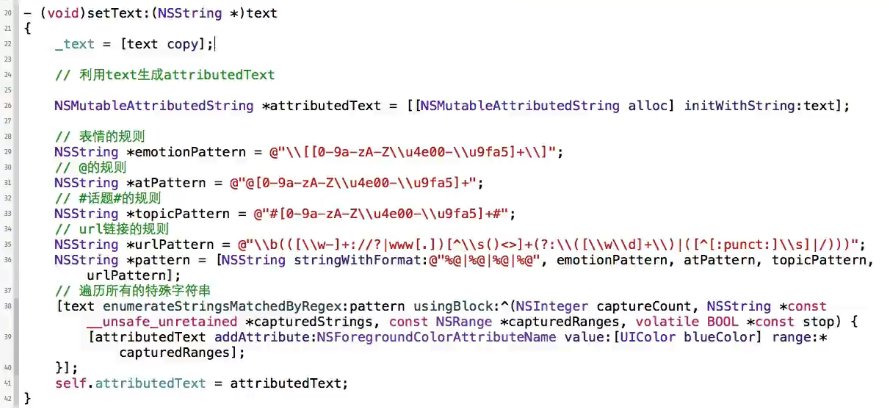
2>轉發微博文字處理
注:轉發微博是由轉發微博用戶名和轉發微博位子組成,用戶名也要處理
微博模型添加轉發微博文字屬性
/** 被轉發的原微博信息字段,當該微博為轉發微博時返回 */
@property(nonatomic, strong) HWStatus *retweeted_status;
/** 被轉發的原微博信息內容 -- 帶有屬性的(特殊文字會高亮顯示\顯示表情)*/
@property(nonatomic, copy) NSAttributedString *retweetedAttributedText;
重寫HWStatus中retweeted_status的setter方法,算出retweetedAttributedText
3.2 文字中的表情
注意點:
注1:對於attributedText的字體設置,不能直接使用label.font來設置,這樣無效,必須使用addAttribute:
[attributedTextaddAttribute:NSFontAttributeName value:font range:…];
注2:不能使用insertAttributeString: atIndex:或者replaceAttributeString:兩個方法,因為一旦前面的文字替換成表情,[微笑]有四個字符,微笑表情只有一個字符會導致後面的index都變掉,不能正確插入或者替換!!!
注3:將微博打散,文字和表情分別取出來,再進行拼接!!!
注4:每一個打散碎片文字都有一個文字和一個范圍,添加一個HWTextPart模型,將微博文字遍歷後存放到模型數組中
注5:對數組中的模型進行排序,再進行拼接,設置表情、文字、關鍵字等
注6:根據表情文字找到對應的表情圖片,使用之前的HWEmotionTool,添加尋找方法
1>HWTextPart
#import@interface HWTextPart : NSObject /** 這段文字的內容 */ @property (nonatomic, copy) NSString *text; /** 這段文字的范圍 */ @property (nonatomic, assign) NSRange range; /** 是否為特殊文字 */ @property (nonatomic, assign, getter = isSpecical) BOOL special; /** 是否為表情 */ @property (nonatomic, assign, getter = isEmotion) BOOL emotion; @end
2>HWEmotionTool
#import@class HWEmotion; @interface HWEmotionTool : NSObject + (void)addRecentEmotion:(HWEmotion *)emotion; + (NSArray *)recentEmotions; + (NSArray *)defaultEmotions; + (NSArray *)lxhEmotions; + (NSArray *)emojiEmotions; /** * 通過表情描述找到對應的表情 * * @param chs 表情描述 */ + (HWEmotion *)emotionWithChs:(NSString *)chs; @end
// 最近表情的存儲路徑
#define HWRecentEmotionsPath [[NSSearchPathForDirectoriesInDomains
    (NSDocumentDirectory, NSUserDomainMask, YES) lastObject] stringByAppendingPathComponent:@"emotions.archive"]

#import "HWEmotionTool.h"
#import "HWEmotion.h"
#import "MJExtension.h"

@implementation HWEmotionTool

static NSMutableArray *_recentEmotions;

+ (void)initialize
{
    _recentEmotions = [NSKeyedUnarchiver unarchiveObjectWithFile:HWRecentEmotionsPath];
    if (_recentEmotions == nil) {
        _recentEmotions = [NSMutableArray array];
    }
}

+ (HWEmotion *)emotionWithChs:(NSString *)chs
{
    NSArray *defaults = [self defaultEmotions];
    for (HWEmotion *emotion in defaults) {
        if ([emotion.chs isEqualToString:chs]) return emotion;
    }

    NSArray *lxhs = [self lxhEmotions];
    for (HWEmotion *emotion in lxhs) {
        if ([emotion.chs isEqualToString:chs]) return emotion;
    }

    return nil;
}

+ (void)addRecentEmotion:(HWEmotion *)emotion
{
    // 刪除重復的表情
    [_recentEmotions removeObject:emotion];

    // 將表情放到數組的最前面
    [_recentEmotions insertObject:emotion atIndex:0];

    // 將所有的表情數據寫入沙盒
    [NSKeyedArchiver archiveRootObject:_recentEmotions toFile:HWRecentEmotionsPath];
}

/**
 *  返回裝著HWEmotion模型的數組
 */
+ (NSArray *)recentEmotions
{
    return _recentEmotions;
}

static NSArray *_emojiEmotions, *_defaultEmotions, *_lxhEmotions;
+ (NSArray *)emojiEmotions
{
    if (!_emojiEmotions) {
        NSString *path = [[NSBundle mainBundle] pathForResource:@"EmotionIcons/emoji/info.plist" ofType:nil];
        _emojiEmotions = [HWEmotion objectArrayWithKeyValuesArray:[NSArray arrayWithContentsOfFile:path]];
    }
    return _emojiEmotions;
}

+ (NSArray *)defaultEmotions
{
    if (!_defaultEmotions) {
        NSString *path = [[NSBundle mainBundle] pathForResource:@"EmotionIcons/default/info.plist" ofType:nil];
        _defaultEmotions = [HWEmotion objectArrayWithKeyValuesArray:[NSArray arrayWithContentsOfFile:path]];
    }
    return _defaultEmotions;
}

+ (NSArray *)lxhEmotions
{
    if (!_lxhEmotions) {
        NSString *path = [[NSBundle mainBundle] pathForResource:@"EmotionIcons/lxh/info.plist" ofType:nil];
        _lxhEmotions = [HWEmotion objectArrayWithKeyValuesArray:[NSArray arrayWithContentsOfFile:path]];
    }
    return _lxhEmotions;
}
@end
3>HWStatus
#import "HWStatus.h"
#import "MJExtension.h"
#import "HWPhoto.h"
#import "HWUser.h"
#import "HWTextPart.h"
#import "RegexKitLite.h"
#import "HWEmotion.h"
#import "HWEmotionTool.h"

@implementation HWStatus
- (NSDictionary *)objectClassInArray
{
    return @{@"pic_urls" : [HWPhoto class]};
}

/**
 *  普通文字 --> 屬性文字
 *
 *  @param text 普通文字
 *
 *  @return 屬性文字
 */
- (NSAttributedString *)attributedTextWithText:(NSString *)text
{
    NSMutableAttributedString *attributedText = [[NSMutableAttributedString alloc] init];

    // 表情的規則
    NSString *emotionPattern = @"\\[[0-9a-zA-Z\\u4e00-\\u9fa5]+\\]";
    // @的規則
    NSString *atPattern = @"@[0-9a-zA-Z\\u4e00-\\u9fa5-_]+";
    // #話題#的規則
    NSString *topicPattern = @"#[0-9a-zA-Z\\u4e00-\\u9fa5]+#";
    // url鏈接的規則
    NSString *urlPattern = @"\\b(([\\w-]+://?|www[.])[^\\s()<>]+(?:\\([\\w\\d]+\\)|([^[:punct:]\\s]|/)))";
    NSString *pattern = [NSString stringWithFormat:@"%@|%@|%@|%@", emotionPattern, atPattern, topicPattern, urlPattern];

    // 遍歷所有的特殊字符串
    NSMutableArray *parts = [NSMutableArray array];
    [text enumerateStringsMatchedByRegex:pattern usingBlock:^(NSInteger captureCount, NSString *const
                __unsafe_unretained *capturedStrings, const NSRange *capturedRanges, volatile BOOL *const stop) {
        if ((*capturedRanges).length == 0) return;

        HWTextPart *part = [[HWTextPart alloc] init];
        part.special = YES;
        part.text = *capturedStrings;
        part.emotion = [part.text hasPrefix:@"["] && [part.text hasSuffix:@"]"];
        part.range = *capturedRanges;
        [parts addObject:part];
    }];
    // 遍歷所有的非特殊字符
    [text enumerateStringsSeparatedByRegex:pattern usingBlock:^(NSInteger captureCount, NSString *const
                __unsafe_unretained *capturedStrings, const NSRange *capturedRanges, volatile BOOL *const stop) {
        if ((*capturedRanges).length == 0) return;

        HWTextPart *part = [[HWTextPart alloc] init];
        part.text = *capturedStrings;
        part.range = *capturedRanges;
        [parts addObject:part];
    }];

    // 排序
    // 系統是按照從小 -> 大的順序排列對象
    [parts sortUsingComparator:^NSComparisonResult(HWTextPart *part1, HWTextPart *part2) {
        // NSOrderedAscending = -1L, NSOrderedSame, NSOrderedDescending
        // 返回NSOrderedSame:兩個一樣大
        // NSOrderedAscending(升序):part2>part1
        // NSOrderedDescending(降序):part1>part2
        if (part1.range.location > part2.range.location) {
            // part1>part2
            // part1放後面, part2放前面
            return NSOrderedDescending;
        }
        // part1<part2 -="" :="" _retweeted_status="retweeted_status;" _text="[text" addattribute:nsfontattributename="" attch="[[NSTextAttachment" attch.bounds="CGRectMake(0," attch.image="[UIImage" attributedtext="" else="" font="[UIFont" for="" hwstatus="" hwtextpart="" if="" in="" initwithstring:part.text="" name="[HWEmotionTool" nsattributedstring="" nsforegroundcolorattributename="" nsstring="" nstextattachment="" part="" pre="" return="" retweetcontent="[NSString" retweeted_status="" self.attributedtext="[self" self.retweetedattributedtext="[self" substr="[NSAttributedString" text="" uicolor="" uifont="" value:font="">
4、監聽點擊
4.1 自定義HWStatusTextView
實現:對關鍵字點擊實現高亮顯示
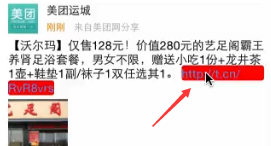
關鍵:首先判斷手指是否在關鍵字上,其次算出關鍵字的范圍,最後設置高亮背景!!!
注1:利用UILabel不能根據文字找出文字對應的尺寸范圍,利用UITextView可以實現,自定義HWStatusTextView!
注2:textView默認會有內邊距,需要取消
注3:
self.editable = NO;
self.textContainerInset =UIEdgeInsetsMake(0, -5, 0, -5);
// 禁止滾動,讓文字完全顯示出來
self.scrollEnabled = NO;
4.2HWStatusTextView點擊
注1:找出關鍵字在textView的范圍,可以使用textView的selectedRange屬性,再通過selectionRectsForRange:方法!!!
注2:找出關鍵字的range,自定義HWSpecial模型
#import@interface HWSpecial : NSObject /** 這段特殊文字的內容 */ @property (nonatomic, copy) NSString *text; /** 這段特殊文字的范圍 */ @property (nonatomic, assign) NSRange range; @end
注3:在HWStatus中拼接字符串時,計算每個字符串中的特殊文字,將HWSpecial模型數組綁定到attributedText中,就可以在textView中根據Key取出特殊字符串!!!
UIFont *font = [UIFont systemFontOfSize:15];
NSMutableArray *specials = [NSMutableArray array];
// 按順序拼接每一段文字
for (HWTextPart *part in parts) {
    // 等會需要拼接的子串
    NSAttributedString *substr = nil;
    if (part.isEmotion) { // 表情
        NSTextAttachment *attch = [[NSTextAttachment alloc] init];
        NSString *name = [HWEmotionTool emotionWithChs:part.text].png;
        if (name) { // 能找到對應的圖片
            attch.image = [UIImage imageNamed:name];
            attch.bounds = CGRectMake(0, -3, font.lineHeight, font.lineHeight);
            substr = [NSAttributedString attributedStringWithAttachment:attch];
        } else { // 表情圖片不存在
            substr = [[NSAttributedString alloc] initWithString:part.text];
        }
    } else if (part.special) { // 非表情的特殊文字
       substr = [[NSAttributedString alloc] initWithString:part.text attributes:@{
                                                                          NSForegroundColorAttributeName : [UIColor redColor]
                                                                          }];

        // 創建特殊對象
        HWSpecial *s = [[HWSpecial alloc] init];
        s.text = part.text;
        NSUInteger loc = attributedText.length;
        NSUInteger len = part.text.length;
        s.range = NSMakeRange(loc, len);
        [specials addObject:s];
    } else { // 非特殊文字
        substr = [[NSAttributedString alloc] initWithString:part.text];
    }
    [attributedText appendAttributedString:substr];
}

// 一定要設置字體,保證計算出來的尺寸是正確的
[attributedText addAttribute:NSFontAttributeName value:font range:NSMakeRange(0, attributedText.length)];
[attributedText addAttribute:@"specials" value:specials range:NSMakeRange(0, 1)];
注4:HWStatusTextView中處理如下:
#import "HWStatusTextView.h"
#import "HWSpecial.h"

#define HWStatusTextViewCoverTag 999

@implementation HWStatusTextView

- (id)initWithFrame:(CGRect)frame
{
    self = [super initWithFrame:frame];
    if (self) {
        self.backgroundColor = [UIColor clearColor];
        self.editable = NO;
        self.textContainerInset = UIEdgeInsetsMake(0, -5, 0, -5);
        // 禁止滾動, 讓文字完全顯示出來
        self.scrollEnabled = NO;
    }
    return self;
}

- (void)touchesBegan:(NSSet *)touches withEvent:(UIEvent *)event
{
    // 觸摸對象
    UITouch *touch = [touches anyObject];

    // 觸摸點
    CGPoint point = [touch locationInView:self];

    NSArray *specials = [self.attributedText attribute:@"specials" atIndex:0 effectiveRange:NULL];
    BOOL contains = NO;

    for (HWSpecial *special in specials) {
        self.selectedRange = special.range;
        // self.selectedRange --影響--> self.selectedTextRange
        // 獲得選中范圍的矩形框
        NSArray *rects = [self selectionRectsForRange:self.selectedTextRange];
        // 清空選中范圍
        self.selectedRange = NSMakeRange(0, 0);

        for (UITextSelectionRect *selectionRect in rects) {
            CGRect rect = selectionRect.rect;
            if (rect.size.width == 0 || rect.size.height == 0) continue;

            if (CGRectContainsPoint(rect, point)) { // 點中了某個特殊字符串
                contains = YES;
                break;
            }
        }

        if (contains) {
            for (UITextSelectionRect *selectionRect in rects) {
                CGRect rect = selectionRect.rect;
                if (rect.size.width == 0 || rect.size.height == 0) continue;

                UIView *cover = [[UIView alloc] init];
                cover.backgroundColor = [UIColor greenColor];
                cover.frame = rect;
                cover.tag = HWStatusTextViewCoverTag;
                cover.layer.cornerRadius = 5;
                [self insertSubview:cover atIndex:0];
            }

            break;
        }
    }
}

- (void)touchesEnded:(NSSet *)touches withEvent:(UIEvent *)event
{
    dispatch_after(dispatch_time(DISPATCH_TIME_NOW, (int64_t)(0.25 * NSEC_PER_SEC)), dispatch_get_main_queue(), ^{
        [self touchesCancelled:touches withEvent:event];
    });
}

- (void)touchesCancelled:(NSSet *)touches withEvent:(UIEvent *)event
{
    // 去掉特殊字符串後面的高亮背景
    for (UIView *child in self.subviews) {
        if (child.tag == HWStatusTextViewCoverTag) [child removeFromSuperview];
    }
}
@end
5、代碼重構
/**
 * 獲取特殊字符串rect數組
 */
- (void)setupSpecialRects
{
    NSArray *specials = [self.attributedText attribute:@"specials" atIndex:0 effectiveRange:NULL];
    for (HWSpecial *special in specials) {
        self.selectedRange = special.range;
        // self.selectedRange --影響--> self.selectedTextRange
        // 獲得選中范圍的矩形框
        NSArray *selectionRects = [self selectionRectsForRange:self.selectedTextRange];
        // 清空選中范圍
        self.selectedRange = NSMakeRange(0, 0);

        NSMutableArray *rects = [NSMutableArray array];
        for (UITextSelectionRect *selectionRect in selectionRects) {
            CGRect rect = selectionRect.rect;
            if (rect.size.width == 0 || rect.size.height == 0) continue;

            // 添加rect
            [rects addObject:[NSValue valueWithCGRect:rect]];
        }
        special.rects = rects;
    }
}

/**
 * 找出被觸摸的特殊字符串
 */
- (HWSpecial *)touchingSpecialWithPoint:(CGPoint)point
{
    NSArray *specials = [self.attributedText attribute:@"specials" atIndex:0 effectiveRange:NULL];
    for (HWSpecial *special in specials) {
        for (NSValue *rectValue in special.rects) {
            if (CGRectContainsPoint(rectValue.CGRectValue, point)) { // 點中了某個特殊字符串
                return special;
            }
        }
    }
    return nil;
}

- (void)touchesBegan:(NSSet *)touches withEvent:(UIEvent *)event
{
    // 觸摸對象
    UITouch *touch = [touches anyObject];

    // 觸摸點
    CGPoint point = [touch locationInView:self];

    // 初始化矩形框
    [self setupSpecialRects];

    // 根據觸摸點獲得被觸摸的特殊字符串
    HWSpecial *special = [self touchingSpecialWithPoint:point];

    // 在被觸摸的特殊字符串後面顯示一段高亮的背景
    for (NSValue *rectValue in special.rects) {
        // 在被觸摸的特殊字符串後面顯示一段高亮的背景
        UIView *cover = [[UIView alloc] init];
        cover.backgroundColor = [UIColor greenColor];
        cover.frame = rectValue.CGRectValue;
        cover.tag = HWStatusTextViewCoverTag;
        cover.layer.cornerRadius = 5;
        [self insertSubview:cover atIndex:0];
    }
}
6、事件處理
注:上述做法,textView攔截了所有的觸摸事件,即點擊了textView,事件不會交給cell去處理,實際應用中,點擊cell,還需要跳轉微博詳情,即交給cell去處理cell點擊事件,因此需要修改textView的事件處理,再點擊關鍵字的時候交給textView處理,其余情況下交給cell去處理!!!
觸摸事件的處理
1.判斷觸摸點在誰身上:調用所有UI控件的-(BOOL)pointInside:(CGPoint)point withEvent:(UIEvent *)event
2.pointInside返回YES的控件就是觸摸點所在的UI控件
3.由觸摸點所在的UI控件選出處理事件的UI控件:調用- (UIView*)hitTest:(CGPoint)point withEvent:(UIEvent *)event
//- (UIView *)hitTest:(CGPoint)point withEvent:(UIEvent *)event
//{
//    return [super hitTest:point withEvent:event];
//}

/**
 * 告訴系統:觸摸點point是否在這個UI控件身上
 */
- (BOOL)pointInside:(CGPoint)point withEvent:(UIEvent *)event
{
    // 初始化矩形框
    [self setupSpecialRects];

    // 根據觸摸點獲得被觸摸的特殊字符串
    HWSpecial *special = [self touchingSpecialWithPoint:point];

    return special : YES ? NO;
}