iOS UITableView 拖動排序實現代碼
編輯:IOS開發綜合
UITbableView作為列表展示信息,除了展示的功能,有時還會用到刪除,排序等功能,下面就來講解一下如何實現排序。
排序是當表格進入編輯狀態後,在單元格的右側會出現一個按鈕,點擊按鈕,就可以拖動單元格,移動位置,進行手動排序。
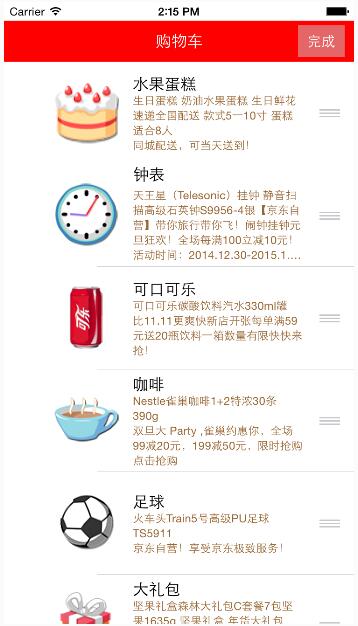
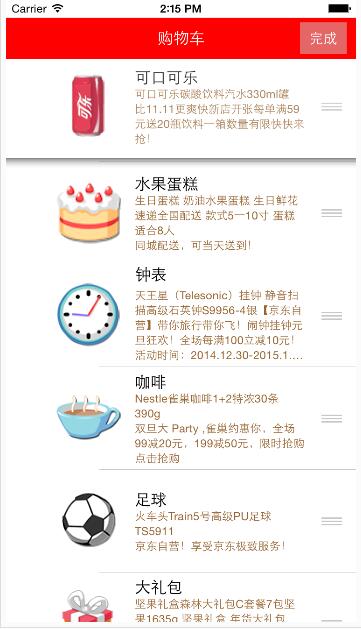
使用系統自帶拖動排序功能的步驟:
1、讓tableView進入編輯狀態,也就是設置它的editing為YES
2、返回編輯模式,也就是實現UITableViewDelegate中的tableview:editingStyleForRowAtIndexPath:方法,在裡面返回UITableViewCellEditingStyleNone模式。如果不實現,默認返回的就是刪除模式
3、實現tableView:moveRowAtIndexPath:toIndexPath方法,只要實現該方法,就能實現單元格的拖動排序,但只是實現了表面的排序,並沒有修改真實地數據
4、在方法中完成數據模型的更新
代碼:
 // ViewController.m
// JRTableView刪除
//
// Created by jerehedu on 15/6/11.
// Copyright (c) 2015年 jerehedu. All rights reserved.
//

#import "ViewController.h"
#import "Goods.h"

@interface ViewController ()<UITableViewDataSource, UITableViewDelegate>

{
  UITableView *_tableView; //列表

  NSMutableArray *_goodsAry; //商品數組

  UIButton *_editBtn; //編輯按鈕
}
@end

@implementation ViewController

- (void)viewDidLoad {
  [super viewDidLoad];

  //添加標題
  UILabel *titleLabel = [[UILabel alloc] initWithFrame:CGRectMake(0, 20, self.view.frame.size.width, 44)];
  titleLabel.text = @"購物車";
  titleLabel.textAlignment = NSTextAlignmentCenter;
  titleLabel.backgroundColor = [UIColor redColor];
  titleLabel.textColor = [UIColor whiteColor];
  [self.view addSubview:titleLabel];

  //添加編輯按鈕
  _editBtn = [UIButton buttonWithType:UIButtonTypeCustom];
  _editBtn.frame = CGRectMake(self.view.frame.size.width-60, 25, 50, 34);
  [_editBtn setTitle:@"編輯" forState:UIControlStateNormal];
  [_editBtn setTitle:@"完成" forState:UIControlStateSelected];
  _editBtn.titleLabel.font = [UIFont systemFontOfSize:15];
  _editBtn.backgroundColor = [UIColor colorWithRed:0.8 green:0.8 blue:0.8 alpha:0.5];
  [self.view addSubview:_editBtn];
  [_editBtn addTarget:self action:@selector(clickEditBtn:) forControlEvents:UIControlEventTouchUpInside];

  //添加tableview
  _tableView = [[UITableView alloc] initWithFrame:CGRectMake(0, 64, self.view.frame.size.width, self.view.frame.size.height-64)];
  _tableView.dataSource = self;
  _tableView.delegate = self;
  [self.view addSubview:_tableView];

  //取數據
  NSArray *ary = [NSArray arrayWithContentsOfFile:[[NSBundle mainBundle] pathForResource:@"ShoppingGoodsList" ofType:@"plist"]];

  //把數據存到模型對象中,然後把對象存到數組中
  _goodsAry = [NSMutableArray array];
  for (int i=0; i<ary.count; i++) {
    Goods *good = [Goods goodsWithDic:ary[i]];
    [_goodsAry addObject:good];
  }
}

#pragma mark 數據源 返回有幾行
-(NSInteger)tableView:(UITableView *)tableView numberOfRowsInSection:(NSInteger)section
{
  return _goodsAry.count;
}

#pragma mark 每行顯示內容
-(UITableViewCell*)tableView:(UITableView *)tableView cellForRowAtIndexPath:(NSIndexPath *)indexPath
{
  static NSString *idGood = @"goods";

  UITableViewCell *cell = [tableView dequeueReusableCellWithIdentifier:idGood];

  if (cell==nil) {
    cell = [[UITableViewCell alloc] initWithStyle:UITableViewCellStyleSubtitle reuseIdentifier:idGood];
  }

  Goods *good = _goodsAry[indexPath.row];

  cell.imageView.image = [UIImage imageNamed:good.icon];
  cell.textLabel.text = good.name;
  cell.detailTextLabel.text = good.details;
  cell.detailTextLabel.numberOfLines = 6;
  cell.detailTextLabel.textColor = [UIColor brownColor];

  return cell;
}

#pragma mark 選中行
-(void)tableView:(UITableView *)tableView didSelectRowAtIndexPath:(NSIndexPath *)indexPath
{
  // 取消選中狀態
  [tableView deselectRowAtIndexPath:indexPath animated:YES];
}

#pragma mark 設置行高
-(CGFloat)tableView:(UITableView *)tableView heightForRowAtIndexPath:(NSIndexPath *)indexPath
{
  return 110;
}

#pragma mark 點擊編輯按鈕
- (IBAction)clickEditBtn:(UIButton *)sender {

  //設置tableview編輯狀態
  BOOL flag = !_tableView.editing;
  [_tableView setEditing:flag animated:YES];
  _editBtn.selected = flag;
}

#pragma mark 選擇編輯模式,添加模式很少用,默認是刪除
-(UITableViewCellEditingStyle)tableView:(UITableView *)tableView editingStyleForRowAtIndexPath:(NSIndexPath *)indexPath
{
  return UITableViewCellEditingStyleNone;
}

#pragma mark 排序 當移動了某一行時候會調用
//編輯狀態下,只要實現這個方法,就能實現拖動排序
-(void)tableView:(UITableView *)tableView moveRowAtIndexPath:(NSIndexPath *)sourceIndexPath toIndexPath:(NSIndexPath *)destinationIndexPath
{
  // 取出要拖動的模型數據
  Goods *goods = _goodsAry[sourceIndexPath.row];
  //刪除之前行的數據
  [_goodsAry removeObject:goods];
  // 插入數據到新的位置
  [_goodsAry insertObject:goods atIndex:destinationIndexPath.row];
}

@end
以上就是本文的全部內容,希望對大家的學習有所幫助,也希望大家多多支持本站。


相關文章
+