CGContextRef繪圖-iOS球形波浪加載進度控件-HcdProcessView詳解
Github地址:https://github.com/Jvaeyhcd/HcdProcessView
這篇文章我要簡單介紹一下我的制作過程。
思路
首先我放棄了使用通過改變圖片的位置來實現上面的動畫效果,雖然這樣也可以實現如上的效果,但是從性能和資源消耗上來說都不是最好的選擇。這裡我采用了通過上下文(也就是CGContextRef)來繪制這樣的效果,大家對它應該並不陌生,它既可以繪制直線、曲線、多邊形圓形以及各種各樣的幾何圖形。
具體步驟
我們可以將上面的復雜圖形拆分成如下幾步:
1. 繪制最外面的一圈刻度尺
2. 繪制表示進度的刻度尺
3. 繪制中間的球形加載界面
繪制刻度尺
如果你先要在控件中繪制自己想要的圖形,你需要重寫UIView的drawRect方法:
- (void)drawRect:(CGRect)rect
{
    CGContextRef context = UIGraphicsGetCurrentContext();
    [self drawScale:context];
}
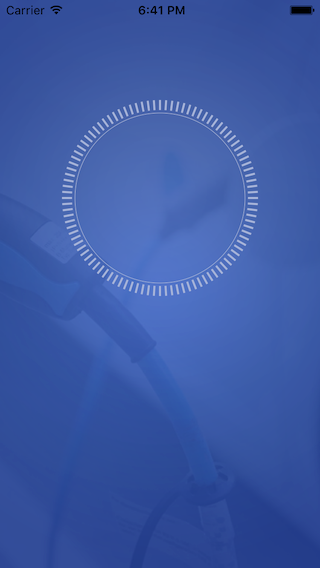
在drawRect方法中,我們先畫出了刻度尺的圖形,刻度尺是由一圈短線在一個圓內圍成的一個圓。
/**
 *  畫比例尺
 *
 *  @param context 全局context
 */
- (void)drawScale:(CGContextRef)context {

    CGContextSetLineWidth(context, _scaleDivisionsWidth);//線的寬度

    //先將參照點移到控件中心
    CGContextTranslateCTM(context, fullRect.size.width / 2, fullRect.size.width / 2);

    //設置線的顏色
    CGContextSetStrokeColorWithColor(context, [UIColor colorWithRed:0.655 green:0.710 blue:0.859 alpha:1.00].CGColor);//線框顏色
    //繪制一些圖形
    for (int i = 0; i < _scaleCount; i++) {
        CGContextMoveToPoint(context, scaleRect.size.width/2 - _scaleDivisionsLength, 0);
        CGContextAddLineToPoint(context, scaleRect.size.width/2, 0);
        //    CGContextScaleCTM(ctx, 0.5, 0.5);
        //渲染
        CGContextStrokePath(context);
        CGContextRotateCTM(context, 2 * M_PI / _scaleCount);
    }

    //繪制刻度尺外的一個圈
    CGContextSetStrokeColorWithColor(context, [UIColor colorWithRed:0.694 green:0.745 blue:0.867 alpha:1.00].CGColor);//線框顏色
    CGContextSetLineWidth(context, 0.5);
    CGContextAddArc (context, 0, 0, scaleRect.size.width/2 - _scaleDivisionsLength - 3, 0, M_PI* 2 , 0);
    CGContextStrokePath(context);

    //復原參照點
    CGContextTranslateCTM(context, -fullRect.size.width / 2, -fullRect.size.width / 2);
}
這裡需要用到兩個東西一個是CGContextAddArc,一個是CGContextAddLineToPoint。創建圓弧的方法有兩種一種是CGContextAddArc,一種是CGContextAddArcToPoint,這裡畫的圓比較簡單所以用的是CGContextAddArc,CGContextAddArcToPoint在後面也會用到(我會在用到的地方詳解)。
CGContextAddArc
 void CGContextAddArc (
    CGContextRef c,
    CGFloat x,             //圓心的x坐標
    CGFloat y,   //圓心的x坐標
    CGFloat radius,   //圓的半徑
    CGFloat startAngle,    //開始弧度
    CGFloat endAngle,   //結束弧度
    int clockwise          //0表示順時針,1表示逆時針
 );
這裡需要創建一個完整的圓,那麼 開始弧度就是0 結束弧度是 2PI, 因為圓周長是 2*PI*radius。函數執行完後,current point就被重置為(x,y)。CGContextTranslateCTM(context, fullRect.size.width / 2, fullRect.size.width / 2);已經將current point移動到了(fullRect.size.width / 2, fullRect.size.width / 2)。
CGContextAddLineToPoint
 void CGContextAddLineToPoint (
    CGContextRef c,
    CGFloat x,
    CGFloat y
 );
創建一條直線,從current point到 (x,y)
然後current point會變成(x,y)。
由於短線不連續,所以通過for循環來不斷畫短線,_scaleCount代表的是刻度尺的個數,每次循環先將current point移動到(scaleRect.size.width/2 - _scaleDivisionsLength, 0)點,_scaleDivisionsLength代表短線的長度。繪制完短線後將前面繪制完成的圖形旋轉一個刻度尺的角度CGContextRotateCTM(context, 2 * M_PI / _scaleCount);,將最終的繪制渲染後就得到了如下的刻度尺:
刻度尺上的進度繪制
首先在drawRect中添加drawProcessScale方法。
- (void)drawRect:(CGRect)rect
{
    CGContextRef context = UIGraphicsGetCurrentContext();
    [self drawScale:context];
    [self drawProcessScale:context];
}
然後在drawProcessScale方法中實現左右兩部分的刻度尺進度繪制。
/**
 *  比例尺進度
 *
 *  @param context 全局context
 */
- (void)drawProcessScale:(CGContextRef)context {

    CGContextSetLineWidth(context, _scaleDivisionsWidth);//線的寬度
    CGContextTranslateCTM(context, fullRect.size.width / 2, fullRect.size.width / 2);

    CGContextSetStrokeColorWithColor(context, [UIColor colorWithRed:0.969 green:0.937 blue:0.227 alpha:1.00].CGColor);//線框顏色

    int count = (_scaleCount / 2 + 1) * currentPercent;
    CGFloat scaleAngle = 2 * M_PI / _scaleCount;

    //繪制左邊刻度進度
    for (int i = 0; i < count; i++) {
        CGContextMoveToPoint(context, 0, scaleRect.size.width/2 - _scaleDivisionsLength);
        CGContextAddLineToPoint(context, 0, scaleRect.size.width/2);
        //    CGContextScaleCTM(ctx, 0.5, 0.5);
        // 渲染
        CGContextStrokePath(context);
        CGContextRotateCTM(context, scaleAngle);
    }
    //繪制右邊刻度進度
    CGContextRotateCTM(context, -count * scaleAngle);

    for (int i = 0; i < count; i++) {
        CGContextMoveToPoint(context, 0, scaleRect.size.width/2 - _scaleDivisionsLength);
        CGContextAddLineToPoint(context, 0, scaleRect.size.width/2);
        //    CGContextScaleCTM(ctx, 0.5, 0.5);
        // 渲染
        CGContextStrokePath(context);
        CGContextRotateCTM(context, -scaleAngle);
    }

    CGContextTranslateCTM(context, -fullRect.size.width / 2, -fullRect.size.width / 2);
}
繪制完後效果如下:

水的波浪效果繪制
終於到了最主要也是最難的效果繪制了,對於帶有波浪不斷滾動的效果是采用NSTimer來不斷繪制每一幀圖形實現的,現在簡單介紹下每一幀的繪制方法。
首先在drawRect中添加drawWave方法,
- (void)drawRect:(CGRect)rect
{
    CGContextRef context = UIGraphicsGetCurrentContext();
    [self drawScale:context];
    [self drawProcessScale:context];
    [self drawWave:context];
}
drawWave中實現如下方法:
/**
 *  畫波浪
 *
 *  @param context 全局context
 */
- (void)drawWave:(CGContextRef)context {

    CGMutablePathRef frontPath = CGPathCreateMutable();
    CGMutablePathRef backPath = CGPathCreateMutable();

    //畫水
    CGContextSetLineWidth(context, 1);
    CGContextSetFillColorWithColor(context, [_frontWaterColor CGColor]);

    CGFloat offset = _scaleMargin + _waveMargin + _scaleDivisionsWidth;

    float frontY = currentLinePointY;
    float backY = currentLinePointY;

    CGFloat radius = waveRect.size.width / 2;

    CGPoint frontStartPoint = CGPointMake(offset, currentLinePointY + offset);
    CGPoint frontEndPoint = CGPointMake(offset, currentLinePointY + offset);

    CGPoint backStartPoint = CGPointMake(offset, currentLinePointY + offset);
    CGPoint backEndPoint = CGPointMake(offset, currentLinePointY + offset);

    for(float x = 0; x <= waveRect.size.width; x++){

        //前浪繪制
        frontY = a * sin( x / 180 * M_PI + 4 * b / M_PI ) * amplitude + currentLinePointY;

        CGFloat frontCircleY = frontY;
        if (currentLinePointY < radius) {
            frontCircleY = radius - sqrt(pow(radius, 2) - pow((radius - x), 2));
            if (frontY < frontCircleY) {
                frontY = frontCircleY;
            }
        } else if (currentLinePointY > radius) {
            frontCircleY = radius + sqrt(pow(radius, 2) - pow((radius - x), 2));
            if (frontY > frontCircleY) {
                frontY = frontCircleY;
            }
        }

        if (fabs(0 - x) < 0.001) {
            frontStartPoint = CGPointMake(x + offset, frontY + offset);
            CGPathMoveToPoint(frontPath, NULL, frontStartPoint.x, frontStartPoint.y);
        }

        frontEndPoint = CGPointMake(x + offset, frontY + offset);
        CGPathAddLineToPoint(frontPath, nil, frontEndPoint.x, frontEndPoint.y);

        //後波浪繪制
        backY = a * cos( x / 180 * M_PI + 3 * b / M_PI ) * amplitude + currentLinePointY;
        CGFloat backCircleY = backY;
        if (currentLinePointY < radius) {
            backCircleY = radius - sqrt(pow(radius, 2) - pow((radius - x), 2));
            if (backY < backCircleY) {
                backY = backCircleY;
            }
        } else if (currentLinePointY > radius) {
            backCircleY = radius + sqrt(pow(radius, 2) - pow((radius - x), 2));
            if (backY > backCircleY) {
                backY = backCircleY;
            }
        }

        if (fabs(0 - x) < 0.001) {
            backStartPoint = CGPointMake(x + offset, backY + offset);
            CGPathMoveToPoint(backPath, NULL, backStartPoint.x, backStartPoint.y);
        }

        backEndPoint = CGPointMake(x + offset, backY + offset);
        CGPathAddLineToPoint(backPath, nil, backEndPoint.x, backEndPoint.y);
    }

    CGPoint centerPoint = CGPointMake(fullRect.size.width / 2, fullRect.size.height / 2);

    //繪制前浪圓弧
    CGFloat frontStart = [self calculateRotateDegree:centerPoint point:frontStartPoint];
    CGFloat frontEnd = [self calculateRotateDegree:centerPoint point:frontEndPoint];

    CGPathAddArc(frontPath, nil, centerPoint.x, centerPoint.y, waveRect.size.width / 2, frontEnd, frontStart, 0);
    CGContextAddPath(context, frontPath);
    CGContextFillPath(context);
    //推入
    CGContextSaveGState(context);
    CGContextDrawPath(context, kCGPathStroke);
    CGPathRelease(frontPath);


    //繪制後浪圓弧
    CGFloat backStart = [self calculateRotateDegree:centerPoint point:backStartPoint];
    CGFloat backEnd = [self calculateRotateDegree:centerPoint point:backEndPoint];

    CGPathAddArc(backPath, nil, centerPoint.x, centerPoint.y, waveRect.size.width / 2, backEnd, backStart, 0);

    CGContextSetFillColorWithColor(context, [_backWaterColor CGColor]);
    CGContextAddPath(context, backPath);
    CGContextFillPath(context);
    //推入
    CGContextSaveGState(context);
    CGContextDrawPath(context, kCGPathStroke);
    CGPathRelease(backPath);

}
上面的代碼較長,可能也比較難以理解。下面我將會對上述代碼簡單解讀一下,已前浪為例(前浪和後浪的實現方式基本一樣,只是兩個浪正余弦函數不一樣而已)。兩個浪都是由一條曲線和和一個圓弧構成的封閉區間,曲線的x區間為[0, waveRect.size.width],y值坐標為frontY = a * sin( x / 180 * M_PI + 4 * b / M_PI ) * amplitude + currentLinePointY;(currentLinePointY為偏移量),通過for循環自增x,計算出y的位置來不斷CGPathAddLineToPoint繪制出一條曲線,這就構成了波浪的曲線。然後我們需要根據波浪曲線的起始點和結束點以及圓心點(fullRect.size.width / 2, fullRect.size.height / 2),來繪制一段封閉的圓弧。
這裡就需要用到CGPathAddArc方法;CGPathAddArc方法和CGContextAddArc類似。需要先計算出點波浪的起始點和結束點分別與圓心之間的夾角。知道兩點計算夾角的方式如下:
/**
 *  根據圓心點和圓上一個點計算角度
 *
 *  @param centerPoint 圓心點
 *  @param point       圓上的一個點
 *
 *  @return 角度
 */
- (CGFloat)calculateRotateDegree:(CGPoint)centerPoint point:(CGPoint)point {

    CGFloat rotateDegree = asin(fabs(point.y - centerPoint.y) / (sqrt(pow(point.x - centerPoint.x, 2) + pow(point.y - centerPoint.y, 2))));

    //如果point縱坐標大於原點centerPoint縱坐標(在第一和第二象限)
    if (point.y > centerPoint.y) {
        //第一象限
        if (point.x >= centerPoint.x) {
            rotateDegree = rotateDegree;
        }
        //第二象限
        else {
            rotateDegree = M_PI - rotateDegree;
        }
    } else //第三和第四象限
    {
        if (point.x <= centerPoint.x) //第三象限,不做任何處理
        {
            rotateDegree = M_PI + rotateDegree;
        }
        else //第四象限
        {
            rotateDegree = 2 * M_PI - rotateDegree;
        }
    }
    return rotateDegree;
}
波浪繪制的相關判斷
由於曲線x區間是[0, waveRect.size.width],y值是根據公式frontY = a * sin( x / 180 * M_PI + 4 * b / M_PI ) * amplitude + currentLinePointY;計算出來的,但是最終構成的波浪是一個球形的,所以對於計算出來的y值坐標,我們需要判斷它是否在圓上,如果不在圓上,我們應該將它移到圓上。
判斷分為兩種情況:
currentLinePointY
currentLinePointY>fullRect.size.height / 2
同理當currentLinePointY>fullRect.size.height / 2時,已知點的坐標x,根據公式y1 = a * sin( x / 180 * M_PI + 4 * b / M_PI ) * amplitude + currentLinePointY;算出來的點位置為(x, y1),而在圓上點坐標為x的點的位置在(x,y2),如果y1>y2 則最終應該放到波浪上的點為 (x,y2)。
其中判斷的代碼如下:
frontY = a * sin( x / 180 * M_PI + 4 * b / M_PI ) * amplitude + currentLinePointY;

CGFloat frontCircleY = frontY;
if (currentLinePointY < radius) {
    frontCircleY = radius - sqrt(pow(radius, 2) - pow((radius - x), 2));
    if (frontY < frontCircleY) {
        frontY = frontCircleY;
    }
} else if (currentLinePointY > radius) {
    frontCircleY = radius + sqrt(pow(radius, 2) - pow((radius - x), 2));
    if (frontY > frontCircleY) {
        frontY = frontCircleY;
    }
}
其中當currentLinePointY < radius時,y2=radius - sqrt(pow(radius, 2) - pow((radius - x), 2));
當currentLinePointY > radius時,y2=radius + sqrt(pow(radius, 2) - pow((radius - x), 2));
然後通過Timer不斷的改變a、b的值就得到了我想要的動畫效果。
- 上一頁:iOS-ReactiveCocoa常見宏
- 下一頁:Xcode8


- iOS9與XCode7中不克不及應用http銜接的疾速處理方法
- xcode8 封閉掌握台不打印不信息的處理辦法(圖文詳解)
- 史上最具體的CocoaPods裝置教程(圖文)
- IOS Xcode中快捷鍵年夜全
- iOS中處理Xcode 8掌握台亂碼的方法
- IOS開辟之適配iOS10及Xcode8的留意點
- xcode8提交ipa掉敗沒法構建版本成績的處理計劃
- XCode 加速編譯鏈接速度的辦法
- 2016 cocoapods的裝置和應用辦法和版本進級碰到的成績
- IOS 陀螺儀開辟(CoreMotion框架)實例詳解
- 進修iOS自界說導航掌握器UINavigationController
- Xcode 8打印log日記的成績小結及處理辦法
- iOS10 適配和Xcode8設置裝備擺設總結
- iOS Xcode8更新後輸入log日記封閉的辦法
- Xcode8、iOS10進級成績記載