
iOS_8:鍵盤的簡單處理與附屬工具列
編輯:iOS 開發綜合
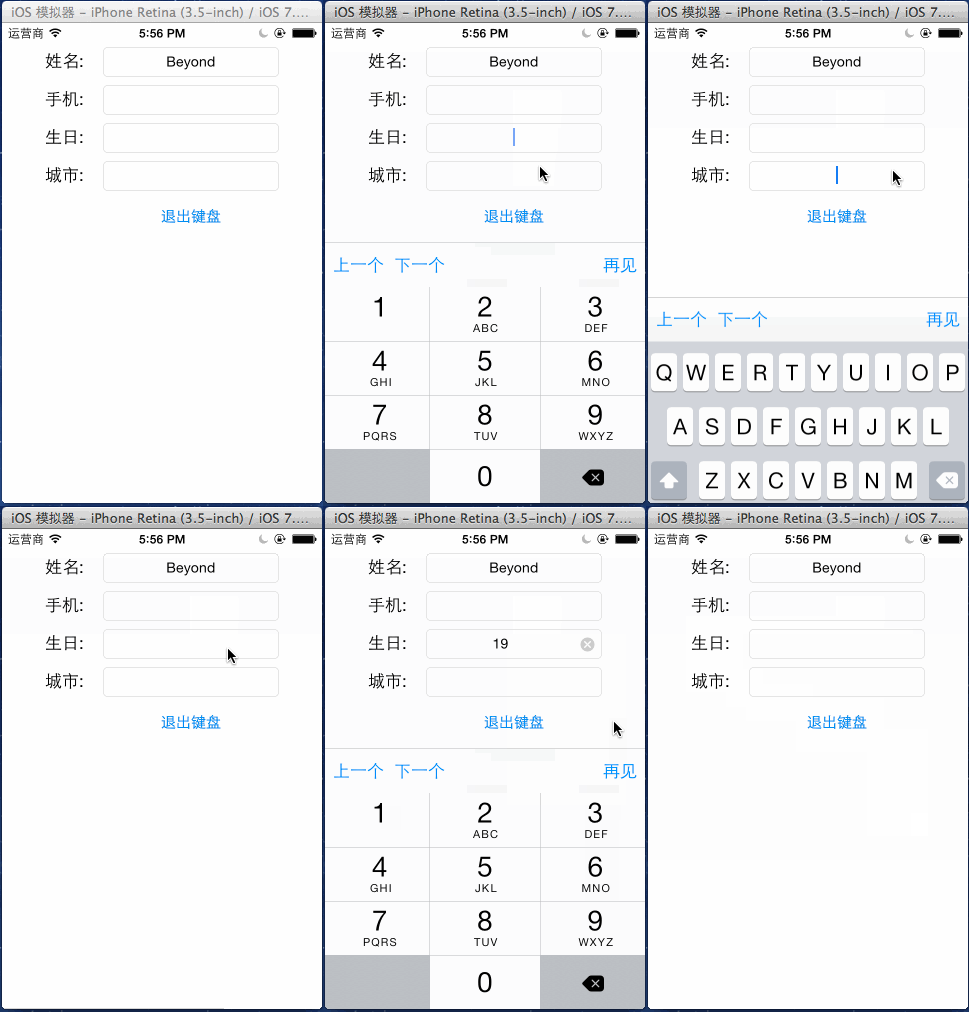
有輸入框就會有鍵盤,而鍵盤帶來兩個必經問題:遮住下面的控制項,以及使用者不知道怎麼收起來。這篇用一個 UIToolbar 同時解決這兩件事。
最終效果:
一、為鍵盤加上工具列
做法是建立一個 UIToolbar,然後指派給每個文字輸入框的 inputAccessoryView。
BeyondViewController.h
#import <UIKit/UIKit.h>

@interface BeyondViewController : UIViewController
- (IBAction)exitKeyboard:(UIButton *)sender;
@end
BeyondViewController.m
#import "BeyondViewController.h"

@interface BeyondViewController ()
{
    UIToolbar *_toolBar;   // 鍵盤上方的附屬工具列
}
@end

@implementation BeyondViewController

- (void)viewDidLoad {
    [super viewDidLoad];
    [self addToolBarForKeyboard];
}

- (void)addToolBarForKeyboard {
    // 從 xib 載入(副檔名不用寫)
    NSArray *arrayXibObjects = [[NSBundle mainBundle] loadNibNamed:@"KeyToolBar"
                                                            owner:nil
                                                          options:nil];
    _toolBar = arrayXibObjects.firstObject;

    // 為 view 內的所有 UITextField 設定工具列
    for (UIView *obj in self.view.subviews) {
        if ([obj isKindOfClass:[UITextField class]]) {
            // 需要轉型,因為 UIView 沒有 inputAccessoryView 屬性
            UITextField *textField = (UITextField *)obj;
            textField.inputAccessoryView = _toolBar;
        }
    }

    // 為工具列最後一顆按鈕(完成)綁定事件
    [[_toolBar.subviews lastObject] addTarget:self
                                       action:@selector(exitKeyboard:)
                             forControlEvents:UIControlEventTouchUpInside];
}

#pragma mark - 工具列按鈕

- (void)previousKeyboard:(UIButton *)sender {
    NSLog(@"要激活上一個輸入框");
}

- (void)nextKeyboard:(UIButton *)sender {
    NSLog(@"要激活下一個輸入框");
}

@end
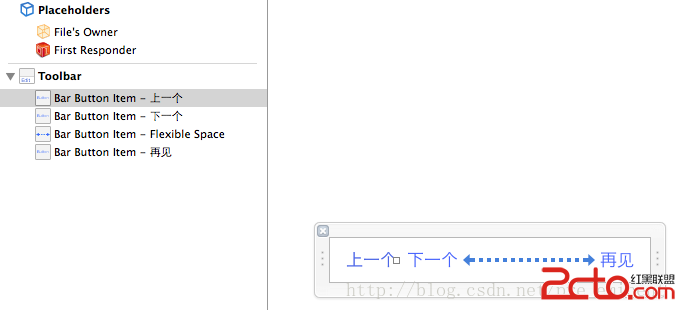
工具列的樣子:
二、退出鍵盤的三種做法
- (IBAction)exitKeyboard:(UIButton *)sender {
    // 做法一(最簡潔):讓 view 及其子孫視圖全部放棄第一響應者
    [self.view endEditing:YES];
    return;

    // 做法二:遍歷所有子視圖逐一 resign
    for (UIView *obj in self.view.subviews) {
        if ([obj isKindOfClass:[UITextField class]]) {
            [obj resignFirstResponder];
        }
    }

    // 做法三:在畫面最底層鋪一顆全屏透明按鈕,
    // 點空白處即觸發 endEditing,體驗最好
}
三、鍵盤遮住控制項怎麼辦
鍵盤高度約 216~336pt(依是否含候選列而異),固定高度版面很容易被蓋住。三種解法:
- 把整個表單放進 UIScrollView:監聽
UIKeyboardWillShowNotification,在通知中把 scrollView 的contentInset.bottom設為鍵盤高度,鍵盤收起時歸零。這是最推薦的做法。 - 動態上移:在鍵盤彈出動畫中,用
UIView animateWithDuration:把整個表單的 y 座標往上推。簡單但容易與其他動畫衝突。 - 使用 IQKeyboardManager 這類現成庫:自動處理位移、上一欄/下一欄切換與 Done 鍵,適合表單欄位眾多的專案。
取得鍵盤實際高度的方式是從通知的 userInfo 中讀取:
CGRect keyboardFrame =
    [[userInfo objectForKey:UIKeyboardFrameEndUserInfoKey] CGRectValue];
CGFloat height = keyboardFrame.size.height;
不要寫死 216 這類數字,因為螢幕尺寸、輸入法與是否顯示候選列都會改變它。
四、關於「上一個/下一個」按鈕
要真正实现欄位間跳躍,需要一個可變的索引與輸入框陣列:
@property (nonatomic, strong) NSArray *textFields;
@property (nonatomic, assign) NSInteger currentIndex;

- (void)nextKeyboard:(UIButton *)sender {
    if (self.currentIndex < self.textFields.count - 1) {
        self.currentIndex++;
        [self.textFields[self.currentIndex] becomeFirstResponder];
    }
}
同時在 textFieldDidBeginEditing: 中更新 currentIndex,並依位置啟用或停用這兩顆按鈕。