
iOS 學習筆記(2):鍵盤控制、鍵盤類型設定與 Alert 對話框
編輯:iOS 開發綜合
輸入框相關的三個基礎題:怎麼收起鍵盤、怎麼換不同的鍵盤配置、怎麼彈出提示框。看起來簡單,但每一項都有幾個容易忽略的細節。
一、關閉鍵盤:放棄第一響應者
鍵盤出現,是因為某個輸入框成為了 first responder。要收起鍵盤,就讓它 resign。常見有兩種做法:
做法一:綁定 UITextField 的 Did End On Exit 事件,按下 Return 時觸發。
做法二:綁定一個 UIControl(或背景按鈕)的 Touch Down 事件,在動作中呼叫 resignFirstResponder。
標頭檔
#import <UIKit/UIKit.h>

@interface ViewController : UIViewController
@property (weak, nonatomic) IBOutlet UITextField *txtUserName;
@property (weak, nonatomic) IBOutlet UITextField *txtUserPwd;

- (IBAction)onclick_UserLogin:(id)sender;
- (IBAction)hideKeyBorad:(id)sender;   // 關閉鍵盤
@end
實作檔
// 讓兩個輸入框都放棄第一響應者
- (IBAction)hideKeyBorad:(id)sender {
    [txtUserName resignFirstResponder];
    [txtUserPwd resignFirstResponder];
}
在 storyboard 中把事件連接起來:
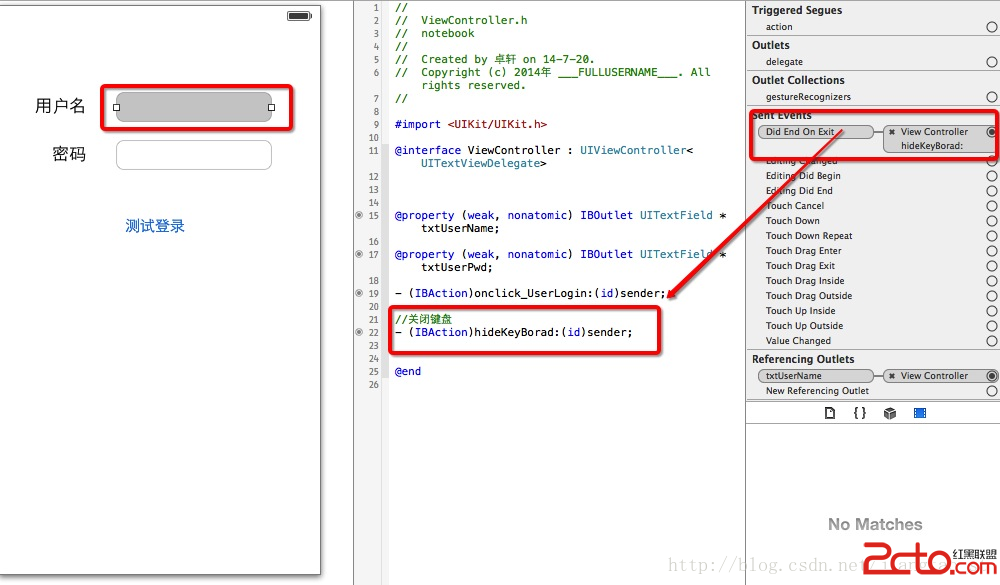
如果頁面上有十幾個輸入框,逐一 resign 就很醜。這時可以直接叫整個 view 交出第一響應者:
[self.view endEditing:YES];
二、鍵盤類型與 Return Key
這兩個都是 UITextField 的屬性,在屬性檢查器中就能設定:
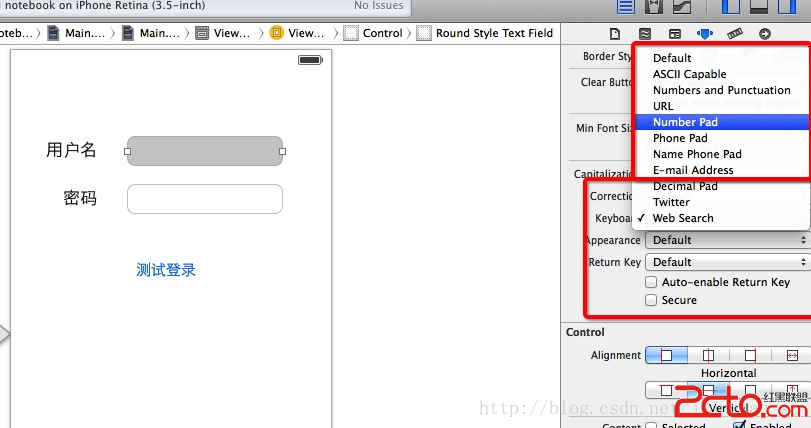
常見的鍵盤型態與適用場景:
- Default:一般文字輸入。
- Email Address: email 輸入框,鍵盤上有 @ 與 . 的快捷鍵。
- Number Pad:純數字,例如驗證碼、PIN 碼。
- Decimal Pad:數字加小數點,適合金額。
- URL:網址輸入,帶有 .com 鍵。
- Phone Pad:電話號碼。
Return Key 則可設為 Done、Next、Go、Search、Send 等,語意上應該與按下後的行為一致——例如表單最後一欄用 Done,中間欄位用 Next。
三、Alert 對話框
把提示框綁到「測試登入」按鈕上:
UIAlertView *alertView = [[UIAlertView alloc] initWithTitle:@"溫馨提示"
                                                    message:@"你好,數據已經更新完畢"
                                                   delegate:self
                                          cancelButtonTitle:@"取消"
                                          otherButtonTitles:@"確定", @"請選擇", @"請投票", nil];
[alertView show];
執行結果:
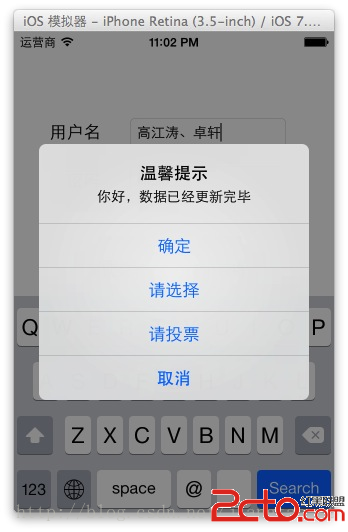
要處理使用者按了哪一顆按鈕,實作 UIAlertViewDelegate:
- (void)alertView:(UIAlertView *)alertView clickedButtonAtIndex:(NSInteger)buttonIndex {
    // cancelButtonIndex 為 0,其餘依 otherButtonTitles 的順序遞增
    NSLog(@"按下第 %ld 顆按鈕", (long)buttonIndex);
}
補充:UIAlertView 已被取代
UIAlertView 自 iOS 8 起已被標記為廢棄,新專案請改用 UIAlertController:
UIAlertController *alert = [UIAlertController alertControllerWithTitle:@"溫馨提示"
                                                               message:@"你好,數據已經更新完畢"
                                                        preferredStyle:UIAlertControllerStyleAlert];

[alert addAction:[UIAlertAction actionWithTitle:@"取消"
                                         style:UIAlertActionStyleCancel
                                       handler:nil]];
[alert addAction:[UIAlertAction actionWithTitle:@"確定"
                                         style:UIAlertActionStyleDefault
                                       handler:^(UIAlertAction * _Nonnull action) {
    NSLog(@"使用者按下確定");
}]];

[self presentViewController:alert animated:YES completion:nil];
新 API 的好處是回呼直接綁在每個 action 上,不必再靠 buttonIndex 分派,而且同一套寫法可以用在 action sheet。
範例原始出處:https://download.csdn.net/detail/jiangtao_st/7684869
- 上一篇文章: iOS_13:UITableView 編輯模式實作(紅樓夢資料範例)
- 下一篇文章: iOS 學習筆記:Swift 自定義運算子實作