
iOS 聲詞同步實作:用 CADisplayLink 讓朗讀文字跟著音檔走
編輯:iOS 開發綜合
有聲書、兒童故事這類 App,最有質感的細節就是「唸到哪一句,哪一句就亮起來」。這個效果的原理並不複雜,核心在於即時比對播放進度與每句話的起始時間。以下用一個朗讀故事為例完整示範。
最終效果圖:

一、資料模型:一句話就是一個物件
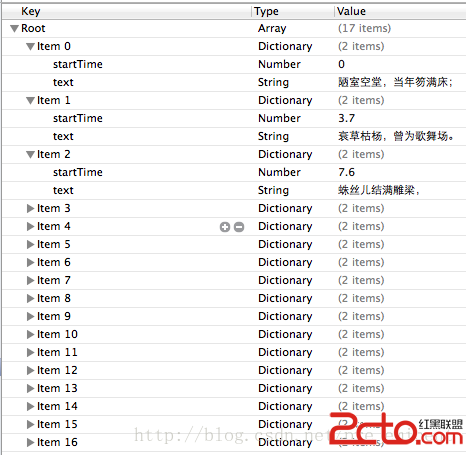
// Sentence.h —— 代表文章中「一句話」
#import <Foundation/Foundation.h>

@interface Sentence : NSObject
@property (nonatomic, copy)   NSString *text;      // 這句話的文字
@property (nonatomic, assign) double    startTime; // 在音檔中開始朗讀的秒數
@end
二、控制器:時鐘 + 播放器 + 表格
#import "BeyondController.h"
#import "Sentence.h"
#import "SongTool.h"

@interface BeyondController ()

@property (nonatomic, strong) NSArray        *sentenceArr;    // 所有句子
@property (nonatomic, strong) CADisplayLink  *link;           // 螢幕刷新時鐘
@property (nonatomic, strong) AVAudioPlayer  *sentencePlayer; // 朗讀音檔播放器

@end

@implementation BeyondController

// 懶載入:時鐘,綁定 update 方法
- (CADisplayLink *)link
{
    if (!_link) {
        _link = [CADisplayLink displayLinkWithTarget:self
                                            selector:@selector(update)];
    }
    return _link;
}

// 懶載入:從 plist 的字典陣列轉成模型物件陣列
- (NSArray *)sentenceArr
{
    if (!_sentenceArr) {
        _sentenceArr = [Sentence objectArrayWithFilename:@"redStory.plist"];
    }
    return _sentenceArr;
}

- (void)viewDidLoad
{
    [super viewDidLoad];

    // 朗讀音檔要另外用變數記住,才能讀到 currentTime
    self.sentencePlayer = [SongTool playMusic:@"一東.mp3"];

    // 背景音樂則播完就好
    [SongTool playMusic:@"Background.caf"];

    // 把時鐘掛到主 RunLoop 上,開始監聽
    [self.link addToRunLoop:[NSRunLoop mainRunLoop] forMode:NSDefaultRunLoopMode];

    self.tableView.contentInset = UIEdgeInsetsMake(20, 0, 0, 0);
}
三、重點:時鐘回呼中的區間比對
- (void)update
{
    // 取得目前播放到第幾秒
    double currentTime = self.sentencePlayer.currentTime;

    int count = (int)self.sentenceArr.count;

    for (int i = 0; i < count; i++) {
        Sentence *s = self.sentenceArr[i];

        // 找出下一句,注意避免陣列越界
        int next = i + 1;
        Sentence *nextS = (next < count) ? self.sentenceArr[next] : nil;

        // 關鍵判斷:目前時間落在 [s.startTime, nextS.startTime) 區間內
        if (currentTime >= s.startTime && currentTime < nextS.startTime) {
            NSIndexPath *path = [NSIndexPath indexPathForRow:i inSection:0];
            [self.tableView selectRowAtIndexPath:path
                                        animated:YES
                                  scrollPosition:UITableViewScrollPositionTop];
            break; // 找到就離開,避免後續覆蓋
        }
    }
}
四、表格資料源
- (NSInteger)tableView:(UITableView *)tableView
 numberOfRowsInSection:(NSInteger)section
{
    return self.sentenceArr.count;
}

- (UITableViewCell *)tableView:(UITableView *)tableView
         cellForRowAtIndexPath:(NSIndexPath *)indexPath
{
    static NSString *cellID = @"Sentence";
    UITableViewCell *cell = [tableView dequeueReusableCellWithIdentifier:cellID];
    if (cell == nil) {
        cell = [[UITableViewCell alloc] initWithStyle:UITableViewCellStyleSubtitle
                                      reuseIdentifier:cellID];
    }

    Sentence *s = self.sentenceArr[indexPath.row];
    cell.textLabel.text = s.text;
    return cell;
}

@end
五、為什麼選 CADisplayLink 而不是 NSTimer
CADisplayLink 是與螢幕刷新同步的計時器,每次畫面更新就會回呼一次,因此高亮切換的時機能對齊畫面,視覺上更順。相較之下 NSTimer 的觸發頻率與顯示週期沒有關聯,容易出現「文字先跳、畫面後到」的落差。
幾個實作上值得注意的地方:
- 記得停止時鐘:在
viewDidDisappear或播放結束時呼叫[self.link invalidate],否則時鐘會持續佔用資源。 - 避免逐格遍歷:句子數量多時,每帧 60 次的全量遍歷會有成本。因為歌詞是時間遞增的,可以用二分搜尋或直接記錄目前索引,只往後找。
- 逐字高亮:若要做到卡拉 OK 式的逐字上色,需要每個字都有 startTime,並改用 attributedText 的漸層渲染,資料量會大得多。
把「音檔時間軸」與「文字序列」用區間比對串起來,聲詞同步就完成了,後續要擴充成多語朗讀或字幕顯示,都是同一套邏輯。