
iOS 第三方庫實作:BlurAlertView 毛玻璃彈窗(搭配 GPUImage)
編輯:iOS 開發綜合
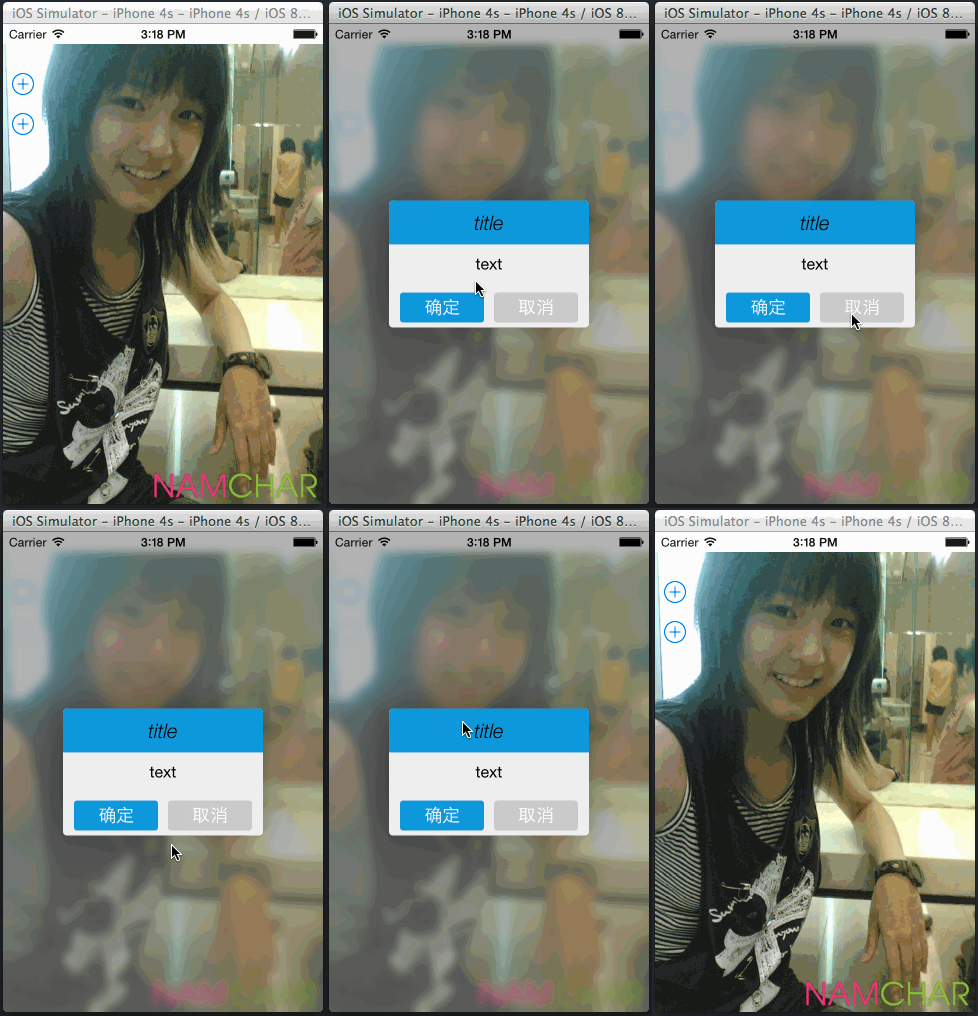
本文實作一個背景毛玻璃、並帶有彈跳或落下動畫的特效彈出框,模糊效果由 GPUImage 提供。
最終效果圖:
準備工作
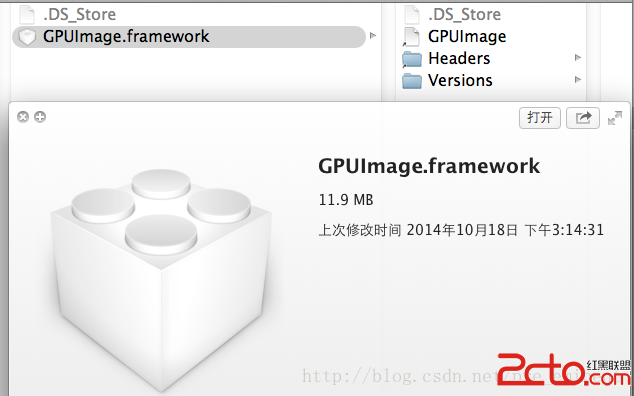
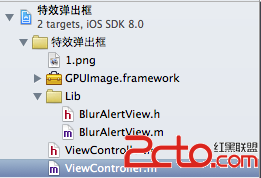
先將 GPUImage.framework 加入專案:
BlurAlertView 標頭檔
// BlurAlertView.h
#import <UIKit/UIKit.h>
// 必須先匯入 GPUImage.framework
#import <GPUImage/GPUImage.h>

@class BlurAlertView;
@protocol BlurAlertViewDelegate;

typedef NS_ENUM(NSInteger, BlurAlertViewAnimationType) {
    BlurAlertViewAnimationTypeBounce,  // 彈跳
    BlurAlertViewAnimationTypeDrop     // 落下
};

typedef NS_ENUM(NSInteger, BlurAlertViewContentType) {
    BlurAlertViewContentTypeText,      // 純文字
    BlurAlertViewContentTypeCustomView // 自訂內容
};

@interface BlurAlertView : UIView
@property (nonatomic, strong) UIButton *okButton;
@property (nonatomic, strong) UIButton *cancelButton;
@property (nonatomic, assign) BlurAlertViewAnimationType animationType;
@property (nonatomic, weak) id<BlurAlertViewDelegate> delegate;
@property (nonatomic, copy) void (^completionBlock)(BlurAlertView *alertView, UIButton *button);

- (id)initWithTitle:(NSString *)title text:(NSString *)text cancelButton:(BOOL)hasCancelButton;
- (id)initWithTitle:(NSString *)title contentView:(UIView *)contentView cancelButton:(BOOL)hasCancelButton;
- (void)show;
- (void)dismiss;
@end

@protocol BlurAlertViewDelegate <NSObject>
@optional
- (void)alertView:(BlurAlertView *)alertView didDismissWithButton:(UIButton *)button;
- (void)alertViewWillShow:(BlurAlertView *)alertView;
- (void)alertViewDidShow:(BlurAlertView *)alertView;
- (void)alertViewWillDismiss:(BlurAlertView *)alertView;
- (void)alertViewDidDismiss:(BlurAlertView *)alertView;
@end

/*
 使用方式一:標題 + 文字
 BlurAlertView *alertView = [[BlurAlertView alloc] initWithTitle:@"title"
                                                          text:@"this is text"
                                                  cancelButton:YES];
 alertView.animationType = BlurAlertViewAnimationTypeDrop;
 [alertView setCompletionBlock:^(BlurAlertView *alert, UIButton *button) {
     if (button == alert.okButton) {
         NSLog(@"ok button touched!");
     } else {
         NSLog(@"cancel button touched!");
     }
 }];
 [alertView show];

 使用方式二:自訂內容視圖
 UIView *contentView = [[UIView alloc] initWithFrame:CGRectMake(0, 0, 180, 180)];
 contentView.backgroundColor = [UIColor blackColor];
 BlurAlertView *alertView = [[BlurAlertView alloc] initWithTitle:@"title"
                                                    contentView:contentView
                                                   cancelButton:YES];
 [alertView show];
 */
BlurAlertView 實作
// BlurAlertView.m
static const float AlertViewTitleLabelHeight = 44.0;
static const float AlertViewSpaceHeight = 10;
static const float AlertViewDefaultTextFontSize = 16;

#define RJTitleLabelBackgroundColor [UIColor colorWithRed:0.204 green:0.596 blue:0.859 alpha:1.0]
#define RJComfirmButtonColor        [UIColor colorWithRed:0.204 green:0.596 blue:0.859 alpha:1.0]
#define screenBounds [[UIScreen mainScreen] bounds]
#define IS_IOS7_Or_Later ([[[UIDevice currentDevice] systemVersion] floatValue] >= 7.0)

@interface BlurAlertView ()
@property (nonatomic, strong) GPUImageiOSBlurFilter *blurFilter;
@property (nonatomic, strong) UIView *alertView;
@property (nonatomic, strong) UIImageView *backgroundView;
@property (nonatomic, strong) UILabel *titleLabel;
@property (nonatomic, strong) UILabel *textLabel;
@property (nonatomic, assign) CGSize contentSize;
@property (nonatomic, assign) BlurAlertViewContentType contentType;
@property (nonatomic, strong) UIView *contentView;
@end

@implementation BlurAlertView

- (id)initWithTitle:(NSString *)title contentView:(UIView *)contentView cancelButton:(BOOL)hasCancelButton {
    self = [super initWithFrame:screenBounds];
    if (self) {
        self.opaque = YES;
        self.alpha = 1;
        _contentType = BlurAlertViewContentTypeCustomView;
        _contentView = contentView;
        [self _setupViewsWithTitle:title text:nil cancelButton:hasCancelButton];
    }
    return self;
}

- (id)initWithTitle:(NSString *)title text:(NSString *)text cancelButton:(BOOL)hasCancelButton {
    self = [super initWithFrame:screenBounds];
    if (self) {
        self.opaque = YES;
        self.alpha = 1;
        _contentType = BlurAlertViewContentTypeText;
        [self _setupViewsWithTitle:title text:text cancelButton:hasCancelButton];
    }
    return self;
}

#pragma mark - Show and Dismiss
- (void)show {
    if ([self.delegate respondsToSelector:@selector(alertViewWillShow:)]) {
        [self.delegate alertViewWillShow:self];
    }

    switch (self.animationType) {
        case BlurAlertViewAnimationTypeBounce:
            [self triggerBounceAnimations];
            break;
        case BlurAlertViewAnimationTypeDrop:
            [self triggerDropAnimations];
            break;
        default:
            break;
    }

    [[[[UIApplication sharedApplication] delegate] window] addSubview:self];
}

- (void)dismiss {
    if ([self.delegate respondsToSelector:@selector(alertViewWillDismiss:)]) {
        [self.delegate alertViewWillDismiss:self];
    }

    [UIView animateWithDuration:0.4
                          delay:0.0
                        options:UIViewAnimationOptionCurveEaseInOut
                     animations:^{ self.alpha = 0; }
                     completion:^(BOOL finished) {
        [self removeFromSuperview];
        if ([self.delegate respondsToSelector:@selector(alertViewDidDismiss:)]) {
            [self.delegate alertViewDidDismiss:self];
        }
    }];
}

#pragma mark - Animations
- (void)triggerBounceAnimations {
    self.alertView.alpha = 0;
    self.alertView.center = CGPointMake(CGRectGetWidth(screenBounds) / 2,
                                        CGRectGetHeight(screenBounds) / 2);

    CAKeyframeAnimation *animation = [CAKeyframeAnimation animationWithKeyPath:@"transform"];
    animation.duration = 0.3f;
    animation.removedOnCompletion = NO;
    animation.fillMode = kCAFillModeForwards;

    NSMutableArray *values = [NSMutableArray array];
    [values addObject:[NSValue valueWithCATransform3D:CATransform3DMakeScale(0.1, 0.1, 1.0)]];
    [values addObject:[NSValue valueWithCATransform3D:CATransform3DMakeScale(1.2, 1.2, 1.0)]];
    [values addObject:[NSValue valueWithCATransform3D:CATransform3DMakeScale(1.0, 1.0, 1.0)]];
    animation.values = values;
    animation.timingFunction = [CAMediaTimingFunction functionWithName:kCAMediaTimingFunctionEaseInEaseOut];
    [self.alertView.layer addAnimation:animation forKey:nil];

    [UIView animateWithDuration:0.3f
                          delay:0
                        options:UIViewAnimationOptionAllowUserInteraction |
                                UIViewAnimationCurveEaseIn |
                                UIViewAnimationOptionBeginFromCurrentState
                     animations:^{
        [self.backgroundView setAlpha:1.0];
        [self.alertView setAlpha:1.0];
    } completion:^(BOOL finished) {
        if ([self.delegate respondsToSelector:@selector(alertViewDidShow:)]) {
            [self.delegate alertViewDidShow:self];
        }
    }];
}

- (void)triggerDropAnimations {
    CAKeyframeAnimation *animation = [CAKeyframeAnimation animationWithKeyPath:@"position"];
    animation.duration = 0.4f;
    animation.removedOnCompletion = NO;
    animation.fillMode = kCAFillModeForwards;

    CGFloat h = self.alertView.frame.size.height;
    NSMutableArray *values = [NSMutableArray array];
    [values addObject:[NSValue valueWithCGPoint:CGPointMake(screenBounds.size.width / 2, -h)]];
    [values addObject:[NSValue valueWithCGPoint:CGPointMake(screenBounds.size.width / 2, (screenBounds.size.height / 2) + h * 0.05)]];
    [values addObject:[NSValue valueWithCGPoint:CGPointMake(screenBounds.size.width / 2, (screenBounds.size.height / 2))]];
    [values addObject:[NSValue valueWithCGPoint:CGPointMake(screenBounds.size.width / 2, (screenBounds.size.height / 2) - h * 0.05)]];
    [values addObject:[NSValue valueWithCGPoint:CGPointMake(screenBounds.size.width / 2, (screenBounds.size.height / 2))]];
    animation.values = values;
    animation.timingFunction = [CAMediaTimingFunction functionWithName:kCAMediaTimingFunctionEaseInEaseOut];
    [self.alertView.layer addAnimation:animation forKey:nil];

    [UIView animateWithDuration:0.4
                          delay:0.0
                        options:UIViewAnimationOptionCurveEaseOut
                     animations:^{ self.backgroundView.alpha = 1.0; }
                     completion:^(BOOL finished) {
        if ([self.delegate respondsToSelector:@selector(alertViewDidShow:)]) {
            [self.delegate alertViewDidShow:self];
        }
    }];
}

#pragma mark - View Setup
- (void)_setupViewsWithTitle:(NSString *)title text:(NSString *)aText cancelButton:(BOOL)hasCancelButton {
    [self calculateContentSize:aText];

    // 1. 背景模糊層:把目前畫面截圖後做高斯模糊
    _blurFilter = [[GPUImageiOSBlurFilter alloc] init];
    _blurFilter.blurRadiusInPixels = 2.0;
    _backgroundView = [[UIImageView alloc] initWithFrame:screenBounds];
    UIImage *image = [self _convertViewToImage];
    UIImage *blurredSnapshotImage = [_blurFilter imageByFilteringImage:image];
    [self.backgroundView setImage:blurredSnapshotImage];
    self.backgroundView.alpha = 0.0;
    [self addSubview:self.backgroundView];

    // 2. 彈窗本體
    self.alertView = [self _alertPopupView];

    // 3. 標題與內容
    [self _labelSetupWithTitle:title andText:aText];
    [self addSubview:self.alertView];

    // 4. 按鈕
    [self _buttonSetupWithCancelButton:hasCancelButton];
}

- (void)_labelSetupWithTitle:(NSString *)title andText:(NSString *)text {
    _titleLabel = [[UILabel alloc] initWithFrame:CGRectMake(0, 0, 180, AlertViewTitleLabelHeight)];
    _titleLabel.center = CGPointMake(CGRectGetWidth(self.alertView.frame) / 2, AlertViewTitleLabelHeight / 2);
    _titleLabel.text = title;
    _titleLabel.font = [UIFont fontWithName:@"HelveticaNeue-LightItalic" size:20.0f];
    _titleLabel.textAlignment = NSTextAlignmentCenter;
    [self.alertView addSubview:_titleLabel];

    if (self.contentType == BlurAlertViewContentTypeText) {
        _textLabel = [[UILabel alloc] initWithFrame:CGRectMake(0, 0, 180, self.contentSize.height)];
        _textLabel.center = CGPointMake(self.alertView.frame.size.width / 2,
                                       CGRectGetHeight(self.alertView.frame) / 2);
        _textLabel.text = text;
        _textLabel.font = [UIFont fontWithName:@"HelveticaNeue" size:AlertViewDefaultTextFontSize];
        _textLabel.textAlignment = NSTextAlignmentCenter;
        _textLabel.lineBreakMode = NSLineBreakByWordWrapping;
        _textLabel.numberOfLines = 0;
        [self.alertView addSubview:_textLabel];
    } else {
        self.contentView.center = CGPointMake(self.alertView.frame.size.width / 2,
                                             CGRectGetHeight(self.alertView.frame) / 2);
        [self.alertView addSubview:self.contentView];
    }
}

- (UIView *)_alertPopupView {
    UIView *alertSquare = [[UIView alloc] initWithFrame:CGRectMake(
        0, 0, 200,
        AlertViewTitleLabelHeight + 2 * AlertViewSpaceHeight + self.contentSize.height + AlertViewTitleLabelHeight)];
    alertSquare.backgroundColor = [UIColor colorWithRed:0.937 green:0.937 blue:0.937 alpha:1];
    alertSquare.center = CGPointMake(CGRectGetWidth(screenBounds) / 2, CGRectGetHeight(screenBounds) / 2);
    [alertSquare.layer setCornerRadius:4.0];
    [alertSquare.layer setShadowColor:[UIColor blackColor].CGColor];
    [alertSquare.layer setShadowOpacity:0.4];
    [alertSquare.layer setShadowRadius:20.0f];
    [alertSquare.layer setShadowOffset:CGSizeMake(0.0, 0.0)];

    // 頂部只有上兩角圓角的色塊
    CAShapeLayer *topBackgroundLayer = [CAShapeLayer layer];
    UIBezierPath *topBackgroundPath = [UIBezierPath bezierPathWithRoundedRect:
        CGRectMake(0, 0, CGRectGetWidth(alertSquare.frame), AlertViewTitleLabelHeight)
        byRoundingCorners:UIRectCornerTopLeft | UIRectCornerTopRight
              cornerRadii:CGSizeMake(4.0, 4.0)];
    topBackgroundLayer.path = topBackgroundPath.CGPath;
    topBackgroundLayer.fillColor = RJTitleLabelBackgroundColor.CGColor;
    [alertSquare.layer addSublayer:topBackgroundLayer];

    return alertSquare;
}

- (void)_buttonSetupWithCancelButton:(BOOL)hasCancelButton {
    CGFloat buttonCenterY = (CGRectGetHeight(self.alertView.frame) * 2 - 30 - AlertViewSpaceHeight) / 2;

    if (hasCancelButton) {
        _okButton = [[UIButton alloc] initWithFrame:CGRectMake(0, 0, 84, 30)];
        _okButton.center = CGPointMake((CGRectGetWidth(self.alertView.frame) / 4) + 3, buttonCenterY);

        _cancelButton = [[UIButton alloc] initWithFrame:CGRectMake(0, 0, 84, 30)];
        _cancelButton.center = CGPointMake((CGRectGetWidth(self.alertView.frame) * 3 / 4) - 3, buttonCenterY);
        _cancelButton.backgroundColor = [UIColor colorWithRed:0.792 green:0.792 blue:0.792 alpha:1];
        [_cancelButton setTitle:@"取消" forState:UIControlStateNormal];
        _cancelButton.titleLabel.textColor = [UIColor whiteColor];
        _cancelButton.titleLabel.font = [UIFont fontWithName:@"HelveticaNeue" size:18.0f];
        [_cancelButton addTarget:self action:@selector(handleButtonTouched:) forControlEvents:UIControlEventTouchUpInside];
        [_cancelButton.layer setCornerRadius:3.0f];
    } else {
        _okButton = [[UIButton alloc] initWithFrame:CGRectMake(0, 0, 180, 30)];
        _okButton.center = CGPointMake(CGRectGetWidth(self.alertView.frame) / 2, buttonCenterY);
    }

    [_okButton setBackgroundColor:RJComfirmButtonColor];
    [_okButton setTitle:@"確定" forState:UIControlStateNormal];
    _okButton.titleLabel.font = [UIFont fontWithName:@"HelveticaNeue" size:18.0f];
    [_okButton addTarget:self action:@selector(handleButtonTouched:) forControlEvents:UIControlEventTouchUpInside];
    [_okButton.layer setCornerRadius:3.0f];
    [self.alertView addSubview:_okButton];

    if (hasCancelButton) {
        [self.alertView addSubview:_cancelButton];
    }
}

- (void)calculateContentSize:(NSString *)text {
    UIFont *font = [UIFont fontWithName:@"HelveticaNeue" size:AlertViewDefaultTextFontSize];
    CGSize constrainedSize = CGSizeMake(180, CGFLOAT_MAX);

    if (IS_IOS7_Or_Later) {
        NSDictionary *tdic = [NSDictionary dictionaryWithObjectsAndKeys:font, NSFontAttributeName, nil];
        self.contentSize = [text boundingRectWithSize:constrainedSize
                                             options:NSStringDrawingUsesLineFragmentOrigin |
                                                     NSStringDrawingUsesFontLeading
                                          attributes:tdic
                                             context:nil].size;
    } else {
#pragma clang diagnostic push
#pragma clang diagnostic ignored "-Wdeprecated-declarations"
        self.contentSize = [text sizeWithFont:font
                           constrainedToSize:constrainedSize
                               lineBreakMode:NSLineBreakByCharWrapping];
#pragma clang diagnostic pop
    }

    if (self.contentType == BlurAlertViewContentTypeCustomView) {
        self.contentSize = self.contentView.bounds.size;
    }
}

// 把目前 keyWindow 的畫面擷取成 UIImage
- (UIImage *)_convertViewToImage {
    UIWindow *keyWindow = [[UIApplication sharedApplication] keyWindow];
    CGRect rect = [keyWindow bounds];
    UIGraphicsBeginImageContextWithOptions(rect.size, YES, 0.0f);
    CGContextRef context = UIGraphicsGetCurrentContext();
    [keyWindow.layer renderInContext:context];
    UIImage *capturedScreen = UIGraphicsGetImageFromCurrentImageContext();
    UIGraphicsEndImageContext();
    return capturedScreen;
}

#pragma mark - Button Action
- (void)handleButtonTouched:(UIButton *)button {
    [self dismiss];
    if ([self.delegate respondsToSelector:@selector(alertView:didDismissWithButton:)]) {
        [self.delegate alertView:self didDismissWithButton:button];
    }
    if (self.completionBlock) {
        self.completionBlock(self, button);
    }
}
@end
主控制器使用範例
// ViewController.m
#import "BlurAlertView.h"

@implementation ViewController

- (void)viewDidLoad {
    [super viewDidLoad];

    // 背景圖片
    UIImageView *imageView = [[UIImageView alloc] initWithFrame:CGRectMake(0, 20, 320, 460)];
    imageView.image = [UIImage imageNamed:@"1.png"];
    imageView.contentMode = UIViewContentModeScaleAspectFill;
    [self.view addSubview:imageView];

    // 兩個按鈕分別觸發兩種動畫
    UIButton *btn = [UIButton buttonWithType:UIButtonTypeContactAdd];
    btn.frame = CGRectMake(0, 40, 40, 40);
    [btn addTarget:self action:@selector(showAlertView) forControlEvents:UIControlEventTouchUpInside];
    [self.view addSubview:btn];

    UIButton *btn2 = [UIButton buttonWithType:UIButtonTypeContactAdd];
    btn2.frame = CGRectMake(0, 80, 40, 40);
    [btn2 addTarget:self action:@selector(showAlertView2) forControlEvents:UIControlEventTouchUpInside];
    [self.view addSubview:btn2];
}

#pragma mark - 第三方提醒控件
- (void)showAlertView {
    BlurAlertView *alertView = [[BlurAlertView alloc] initWithTitle:@"title"
                                                              text:@"text"
                                                      cancelButton:YES];
    alertView.animationType = BlurAlertViewAnimationTypeBounce;

    [alertView setCompletionBlock:^(BlurAlertView *alert, UIButton *button) {
        if (button == alert.okButton) {
            NSLog(@"ok button touched!");
        } else {
            NSLog(@"cancel button touched!");
        }
    }];
    [alertView show];
}

- (void)showAlertView2 {
    BlurAlertView *alertView = [[BlurAlertView alloc] initWithTitle:@"title"
                                                              text:@"text"
                                                      cancelButton:YES];
    alertView.animationType = BlurAlertViewAnimationTypeDrop;

    [alertView setCompletionBlock:^(BlurAlertView *alert, UIButton *button) {
        if (button == alert.okButton) {
            NSLog(@"ok button touched!");
        } else {
            NSLog(@"cancel button touched!");
        }
    }];
    [alertView show];
}
@end
值得借鑑的兩個設計
背景模糊的做法。它不是即時模糊背後的所有視圖,而是先對 keyWindow 截圖,再用 GPUImageiOSBlurFilter 對這張靜態圖做模糊。好處是效能成本單次、實作簡單;代價是背景在彈窗顯示期間不會更新,屬於可接受的取捨。
回呼設計的雙軌制。同時提供 delegate 與 completionBlock 兩種回呼方式,讓呼叫端可以依情境挑選。注意 delegate 宣告為 weak,避免循環引用;而 block 屬性用 copy,這是 Objective-C 中 block 屬性該有的寫法。