
iOS:JavaScript 直接調用 OC 代碼的實現
之前一個 iOS 項目中,需要通過 UIWebView 打開一個靜態頁面,並在頁面中調用相關 Objective-C 代碼。
一、以前使用 JS 調用 OC 的方法
關於如何用 JavaScript 調用 OC 中的方法,網上主流做法是在 UIWebView 加載的 JS 代碼中,通過改變 document.location,然後回調 shouldStartLoadWithRequest:navigationType: 方法,在其中截取 NSURLRequest 解析 JS 傳來的參數,再據此選擇預定義的方法。這種方式繞彎且繁瑣。
後來我偶然知道了 javascriptCore.framework 這個庫,事情便有了轉機。
二、在 JS 中直接調用 OC 的方法
首先建立一個 UIWebView,代碼如下:
// // webview.m // login // // Created by wangdan on 15-3-19. // Copyright (c) 2015年 wangdan. All rights reserved. // #import "webview.h" #import@implementation webview -(id)initWithFrame:(CGRect)frame { self=[super initWithFrame:frame]; if( self ){ self.webview=[[UIWebView alloc]initWithFrame:CGRectMake(0, 310, self.bounds.size.width, 300)]; self.webview.backgroundColor=[UIColor lightGrayColor]; NSString *htmlPath=[[NSBundle mainBundle] resourcePath]; htmlPath=[htmlPath stringByAppendingPathComponent:@"html/index.html"]; NSURL *localURL=[[NSURL alloc]initFileURLWithPath:htmlPath]; [self.webview loadRequest:[NSURLRequest requestWithURL:localURL]]; [self addSubview:self.webview]; JSContext *context = [self.webview valueForKeyPath:@"documentView.webView.mainFrame.javaScriptContext"]; context[@"log"] = ^() { NSLog(@"+++++++Begin Log+++++++"); NSArray *args = [JSContext currentArguments]; for (JSValue *jsVal in args) { NSLog(@"%@", jsVal); } JSValue *this = [JSContext currentThis]; NSLog(@"this: %@",this); NSLog(@"-------End Log-------"); }; } return self; } @end
(1) 使用 javascriptCore.framework,先讓 UIWebView 加載一個靜態網頁,再通過以下語句獲取該 UIWebView 的 JS 執行環境:
JSContext *context = [self.webview valueForKeyPath:@"documentView.webView.mainFrame.javaScriptContext"];
(2) 在該 JS 環境中定義一個函數,關鍵點在於——這個函數的執行體完全是用 Objective-C 代碼寫的:
context[@"jakilllog"] = ^() { NSLog(@"Begin Log"); NSArray *args = [JSContext currentArguments]; for (JSValue *jsVal in args) { NSLog(@"%@", jsVal); } JSValue *this = [JSContext currentThis]; NSLog(@"-------End Log-------"); };
(3) 那麼,如果 JS 執行 log 這個函數,是否會調用上面 OC 中的 block 呢?答案是肯定的。
下面看看 UIWebView 加載的 html 及其 JS 代碼。
(4) index.html 代碼:
<script type="text/javascript" src="index.js"></script>上面 html 定義了一個 button,引用 index.js,點擊響應函數為 buttonClick(),該函數在 index.js 中定義:
function buttonClick() { jakilllog("hello world"); }
意思是點擊這個 button 就調用 jakilllog() 函數,而它顯然就是我們在 OC 中實現的那段 block。
點擊 button 確實能執行 OC 中的代碼,如下圖所示:

執行結果:
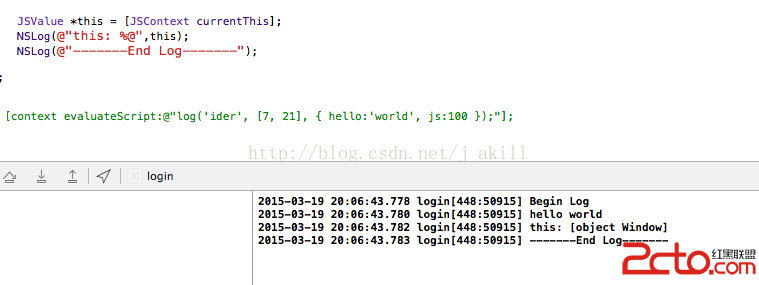
由此可見,直接從 JS 調用 OC 的意圖成功達成。
- 上一篇文章: iOS 撥打電話、發短信、發郵件等系統功能調用
- 下一篇文章: iOS 實時監聽 UITextField 文本值的變化