
iOS 自定義控件實戰(三):UITableViewCell 側滑菜單
編輯:iOS 開發綜合
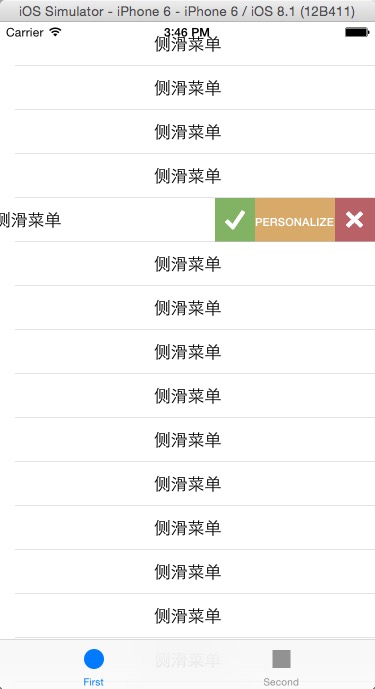
系統的側滑刪除很好用,但限制也多:只能有一個按鈕、只能放文字、樣式無法客製。真實專案裡常常需要「歸檔、標記已讀、刪除」這種多項、帶圖標、自訂配色的菜單,系統控件顯然不夠用。本文手寫一個可高度客製的側滑菜單 Cell。
能力清單
- 菜單項數量不限,每項可獨立設定標題、文字顏色、背景色、背景圖、常態/選中圖標與寬度。
- 手勢驅動:跟手拖動,放開後依拖動距離自動吸附到「展開」或「收起」。
- 批量收起:滾動列表或點擊其他 Cell 時,把已展開的菜單自動關上。
- 代理回饋:拖動過程與結束狀態透過 delegate 回傳,方便宿主列表按需處理。
頭文件
//
//  WHC_MenuCell.h
//

#import <UIKit/UIKit.h>

@class WHC_MenuCell;

@protocol WHC_MenuCellDelegate <NSObject>
- (BOOL)WHC_MenuCell:(WHC_MenuCell *)whcCell didPullCell:(NSInteger)index;
@end

@interface WHC_MenuCell : UITableViewCell

@property (nonatomic, assign) CGFloat menuViewWidth;        // 菜單總寬度
@property (nonatomic, retain) NSArray *menuItemTitles;      // 各項標題
@property (nonatomic, retain) NSArray *menuItemTitleColors; // 各項文字顏色
@property (nonatomic, retain) NSArray *menuItemBackImages;  // 各項背景圖
@property (nonatomic, retain) NSArray *menuItemNormalImages;// 各項常態圖標
@property (nonatomic, retain) NSArray *menuItemSelectedImages; // 各項選中圖標
@property (nonatomic, retain) NSArray *menuItemBackColors;  // 各項背景色
@property (nonatomic, retain) NSArray *menuItemWidths;      // 各項寬度
@property (nonatomic, strong) UIView  *ContentView;         // 自定義內容視圖
@property (nonatomic, assign) CGFloat  fontSize;            // 字體大小
@property (nonatomic, assign) NSInteger index;              // Cell 下標
@property (nonatomic, assign) id<WHC_MenuCellDelegate> delegate;

- (void)clickMenuItem:(UIButton *)sender;                   // 點擊菜單項
- (BOOL)closeCellWithAnimation:(BOOL)b;                     // 關閉自身菜單
- (BOOL)closeCellWithTableView:(UITableView *)tableView
                         index:(NSInteger)index
                     animation:(BOOL)b;                       // 批量關閉菜單
- (void)startScrollviewCell:(BOOL)state x:(CGFloat)moveX;   // 拖動中
- (void)didEndScrollViewCell:(BOOL)state;                    // 拖動結束

@end
實作要點
//
//  WHC_MenuCell.m
//

#import "WHC_MenuCell.h"

#define KWHC_MENUCELL_ANMATION_PADING (10.0)

@interface WHC_MenuCell () <UIGestureRecognizerDelegate> {
    BOOL    _isOpen;        // 菜單是否展開
    BOOL    _isScorllClose; // 是否隨列表滾動關閉
    CGFloat _startX;        // 起始 x 坐標
    UIView  *_menuView;     // 菜單容器
    UIPanGestureRecognizer *_panGesture;
}
@end

@implementation WHC_MenuCell

#pragma mark - 界面搭建

- (void)initUI {
    _panGesture = [[UIPanGestureRecognizer alloc] initWithTarget:self action:@selector(handlePanGesture:)];
    _panGesture.delegate = self;
    [self.contentView addGestureRecognizer:_panGesture];

    UITapGestureRecognizer *tapGesture =
        [[UITapGestureRecognizer alloc] initWithTarget:self action:@selector(handleTapGestrue:)];
    tapGesture.delegate = self;
    [self.contentView addGestureRecognizer:tapGesture];

    // 各項數組給安全預設值,避免後續取值越界
    if (_menuItemTitles      == nil) _menuItemTitles      = @[];
    if (_menuItemBackImages == nil) _menuItemBackImages = @[];
    if (_menuItemBackColors == nil) _menuItemBackColors = @[[UIColor redColor]];
    if (_menuItemTitleColors == nil) _menuItemTitleColors = @[[UIColor blackColor]];
    if (_menuItemWidths     == nil) _menuItemWidths     = @[];
    if (_menuItemNormalImages   == nil) _menuItemNormalImages   = @[];
    if (_menuItemSelectedImages == nil) _menuItemSelectedImages = @[];

    CGFloat _menuViewX = CGRectGetWidth(_ContentView.frame) - _menuViewWidth;
    _menuView = [[UIView alloc]
                 initWithFrame:CGRectMake(_menuViewX + CGRectGetMinX(_ContentView.frame),
                                          0.0,
                                          _menuViewWidth,
                                          CGRectGetHeight(_ContentView.frame))];
    _menuView.backgroundColor = [UIColor clearColor];
    // 菜單墊在內容視圖下方,滑開後才露出來
    [self.contentView insertSubview:_menuView belowSubview:_ContentView];

    NSInteger menuItemCount          = _menuItemTitles.count;
    NSInteger menuBackImageCount     = _menuItemBackImages.count;
    NSInteger menuBackColorCount     = _menuItemBackColors.count;
    NSInteger menuTitleColorCount    = _menuItemTitleColors.count;
    NSInteger menuItemWidthCount     = _menuItemWidths.count;
    NSInteger menuItemNormalImageCount   = _menuItemNormalImages.count;
    NSInteger menuItemSelectedImageCount = _menuItemSelectedImages.count;

    CGFloat btnWidth = _menuViewWidth / (CGFloat)menuItemCount;

    // 累計寬度,供自訂寬度模式使用
    CGFloat (^currentWidth)(NSInteger i) = ^(NSInteger i) {
        CGFloat width = 0.0;
        for (NSInteger j = 0; j <= i; j++) {
            width += [_menuItemWidths[j] floatValue];
        }
        return width;
    };

    for (NSInteger i = 0; i < menuItemCount; i++) {
        UIButton *btn = [UIButton buttonWithType:UIButtonTypeCustom];
        btn.tag = i;
        CGRect btnRc = CGRectMake(i * btnWidth, 0.0, btnWidth, CGRectGetHeight(_ContentView.frame));
        btn.frame = btnRc;

        // 若提供了與項目數一致的寬度數組,改用自訂寬度
        if (menuItemWidthCount == menuItemCount) {
            btnRc.origin.x    = currentWidth(i - 1);
            btnRc.size.width  = [_menuItemWidths[i] floatValue];
            btn.frame = btnRc;
        }

        [btn setTitle:_menuItemTitles[i] forState:UIControlStateNormal];

        // 文字顏色:不足則沿用最後一項
        NSInteger titleColorIndex = i;
        if (titleColorIndex >= menuTitleColorCount) {
            titleColorIndex = menuTitleColorCount - 1;
            if (titleColorIndex < 0) titleColorIndex = 0;
        }
        [btn setTitleColor:_menuItemTitleColors[titleColorIndex] forState:UIControlStateNormal];

        // 背景圖
        NSInteger imageIndex = i;
        if (imageIndex >= menuBackImageCount) {
            imageIndex = menuBackImageCount - 1;
            if (imageIndex < 0) imageIndex = 0;
        }
        if (imageIndex < menuBackImageCount) {
            [btn setBackgroundImage:[UIImage imageNamed:_menuItemBackImages[imageIndex]]
                           forState:UIControlStateNormal];
        }

        // 背景色
        NSInteger colorIndex = i;
        if (colorIndex >= menuBackColorCount) {
            colorIndex = menuBackColorCount - 1;
            if (colorIndex < 0) colorIndex = 0;
        }
        btn.backgroundColor = _menuItemBackColors[colorIndex];

        // 圖標
        if (i < menuItemNormalImageCount) {
            NSString *imageName = _menuItemNormalImages[i];
            if (imageName != nil && imageName.length) {
                [btn setImage:[UIImage imageNamed:imageName] forState:UIControlStateNormal];
            }
            if (i < menuItemSelectedImageCount) {
                NSString *selectedImageName = _menuItemSelectedImages[i];
                if (selectedImageName != nil && selectedImageName.length) {
                    [btn setImage:[UIImage imageNamed:selectedImageName]
                         forState:UIControlStateHighlighted];
                }
            }
        }

        btn.titleLabel.minimumScaleFactor = 0.1;
        btn.titleLabel.adjustsFontSizeToFitWidth = YES;
        if (_fontSize == 0.0) _fontSize = 18.0;
        btn.titleLabel.font = [UIFont boldSystemFontOfSize:_fontSize];

        [btn addTarget:self action:@selector(clickMenuItem:) forControlEvents:UIControlEventTouchUpInside];
        [_menuView addSubview:btn];
    }
}

- (void)awakeFromNib {
    [self initUI];
}

#pragma mark - 關閉邏輯

- (void)setIsScrollClose {
    _isScorllClose = NO;
}

// 供子類覆寫的觸摸監聽
- (void)startScrollviewCell:(BOOL)state x:(CGFloat)moveX {}
- (void)didEndScrollViewCell:(BOOL)state {}

- (void)clickMenuItem:(UIButton *)sender {
    [self closeCellWithAnimation:YES];
}

// 批量關閉列表中其他 Cell 的菜單
- (BOOL)closeCellWithTableView:(UITableView *)tableView
                         index:(NSInteger)index
                     animation:(BOOL)b {
    NSArray *indexPathArr = [tableView indexPathsForVisibleRows];
    BOOL handleResult = NO;
    for (NSIndexPath *indexPath in indexPathArr) {
        if (_index != indexPath.row && index > -1) {
            WHC_MenuCell *cell = (WHC_MenuCell *)[tableView cellForRowAtIndexPath:indexPath];
            [cell setIsScrollClose];
            if ([cell closeCellWithAnimation:b]) handleResult = YES;
        } else if (index <= -1) {
            WHC_MenuCell *cell = (WHC_MenuCell *)[tableView cellForRowAtIndexPath:indexPath];
            if (_index != indexPath.row) [cell setIsScrollClose];
            if ([cell closeCellWithAnimation:b]) handleResult = YES;
        }
    }
    return handleResult;
}

- (BOOL)closeCellWithAnimation:(BOOL)b {
    BOOL isClose = NO;
    if (_isOpen) {
        isClose = YES;
        if (b) {
            [UIView animateWithDuration:0.2 animations:^{
                _ContentView.transform = CGAffineTransformMakeTranslation(0.0, 0.0);
            } completion:^(BOOL finished) {
                _isOpen = NO;
                [self didEndScrollViewCell:_isOpen];
            }];
        } else {
            _ContentView.transform = CGAffineTransformMakeTranslation(0.0, 0.0);
            _isOpen = NO;
            [self didEndScrollViewCell:_isOpen];
        }
    }
    return isClose;
}

#pragma mark - 手勢處理

- (void)handlePanGesture:(UIPanGestureRecognizer *)panGesure {
    switch (panGesure.state) {
        case UIGestureRecognizerStateBegan: {
            _startX = _ContentView.transform.tx;
            _isScorllClose = [_delegate WHC_MenuCell:self didPullCell:_index];
        }
            break;
        case UIGestureRecognizerStateChanged: {
            if (_isScorllClose && _isOpen == NO) return;

            CGFloat currentX      = _ContentView.transform.tx;
            CGFloat moveDistanceX = [panGesure translationInView:panGesure.view].x;
            CGFloat velocityX     = [panGesure velocityInView:panGesure.view].x;
            CGFloat moveX         = _startX + moveDistanceX;

            if (velocityX > 0) {          // 右滑:收起
                if (currentX >= KWHC_MENUCELL_ANMATION_PADING) {
                    [panGesure setTranslation:CGPointMake(KWHC_MENUCELL_ANMATION_PADING, 0.0)
                                       inView:panGesure.view];
                    break;
                }
            } else {                      // 左滑:展開,並加入阻尼
                if (currentX < -_menuViewWidth) {
                    moveX = currentX - 0.4;
                    [panGesure setTranslation:CGPointMake(moveX, 0.0) inView:panGesure.view];
                }
            }
            _ContentView.transform = CGAffineTransformMakeTranslation(moveX, 0.0);
            [self startScrollviewCell:_isOpen x:moveDistanceX];
        }
            break;
        case UIGestureRecognizerStateCancelled:
        case UIGestureRecognizerStateEnded: {
            _isScorllClose = NO;
            if (_ContentView.transform.tx > 0.0) {
                // 反向拖動過多,先復位再回弹
                [UIView animateWithDuration:0.2 animations:^{
                    _ContentView.transform = CGAffineTransformMakeTranslation(-KWHC_MENUCELL_ANMATION_PADING, 0.0);
                } completion:^(BOOL finished) {
                    _isOpen = NO;
                    [self didEndScrollViewCell:_isOpen];
                    [UIView animateWithDuration:0.2 animations:^{
                        _ContentView.transform = CGAffineTransformMakeTranslation(0.0, 0.0);
                    }];
                }];
            } else if (_ContentView.transform.tx < 0) {
                CGFloat tx = fabsf(_ContentView.transform.tx);
                // 位移未超過一半,或已展開但未超過全寬,則收起
                if (tx < _menuViewWidth / 2.0 || (tx < _menuViewWidth && _isOpen)) {
                    [UIView animateWithDuration:0.2 animations:^{
                        _ContentView.transform = CGAffineTransformMakeTranslation(0.0, 0.0);
                    } completion:^(BOOL finished) {
                        _isOpen = NO;
                        [self didEndScrollViewCell:_isOpen];
                    }];
                } else {
                    [UIView animateWithDuration:0.2 animations:^{
                        _ContentView.transform = CGAffineTransformMakeTranslation(-_menuViewWidth, 0.0);
                    } completion:^(BOOL finished) {
                        _isOpen = YES;
                        [self didEndScrollViewCell:_isOpen];
                    }];
                }
            }
        }
            break;
        default:
            break;
    }
}

- (void)handleTapGestrue:(UITapGestureRecognizer *)tapGesture {}

#pragma mark - UIGestureRecognizerDelegate

- (BOOL)gestureRecognizerShouldBegin:(UIGestureRecognizer *)gestureRecognizer {
    if ([gestureRecognizer isKindOfClass:[UITapGestureRecognizer class]]) {
        return [_delegate WHC_MenuCell:self didPullCell:-1];
    } else if ([gestureRecognizer isKindOfClass:[UIPanGestureRecognizer class]]) {
        UIPanGestureRecognizer *panGesture = (UIPanGestureRecognizer *)gestureRecognizer;
        CGPoint velocityPoint = [panGesture velocityInView:panGesture.view];
        // 只有水平分量佔優勢時才攔下手勢,避免影響列表正常上下滾動
        if (fabsf(velocityPoint.x) > fabsf(velocityPoint.y)) {
            return YES;
        } else {
            _isScorllClose = [_delegate WHC_MenuCell:self didPullCell:-1];
            return _isScorllClose;
        }
    }
    return NO;
}

@end
使用時機與注意事項
在 tableView:didSelectRowAtIndexPath: 與 scrollViewDidScroll: 中呼叫 closeCellWithTableView:index:animation:,即可達成「只能展開一個菜單」的效果。
手勢衝突是這類控件最容易出問題的地方。這裡的處理方式是透過 gestureRecognizerShouldBegin: 比較水平與垂直速度分量,只在明顯橫向拖動時才攔截,同時把判定結果交給 delegate,讓宿主列表決定是否要順便收起其他 Cell。
- 上一篇文章: iOS 自定義控件實戰(二):狀態欄消息提示控件
- 下一篇文章: iOS 清理應用緩存:定位 Caches 目錄並安全刪除