
iOS CoreText.framework 基本用法與文字屬性全解
Core Text 是 iOS 上最底層的文字排版引擎,能精確控制字型、字距、行距、連字與文字方向。以下整理它的架構、常用類別與屬性設定。
常用類別
CTFont、CTFontCollection、CTFontDescriptor、CTFrame、CTFramesetter、CTGlyphInfo、CTLine、CTParagraphStyle、CTRun、CTTextTab、CTTypesetter。
整體結構
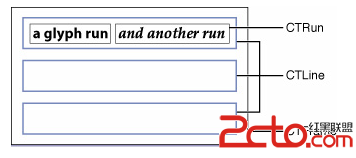
CTFrame 是整塊畫布(Canvas),由多個 CTLine(行)組成,每一行又可再切成一個或多個 CTRun(小方塊)。
重點:你不需要自己建立 CTRun。Core Text 會依據 NSAttributedString 的屬性自動切分——屬性相同的連續字元會被歸在同一個 CTRun 中。正因為如此,你才能自由控制字型、顏色、字距等資訊。
標準處理流程
1. 建立 attributed string
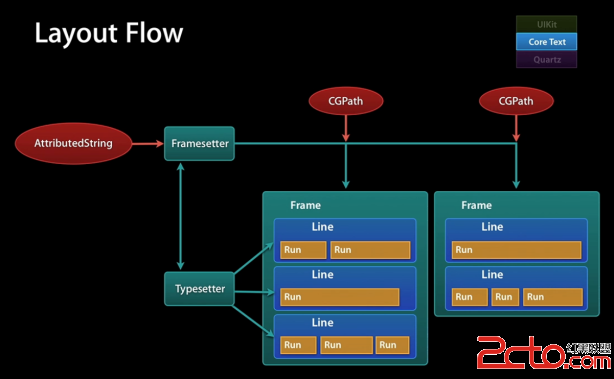
先準備要顯示的字串,再定義每一段的樣式,組合成 NSAttributedString → 交給 CTFramesetter → 得到 CTFrame → 呼叫 CTFrameDraw 繪製。其中還可以進一步設定換行方式、對齊方式與繪製區域大小。
2. 處理點擊事件
繪製只是「顯示」,要支援點擊則需要額外判斷。CTFrame 包含多個 CTLine,可取得各行的起始位置與尺寸,先判斷點擊點落在哪一行;接著用 CTLine 找出該點對應的字元範圍;最後遍歷字串中所有的 NSTextCheckingResult,依 result 的 range 判斷點擊處是否落在其中,即可得到被點擊的連結與位置。
字體相關術語
字體(Font):一系列字級、樣式與粗度相同的字符,例如 10pt 黑體。
字面(Face):所有字級的粗度與格式綜合。
字體集(Font Family):一組相關字體,例如 Helvetica Neue 家族包含多種粗度。
粗度(Weight):描述字體粗細,從最粗到最細依序為 ultra-light、thin、light、book、regular、medium、semibold、bold、heavy、black。
樣式(Style):字形有三種形式——Roman 為直體,oblique 為傾斜體,italic 則是更接近書法的曲線斜體。
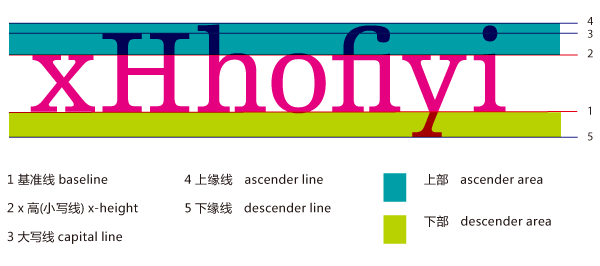
x 高度(X-height):小寫字母的平均高度(以 x 為基準)。粗度相同的兩個字體,x-height 較大者看起來會更大。
Cap 高度(Cap height):大寫字母的平均高度(以 C 為基準)。
上行部(Ascender):x-height 以上的部分,例如字母 b 的頂端。
下行部(Descender):基線以下的部分,例如字母 q 的尾巴。
基線(Baseline):通常通過 x、v、b、m 底部的那條線。
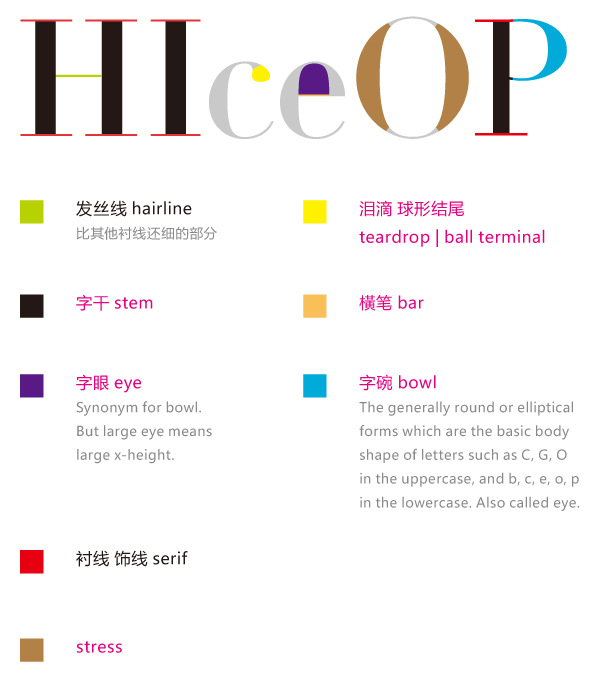
描邊(Stroke):組成字符的線條或曲線,可加粗或改變字形。
襯線(Serif):用來提升可讀性的水平裝飾線。
無襯線(Sans Serif):不使用襯線裝飾的字體。
方形字(Block):筆畫比無襯線更顯眼但不到襯線程度,如 Lubalin Graph。
手寫體(Calligraphic script):仿手寫的字體,如 Murray Hill。
藝術字(Decorative):如繪畫般的裝飾性字體。
Pi 符號(Pi symbol):非標準的特殊符號字集,如 Wingdings。
連字(Ligature):如 fi、fl、ffi 等因字形關係常被連寫的字母組合。
字符屬性一覽
kCTCharacterShapeAttributeName — 字體形狀屬性,必須是 CFNumberRef,預設 0;非 0 則對應相應的字符形狀定義(如 1 表示傳統字形)。
kCTFontAttributeName — 字體屬性,必須是 CTFont 物件。
kCTKernAttributeName — 字元間距,必須是 CFNumberRef。
kCTLigatureAttributeName — 是否使用連字。設為 0 表示不使用;預設 1,即使用標準連字(fi、fl)。也就是說搜尋到 f 時,會把 fl 當成一個字符處理。必須是 CFNumberRef,可取 0、1、2。
kCTForegroundColorAttributeName — 文字顏色,必須是 CGColor 物件,預設黑色。
kCTForegroundColorFromContextAttributeName — 是否使用上下文的文字顏色,必須是 CFBooleanRef,預設 false。
kCTParagraphStyleAttributeName — 段落樣式,必須是 CTParagraphStyle 物件,預設 nil。
kCTStrokeWidthAttributeName — 筆畫線條寬度,必須是 CFNumberRef,預設 0.0;此值大於 0 時文字會變成空心字。
kCTStrokeColorAttributeName — 筆畫顏色,必須是 CGColorRef,預設為前景色。
kCTSuperscriptAttributeName — 上下標。必須是 CFNumberRef,預設 0;-1 為下標,1 為上標,需字體本身支援(如 C+n 的組合寫法)。
kCTUnderlineColorAttributeName — 下劃線顏色,必須是 CGColorRef,預設為前景色。
kCTUnderlineStyleAttributeName — 下劃線樣式,必須是 CFNumberRef,預設 kCTUnderlineStyleNone,可透過 CTUnderlineStyleModifiers 調整風格。
kCTVerticalFormsAttributeName — 字形方向,必須是 CFBooleanRef,預設 false(水平),true 表示縱排。
kCTGlyphInfoAttributeName — 字形資訊,必須是 CTGlyphInfo 物件。
kCTRunDelegateAttributeName — CTRun 委派屬性,必須是 CTRunDelegate 物件(圖文混排時用來指定佔位大小)。
各屬性的實際效果
建立 attributed string:
NSMutableAttributedString *mabstring =
    [[NSMutableAttributedString alloc] initWithString:
     @"This is a test of characterAttribute. 中文字符"];
設定字型:
CTFontRef font = CTFontCreateWithName(CFSTR("Georgia"), 40, NULL);
[mabstring addAttribute:(id)kCTFontAttributeName value:(id)font range:NSMakeRange(0, 4)];
斜體:
CTFontRef font = CTFontCreateWithName(
    (CFStringRef)[UIFont italicSystemFontOfSize:20].fontName, 14, NULL);
[mabstring addAttribute:(id)kCTFontAttributeName value:(id)font range:NSMakeRange(0, 4)];
下劃線:
[mabstring addAttribute:(id)kCTUnderlineStyleAttributeName
                  value:(id)[NSNumber numberWithInt:kCTUnderlineStyleDouble]
                  range:NSMakeRange(0, 4)];
下劃線顏色:
[mabstring addAttribute:(id)kCTUnderlineColorAttributeName
                  value:(id)[UIColor redColor].CGColor
                  range:NSMakeRange(0, 4)];
字元間距:
long number = 10;
CFNumberRef num = CFNumberCreate(kCFAllocatorDefault, kCFNumberSInt8Type, &number);
[mabstring addAttribute:(id)kCTKernAttributeName value:(id)num range:NSMakeRange(10, 4)];
連字:
long number = 1;
CFNumberRef num = CFNumberCreate(kCFAllocatorDefault, kCFNumberSInt8Type, &number);
[mabstring addAttribute:(id)kCTLigatureAttributeName
                  value:(id)num
                  range:NSMakeRange(0, [str length])];
文字顏色:
[mabstring addAttribute:(id)kCTForegroundColorAttributeName
                  value:(id)[UIColor redColor].CGColor
                  range:NSMakeRange(0, 9)];
空心字(描邊寬度):
long number = 2;
CFNumberRef num = CFNumberCreate(kCFAllocatorDefault, kCFNumberSInt8Type, &number);
[mabstring addAttribute:(id)kCTStrokeWidthAttributeName value:(id)num range:NSMakeRange(0, [str length])];
空心字顏色(必須先設定 strokeWidth,顏色才會生效):
[mabstring addAttribute:(id)kCTStrokeColorAttributeName
                  value:(id)[UIColor greenColor].CGColor
                  range:NSMakeRange(0, [str length])];
一次套用多個屬性:
NSMutableDictionary *attributes = [NSMutableDictionary dictionary];
// 紅色
[attributes setObject:(id)[UIColor redColor].CGColor
               forKey:(id)kCTForegroundColorAttributeName];
// 斜體
CTFontRef font = CTFontCreateWithName(
    (CFStringRef)[UIFont italicSystemFontOfSize:20].fontName, 40, NULL);
[attributes setObject:(id)font forKey:(id)kCTFontAttributeName];
// 雙下劃線
[attributes setObject:(id)[NSNumber numberWithInt:kCTUnderlineStyleDouble]
               forKey:(id)kCTUnderlineStyleAttributeName];

[mabstring addAttributes:attributes range:NSMakeRange(0, 4)];
完整繪製流程
- (void)characterAttribute {
    NSString *str = @"This is a test of characterAttribute. 中文字符";
    NSMutableAttributedString *mabstring =
        [[NSMutableAttributedString alloc] initWithString:str];

    [mabstring beginEditing];

    // 多屬性同時設定
    NSMutableDictionary *attributes = [NSMutableDictionary dictionary];
    [attributes setObject:(id)[UIColor redColor].CGColor
                   forKey:(id)kCTForegroundColorAttributeName];
    CTFontRef font = CTFontCreateWithName(
        (CFStringRef)[UIFont italicSystemFontOfSize:20].fontName, 40, NULL);
    [attributes setObject:(id)font forKey:(id)kCTFontAttributeName];
    [attributes setObject:(id)[NSNumber numberWithInt:kCTUnderlineStyleDouble]
                   forKey:(id)kCTUnderlineStyleAttributeName];
    [mabstring addAttributes:attributes range:NSMakeRange(0, 4)];

    NSRange kk = NSMakeRange(0, 4);
    NSDictionary *dc = [mabstring attributesAtIndex:0 effectiveRange:&kk];
    NSLog(@"value = %@", dc);

    [mabstring endEditing];

    // 建立 framesetter
    CTFramesetterRef framesetter =
        CTFramesetterCreateWithAttributedString((CFAttributedStringRef)mabstring);

    // 決定繪製區域
    CGMutablePathRef path = CGPathCreateMutable();
    CGPathAddRect(path, NULL,
                  CGRectMake(10, 0, self.bounds.size.width - 10, self.bounds.size.height - 10));

    CTFrameRef frame = CTFramesetterCreateFrame(framesetter, CFRangeMake(0, 0), path, NULL);

    // 取得當前圖形上下文(離屏繪製)
    CGContextRef context = UIGraphicsGetCurrentContext();

    CGContextSetTextMatrix(context, CGAffineTransformIdentity);

    // 保存圖形狀態。每個圖形上下文都維護一個狀態堆疊,
    // 保存後續對 context 的繪製不會影響真正的螢幕
    CGContextSaveGState(context);

    // 座標系翻轉:先沿 Y 軸平移,再沿 X 軸鏡像
    CGContextTranslateCTM(context, 0, self.bounds.size.height);
    CGContextScaleCTM(context, 1.0, -1.0);

    CTFrameDraw(frame, context);

    CGPathRelease(path);
    CFRelease(framesetter);
}

- (void)drawRect:(CGRect)rect {
    [self characterAttribute];
}
實務上的幾個關鍵點
1. 座標系翻轉不能省。 Core Text 使用左下原點的座標系,UIKit 使用左上原點。少了 CGContextTranslateCTM 與 CGContextScaleCTM(context, 1.0, -1.0) 這兩行,文字會上下顛倒。
2. CFRelease 別忘了。 CTFramesetterRef、CGMutablePathRef 都是 Core Foundation 物件,即使在 ARC 下也不受自動管理,必須手動釋放,否則每次重繪都會洩漏。
3. 排版與繪製分離。 效能更好的做法是把 CTFrame 的建立放在背景執行緒(它與繪製無關,純運算),只在 drawRect: 中呼叫 CTFrameDraw。列表大量使用 Core Text 時,這個優化差距非常明顯。
4. 記得使用 CTFramesetterSuggestFrameSizeWithConstraints。 若 view 高度需依內容自適應,可用它先算出所需高度,再決定 frame,避免文字被裁切。
補充閱讀:關於 CGContext 的更多細節可參考 Core Text 學習筆記。另外,若專案 targeting iOS 7 以上,做純文字排版其實可以直接用 NSAttributedString 搭配 UILabel 或 UITextView,Core Text 主要在你需要「自訂繪製」「精細控制行內元素」或「異步排版大量文字」時才值得投入。