
iOS UI Tab 開發:UITabBarController 完整 API 梳理
編輯:iOS 開發綜合
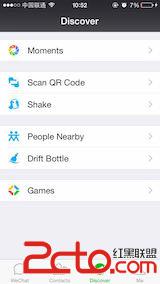
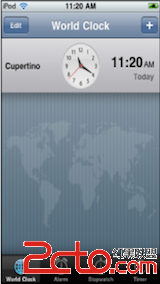
Tab 這種樣式本質上是一個 radio-style 的單選切換,是當今主流的 layout 設計之一。它讓 App 的資訊架構一目了然,分工邏輯清楚,微信、時鐘這類 App 都是經典範例。
先掌握七個核心觀念
UITabBarController繼承自 UIViewController,本質是一個 view controller container。- 它擁有一個唯讀的
tabBar,而 TabBar 持有一到多個UITabBarItem。 - 每個 item 需關聯一個自訂的 UIViewController;
viewControllers陣列中元素的順序,就是 TabBar 上呈現的順序。 - item 的標題若未自行設定,預設取對應 ViewController 的
title;圖片則必須自己設定。 UITabBarControllerDelegate協定提供監控 TabBar 操作的回調。- 被嵌入 TabBarController 的每個 ViewController 都會自動調整自己的 layout,避免內容被下方的 Bar 遮擋。
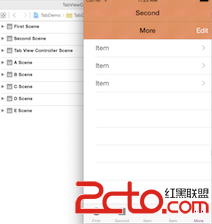
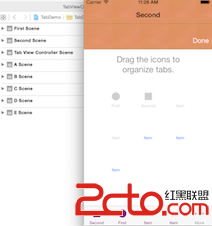
- 當 item 數量超過 5 個(>=6),TabBarController 會自動變成「可拖動」模式。
tabBar 屬性
@property(nonatomic, readonly) UITabBar *tabBar
唯讀,不應嘗試直接修改。要配置 item,請改 viewControllers。它存在的意義主要是為了在使用 UIActionSheet 的 showFromTabBar: 時提供 sender。
管理 ViewControllers
@property(nonatomic, copy) NSArray *viewControllers
赋值後,customizableViewControllers 的值會與之一致。若在 runtime 替換這個屬性,而原本選中的 index 已不存在,系統會預設選中 index 0。
- (void)setViewControllers:(NSArray *)viewControllers animated:(BOOL)animated;
帶動畫的替換版本,是否使用可自行衡量。
@property(nonatomic, copy) NSArray *customizableViewControllers
指定哪些 tab 允許使用者自行拖動排序,對應上面那張超過 5 個 item 的示意圖。
@property(nonatomic, readonly) UINavigationController *moreNavigationController
系統為管理 customizableViewControllers 而自動建立的 NavigationController。
管理被選中的 Tab
@property(nonatomic, assign) UIViewController *selectedViewController
@property(nonatomic) NSUInteger selectedIndex
兩者互為表裡,可讀可寫。
UITabBarControllerDelegate 能做的事
- 決定某個 tab 是否應該被選中
- 在選中 tab 之後執行動作
- 在使用者自訂排序前後執行動作
- 覆寫 view 旋轉設定
- 支援自訂轉場動畫
UITabBar 的排版 API
// 讓使用者自訂 items 的排序,系統會自動彈出帶 Done 按鈕的編輯畫面
[self.tabBar beginCustomizingItems:@[item1, item3, item2]];

// 設定 item 的排列方式
self.tabBar.itemPositioning = UITabBarItemPositioningCentered;

// 以下兩個屬性僅在 Centered 模式下才生效
self.tabBar.itemSpacing = 80.0f;
self.tabBar.itemWidth   = 30.0f;
UITabBarItem 的樣式設定
UITabBarItem *item = [[UITabBarItem alloc] initWithTitle:@"Test" image:nil tag:0];

// 標題文字顏色
[item setTitleTextAttributes:@{NSForegroundColorAttributeName:[UIColor redColor]}
                    forState:UIControlStateNormal];
[item setTitleTextAttributes:@{NSForegroundColorAttributeName:[UIColor darkGrayColor]}
                    forState:UIControlStateSelected];

// 保留圖片原色。
// 預設情況下系統會取圖片的 alpha 通道自行生成單色圖,
// 這正是「設了自訂圖片卻沒生效」的最常見原因
item.image = [[UIImage imageNamed:@"color"]
               imageWithRenderingMode:UIImageRenderingModeAlwaysOriginal];

// 圖片內縮/外擴:正值向內縮,負值向外延伸
UIEdgeInsets insets;
insets.left  = -5;
insets.right = -5;
item.imageInsets = insets;

// 標題位置偏移
UIOffset offset;
offset.horizontal = 30;
offset.vertical   = -10;
[item setTitlePositionAdjustment:offset];
UITabBarDelegate
提供操作 Tab 時的回調,細節可對照官方文件。
總結
對於內容展示類、功能導向的 App,最外層的資訊架構建議直接採用 Tab 模式——它對使用者最直覺,對開發分工也最友善。