
iOS 基本 UI 控件詳解:UIButton、UITextField、UITextView 與 UISwitch
一、UI 控件分類
在 iOS 中,UI 控件大致可分為三大類:
- 活動控件:繼承自 UIControl 基類,能與使用者互動,操作會觸發對應的事件綁定回呼方法,例如 UIButton。
- 靜態控件:繼承自 UIView 基類,無法與使用者互動,例如 UILabel。
- 被動控件:可接收使用者操作,通常用於接收輸入,但不會觸發 IBAction 方法,例如文字輸入框。
二、UIControl 介紹
UIControl 本身很少被直接使用,真正常用的是它的子類。它主要負責定義通用接口、為活動控件的事件機制提供實作,當指定動作發生後,控件便會初始化 Action 方法並回呼對應的事件處理方法。
常見方法包括 addTarget:action:forControlEvents:(註冊事件)、removeTarget:action:forControlEvents:(移除事件)、actionsForTarget:forControlEvents:(取得註冊的方法)、allTargets 與 allControlEvents 等。
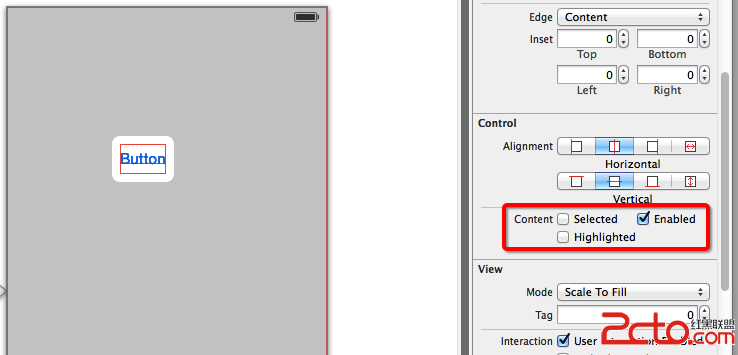
UI 控件具備多種狀態:普通(Normal)、高亮(Highlighted)、禁用(Disabled) 與 選中(Selected),分別對應 enabled、selected、highlighted 等屬性。此外,beginTrackingWithTouch:withEvent:、continueTrackingWithTouch:withEvent:、endTrackingWithTouch:withEvent: 則對應觸摸的開始、持續與結束。
三、UIButton 控件
UIButton 的 Type 屬性決定了按鈕外觀:若要自訂外觀請選擇 Custom;System 為預設風格;Detail Disclosure 顯示 i 圖示;Info Light / Info Dark 顯示說明資訊;Add Contact 則顯示加號按鈕。

在 State Config 中,可為 Default、Highlighted、Selected、Disabled 各狀態分別設定不同的文字、圖片與格式,方法是透過 setTitle:forState:、setTitleColor:forState:、setBackgroundImage:forState:、setImage:forState: 等系列方法,搭配 UIControlState 枚舉值使用。
其他重要屬性還包括 Tittle(文字設定)、Font(字體)、Text Color 與 Shadow Color、Image(圖片按鈕)、Background(背景圖,可讓文字與圖片共存)、Shadow Offset(陰影偏移,水平 > 0 向右、< 0 向左;垂直 > 0 向下、< 0 向上)、Line Break(截斷方式)、Edge(邊界)與 Inset(四周間距)。
四、UITextField 控件
UITextField 是單行文字輸入框,重點屬性如下:
- PlaceHolder:無輸入時顯示的灰色提示文字。
- Border Style:邊框風格,一般選最右側的圓角矩形。
- Clear Button:清除按鈕的顯示時機(Never、While editing、Unless editing、Always)。
- Min Font Size / Adjust to Fit:控制文字是否隨框縮放。
- Capitalization:大小寫切換(None、Words、Sentence、All Characters)。
- Correction:是否自動更正。
- KeyBoard:虛擬鍵盤類型(Default、ASCII、Numbers and Punctuation、Number Pad、Phone Pad、E-mail、Decimal Pad 等)。
- Return Key:按下 return 的行為,並可勾選 Auto-enable Return Key 與 Secure(密碼以圓點顯示)。
五、UITextView 多行文本控件
UITextView 繼承自 UIScrollView,因此自帶滾動能力,適合用於多行文本。與 UITextField 不同,它沒有繼承 UIControl,無法綁定 IBAction,而是透過 UITextViewDelegate 協定來處理事件,例如 textViewShouldBeginEditing:、textViewDidBeginEditing:、textView:shouldChangeTextInRange:replacementText: 與 textViewDidChange: 等。
由於 UITextView 的虛擬鍵盤右下角是 return(換行)而非 Done,若要關閉鍵盤,常見做法有三種:
- 點擊背景關閉:將背景的 Custom Class 由 UIView 改為 UIControl,綁定 IBAction 後呼叫
resignFirstResponder。 - 導航按鈕關閉:實作 UITextViewDelegate,於開始編輯時顯示導航列上的 Done 按鈕,點擊後收起鍵盤。
- 自訂鍵盤附件:透過
inputAccessoryView設定一個 UIToolbar 作為鍵盤上方的工具列,適合沒有導航列的應用。
此外,還可透過 UIMenuController 實作自訂的選取選單,例如在選取文字後顯示「刪除內容」等自訂操作。
六、UISwitch 開關按鈕
UISwitch 是一個開關控件,透過 isOn 判斷當前狀態,並在 Value Changed 事件中做出回應。以下範例展示如何依開關狀態切換背景顏色:
- (IBAction)valueChange:(id)sender {
    if ([sender isOn] == YES) {
        self.view.backgroundColor = [UIColor whiteColor];
    } else {
        self.view.backgroundColor = [UIColor blackColor];
    }
}
