
iOS 動畫完全解析:UIView 動畫與 CALayer 動畫
為 iOS 應用引入恰到好處的動畫效果,能顯著提升用戶體驗。因此,深入研究動畫無疑是開發者的一大加分項。
iOS 動畫操作的兩大類別
常見的 iOS 動畫操作可分為兩類:
CALayer 層的操作
UIView 的操作
二者有何區別
UIView 內部包含一個 CALayer 層。
UIView 之所以能在屏幕上呈現,正是因為它內部擁有這個 CALayer 層。
CALayer 層的操作更底層、更輕量級,性能也更高。
UIView 動畫執行完畢後不會反彈;而 CALayer 動畫改變的是 layer 的狀態與位置,只是造成一種「假象」的改變,實際位置並未真正改變。
開發時如何取捨
每個 UIView 的操作其實都是對 CALayer 層的封裝,使用起來更簡單,因此可優先選擇 UIView 動畫。
而直接操作 CALayer 層更為直接,能實現一些 UIView 無法完成的效果。
UIView 動畫
一、首尾式動畫(經典中的經典)
[UIView beginAnimations:nil context:nil] ; //需要執行動畫的核心代碼 //設置動畫執行時間 [UIView setAnimationDuration:2.0]; //設置代理 [UIView setAnimationDelegate:self]; //設置動畫執行完畢調用的事件 [UIView setAnimationDidStopSelector:@selector(didStopAnimation)]; self.customView.center=CGPointMake(200, 300); [UIView commitAnimations];
+ (void)setAnimationDelegate:(id)delegate 設置動畫代理對象,動畫開始或結束時會發消息給代理 + (void)setAnimationWillStartSelector:(SEL)selector 動畫即將開始時執行 delegate 的 selector + (void)setAnimationDidStopSelector:(SEL)selector 動畫結束時執行 delegate 的 selector + (void)setAnimationDuration:(NSTimeInterval)duration 動畫持續時間(秒) + (void)setAnimationDelay:(NSTimeInterval)delay 延遲 delay 秒後開始 + (void)setAnimationStartDate:(NSDate *)startDate 動畫開始時間,默認為 now + (void)setAnimationCurve:(UIViewAnimationCurve)curve 動畫節奏控制 + (void)setAnimationRepeatCount:(float)repeatCount 動畫重複次數 + (void)setAnimationRepeatAutoreverses:(BOOL)repeatAutoreverses 設為 YES 時每次重複效果與上一次相反 + (void)setAnimationTransition:(UIViewAnimationTransition)transition forView:(UIView *)view cache:(BOOL)cache 設置視圖過渡效果,cache 為 YES 時使用緩存、性能更好
二、block 動畫(同樣經典)
+ (void)animateWithDuration:(NSTimeInterval)duration delay:(NSTimeInterval)delay options:(UIViewAnimationOptions)options animations:(void (^)(void))animations completion:(void (^)(BOOL finished))completion duration:動畫持續時間 delay:延遲 delay 秒後開始 options:動畫節奏控制 animations:把改變視圖屬性的代碼放在此 block completion:動畫結束後自動調用
+ (void)transitionWithView:(UIView *)view duration:(NSTimeInterval)duration options:(UIViewAnimationOptions)options animations:(void (^)(void))animations completion:(void (^)(BOOL finished))completion duration:動畫持續時間 view:需要轉場動畫的視圖 options:轉場動畫類型 animations:把改變視圖屬性的代碼放在此 block completion:動畫結束後自動調用
+ (void)transitionFromView:(UIView *)fromView toView:(UIView *)toView duration:(NSTimeInterval)duration options:(UIViewAnimationOptions)options completion:(void (^)(BOOL finished))completion duration:動畫持續時間 options:轉場動畫類型 completion:動畫結束後自動調用
typedef NS_OPTIONS(NSUInteger, UIViewAnimationOptions) { UIViewAnimationOptionLayoutSubviews = 1 << 0, UIViewAnimationOptionAllowUserInteraction = 1 << 1, UIViewAnimationOptionBeginFromCurrentState = 1 << 2, UIViewAnimationOptionRepeat = 1 << 3, UIViewAnimationOptionAutoreverse = 1 << 4, UIViewAnimationOptionOverrideInheritedDuration = 1 << 5, UIViewAnimationOptionOverrideInheritedCurve = 1 << 6, UIViewAnimationOptionAllowAnimatedContent = 1 << 7, UIViewAnimationOptionShowHideTransitionViews = 1 << 8, UIViewAnimationOptionOverrideInheritedOptions = 1 << 9, UIViewAnimationOptionCurveEaseInOut = 0 << 16, UIViewAnimationOptionCurveEaseIn = 1 << 16, UIViewAnimationOptionCurveEaseOut = 2 << 16, UIViewAnimationOptionCurveLinear = 3 << 16, UIViewAnimationOptionTransitionNone = 0 << 20, UIViewAnimationOptionTransitionFlipFromLeft = 1 << 20, UIViewAnimationOptionTransitionFlipFromRight = 2 << 20, UIViewAnimationOptionTransitionCurlUp = 3 << 20, UIViewAnimationOptionTransitionCurlDown = 4 << 20, UIViewAnimationOptionTransitionCrossDissolve = 5 << 20, UIViewAnimationOptionTransitionFlipFromTop = 6 << 20, UIViewAnimationOptionTransitionFlipFromBottom = 7 << 20, } NS_ENUM_AVAILABLE_IOS(4_0);
CALayer 層動畫
CALayer 的兩個關鍵屬性
position:位置(原點為父類的 (0, 0))。
anchorPoint:錨點(默認位於自身長寬各一半的交點,即 (0.5, 0.5))。
什麼是隱式動畫
簡單來說,每個控件都有一個自帶的 CALayer 層,稱為根層;與之相對的就是非根層。非根層的屬性一旦改變,就會默認引發動畫,這樣的動畫便稱為隱式動畫。
若項目不希望出現動畫效果,如何關閉隱式動畫?
[CATransaction begin]; [CATransaction setDisableActions:YES]; //......這裡修改你想修改的 Layer 屬性,就不會產生默認的隱式動畫 [CATransaction commit];
Layer 層的動畫分類
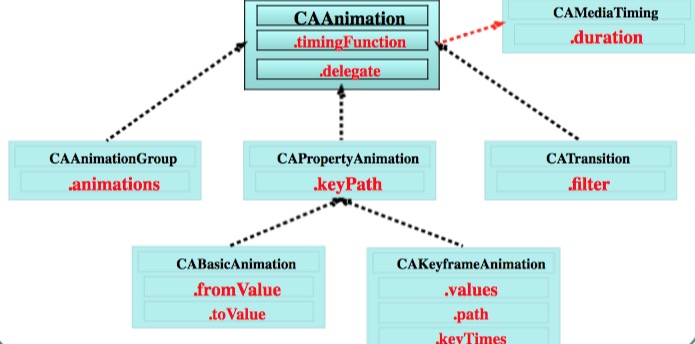
CAAnimation 是所有動畫類的父類,它與 CAPropertyAnimation 不能直接使用,應使用其子類 CABasicAnimation、CAKeyframeAnimation、CATransition、CAAnimationGroup。
CABasicAnimation 基礎動畫
fromValue:keyPath 對應屬性值的初始值
toValue:keyPath 對應屬性的結束值
byValue:增加多少值(注意與 toValue 的區別)
keyPath 的內容是 CALayer 的可動畫 Animation 屬性
// 1.創建動畫對象 CABasicAnimation *anim = [CABasicAnimation animation]; // 2.設置動畫對象 anim.keyPath = @"transform.translation.x"; anim.toValue = @(100); anim.duration = 2.0; //加入下面兩行,動畫結束時 layer 不會回到初始位置 anim.removedOnCompletion = NO; anim.fillMode = kCAFillModeForwards; // 3.添加動畫 [self.layer addAnimation:anim forKey:nil];
CAKeyframeAnimation 關鍵幀動畫
CAKeyframeAnimation 是 CABasicAnimation 的升級版。CABasicAnimation 只能改變一組屬性就停止,而 CAKeyframeAnimation 可以運行關於同一屬性的一組數據(特別注意:必須是同一個屬性的一組數據)。
values:所有的值
path:路線
keyTimes:為對應的關鍵幀指定時間點,取值範圍 0 到 1.0
注意:path 與 values 二者相互排斥,選其一即可
values 示例:
CAKeyframeAnimation *anim = [CAKeyframeAnimation animation]; anim.keyPath = @"transform.rotation"; anim.values = array; anim.duration = 0.25; anim.repeatCount = MAXFLOAT; anim.removedOnCompletion = NO; anim.fillMode = kCAFillModeForwards; [self.redView.layer addAnimation:anim forKey:nil];
path 示例:
CAKeyframeAnimation *anim = [CAKeyframeAnimation animation]; anim.keyPath = @"position"; anim.removedOnCompletion = NO; anim.fillMode = kCAFillModeForwards; anim.duration = 2.0; CGMutablePathRef path = CGPathCreateMutable(); CGPathAddEllipseInRect(path, NULL, CGRectMake(100, 100, 200, 200)); anim.path = path; CGPathRelease(path); anim.timingFunction = [CAMediaTimingFunction functionWithName:kCAMediaTimingFunctionEaseInEaseOut]; anim.delegate = self; [self.redView.layer addAnimation:anim forKey:nil];
CAAnimationGroup 動畫組
上面兩個動畫類都只能對同一個屬性進行修改,無法同時修改兩個屬性,於是便引入了 CAAnimationGroup 動畫組。最經典的莫過於「邊旋轉、邊縮放、邊移動」的組合動畫,其實就是把前面幾個基礎動畫加入動畫組即可。
// 1.創建旋轉動畫 CABasicAnimation *rotate = [CABasicAnimation animation]; rotate.keyPath = @"transform.rotation"; rotate.toValue = @(M_PI); // 2.創建縮放動畫 CABasicAnimation *scale = [CABasicAnimation animation]; scale.keyPath = @"transform.scale"; scale.toValue = @(0.0); // 3.平移動畫 CABasicAnimation *move = [CABasicAnimation animation]; move.keyPath = @"transform.translation"; move.toValue = [NSValue valueWithCGPoint:CGPointMake(100, 100)]; // 4.將所有動畫加入動畫組 CAAnimationGroup *group = [CAAnimationGroup animation]; group.animations = @[rotate, scale, move]; group.duration = 2.0; group.removedOnCompletion = NO; group.fillMode = kCAFillModeForwards; [self.myvie.layer addAnimation:group forKey:nil];
CATransition 轉場動畫
提供移除屏幕與移入屏幕的動畫效果。
// 創建轉場動畫對象 CATransition *anim = [CATransition animation]; // 設置轉場類型 anim.type = @"pageCurl"; // 設置動畫方向 anim.subtype = kCATransitionFromLeft; anim.duration = 3; [_imageV.layer addAnimation:anim forKey:nil];
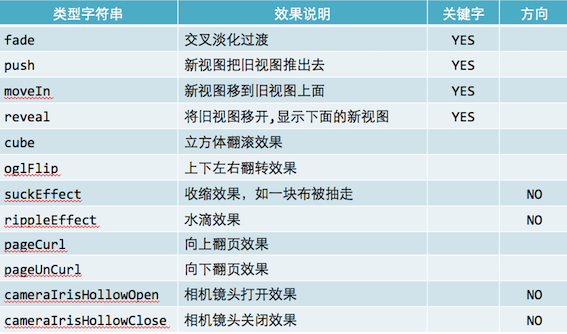
type:動畫過渡類型;subtype:動畫過渡方向。
附一張 type 參照表
+(void)transitionWithView:(UIView*)view duration:(NSTimeInterval)duration options: (UIViewAnimationOptions)options animations:(void(^)(void))animations completion:(void(^)(BOOLfinished))completion;
duration:動畫持續時間;view:需要轉場動畫的視圖;options:轉場動畫類型;animations:把改變視圖屬性的代碼放在此 block;completion:動畫結束後自動調用。
+ (void)transitionFromView:(UIView*) fromView toView:(UIView*) toViewduration:(NSTimeInterval)durationoptions:(UIViewAnimationOptions) options completion:(void(^)(BOOLfinished))completion;
duration:動畫持續時間;options:轉場動畫類型;completion:動畫結束後自動調用。
動畫代理
動畫同樣存在代理,借助代理可以在動畫開始和結束時執行一些操作。
anim.delegate = self; #pragma mark 動畫開始的時候調用 - (void)animationDidStart:(CAAnimation *)anim { } #pragma mark 動畫結束的時候調用 - (void)animationDidStop:(CAAnimation *)anim finished:(BOOL)flag { }
- 上一篇文章: iOS 開發常用知識點彙總(Swift 與 OC 對照)
- 下一篇文章: 基於 Xilinx 的綜合(Synthesize)詳解