
用 NSMutableAttributedString 實作下劃線、刪除線、陰影、填充與多色文字
在 iOS 開發中,我們常需要為文字加上下劃線,或讓字串中的某幾個字呈現不同顏色。最典型的例子就是註冊頁面。
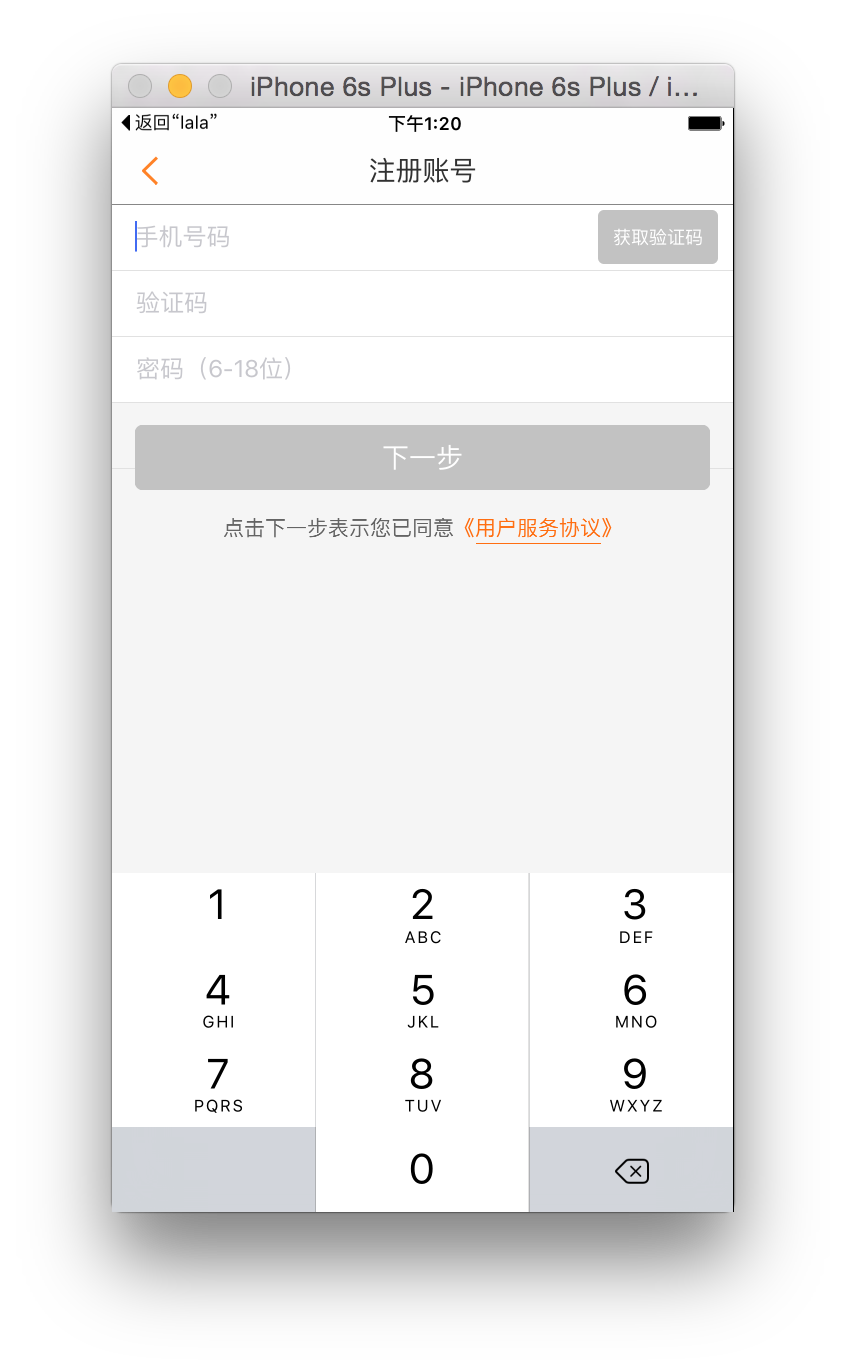
幾乎所有註冊頁都會出現這麼一句:「點擊下一步表示您已同意《用戶服務協議》」,而且你會發現「《用戶服務協議》」幾個字顏色不同,下方還帶著下劃線。這是怎麼做到的呢?
有人可能會說:不同顏色就設兩個 label,左邊顯示前半句設黑色,右邊顯示後半句設橘色就行了。這固然可行,但顯得麻煩,若顏色很多,難不成要擺上一大堆 label?
其實,NSMutableAttributedString 就能完美解決這些問題。先來認識與 attributes 相關的四個方法:
為某範圍內文字設定多個屬性:
- (void)setAttributes:(NSDictionary*)attrs range:(NSRange)range;
為某範圍內文字添加單一屬性:
- (void)addAttribute:(NSString*)name value:(id)value range:(NSRange)range;
為某範圍內文字添加多個屬性:
- (void)addAttributes:(NSDictionary*)attrs range:(NSRange)range;
移除某範圍內的某個屬性:
- (void)removeAttribute:(NSString*)name range:(NSRange)range;
直接來看例子:
- (void)viewDidLoad { [super viewDidLoad]; UILabel *label = [[UILabel alloc] initWithFrame:CGRectMake(0, 100, ScreenWidth, 40)]; label.font = [UIFont systemFontOfSize:18]; label.textAlignment = NSTextAlignmentCenter; NSMutableAttributedString *str = [[NSMutableAttributedString alloc] initWithString: @"點擊下一步表示您已同意《用戶服務協議》"]; [str addAttribute:NSForegroundColorAttributeName value: [UIColor colorWithRed:100/255.0 green:100/255.0 blue:100/255.0 alpha:1] range:NSMakeRange(0,11)]; [str addAttribute:NSForegroundColorAttributeName value: [UIColor colorWithRed:255/255.0 green:110/255.0 blue:17/255.0 alpha:1] range:NSMakeRange(11,8)]; label.attributedText = str; [self.view addSubview:label]; }
我們建立一個 NSMutableAttributedString 物件 str,接著為它添加名為 NSForegroundColorAttributeName 的屬性——這就是文字顏色,值是一個 UIColor。我們自訂了一個顏色,並設定範圍 NSMakeRange(0, 11),意思就是「從第 0 個字開始,共 11 個字」,對應「點擊下一步表示您已同意」。
然後又為這個字串加上同名的屬性,但顏色改為橘色,範圍是從第 11 個字開始(別忘了編號從 0 起算)共 8 個字,對應「《用戶服務協議》」(書名號也算在內)。
執行看看效果:

顏色搞定後,接著加上下劃線。在原本程式碼上多加一句:
[str addAttribute:NSUnderlineStyleAttributeName value: [NSNumber numberWithInteger:NSUnderlineStyleSingle] range:NSMakeRange(12, 6)]; // 下劃線
這句話的意思是:為 str 加上名為 NSUnderlineStyleAttributeName 的屬性,也就是下劃線的樣式。它的值是 NSInteger 型別,預設為 0(即無下劃線)。範圍從第 12 個字開始,共 6 個字,對應「用戶服務條款」。
這裡要特別注意。我們再看一次添加屬性的方法原型:
- (void)addAttribute:(NSString*)name value:(id)value range:(NSRange)range;
注意,參數 value 是 id 型別,也就是 Objective-C 物件。而 NSInteger 是基本資料型別,並非物件,因此必須寫成 [NSNumber numberWithInteger:123] 的形式。
關於這個值,一開始我亂試數字卻怎麼都不對,查了資料才知道它其實有一組列舉:
typedef NS_ENUM(NSInteger, NSUnderlineStyle) { NSUnderlineStyleNone = 0x00, NSUnderlineStyleSingle = 0x01, NSUnderlineStyleThick = 0x02, NSUnderlineStyleDouble = 0x09, NSUnderlinePatternSolid = 0x0000, NSUnderlinePatternDot = 0x0100, NSUnderlinePatternDash = 0x0200, NSUnderlinePatternDashDot = 0x0300, NSUnderlinePatternDashDotDot = 0x0400, NSUnderlineByWord = 0x8000 };
實際上,設定刪除線 NSStrikethroughColorAttributeName 時,值也是這組列舉:
// NSUnderlineStyleNone 不設置下劃線/刪除線
// NSUnderlineStyleSingle 設為細的單線
// NSUnderlineStyleThick 設為粗的單線
// NSUnderlineStyleDouble 設為細的雙線
// NSUnderlinePatternSolid 樣式為連續實線
// NSUnderlinePatternDot 樣式為點狀虛線
// NSUnderlinePatternDash 樣式為破折號
// NSUnderlinePatternDashDot 樣式為連續的破折號與點
// NSUnderlinePatternDashDotDot 樣式為連續的破折號、點、點
// NSUnderlineByWord 在空格處不設置下劃線/刪除線
為什麼要分三段說明呢?因為它們分屬三種設定,可以同時套用其中兩種甚至三種。例如:
[str addAttribute:NSUnderlineStyleAttributeName value: [NSNumber numberWithInteger:NSUnderlineStyleDouble | NSUnderlinePatternDot] range:NSMakeRange(12, 6)];
這行程式碼就是為「用戶服務協議」加上雙線且虛線的下劃線。
其實下劃線的顏色也能設定,若不設,預設會與文字同色(也就是橘色)。我們來把它換成藍色試試:
[str addAttribute:NSUnderlineStyleAttributeName value: [NSNumber numberWithInteger:NSUnderlineStyleSingle] range:NSMakeRange(12, 6)]; // 下劃線類型 [str addAttribute:NSUnderlineColorAttributeName value: [UIColor blueColor] range:NSMakeRange(12, 6)]; // 下劃線顏色
執行後結果如下:

再舉一例,加上粗體刪除線並設為黑色(若不設顏色,同樣預設與文字同色):
[str addAttribute:NSStrikethroughStyleAttributeName value: [NSNumber numberWithInteger:NSUnderlineStyleThick] range:NSMakeRange(12, 6)]; // 刪除線類型 [str addAttribute:NSStrikethroughColorAttributeName value: [UIColor blackColor] range:NSMakeRange(12, 6)]; // 刪除線顏色
執行看看:

最後一個例子,設定填充(描邊):
[str addAttribute:NSStrokeWidthAttributeName value: [NSNumber numberWithFloat:3.0] range:NSMakeRange(11, 8)]; // 設置填充
執行後:

同理,填充也能設定顏色,若不設,預設與文字同色。
除此之外,NSMutableAttributedString 還能設定段落格式、陰影等眾多屬性。想完整學習,建議參考 Apple 官方文件。
最後要提一個美中不足:下劃線與文字靠得太近,且無法調整兩者的間距,算是它小小的遺憾。
- 上一篇文章: CoreText 排版引擎入門:從基礎到圖文混排
- 下一篇文章: 深入解析 iOS 中的 MVC 設計模式