
iOS SQLite3 數據庫操作完整教程
編輯:iOS 開發綜合
iOS 中的數據持久化主要有四種方式:屬性列表、對象歸檔、SQLite3 與 Core Data。其中 SQLite3 是最基礎也最不可替代的一項技能。
SQLite3 簡介
SQLite3 是移動端(iOS、Android、嵌入式)公認的關系型數據庫。與 MySQL、Oracle 相比,它的核心優勢是極度輕量——體積小、啟動快、使用簡單,同時功能依然強大,這使它成為移動應用的默認選擇。
SQLite 語法要點
- 語句不區分大小寫
- 每條語句以分號結尾
字段類型:
integer:整型real:浮點值text:文本字符串blob:二進制數據
嚴格來說 SQLite 的類型系統是「動態」的,integer 字段也能塞入其他類型的數據。但為了代碼規範,強烈建議嚴格遵守類型約定。
DDL:建表與刪表
create table if not exists t_Student(
    id integer primary key autoincrement,
    name text,
    age integer,
    addr text
);

drop table t_Student;
建表時加上 if not exists 是個好习惯:表已存在時不會報錯,類似變量的懶加載。
常用約束:
primary key autoincrement:主鍵自增,保證每行記錄唯一not null:字段值不允許為空unique:字段值必須唯一default:指定字段默認值
DML:增刪改
insert into t_Student(name, age, addr) values('唐伯虎', 788, '宋朝');

update t_Student set age = 1000 where name = '唐伯虎';

delete from t_Student where age < 100;
DQL:查詢
select * from t_Student;
select name, age, addr from t_Student;
select name from t_Student where age < 100;
select count(*) from t_Student;
where 子句支持 >、<、=、!=、is、is not、and、or 等運算,含義與其他語言一致。此外 as 可以給表或字段起別名,配合點語法訪問字段。
Objective-C 中的 C API
先熟悉幾個核心對象與函數:
sqlite3 *db:數據庫句柄,類似文件句柄 FILEsqlite3_stmt *stmt:預編譯語句對象,可理解為 ODBC 中的 Commandsqlite3_open():打開數據庫,不存在時自動創建sqlite3_exec():執行非查詢類語句sqlite3_prepare_v2():編譯並校驗 SQL 合法性sqlite3_bind_text():為佔位符綁定參數sqlite3_step():遍歷結果集sqlite3_column_int() / _text() / _blob():按列取數據sqlite3_close():關閉數據庫
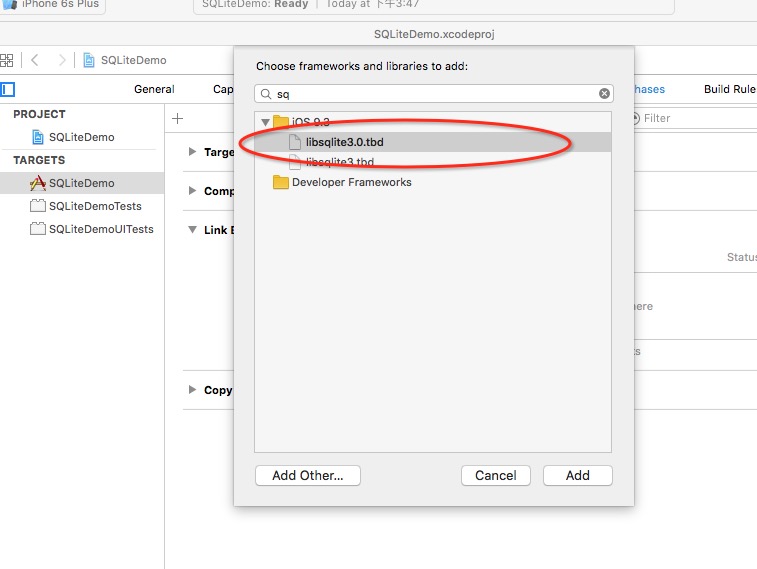
使用前記得在工程中加入 libsqlite3 庫:
在沙盒中建庫建表
NSString *filename = [[NSSearchPathForDirectoriesInDomains(NSDocumentDirectory, NSUserDomainMask, YES) lastObject]
                      stringByAppendingPathComponent:@"student.sqlite"];
int result = sqlite3_open(filename.UTF8String, &_db);
if (result == SQLITE_OK) {
    const char *sql = "create table if not exists t_Student(id integer primary key autoincrement,"
                      "name text, age integer, addr text);";
    char *errorMesg = NULL;
    if (sqlite3_exec(_db, sql, NULL, NULL, &errorMesg) == SQLITE_OK) {
        NSLog(@"建表成功");
    } else {
        NSLog(@"建表失敗 %s", errorMesg);
    }
}
插入數據
NSString *sql = [NSString stringWithFormat:@"insert into t_Student(name, age, addr) values('%@', '%@', '%@');",
                 _nameTF.text, _ageTF.text, _addrTF.text];
char *errorMesg = NULL;
int result = sqlite3_exec(_db, sql.UTF8String, NULL, NULL, &errorMesg);
實戰中更推薦使用 sqlite3_prepare_v2 + sqlite3_bind_text 的佔位符方式,既能規避拼接帶來的 SQL 注入風險,也能避免中文與特殊字符導致的解析錯誤。
查詢數據
const char *sql = "select * from t_Student;";
sqlite3_stmt *stmt = NULL;
if (sqlite3_prepare_v2(_db, sql, -1, &stmt, NULL) == SQLITE_OK) {
    while (sqlite3_step(stmt) == SQLITE_ROW) {
        int sid = sqlite3_column_int(stmt, 0);
        const unsigned char *sname = sqlite3_column_text(stmt, 1);
        int sage = sqlite3_column_int(stmt, 2);
        NSLog(@"%d, %s, %d", sid, sname, sage);
    }
}
sqlite3_finalize(stmt);
可視化工具:Navicat Premium
純寫 SQL 效率終究有限,日常開發建議配備一個圖形化客戶端。Navicat Premium 內部集成了 SQLite3,建表、增刪改查都能可視化完成。
基本用法:
- 打開 Navicat Premium,點擊左上角的連接按鈕。

- 選擇 SQLite,填寫數據庫名稱、選擇文件存放路徑,點擊 OK。

- 展開 main → Tables,右鍵選擇 New Table 新建一張表。

此處可設置 id 為 Key 並勾選 Auto increment,age 設置默認值 20。
- 保存後把表命名為 t_Student。

- 雙擊 t_Student,點擊「+」號添加幾組測試數據。可以觀察到不填 id 和 age 時會自動套用默認值。

客戶端裡同樣可以直接執行 SQL:
INSERT INTO t_Student(name, age, addr) VALUES('喬布斯', 64, '蘋果公司');


- 上一篇文章: iOS 動畫詳解:UIView 動畫與 CALayer 動畫全對比
- 下一篇文章: JS 與 iOS 原生雙向交互的三種實現方案