
iOS 動畫詳解:UIView 動畫與 CALayer 動畫全對比
編輯:iOS 開發綜合
兩類動畫操作
iOS 中做動畫大致分為兩條路徑:基於 UIView 的操作,以及基於 CALayer 的操作。
它們的關係與差異
- 每個 UIView 內部都持有一個 CALayer,正是這個 layer 決定了視圖如何在屏幕上呈現。
- CALayer 層的操作更貼近底層、更輕量,性能也更高。
- UIView 動畫執行完畢後狀態會保留;而 CALayer 動畫改變的是 layer 的呈現狀態,容易造成「看起來變了、實際模型並未改變」的假象。
開發時如何選擇
UIView 動畫本質上是對 CALayer 的封裝,寫起來更省心,日常首選。當需求超出 UIView 封裝的能力範圍(例如沿路徑運動、多段關鍵幀)時,再直接操作 CALayer。
UIView 動畫
首尾式動畫
最經典的寫法,邏輯一目了然:
[UIView beginAnimations:nil context:nil];
// 需要執行動畫的核心代碼
[UIView setAnimationDuration:2.0];
[UIView setAnimationDelegate:self];
[UIView setAnimationDidStopSelector:@selector(didStopAnimation)];
self.customView.center = CGPointMake(200, 300);
[UIView commitAnimations];
常用配置方法:
+ (void)setAnimationDuration:(NSTimeInterval)duration;   // 持續時間(秒)
+ (void)setAnimationDelay:(NSTimeInterval)delay;         // 延遲多久開始
+ (void)setAnimationStartDate:(NSDate *)startDate;       // 開始時間,默認 now
+ (void)setAnimationCurve:(UIViewAnimationCurve)curve;   // 節奏曲線
+ (void)setAnimationRepeatCount:(float)repeatCount;      // 重複次數
+ (void)setAnimationRepeatAutoreverses:(BOOL)flag;       // 每次重複是否反向
+ (void)setAnimationDelegate:(id)delegate;               // 動畫代理
+ (void)setAnimationWillStartSelector:(SEL)selector;     // 即將開始
+ (void)setAnimationDidStopSelector:(SEL)selector;       // 已經結束
+ (void)setAnimationTransition:(UIViewAnimationTransition)transition
                      forView:(UIView *)view cache:(BOOL)cache;  // 過渡效果
Block 動畫
+ (void)animateWithDuration:(NSTimeInterval)duration
                      delay:(NSTimeInterval)delay
                    options:(UIViewAnimationOptions)options
                 animations:(void (^)(void))animations
                 completion:(void (^)(BOOL finished))completion;
轉場動畫:
+ (void)transitionWithView:(UIView *)view
                  duration:(NSTimeInterval)duration
                   options:(UIViewAnimationOptions)options
                animations:(void (^)(void))animations
                completion:(void (^)(BOOL finished))completion;

+ (void)transitionFromView:(UIView *)fromView
                    toView:(UIView *)toView
                  duration:(NSTimeInterval)duration
                   options:(UIViewAnimationOptions)options
                completion:(void (^)(BOOL finished))completion;
options 常用枚舉值:
UIViewAnimationOptionLayoutSubviews            // 動畫中同步布局
UIViewAnimationOptionAllowUserInteraction      // 動畫期間允許交互
UIViewAnimationOptionBeginFromCurrentState     // 從當前值開始而非初始值
UIViewAnimationOptionRepeat                    // 無限重複
UIViewAnimationOptionAutoreverse               // 來回播放
UIViewAnimationOptionCurveEaseInOut            // 慢-快-慢(默認)
UIViewAnimationOptionCurveEaseIn / EaseOut / Linear
UIViewAnimationOptionTransitionFlipFromLeft    // 翻轉
UIViewAnimationOptionTransitionCurlUp          // 翻頁
UIViewAnimationOptionTransitionCrossDissolve   // 交叉溶解
CALayer 動畫
兩個關鍵屬性
position:位置,原點相對於父 layer 的 (0, 0)。anchorPoint:錨點,默認為 (0.5, 0.5),即自身寬高各一半的交點。
什麼是隱式動畫
每個視圖都自帶一個根 layer,而非根 layer 的屬性一旦發生變化,系統會默認生成一段動畫,這就是隱式動畫。如果需求明確要求「不要動畫效果」,可以用 CATransaction 關掉:
[CATransaction begin];
[CATransaction setDisableActions:YES];
// 在這裡修改 layer 屬性,不會產生默認動畫
[CATransaction commit];
動畫類的繼承體系
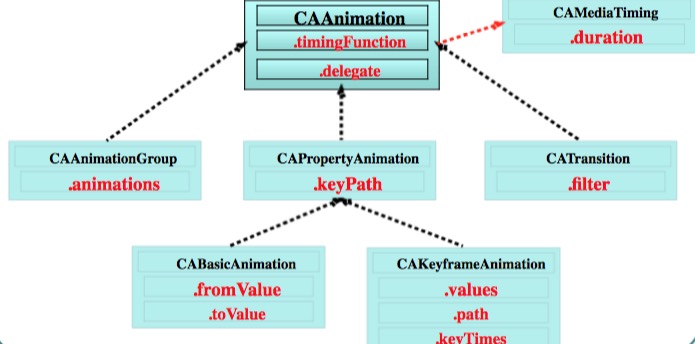
CAAnimation 是所有動畫類的父類,它與 CAPropertyAnimation 本身不建議直接使用,實戰中用它的四個子類:CABasicAnimation、CAKeyframeAnimation、CATransition、CAAnimationGroup。
CABasicAnimation 基礎動畫
CABasicAnimation *anim = [CABasicAnimation animation];
anim.keyPath = @"transform.translation.x";  // 決定做什麼動畫
anim.toValue = @(100);
anim.duration = 2.0;
anim.removedOnCompletion = NO;             // 動畫結束後保持終態
anim.fillMode = kCAFillModeForwards;
[self.layer addAnimation:anim forKey:nil];
常用 keyPath:
transform.scale / transform.scale.x / transform.scale.y   // 比例
transform.rotation.z                                      // 旋轉
transform.translation                                     // 平移
opacity            // 透明度
backgroundColor    // 背景色
cornerRadius       // 圓角
borderWidth        // 邊框
bounds / position / frame / hidden / masksToBounds
shadowColor / shadowOffset / shadowOpacity / shadowRadius
contents / contentsRect / zPosition
CAKeyframeAnimation 關鍵幀動畫
它是 CABasicAnimation 的升級版:基礎動畫只能描述「從 A 到 B」,關鍵幀動畫可以傳入同一屬性的一組中間值,讓運動軌跡更豐富。
// values 方式
CAKeyframeAnimation *anim = [CAKeyframeAnimation animation];
anim.keyPath = @"transform.rotation";
anim.values = array;
anim.duration = 0.25;
anim.repeatCount = MAXFLOAT;
anim.removedOnCompletion = NO;
anim.fillMode = kCAFillModeForwards;
[self.redView.layer addAnimation:anim forKey:nil];

// path 方式
CAKeyframeAnimation *anim2 = [CAKeyframeAnimation animation];
anim2.keyPath = @"position";
CGMutablePathRef path = CGPathCreateMutable();
CGPathAddEllipseInRect(path, NULL, CGRectMake(100, 100, 200, 200));
anim2.path = path;
CGPathRelease(path);
anim2.timingFunction = [CAMediaTimingFunction functionWithName:kCAMediaTimingFunctionEaseInEaseOut];
[self.redView.layer addAnimation:anim2 forKey:nil];
注意 values 與 path 互斥,二者選其一即可。
CAAnimationGroup 動畫組
前兩種動畫都只能針對單一屬性,若想把旋轉、縮放、平移同時播放,就需要動畫組:
CABasicAnimation *rotate = [CABasicAnimation animation];
rotate.keyPath = @"transform.rotation";
rotate.toValue = @(M_PI);

CABasicAnimation *scale = [CABasicAnimation animation];
scale.keyPath = @"transform.scale";
scale.toValue = @(0.0);

CABasicAnimation *move = [CABasicAnimation animation];
move.keyPath = @"transform.translation";
move.toValue = [NSValue valueWithCGPoint:CGPointMake(100, 100)];

CAAnimationGroup *group = [CAAnimationGroup animation];
group.animations = @[rotate, scale, move];
group.duration = 2.0;
group.removedOnCompletion = NO;
group.fillMode = kCAFillModeForwards;
[self.myView.layer addAnimation:group forKey:nil];
CATransition 轉場動畫
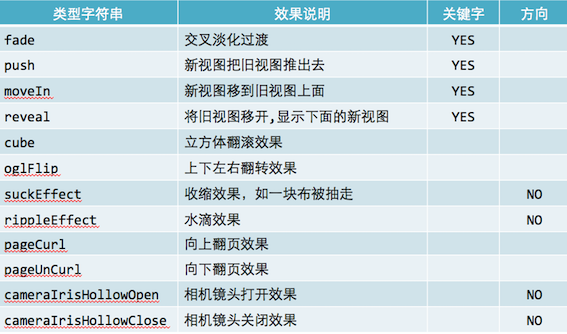
CATransition *anim = [CATransition animation];
anim.type = @"pageCurl";              // 過渡類型
anim.subtype = kCATransitionFromLeft; // 過渡方向
anim.duration = 3;
[_imageV.layer addAnimation:anim forKey:nil];
type 可選值對照:
動畫代理
Core Animation 同樣支持代理回調,可以在動畫開始和結束時插入自定義邏輯:
anim.delegate = self;

- (void)animationDidStart:(CAAnimation *)anim { }

- (void)animationDidStop:(CAAnimation *)anim finished:(BOOL)flag { }
- 上一篇文章: iOS 語音聽寫功能實戰:接入科大訊飛 SDK
- 下一篇文章: iOS SQLite3 數據庫操作完整教程